https://github.com/generate/generate-gitattributes
Generate a .gitattributes file from the command line when Generate's CLI is installed globally, or use as a plugin or sub-generator in your own generator.
https://github.com/generate/generate-gitattributes
Last synced: about 1 year ago
JSON representation
Generate a .gitattributes file from the command line when Generate's CLI is installed globally, or use as a plugin or sub-generator in your own generator.
- Host: GitHub
- URL: https://github.com/generate/generate-gitattributes
- Owner: generate
- License: mit
- Created: 2016-07-09T06:22:15.000Z (almost 10 years ago)
- Default Branch: master
- Last Pushed: 2016-08-17T15:22:27.000Z (almost 10 years ago)
- Last Synced: 2025-04-13T02:03:07.535Z (about 1 year ago)
- Language: JavaScript
- Size: 373 KB
- Stars: 10
- Watchers: 2
- Forks: 1
- Open Issues: 0
-
Metadata Files:
- Readme: README.md
- License: LICENSE
Awesome Lists containing this project
README

Generate a .gitattributes file from the command line when Generate's CLI is installed globally, or use as a plugin or sub-generator in your own generator to make it a continuous part of the build workflow when scaffolding out a new project.
# generate-gitattributes
[](https://www.npmjs.com/package/generate-gitattributes) [](https://npmjs.org/package/generate-gitattributes) [](https://travis-ci.org/generate/generate-gitattributes)
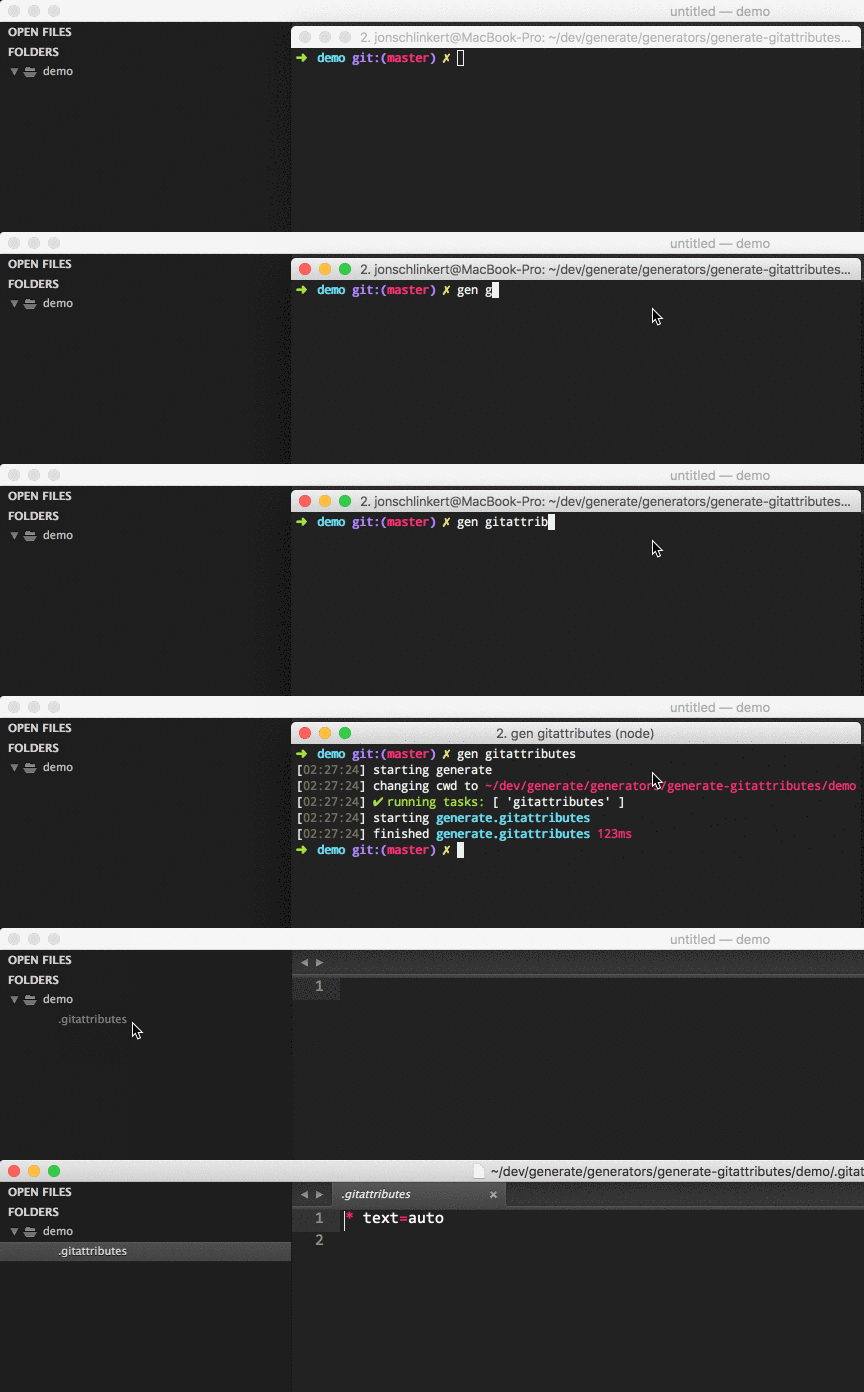
**Example**
Templates are [customizable](#customization) and can be overridden.

## What is "Generate"?
Generate is a command line tool and developer framework for scaffolding out new GitHub projects using [generators](https://github.com/generate/generate/blob/master/docs/generators.md) and [tasks](https://github.com/generate/generate/blob/master/docs/tasks.md).
Answers to prompts and the user's environment can be used to determine the templates, directories, files and contents to build. Support for [gulp](http://gulpjs.com), [base](https://github.com/node-base/base) and [assemble](https://github.com/assemble/assemble) plugins, and much more.
**For more information**:
* Visit the [generate project](https://github.com/generate/generate/)
* Visit the [generate documentation](https://github.com/generate/generate/blob/master/docs/)
* Find [generators on npm](https://www.npmjs.com/browse/keyword/generate-generator) (help us [author generators](https://github.com/generate/generate/blob/master/docs/micro-generators.md))
## Command line usage
### Install globally
**Installing the CLI**
To run the `gitattributes` generator from the command line, you'll need to install [Generate](https://github.com/generate/generate) globally first. You can do that now with the following command:
```sh
$ npm install --global generate
```
This adds the `gen` command to your system path, allowing it to be run from any directory.
**Install generate-gitattributes**
Install this module with the following command:
```sh
$ npm install --global generate-gitattributes
```
### Running generate-gitattributes
You should now be able to run `generate-gitattributes` with the following command:
```sh
$ gen gitattributes
```
**What will happen?**
Running `$ gen gitattributes` will run the generator's [default task](#default), which writes a `.gitattributes` file to the current working directory, or the [specified directory](#customization).
**What you should see in the terminal**
If completed successfully, you should see both `starting` and `finished` events in the terminal, like the following:
```sh
[00:44:21] starting ...
...
[00:44:22] finished ✔
```
If you do not see one or both of those events, please [let us know about it](../../issues).
### Help
To see a general help menu and available commands for Generate's CLI, run:
```sh
$ gen help
```
## Running multiple generators
[generate](https://github.com/generate/generate) supports running multiple generators at once. Here is an example of a generator that works well with `generate-gitattributes`.
### generate-dest
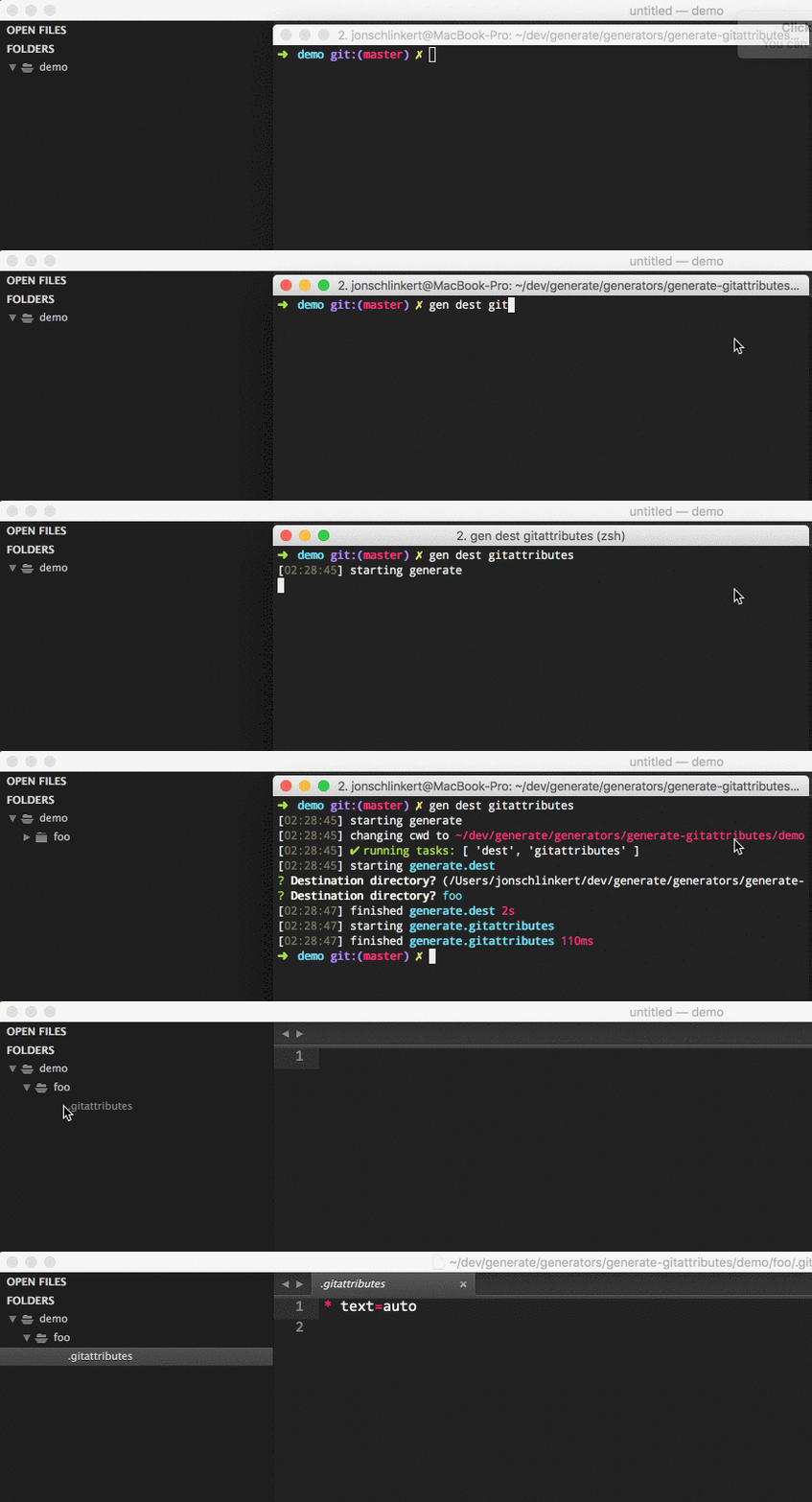
Run [generate-dest](https://github.com/generate/generate-dest) **before** this generator to prompt for the destination directory to use for generated files.
**Example**
## API usage
Use `generate-gitattributes` as a [plugin](https://github.com/generate/generate/blob/master/docs/plugins.md) in your own [generator](https://github.com/generate/generate/blob/master/docs/generators.md).
### Install locally
Install with [npm](https://www.npmjs.com/):
```sh
$ npm install --save generate-gitattributes
```
### Register as a plugin
Inside your own [generator](https://github.com/generate/generate/blob/master/docs/generators.md):
```js
module.exports = function(app) {
// register generate-gitattributes as a plugin to add the gitattributes
// task to your own generator
app.use(require('generate-gitattributes'));
};
```
### Run tasks
Programmatically run tasks from `generate-gitattributes`.
```js
module.exports = function(app) {
// adds the `gitattributes` task to your generator
app.use(require('generate-gitattributes'));
// run the `gitattributes` task
app.task('default', 'gitattributes');
};
```
Visit the [generator docs](https://github.com/generate/generate/blob/master/docs/generators.md) to learn more about creating, installing, using and publishing generators.
## Customization
The following instructions can be used to override settings in `generate-gitattributes`. Visit the [Generate documentation](https://github.com/generate/generate/blob/master/docs/overriding-defaults.md) to learn about other ways to override defaults.
### Destination directory
To customize the destination directory, install [generate-dest](https://github.com/generate/generate-dest) globally, then in the command line prefix `dest` before any other generator names.
For example, the following will prompt you for the destination path to use, then pass the result to `generate-gitattributes`:
```sh
$ gen dest gitattributes
```
### Overriding templates
You can override a template by adding a template of the same name to the `templates` directory in user home. For example, to override the `.gitattributes` template, add a template at the following path `~/generate/generate-gitattributes/templates/.gitattributes`, where `~/` is the user-home directory that `os.homedir()` resolves to on your system.
## What is "Generate"?
Generate is a command line tool and developer framework for scaffolding out new GitHub projects using [generators](https://github.com/generate/generate/blob/master/docs/generators.md) and [tasks](https://github.com/generate/generate/blob/master/docs/tasks.md).
Answers to prompts and the user's environment can be used to determine the templates, directories, files and contents to build. Support for [gulp](http://gulpjs.com), [base](https://github.com/node-base/base) and [assemble](https://github.com/assemble/assemble) plugins, and much more.
**For more information**:
* Visit the [generate project](https://github.com/generate/generate/)
* Visit the [generate documentation](https://github.com/generate/generate/blob/master/docs/)
* Find [generators on npm](https://www.npmjs.com/browse/keyword/generate-generator) (help us [author generators](https://github.com/generate/generate/blob/master/docs/micro-generators.md))
## Getting started
### Install
**Installing the CLI**
To run the `gitattributes` generator from the command line, you'll need to install [Generate](https://github.com/generate/generate) globally first. You can do that now with the following command:
```sh
$ npm install --global generate
```
This adds the `gen` command to your system path, allowing it to be run from any directory.
**Install generate-gitattributes**
Install this module with the following command:
```sh
$ npm install --global generate-gitattributes
```
### Usage
Run this generator's `default` [task](https://github.com/generate/generate/blob/master/docs/tasks.md#default) with the following command:
```sh
$ gen gitattributes
```
**What you should see in the terminal**
If completed successfully, you should see both `starting` and `finished` events in the terminal, like the following:
```sh
[00:44:21] starting ...
...
[00:44:22] finished ✔
```
If you do not see one or both of those events, please [let us know about it](../../issues).
### Help
To see a general help menu and available commands for Generate's CLI, run:
```sh
$ gen help
```
## Tasks
All available tasks.
### [gitattributes](generator.js#L20)
Generates a `.gitattributes` file to the current working directory. The built-in template can be [overridden](#customization).
**Example**
```sh
$ gen gitattributes
```
Visit Generate's [documentation for tasks](https://github.com/generate/generate/blob/master/docs/tasks.md).
## About
### Community
Are you using [Generate](https://github.com/generate/generate) in your project? Have you published a [generator](https://github.com/generate/generate/blob/master/docs/generators.md) and want to share your project with the world?
Here are some suggestions!
* If you get like Generate and want to tweet about it, please feel free to mention `@generatejs` or use the `#generatejs` hashtag
* Show your love by starring [Generate](https://github.com/generate/generate) and `generate-gitattributes`
* Get implementation help on [StackOverflow](http://stackoverflow.com/questions/tagged/generate) (please use the `generatejs` tag in questions)
* **Gitter** Discuss Generate with us on [Gitter](https://gitter.im/generate/generate)
* If you publish an generator, thank you! To make your project as discoverable as possible, please add the keyword `generategenerator` to package.json.
### Contributing
Pull requests and stars are always welcome. For bugs and feature requests, [please create an issue](../../issues/new).
### Running tests
Install dev dependencies:
```sh
$ npm install -d && npm test
```
### Author
**Jon Schlinkert**
* [github/jonschlinkert](https://github.com/jonschlinkert)
* [twitter/jonschlinkert](http://twitter.com/jonschlinkert)
### License
Copyright © 2016, [Jon Schlinkert](https://github.com/jonschlinkert).
Released under the [MIT license](https://github.com/generate/generate-gitattributes/blob/master/LICENSE).
***
_This file was generated by [verb-generate-readme](https://github.com/verbose/verb-generate-readme), v0.1.30, on August 17, 2016._