https://github.com/geoffdutton/desktop-lftp
A corss platform GUI for LFTP
https://github.com/geoffdutton/desktop-lftp
Last synced: about 1 year ago
JSON representation
A corss platform GUI for LFTP
- Host: GitHub
- URL: https://github.com/geoffdutton/desktop-lftp
- Owner: geoffdutton
- License: mit
- Created: 2016-11-28T19:10:37.000Z (over 9 years ago)
- Default Branch: master
- Last Pushed: 2019-06-29T03:37:46.000Z (about 7 years ago)
- Last Synced: 2024-04-15T02:07:24.081Z (about 2 years ago)
- Language: JavaScript
- Size: 1.21 MB
- Stars: 5
- Watchers: 2
- Forks: 1
- Open Issues: 1
-
Metadata Files:
- Readme: README.md
- License: LICENSE
Awesome Lists containing this project
README
# DesktopLftp
**Important:** This is not functioning. It will run, but it doesn't actually connect to anything yet.
Based on [electron-react-boilerplate](https://github.com/chentsulin/electron-react-boilerplate), thanks!
## Motivation
Sometimes it seems like my ISP will throttle transfer speeds even over SFTP. Luckily, [LFTP](https://en.wikipedia.org/wiki/Lftp) offters multi-threaded connections, which almost always maxes out my connection, or pretty close to it depending on the source server. I also wanted to fiddle with react/redux/electron/etc.
As suggested below, I'm using [react-desktop](https://github.com/gabrielbull/react-desktop) for the UI components.
The plan is to model it after [FileZilla](https://filezilla-project.org/). I would like to encrypt the saved sites though.
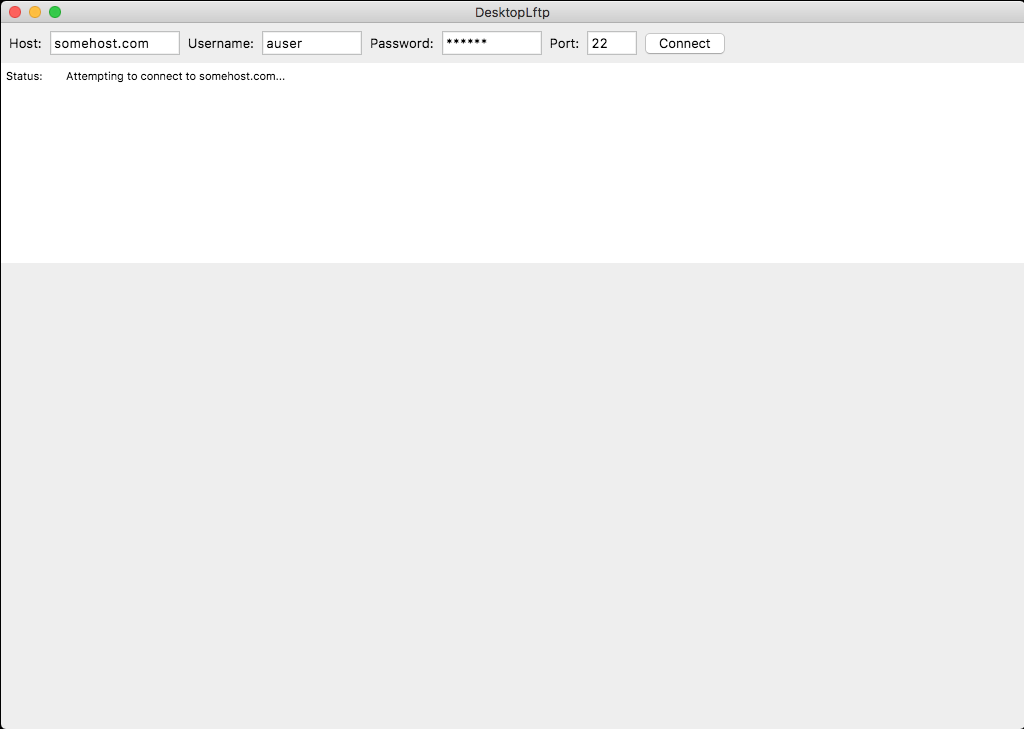
## Screenshot
# From electron-react-boilerplate
_Everything below is from [electron-react-boilerplate](https://github.com/chentsulin/electron-react-boilerplate)_
> Live editing development on desktop app
[Electron](http://electron.atom.io/) application boilerplate based on [React](https://facebook.github.io/react/), [Redux](https://github.com/reactjs/redux), [React Router](https://github.com/reactjs/react-router), [Webpack](http://webpack.github.io/docs/), [React Transform HMR](https://github.com/gaearon/react-transform-hmr) for rapid application development
## Install
* **Note: requires a node version >= 6 and an npm version >= 3.**
* **If you have installation or compilation issues with this project, please see the [electron-react-boilerplate debugging guide](https://github.com/chentsulin/electron-react-boilerplate/issues/400)**
First, clone the repo via git:
```bash
git clone https://github.com/geoffdutton/desktop-lftp.git your-project-name
```
And then install dependencies.
**ProTip**: Install with [yarn](https://github.com/yarnpkg/yarn) for faster and safer installation
```bash
$ cd your-project-name && npm install
```
:bulb: *In order to remove boilerplate sample code, simply run `npm run cleanup`. After this is run, the initial sample boilerplate code will be removed in order for a clean project for starting custom dev*
## Run
Run these two commands __simultaneously__ in different console tabs.
```bash
$ npm run hot-server
$ npm run start-hot
```
or run two servers with one command
```bash
$ npm run dev
```
## Editor Configuration
**Atom**
```bash
apm install editorconfig es6-javascript autocomplete-flow javascript-snippets linter linter-eslint language-babel
```
**Sublime**
* https://github.com/sindresorhus/editorconfig-sublime#readme
* https://github.com/SublimeLinter/SublimeLinter3
* https://github.com/roadhump/SublimeLinter-eslint
* https://github.com/babel/babel-sublime
**Others**
* [Editorconfig](http://editorconfig.org/#download)
* [ESLint](http://eslint.org/docs/user-guide/integrations#editors)
* Babel Syntax Plugin
## DevTools
#### Toggle Chrome DevTools
- OS X: Cmd Alt I or F12
- Linux: Ctrl Shift I or F12
- Windows: Ctrl Shift I or F12
*See [electron-debug](https://github.com/sindresorhus/electron-debug) for more information.*
#### DevTools extension
This boilerplate is included following DevTools extensions:
* [Devtron](https://github.com/electron/devtron) - Install via [electron-debug](https://github.com/sindresorhus/electron-debug).
* [React Developer Tools](https://github.com/facebook/react-devtools) - Install via [electron-devtools-installer](https://github.com/GPMDP/electron-devtools-installer).
* [Redux DevTools](https://github.com/zalmoxisus/redux-devtools-extension) - Install via [electron-devtools-installer](https://github.com/GPMDP/electron-devtools-installer).
You can find the tabs on Chrome DevTools.
If you want to update extensions version, please set `UPGRADE_EXTENSIONS` env, just run:
```bash
$ UPGRADE_EXTENSIONS=1 npm run dev
# For Windows
$ set UPGRADE_EXTENSIONS=1 && npm run dev
```
## CSS Modules
This boilerplate out of the box is configured to use [css-modules](https://github.com/css-modules/css-modules).
All `.css` file extensions will use css-modules unless it has `.global.css`.
If you need global styles, stylesheets with `.global.css` will not go through the
css-modules loader. e.g. `app.global.css`
If you want to import global css libraries (like `bootstrap`), you can just write the following code in `.global.css`:
```css
@import "~bootstrap/dist/css/bootstrap.css";
```
## Packaging
To package apps for the local platform:
```bash
$ npm run package
```
To package apps for all platforms:
First, refer to [Multi Platform Build](https://github.com/electron-userland/electron-builder/wiki/Multi-Platform-Build) for dependencies.
Then,
```bash
$ npm run package-all
```
To package apps with options:
```bash
$ npm run package -- --[option]
```
## Further commands
To run the application without packaging run
```bash
$ npm run build
$ npm start
```
To run End-to-End Test
```bash
$ npm run build
$ npm run test-e2e
```
#### Options
See [electron-builder CLI Usage](https://github.com/electron-userland/electron-builder#cli-usage)
#### Module Structure
This boilerplate uses a [two package.json structure](https://github.com/electron-userland/electron-builder#two-packagejson-structure).
1. If the module is native to a platform or otherwise should be included with the published package (i.e. bcrypt, openbci), it should be listed under `dependencies` in `./app/package.json`.
2. If a module is `import`ed by another module, include it in `dependencies` in `./package.json`. See [this ESLint rule](https://github.com/benmosher/eslint-plugin-import/blob/master/docs/rules/no-extraneous-dependencies.md).
3. Otherwise, modules used for building, testing and debugging should be included in `devDependencies` in `./package.json`.
## Static Type Checking
This project comes with Flow support out of the box! You can annotate your code with types, [get Flow errors as ESLint errors](https://github.com/amilajack/eslint-plugin-flowtype-errors), and get [type errors during runtime](https://github.com/gcanti/babel-plugin-tcomb-boilerplate) during development. Types are completely optional.
## Native-like UI
If you want to have native-like User Interface (OS X El Capitan and Windows 10), [react-desktop](https://github.com/gabrielbull/react-desktop) may perfect suit for you.
## Dispatching redux actions from main process
see discusses in [electron-react-boilerplate #118](https://github.com/chentsulin/electron-react-boilerplate/issues/118) and [electron-react-boilerplate #108](https://github.com/chentsulin/electron-react-boilerplate/issues/108)
## How to keep the boilerplate updated
If your application is a fork from this repo, you can add this repo to another git remote:
```sh
git remote add upstream https://github.com/chentsulin/electron-react-boilerplate.git
```
Then, use git to merge some latest commits:
```sh
git pull upstream master
```
## Credits
- [C. T. Lin](https://github.com/chentsulin)
- [Jhen-Jie Hong](https://github.com/jhen0409)
- [Amila Welihinda](https://github.com/amilajack)
## License
MIT © [Geoff Dutton](https://github.com/geoffdutton)