https://github.com/getindata/dbt-intro
Introductory repository to dbt with the use of data-pipelines-cli Topics Resources
https://github.com/getindata/dbt-intro
Last synced: 4 months ago
JSON representation
Introductory repository to dbt with the use of data-pipelines-cli Topics Resources
- Host: GitHub
- URL: https://github.com/getindata/dbt-intro
- Owner: getindata
- Created: 2022-04-26T06:44:45.000Z (over 4 years ago)
- Default Branch: master
- Last Pushed: 2022-04-26T06:45:55.000Z (over 4 years ago)
- Last Synced: 2025-01-24T02:31:06.576Z (over 1 year ago)
- Size: 5.86 KB
- Stars: 1
- Watchers: 6
- Forks: 1
- Open Issues: 0
-
Metadata Files:
- Readme: README.md
Awesome Lists containing this project
README
## dbt-resources
This section contains various resources, which will help you establish your dbt knowledge.
Ideal for starting your new dbt adventure!
List of contents:
1. What is dbt and why companies are using it?
https://seattledataguy.substack.com/p/what-is-dbt-and-why-are-companies?s=r
2. Hackernews discussion on dbt (January 2022)
https://news.ycombinator.com/item?id=29424445
3. Up & Running: data pipeline with BigQuery and dbt
https://getindata.com/blog/up-running-data-pipeline-bigquery-dbt/
4. Overview of testing options with dbt
https://datacoves.com/post/an-overview-of-testing-options-in-dbt-data-build-tool
5. Integrating airflow and dbt
https://www.astronomer.io/guides/airflow-dbt/
6. Auto-generating an Airflow DAG using the dbt manifest
https://engineering.autotrader.co.uk/2021/09/15/auto-generated-airflow-dag-for-dbt.html
7. Creating dbt project on Windows
https://www.youtube.com/watch?v=5rNquRnNb4E
8. 5 tips to improve your dbt project
https://www.youtube.com/watch?v=qOx8l_QFz9I
9. Future of the modern data stack (December 2020)
https://blog.getdbt.com/future-of-the-modern-data-stack/
10. dbt Official Documentation
https://docs.getdbt.com/docs/introduction
# Exercise
## Setting up environment
1. Go to: https://console.cloud.google.com/vertex-ai/workbench/list/instances?project=dataops-demo-342817
2. If you don't see a project or you see an error, click on project select button right to the Google Cloud Platform sign, type dataops-demo-342817 and select it.

4. Click on New Notebook located in the topbar and then "Customize..."

5. Type notebook name (preferrably your name). In environment section, choose Debian 10 and "Custom container"
6. Provide link to the image: gcr.io/getindata-images-public/jupyterlab-dataops:bigquery-1.0.5

8. In machine configuration section, choose n1-standard-2 machine 2vCPU/7.5GB RAM (~0.074 USD / hour)
9. Leave everything else on default.
10. Create Jupyter notebook.
11. Wait until it's configured and click on Open Jupyterlab
You can find full documentation of our GID Data Platform Tool on https://github.com/getindata/data-pipelines-cli and also https://data-pipelines-cli.readthedocs.io/en/latest/index.html
## Inside the notebook with data-pipelines-cli
You are now inside managed Vertex AI Workbench instance, which will serve as our transformations development workflow. This image lets you open:
- VSCode instance
- CloudBeaver, open source SQL IDE
- dbt docs
- python3 interactive terminal
1. Now, open a VSCode instance. At the top, click on explore and open a home directory so you can easily create new files and track changes to directories inside VSCode.
>-> Tip: In the toolbar click on 'Explore' and then 'Open Folder'. Click OK. You should be located in JOVYAN directory.

3. Open a new terminal instance.
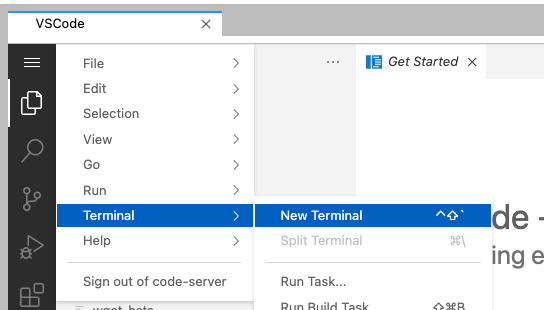
5. Browse to the work directory with `cd work` and execute command `dp init https://github.com/getindata/data-pipelines-cli-init-example`. This will initialize data-pipelines-cli in the environment. Provide any username when prompted.
>-> Tip: when copy+pasting for the 1st time, you might be asked for permissions to access your clipboard by Chrome. Accept.
6. Run `dp create .` This command will create a full data-pipelines-cli environment with dbt project as a core part of it. IMPORTANT: provide __dataops-demo-342817__ as a GCP project name.
>-> Tip: when prompted, you can simply press ENTER to use default values. Don't use it for GCP Project ID!
>-> Tip: use underscores _
>-> Tip: Example of provided values

7. Run `git init`. Data-pipelines-cli is a tool tightly coupled with CI/CD so we need to initialize git repository. We won't use CI/CD in this exercise.
8. Run these commands in following order:
`git add .`
`git config --global user.email "you@example.com"`
`git config --global user.name "Your Name"`
`git commit -m 'Initial'`
9. Your environment is now ready to execute some dbt code!
## Running dbt transformations
1. Firstly, set up some seeds to load your static data to warehouse. You need to provide .yml file with a definition, and a .csv with actual data to be loaded in. Put them under `seeds` directory. You can make additional directories inside `seeds` for clarity.
>-> Tip: you can find documentation on seeds on https://docs.getdbt.com/docs/building-a-dbt-project/seeds
2. Next, setup data sources under `models` directory, as they will act as a starting point for you transformations. Lookup tables names in BigQuery under `raw_data` schema.
>-> Tip: at any point of this tutorials, you can execute `dp seed`, `dp run` and `dp test` commands to see how your pipelines behave against the database.
>-> Tip: execute `dp --help` to see a list of available commands
3. Put tests in .yml files, based on patterns that you see in the data (please do that in real-life scenarios!). Look up for uniqueness and not_nulls in columns.
>-> Tip: you can find documentation on tests on https://docs.getdbt.com/docs/building-a-dbt-project/tests
4. Write your models inside `models` directory. You can make additional directories there - a good practice is to separate them based on schema names you wish to have. Put tests in .yml files.
>-> Tip: you can find documentation on models on https://docs.getdbt.com/docs/building-a-dbt-project/building-models
>-> Tip: Ideas for transformations based on example data
>
>> provide mapping between real country names and identifiers found in raw_mapping.country
>>
>> find out which country had most total sales
>>
>> provide a metric on monthly revenue by month
5. Execute everything and look results in your personal schema.
6. Enrich your seeds, sources and models with descriptions and additional tests f.e. with dbt-expectations plugin. https://github.com/calogica/dbt-expectations
7. Run dp docs-serve in the terminal, and open dbt docs in new Vertex Workbench window.

8. In dbt docs, look up 'Lineage Graph' to find DAG of your new project:

