https://github.com/getlantern/unbounded
Next-gen P2P proxies for censorship circumvention
https://github.com/getlantern/unbounded
censorship-circumvention p2p proxy wasm
Last synced: about 2 months ago
JSON representation
Next-gen P2P proxies for censorship circumvention
- Host: GitHub
- URL: https://github.com/getlantern/unbounded
- Owner: getlantern
- License: gpl-3.0
- Created: 2022-11-08T15:18:10.000Z (over 3 years ago)
- Default Branch: main
- Last Pushed: 2025-09-29T23:20:48.000Z (9 months ago)
- Last Synced: 2025-09-30T01:15:52.131Z (9 months ago)
- Topics: censorship-circumvention, p2p, proxy, wasm
- Language: Go
- Homepage:
- Size: 179 MB
- Stars: 34
- Watchers: 6
- Forks: 0
- Open Issues: 78
-
Metadata Files:
- Readme: README.md
- License: LICENSE
Awesome Lists containing this project
README
```
_ _ _
| | | | | |
_ _ _ __ | |__ ___ _ _ _ __ __| | ___ __| |
| | | | '_ \| '_ \ / _ \| | | | '_ \ / _` |/ _ \/ _` |
| |_| | | | | |_) | (_) | |_| | | | | (_| | __/ (_| |
\__,_|_| |_|_.__/ \___/ \__,_|_| |_|\__,_|\___|\__,_|
```
# :compass: Table of contents
* [What is Unbounded?](#question-what-is-unbounded)
* [Features](#boom-features)
* [Related work](#love_letter-related-work)
* [System components](#floppy_disk-system-components)
* [Quickstart for devs](#arrow_forward-quickstart-for-devs)
* [Observing networks with netstate](#spider_web)
* [UI](#art-ui)
### :question: What is Unbounded?
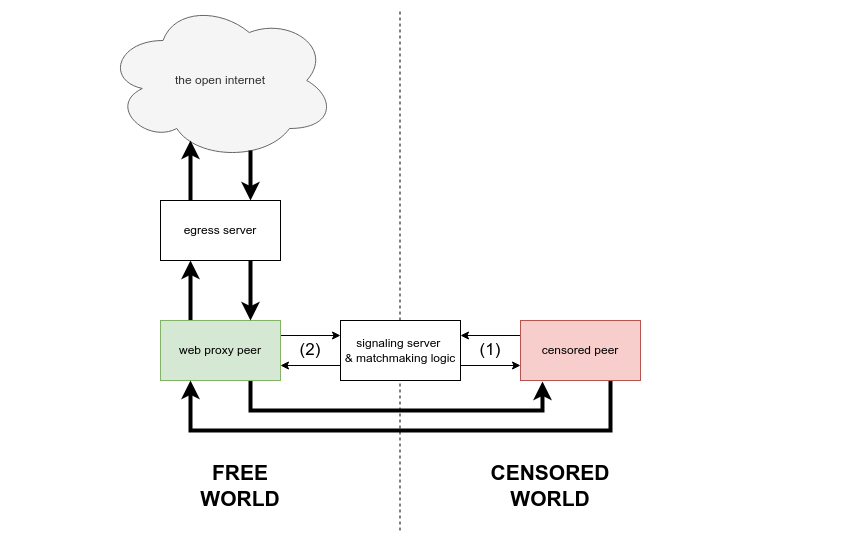
Unbounded is a next-gen technology stack for circumventing internet censorship using browser-based
P2P proxies. It organizes an ephemeral swarm of short-lived residential IP addresses, provided by volunteers in less censored regions, which create censorship resistant routes for network requests originating from users in heavily censored regions.
**Here are just a few of the things you can do:**
* Turn your friends into a private swarm to unblock a loved one in a censored region ([tutorial](https://github.com/getlantern/unbounded/blob/main/examples/private-swarm)) :fire:
* Add a P2P transport to your circumvention app (tutorial coming soon)
* Volunteer on the Lantern network with just one click ([link](https://unbounded.lantern.io))
* Add the Lantern volunteer widget to your website (tutorial coming soon)
* Deploy a permanent volunteer node on a Raspberry Pi (tutorial coming soon)
### :boom: Features
* End-to-end connection state persistence across ephemeral peer transports
* HTTP and SOCKS5 mode
* Concurrent client for IP efficiency: 1 volunteer can proxy for N users simultaneously
* N:M multiplexing
* High performance, low latency, rapid peer discovery
* Maintainable and debuggable: one cross-platform WebAssembly-friendly engine that runs everywhere
### :love_letter: Related work
Unbounded is a descendant of the "flash proxy" concept first described in 2012 by David Fifield,
Nate Hardison, Jonathan Ellithorpe, Emily Stark, Dan Boneh, Roger Dingledine, and Phil Porras
([paper](https://crypto.stanford.edu/flashproxy/flashproxy.pdf)).
[uProxy](https://en.wikipedia.org/wiki/UProxy) is a historical project exploring similar
ideas that also started in 2012 as a collaboration between Google Ideas (now Jigsaw), the University of Washington,
and the Brave New Software Project, the creators of [Lantern](https://lantern.io).
[Snowflake](https://snowflake.torproject.org/), part of the Tor project, is an evolution of the same concenpt, with
roots in both flash proxy and uProxy, and it is widely used today.
The idea to create connection state persistence across ephemeral peer transports was formalized
by David Fifield as "Turbo Tunnel" in 2020 ([paper](https://www.bamsoftware.com/papers/turbotunnel/turbotunnel.pdf)).
### :floppy_disk: System components
| Module | Description |
|------------|-----------------------------------------------------------------------------------------------|
| clientcore | library exposing Unbounded's high level client API |
| cmd | driver code for operationalizing Unbounded outside of a controlling process |
| common | data structures and functionality shared across Unbounded modules |
| egress | egress server |
| freddie | discovery, signaling, and matchmaking server |
| netstate | network topology observability tool |
| ui | embeddable web user interface
### :arrow_forward: Quickstart for devs
1. Clone this repo.
2. Configure **Mozilla Firefox** to use a local HTTP proxy. In settings, search "proxy". Select
*Manual proxy configuration*. Enter address `127.0.0.1`, port `1080`, and check the box labeled
*Also use this proxy for HTTPS*.
3. Build the native binary desktop client: `cd cmd && ./build.sh desktop`
4. Build the native binary widget: `cd cmd && ./build.sh widget`
5. Build the browser widget: `cd cmd && ./build_web.sh`
6. Start Freddie: `cd freddie/cmd && PORT=9000 go run main.go`
7. Start the egress server: `cd egress/cmd && PORT=8000 go run egress.go`
8. Start a desktop client: `cd cmd/dist/bin && FREDDIE=http://localhost:9000
EGRESS=http://localhost:8000 ./desktop`
9. Decision point: do you want to run a **native binary** widget or a **browser** widget? To start
a native binary widget: `cd cmd/dist/bin && FREDDIE=http://localhost:9000 EGRESS=http://localhost:8000
./widget`. Alternatively, to start a browser widget, follow the
[UI quickstart](#ui-quickstart-for-devs).
_The widget and desktop client find each other via the discovery server, execute a signaling step,
and establish several WebRTC connections._
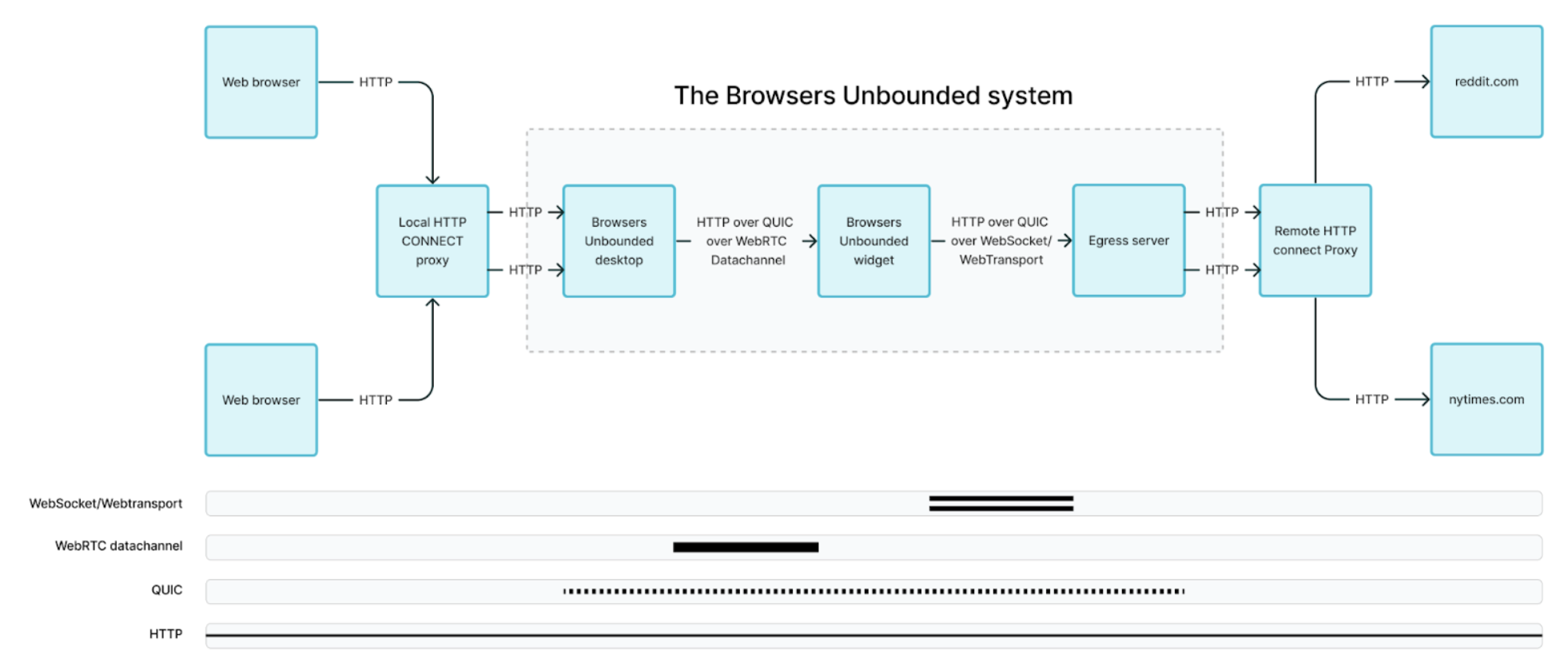
10. Start **Mozilla Firefox**. Use the browser as you normally would, visiting all your favorite
websites. Your traffic is proxied in a chain: Firefox -> local HTTP proxy -> desktop client ->
webRTC -> widget -> WebSocket -> egress server -> remote HTTP proxy -> the internet.
### :spider_web: Observing networks with netstate
The netstate module is a work-in-progress tool for observing Unbounded networks. netstate currently
visualizes network topology, labeling each Unbounded node with an arbitrary, user-defined "tag" which
may be injected at runtime.
`netstated` is a distributed state machine which collects and processes state changes from Unbounded
clients. It serves a network visualization at `GET /`. The `gv` visualizer client looks for a
`netstated` instance at `localhost:8080`.
In the example below, we assume that Freddie is at `http://localhost:9000` and the egress server
is at `http://localhost:8000`:
1. Start `netstated`: `cd netstate/d && go run netstated.go`
2. Start a widget as user Alice: `cd cmd/dist/bin && NETSTATED=http://localhost:8080/exec TAG=Alice
FREDDIE=http://localhost:9000 EGRESS=http://localhost:8000 ./widget`
3. Start a desktop client as user Bob: `cd cmd/dist/bin && NETSTATED=http://localhost:8080/exec
TAG=Bob FREDDIE=http://localhost:9000 EGRESS=http://localhost:8000 ./desktop`
4. Open a web browser and navigate to `http://localhost:8080`. As Alice and Bob complete the
signaling process and establish connection(s) to one another, you should see the network you have
created. You must refresh the page to update the visualization.
### :art: UI
#### UI settings and configuration
The UI is bootstrapped with [Create React App](https://github.com/facebook/create-react-app). Then "re-wired" to build one single js bundle entry using [rewire](https://www.npmjs.com/package/rewire).
The React app will bind to a custom `` DOM el and render based on settings passed to the [dataset](https://developer.mozilla.org/en-US/docs/Web/API/HTMLElement/dataset).
In development, this html can be found in `ui/public/index.html`. In production, the html is supplied by the "embedder" via https://unbounded.lantern.io/embed.
Example production embed:
```html
```
This tables lists all the available settings that can be passed to the `` DOM el via the `data-*` attributes.
The "default" column shows the default value if the attribute is not set.
| dataset | description | default |
|-----------|-----------------------------------------------------------|---------|
| layout | string "banner" or "panel" layout | banner |
| theme | string "dark", "light" or "auto" (browser settings) theme | light |
| globe | boolean to include webgl globe | true |
| exit | boolean to include toast on exit intent | true |
| menu | boolean to include menu | true |
| keep-text | boolean to include text to keep tab open | true |
| mobile-bg | boolean to run on mobile background | false |
| mobile-bg | boolean to run on desktop background | true |
| editor | boolean to include debug dataset editor | false |
| branding | boolean to include logos | true |
| mock | boolean to use the mock wasm client data | false |
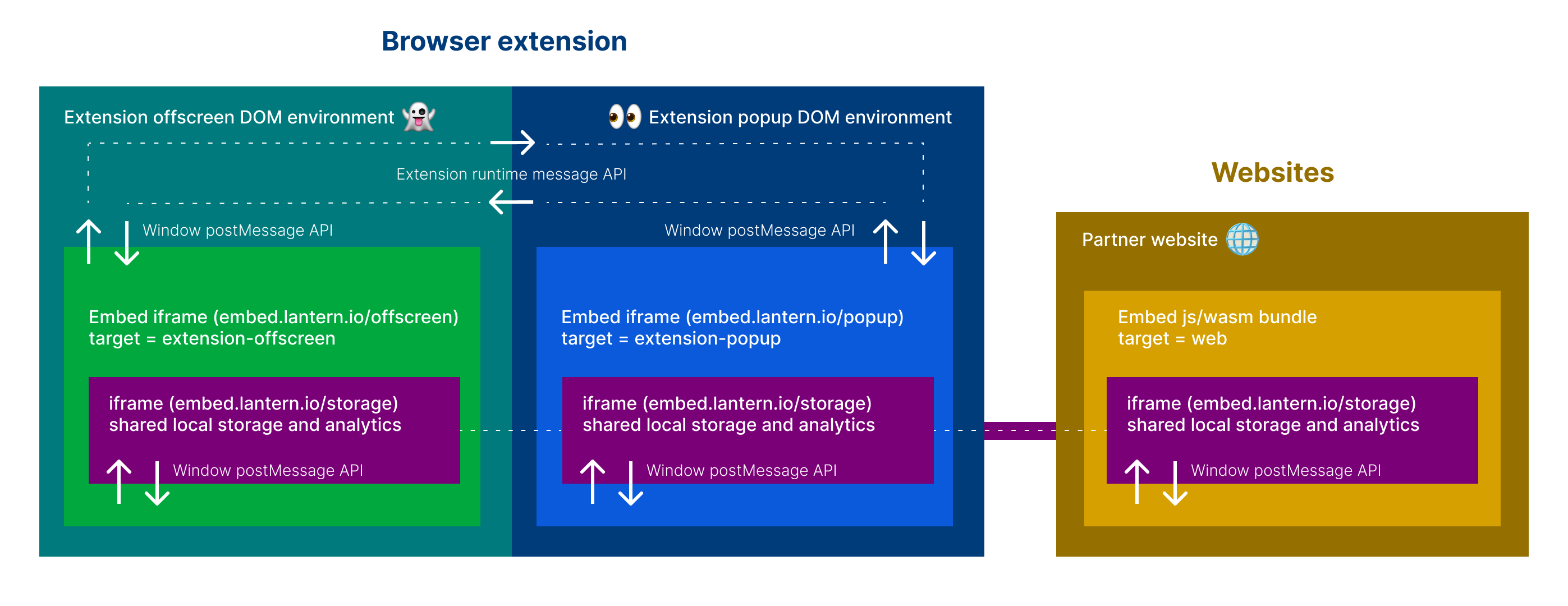
| target | string "web", "extension-offscreen" or "extension-popup" | web |
In development, these settings can be customized using the `REACT_APP_*` environment variables in the `.env` or in your terminal.
For example, to run the widget in "panel" layout, you can run `REACT_APP_LAYOUT=panel yarn start`. To run the widget with mock data,
you can run `REACT_APP_MOCK=true yarn start`.
Settings can also be passed to the widget via the `data-*` attributes in `ui/public/index.html`. For example, to run the widget in "panel" layout,
you can set `data-layout="panel"` in `ui/public/index.html`.
If you enable the editor (by setting `REACT_APP_EDITOR=true` or `data-editor="true"`), you can also edit the settings dynamically in the browser using a UI editor the renders above the widget.
*Note* that the `mock` and `target` settings are not dynamic and therefore not editable in the browser. These two settings are static and must be set at the time the wasm interface is initialized.
Links:
[Github pages sandbox](https://embed.lantern.io)
[Unbounded website](https://unbounded.lantern.io)
#### UI quickstart for devs
1. Work from the ui dir: `cd ui`
2. Install deps: `yarn`
Development:
1. Copy the example env: `cp .env.development.example .env.development`
2. Start the dev server: `yarn dev:web` and open [http://localhost:3000](http://localhost:3000) to view it in the browser.
Production:
1. Copy the example env: `cp .env.production.example .env.production`
2. Build and deploy prod bundle to Github page: `yarn deploy`
#### UI deep dive for devs
1. Work from the ui dir: `cd ui`
2. Configure your .env file: `cp .env.development.example .env.development`
1. Set `REACT_APP_WIDGET_WASM_URL` to your intended hosted `widget.wasm` file. If you are serving it from `client` in [step #8](#arrow_forward-quickstart-for-devs), use [http://localhost:9000/widget.wasm](http://localhost:9000/widget.wasm). If you ran `./build_web.sh` ([step #7](#arrow_forward-quickstart-for-devs)) you can also use `/widget.wasm`. To config for prod point to a publicly hosted `widget.wasm` e.g. `https://embed.lantern.io/widget.wasm`. If you know you know, if not, you likely want to use `/widget.wasm`.
2. Set `REACT_APP_GEO_LOOKUP_URL` to your intended geo lookup service. Most likely `https://geo.getiantem.org/lookup` or `http://localhost:/lookup` if testing geo lookups locally
3. Set `REACT_APP_STORAGE_URL` to your intended iframe html for local storage of widget state and analytics. Most likely `https://embed.lantern.io/storage.html` or `/storage.html` if testing locally
4. Set any `REACT_APP_*` variables as needed for your development environment. See [UI settings and configuration](#ui-settings-and-configuration) for more info.
5. Configure the WASM client endpoints: `REACT_APP_DISCOVERY_SRV`, `REACT_APP_DISCOVERY_ENDPOINT`, `REACT_APP_EGRESS_ADDR` & `REACT_APP_EGRESS_ENDPOINT`
6. Configure the CMS and translations: `STRAPI_API_TOKEN` & `STRAPI_API_URL`
3. Install the dependencies: `yarn`
4. To start in developer mode with hot-refresh server (degraded performance): run `yarn dev:web` and visit [http://localhost:3000](http://localhost:3000)
5. To build optimized for best performance:
1. First configure your .env file: `cp .env.production.example .env.production` (see Step 2)
2. Run `yarn build:web`
6. To serve a build:
1. Install a simple server e.g. `npm install -g serve` (or your lightweight http server of choice)
2. Serve the build dir e.g. `cd build && serve -s -l 3000` and visit [http://localhost:3000](http://localhost:3000)
7. To deploy to Github pages: `yarn deploy`
8. Coming soon to a repo near you: `yarn test`
#### Browser extension quickstart for devs
1. Work from the ui dir: `cd ui`
2. Install the dependencies: `yarn`
3. Configure your .env file: `cd extension && cp .env.example .env`
1. Set `EXTENSION_POPUP_URL` to your intended hosted popup page. If you are serving it from `ui` in [step #6](#ui-quickstart-for-devs), use [http://localhost:3000/popup](http://localhost:3000/popup). To use prod, set to [https://embed.lantern.io/popup](https://embed.lantern.io/popup).
2. Set `EXTENSION_OFFSCREEN_URL` to your intended hosted offscreen page. If you are serving it from `ui` in [step #6](#ui-quickstart-for-devs), use [http://localhost:3000/offscreen](http://localhost:3000/offscreen). To use prod, set to [https://embed.lantern.io/offscreen](https://embed.lantern.io/offscreen).
3. To start in developer mode with hot-refresh server:
```
yarn dev:ext chrome
yarn dev:ext firefox
```
This will compile the extension and output to the `ui/extension/dist` dir. You can then load the unpacked extension in your browser of choice.
- For Chrome, go to [chrome://extensions](chrome://extensions) and click "Load unpacked" and select the `ui/extension/dist/chrome` dir.
- For Firefox, go to [about:debugging#/runtime/this-firefox](about:debugging#/runtime/this-firefox) and click "Load Temporary Add-on" and select the `ui/extension/dist/firefox/manifest.json` file.
- For Edge, go to [edge://extensions](edge://extensions) and click "Load unpacked" and select the `ui/extension/dist/edge` dir.
4. To build for production:
```
yarn build:ext chrome
yarn build:ext firefox
```
This will compile the extension and output a compressed build to the `ui/extension/packages` dir.
### CMS & Translations
The copy and translations are bootstrapped with [Strapi](https://strapi.io/) as a headless CMS to manage translations and other content for the UI.
The translations are queried at build time and the UI uses the `i18next` library to manage the translations and the `react-i18next` library to bind the translations to the UI components.
To re-query the translations from the CMS, run `yarn translate`. This will fetch the latest translations from the CMS and update the `src/translations.json` file.