https://github.com/gettyimages/gettyimages-api_dotnet
Getty Images API SDK - .NET
https://github.com/gettyimages/gettyimages-api_dotnet
getty-images nuget sdk
Last synced: 6 months ago
JSON representation
Getty Images API SDK - .NET
- Host: GitHub
- URL: https://github.com/gettyimages/gettyimages-api_dotnet
- Owner: gettyimages
- License: mit
- Created: 2018-02-09T21:46:37.000Z (over 8 years ago)
- Default Branch: main
- Last Pushed: 2025-11-24T19:23:11.000Z (8 months ago)
- Last Synced: 2026-01-17T10:26:01.033Z (7 months ago)
- Topics: getty-images, nuget, sdk
- Language: C#
- Size: 1.85 MB
- Stars: 13
- Watchers: 10
- Forks: 8
- Open Issues: 1
-
Metadata Files:
- Readme: README.md
- License: LICENSE
Awesome Lists containing this project
- system-architecture-awesome - Getty Images API SDK - SDK for the Getty Images and iStock APIs (SDK and API Clients)
- awesome-dot-dev - Getty Images API SDK - SDK for the Getty Images and iStock APIs (SDK and API Clients)
- awsome-dotnet - Getty Images API SDK - SDK for the Getty Images and iStock APIs (SDK and API Clients)
- awesome-csharp - Getty Images API SDK - SDK for the Getty Images and iStock APIs (SDK and API Clients)
- awesome-dotnet-cn - Getty Images API SDK - 用于 Getty Images 和 iStock APIs 的SDK。 (SDK和API客户端)
- fucking-awesome-dotnet - Getty Images API SDK - SDK for the Getty Images and iStock APIs (SDK and API Clients / GUI - other)
- awesome-dotnet - Getty Images API SDK - SDK for the Getty Images and iStock APIs (SDK and API Clients)
- awesome-dotnet - Getty Images API SDK - SDK for the Getty Images and iStock APIs (SDK and API Clients / GUI - other)
- awesome-dotnet - Getty Images API SDK - api_dotnet?style=social&label=)|SDK for the Getty Images and iStock APIs. (Identifiers)
README
# Getty Images API SDK - .NET
[](https://github.com/gettyimages/gettyimages-api_dotnet/actions/workflows/build.yml)
[](https://badge.fury.io/nu/gettyimages.api)
[](https://www.nuget.org/packages/gettyimages.api)
[](https://www.openhub.net/p/gettyimages-api_dotnet)
## Introduction
This SDK makes using the Getty Images [API](http://developers.gettyimages.com) easy. It handles credential management, makes HTTP requests and is written with a fluent style in mind. For more info about the API, see the [Documentation](https://developers.gettyimages.com/api/).
* Functionality for all endpoints.
## Help & Support
* [Getty Images API](http://developers.gettyimages.com/)
* [Issue Tracker](https://github.com/gettyimages/gettyimages-api_dotnet/issues)
## Getting started
### Obtain an API Key
If you don't already have an API key, fill out and submit the [contact form](http://engage.gettyimages.com/api-contact) to be connected to our Sales team.
### Using the Nuget Package
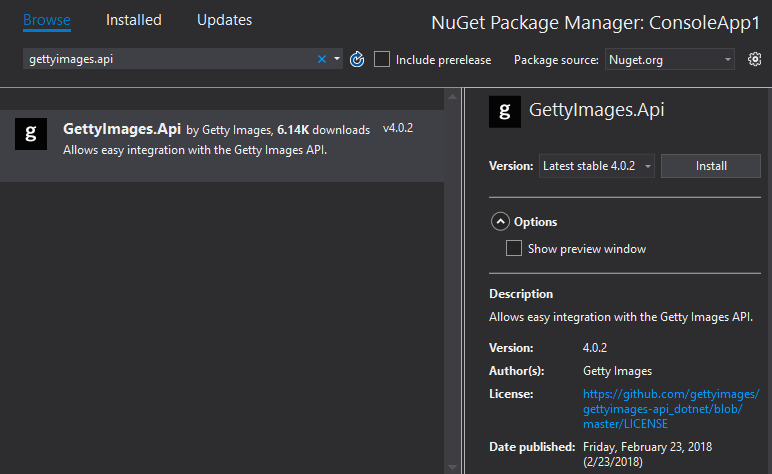
The SDK is published to the public [Nuget](https://www.nuget.org/packages/GettyImages.Api/) package repository.
Open the package manager and add the package to your project:
### Examples
The SDK supports async operations.
```csharp
var client = ApiClient.GetApiClientWithClientCredentials("YOUR_API_KEY", "YOUR_API_SECRET");
var searchResult = await client.SearchImagesEditorial()
.WithEditorialSegment(EditorialSegment.News)
.WithPhrase("all vocabulary")
.WithSortOrder(SortOrder.Newest)
.ExecuteAsync();
foreach (var image in searchResult.images)
{
Console.WriteLine("Title: {0} \r\nId: {1}", image.title, image.id);
}
````
The SDK can also be used synchronously, such as when running in a console application:
```csharp
var client = ApiClient.GetApiClientWithClientCredentials("YOUR_API_KEY", "YOUR_API_SECRET");
var searchResult = client.SearchImagesEditorial()
.WithEditorialSegment(EditorialSegment.News)
.WithPhrase("all vocabulary")
.WithSortOrder(SortOrder.Newest)
.ExecuteAsync()
.Result;
foreach (var image in searchResult.images)
{
Console.WriteLine("Title: {0} \r\nId: {1}", image.title, image.id);
}
````
Results are returned as `dynamic`. Visit the [API Interactive Documentation](https://api.gettyimages.com/swagger) to learn more about available parameters and to see what the response objects look like.
#### ASP.NET Webforms
When using the SDK in a Webforms project, there are a few extra steps needed. For more detailed information, see [Using Asynchronous Methods in ASP.NET 4.5](https://docs.microsoft.com/en-us/aspnet/web-forms/overview/performance-and-caching/using-asynchronous-methods-in-aspnet-45) on Microsoft's documentation website.
First, the Page must be marked as `Async="true"`:
```html
<%@ Page Language="C#" Async="true" AutoEventWireup="true" CodeBehind="Images.aspx.cs" Inherits="WebFormsSdkTest.Images" %>
```
Then register an async task in the `Page_Load` method:
```csharp
public partial class Images : Page
{
public List ImageList { get; set; }
protected void Page_Load(object sender, EventArgs e)
{
RegisterAsyncTask(new PageAsyncTask(GetImages));
}
private async Task GetImages()
{
var client = ApiClient.GetApiClientWithClientCredentials("YOUR_API_KEY",
"YOUR_API_SECRET");
var response = await client.SearchImagesCreative().WithPhrase("tacos").ExecuteAsync();
ImageList = new List();
for (int i = 0; i < response.images.Count; i++)
{
ImageList.Add((string)response.images[i].display_sizes[0].uri);
}
RepeaterImages.DataSource = ImageList;
RepeaterImages.DataBind();
}
}
```
### Building From Source Code
_This is only necessary if you would like to contribute to the project. Otherwise, use the [Nuget Package](#using-the-nuget-package)_
#### Assumptions
+ You have [.NET Core 2.0](https://www.microsoft.com/net/learn/get-started/windows) or later installed
+ You have [Git](https://git-scm.com/downloads) installed
#### Clone the repository
Open a console window (Command Prompt, PowerShell or Bash) and issue the following commands to clone the Git repository:
```sh
git clone git@github.com:gettyimages/gettyimages-api_dotnet.git
cd gettyimages-api_dotnet
```
#### Build
```sh
dotnet restore
dotnet build
dotnet test UnitTests/
```