https://github.com/gfazioli/mantine-split-pane
A Mantine UI Library Extension component that manages split panes allows users to divide and resize content areas within a layout efficiently.
https://github.com/gfazioli/mantine-split-pane
component mantine mantine-ui mantine-v7 nextjs pane react reactjs split splitpane typescript ui
Last synced: 3 months ago
JSON representation
A Mantine UI Library Extension component that manages split panes allows users to divide and resize content areas within a layout efficiently.
- Host: GitHub
- URL: https://github.com/gfazioli/mantine-split-pane
- Owner: gfazioli
- License: mit
- Created: 2024-02-22T13:29:59.000Z (over 2 years ago)
- Default Branch: master
- Last Pushed: 2026-04-01T13:52:43.000Z (3 months ago)
- Last Synced: 2026-04-01T15:29:54.941Z (3 months ago)
- Topics: component, mantine, mantine-ui, mantine-v7, nextjs, pane, react, reactjs, split, splitpane, typescript, ui
- Language: TypeScript
- Homepage: https://gfazioli.github.io/mantine-split-pane/
- Size: 18.3 MB
- Stars: 70
- Watchers: 1
- Forks: 5
- Open Issues: 1
-
Metadata Files:
- Readme: README.md
- Contributing: CONTRIBUTING.md
- Funding: .github/FUNDING.yml
- License: LICENSE
- Code of conduct: CODE_OF_CONDUCT.md
Awesome Lists containing this project
README
# Mantine Split Pane Component

[](https://www.npmjs.com/package/@gfazioli/mantine-split-pane)
[](https://www.npmjs.com/package/@gfazioli/mantine-split-pane)
[](https://www.npmjs.com/package/@gfazioli/mantine-split-pane)

---
[
❤️ If this component has been useful to you or your team, please consider becoming a sponsor
](https://github.com/sponsors/gfazioli?o=esc)
## Overview
A Mantine 9 React component for resizable split pane layouts with 7 resizer variants, context-based prop inheritance, responsive orientation, and dynamic pane generation.
This component is created on top of the [Mantine](https://mantine.dev/) library.
It requires **Mantine 9.x** and **React 19**.
> [!note]
>
> → [Demo and Documentation](https://gfazioli.github.io/mantine-split-pane/) → [Youtube Video](https://www.youtube.com/playlist?list=PL85tTROKkZrWyqCcmNCdWajpx05-cTal4) → [More Mantine Components](https://mantine-extensions.vercel.app/)
## Features
- Separate `Split.Pane` (content) and `Split.Resizer` (drag handle) architecture
- 7 resizer variants: `default`, `filled`, `outline`, `transparent`, `gradient`, `dotted`, `dashed`
- Initial sizes in pixels or percentages with min/max constraints
- `grow` property to let specific panes expand to fill available space
- Horizontal and vertical orientation, including responsive breakpoints
- Context-based prop inheritance: resizer props set on `Split` cascade to all children
- Per-resizer overrides for full control
- Snap points for common pane sizes during drag and keyboard resizing
- `autoResizers` mode to automatically insert resizers between panes
- `Split.Dynamic` helper to generate panes from a configuration array
- Resize lifecycle events (`onResizeStart`, `onResizing`, `onResizeEnd`) on both pane and resizer
- Keyboard accessible: focusable resizer with configurable `step` and `shiftStep`
- Container resize tracking with drag ratio preservation
## Installation
```sh
npm install @gfazioli/mantine-split-pane
```
or
```sh
yarn add @gfazioli/mantine-split-pane
```
After installation import package styles at the root of your application:
```tsx
import '@gfazioli/mantine-split-pane/styles.css';
```
## Usage
```tsx
import { Split } from '@gfazioli/mantine-split-pane';
import { Paper } from '@mantine/core';
function Demo() {
return (
Pane 1
Pane 2
);
}
```
### Auto Resizers
Use the `autoResizers` prop to automatically insert resizers between panes:
```tsx
import { Split } from '@gfazioli/mantine-split-pane';
import { Paper } from '@mantine/core';
function Demo() {
return (
Pane 1
Pane 2
Pane 3
);
}
```
### Snap Points
Use `snapPoints` and `snapTolerance` to snap a resizer to common pane sizes in pixels while dragging or using the keyboard:
```tsx
import { Split } from '@gfazioli/mantine-split-pane';
import { Paper } from '@mantine/core';
function Demo() {
return (
Pane 1
Pane 2
Pane 3
);
}
```
`snapPoints` and `snapTolerance` are also available on `Split.Resizer` for per-divider overrides. With `autoResizers`, the generated resizers inherit these values from `Split`.
### Dynamic Panes
You can also use `Split.Dynamic` to create panes from a configuration array:
```tsx
import { Split, PaneConfig } from '@gfazioli/mantine-split-pane';
import { Paper } from '@mantine/core';
function Demo() {
const panes: PaneConfig[] = [
{
id: 'sidebar',
initialWidth: 200,
minWidth: 150,
content: (
Sidebar
),
},
{
id: 'main',
grow: true,
content: (
Main Content
),
},
];
return (
{Split.Dynamic({ panes })}
);
}
```
## Sponsor
[
❤️ If this component has been useful to you or your team, please consider becoming a sponsor
](https://github.com/sponsors/gfazioli?o=esc)
Your support helps me:
- Keep the project actively maintained with timely bug fixes and security updates
- Add new features, improve performance, and refine the developer experience
- Expand test coverage and documentation for smoother adoption
- Ensure long-term sustainability without relying on ad hoc free time
- Prioritize community requests and roadmap items that matter most
Open source thrives when those who benefit can give back—even a small monthly contribution makes a real difference. Sponsorships help cover maintenance time, infrastructure, and the countless invisible tasks that keep a project healthy.
Your help truly matters.
💚 [Become a sponsor](https://github.com/sponsors/gfazioli?o=esc) today and help me keep this project reliable, up-to-date, and growing for everyone.
---
https://github.com/user-attachments/assets/2e45af2b-60c7-4cb3-9b9a-6cf0e710af1c
---
[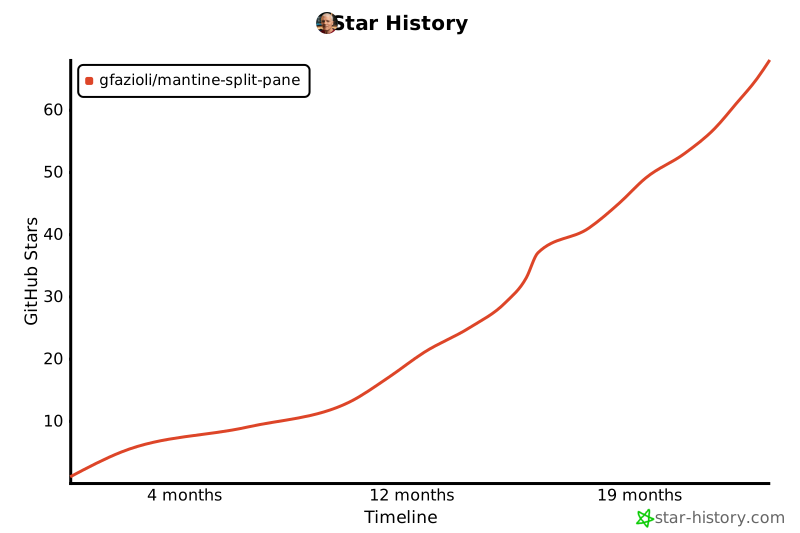](https://www.star-history.com/#gfazioli/mantine-split-pane&Timeline)