https://github.com/gfazioli/octoscope
Terminal dashboard for GitHub — followers, stars, PRs and issues at a glance, auto-refreshed
https://github.com/gfazioli/octoscope
bubbletea cli dashboard github github-api go lipgloss monitoring stats terminal tui
Last synced: about 2 months ago
JSON representation
Terminal dashboard for GitHub — followers, stars, PRs and issues at a glance, auto-refreshed
- Host: GitHub
- URL: https://github.com/gfazioli/octoscope
- Owner: gfazioli
- License: mit
- Created: 2026-04-21T17:12:51.000Z (3 months ago)
- Default Branch: main
- Last Pushed: 2026-05-15T09:09:19.000Z (2 months ago)
- Last Synced: 2026-05-15T10:52:34.803Z (2 months ago)
- Topics: bubbletea, cli, dashboard, github, github-api, go, lipgloss, monitoring, stats, terminal, tui
- Language: Go
- Homepage: https://gfazioli.github.io/octoscope
- Size: 3.74 MB
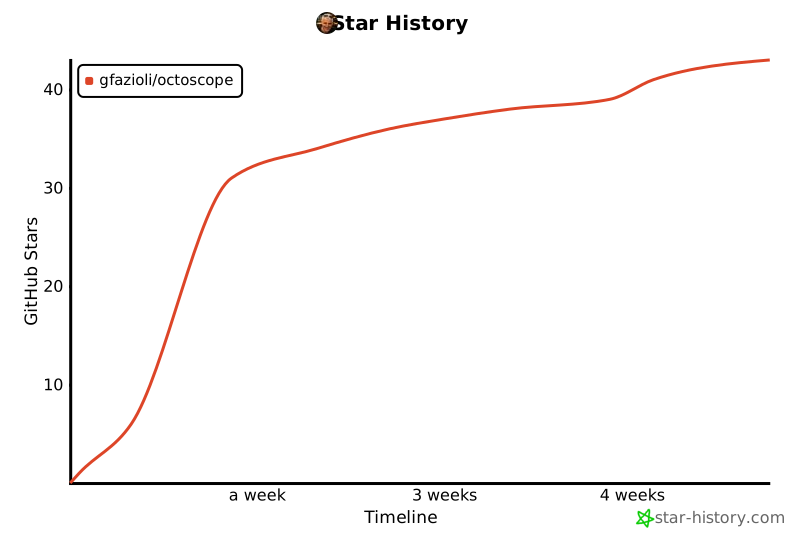
- Stars: 37
- Watchers: 0
- Forks: 0
- Open Issues: 0
-
Metadata Files:
- Readme: README.md
- License: LICENSE
Awesome Lists containing this project
README

↓
OCTOSCOPE is a terminal dashboard for **your GitHub account, or anyone else's public
profile** — profile, activity, repo health and network at a glance,
auto-refreshed in the background.
[](https://github.com/gfazioli/octoscope/releases/latest)



↓

## Contents
- [What it does](#what-it-does)
- [The tabs](#the-tabs)
- [Drill-in details](#drill-in-details)
- [Rate-limit awareness](#rate-limit-awareness)
- [Public-only mode](#public-only-mode)
- [Activity tab](#activity-tab)
- [Live feedback](#live-feedback)
- [What octoscope can't show](#what-octoscope-cant-show)
- [Install](#install)
- [Homebrew (macOS & Linux)](#homebrew-macos--linux)
- [From source](#from-source)
- [Pre-built binary](#pre-built-binary)
- [Usage](#usage)
- [Themes](#themes)
- [Configuration](#configuration)
- [In-app settings panel](#in-app-settings-panel)
- [Authentication](#authentication)
- [Token scopes](#token-scopes)
- [Contributing](#contributing)
- [Sponsor](#sponsor)
- [License](#license)
## What it does
octoscope is a single-binary TUI built with
[BubbleTea](https://github.com/charmbracelet/bubbletea). It pulls a focused
set of numbers from the GitHub GraphQL API in one round-trip and keeps them
current on screen so you can check the pulse of your GitHub life without
switching to a browser.
The dashboard is split into **tabs** (`Overview`, `Repos`, `PRs`, `Issues`,
`Activity`) — jump with number keys or cycle with `tab` / `shift+tab`.
### The tabs
- **Overview** — the five stat sections below, the traditional dashboard
landing.
- **Repos** — every owned, non-fork repository in one sortable, searchable
list. Columns: **CI status** (a coloured dot — green / red / yellow / dim
— sourced from the default-branch status-check rollup), name, primary
language, stars, forks, open issues, open PRs, last push, **latest
release** (tag + age, v0.14.0+). Press `s` to cycle sort (CI is in the
cycle and surfaces failures first; "release" sort lists the most
recently published first), `/` to filter by substring, `P` on a row to
pin a repo to a sticky section at the top — the viewport scrolls so
even a 100-repo account stays navigable. Add `watch_repos = ["..."]`
to the config to monitor repositories you don't own — they appear in
a third "Watched" section under your own list.
- **PRs** — every open pull request you've authored, across every repo.
Number, title, repo, state (draft / ready / conflicts) and last-update
time. Same sort & search idioms as Repos.
- **Issues** — every open issue you've authored, wherever it lives. Same
shape as PRs minus the state column.
- **Activity** — 52-week contribution heatmap, plus total / current streak /
longest streak / busiest day computed from the same cells.
The **Overview** tab is organised in five sections:
- **Profile** — name, login, pronouns, bio, company, location, website, and
how many years you've been on GitHub
- **Social** — Followers · Following · Stars received (across your non-fork
repositories) · plus a 4th *Stars + Forks* card when you own forks that
carry stargazers, so the dashboard reconciles with counters that don't
filter forks out
- **Activity** — lifetime PRs authored and merged, lifetime issues authored,
and commits in the last 12 months, with a takeaway line ("X% of N PRs
merged · M still open") summarising the funnel; underneath, a Languages
bar (byte counts across your owned repos, colour-matched to GitHub's own
hex palette) and a *Top repositories* column ranking your five most-starred
owned non-fork repos
- **Operational** — repositories, forks received, open issues *(own)* and
open PRs *(own)* across your owned repositories — the *(own)* qualifier
disambiguates from your lifetime authored counts above
- **Network** — the organisations you're a member of plus your verified
social accounts (X, LinkedIn, Bluesky, Mastodon…)
The top header also shows whether the current session is authenticated and
how fresh the data is. Auto-refresh runs every 60 seconds; press `r` at any
time for an on-demand refresh.
The banner, profile card, tab bar and footer stay pinned. The body of the
**Overview** and **Activity** tabs scrolls vertically when the rendered
content overflows a short terminal — `↑` / `↓` for line, `pgup` / `pgdn`
for page, `u` / `d` for half a page. A `↑/↓ scroll` hint appears in the
footer only when the active tab actually overflows.
### Drill-in details
On any list tab (Repos, PRs, Issues), pressing **`enter`** on the
selected row opens a rich **drill-in view** of that item; pressing
**`space`** opens the **action menu** instead:
```
┌─ Actions for octoscope ─────────────────┐
│ ▸ o Open in GitHub │
│ d View details │
│ c Copy URL │
│ │
│ ↑/↓ select · enter confirm · esc back │
└─────────────────────────────────────────┘
```
`enter` confirms the highlighted action; the underlined letter is a
direct shortcut you can press from inside the menu to skip selection.
- **Open in GitHub** (`o`) — opens the repo / PR / issue in your
default browser. Same gesture is bound to `o` directly on the
list row, so the menu is just one of two paths to the same action.
- **View details** (`d`) — replaces the tab body with a rich
drill-in view of the selected item, also reachable directly via
`enter` on the row (the canonical TUI convention, mirroring
lazygit / k9s / ranger). Per tab:
- **Repos** — description, license, languages bar, latest
release, recent commits with total + your-commits-in-the-last-year
counts, open issues / PRs preview, topics.
- **PRs** — title + state chip (Open / Draft / Merged / Closed),
glamour-rendered description, reviewers, checks summary,
files changed, recent commits, labels, curated timeline.
Press `f` to inspect the changed files: a full-screen list
with cursor navigation, and Enter on a file opens its
unified diff in a syntax-highlighted viewer (chroma `diff`
lexer + monokai palette). Both sub-views support `↑↓` /
`pgup` / `pgdn`, `o` to open on github.com, `c` to copy
the path, and `esc` to go back one level.
- **Issues** — title + state chip, glamour-rendered description,
assignees, recent comments, labels, linked PRs (those that
would close the issue when merged), curated timeline.
Each detail is fetched in a **single targeted query** for
that one item, so it never affects the dashboard's rate-limit
budget. The PR detail additionally pulls the file changeset
from GitHub's REST `/pulls/{n}/files` in **parallel** with the
GraphQL drill-in — wall-clock latency stays close to the
slower of the two. While in the detail view: `r` refreshes
the data, `o` opens the item in your browser, `c` copies its
URL, `esc` goes back to the list (cursor preserved).
- **Copy URL** (`c`) — copies the row's URL to your system
clipboard (uses `pbcopy` on macOS, `clip` on Windows,
`wl-copy` / `xclip` / `xsel` on Linux). A `URL copied` toast
confirms in the footer.
### Rate-limit awareness
The footer surfaces your GitHub GraphQL budget live:
```
Updated 12s ago · rate 4872/5000 · reset 23m · auto 60s
```
The chip is muted at normal levels, warn-yellow under 20% remaining, and
error-red under 5%. If GitHub ever tells us we're out of budget, the
auto-refresh backs off until the reset time instead of hammering every
60s.
When a refresh fails, the footer says **why** — `rate-limited · retry at
14:23`, `token rejected · check $GITHUB_TOKEN`, `offline · retrying`, or
`github errored · retrying` — so you know whether to wait, fix auth, or
check the network.
### Public-only mode
Pass `--public-only` to hide private repositories, PRs and issues from
the lists — perfect for demos, screenshots and screencasts where you
don't want internal work leaking. Global counters (PRs Authored, PRs
Merged, Issues Authored) stay complete; only titles and repo names get
filtered.
### Activity tab
The **Activity** tab renders the last ~52 weeks of your public contribution
calendar as a heatmap, shaded on an accent-pink gradient that adapts to
your own distribution (the busiest day always hits the full neon pink, the
quiet days sit on the surface grey). Underneath:
- **Total contributions** for the window
- **Current streak** (how many consecutive days you've pushed)
- **Longest streak** in the window
- **Busiest day** with its date, so you know when you shipped the most
### Live feedback
- **Change pulse** — whenever a value changes between two refreshes (e.g. a
new star arrives, someone follows or unfollows you, an issue gets closed),
the affected card's border flashes accent-pink for 2 seconds.
- **Native notifications** — Stars and Followers changes also trigger a
system notification and a short audio beep, so you notice the "passive"
events even when octoscope is in a background tab. Clicking the banner
opens the relevant page (your profile for follower changes, the
starred-repos tab for star changes).
- **macOS**: notifications go through `terminal-notifier`, which the
Homebrew formula installs automatically as a dependency. If you
installed octoscope another way (`go install`, manual binary), run
`brew install terminal-notifier` once. The click-through works;
the **custom icon does not** — Apple deprecated `NSUserNotification`
in macOS 11, and the system now ignores `-appIcon` overrides for
notifications coming from CLI tools. The banner shows the
`terminal-notifier` icon instead. Cosmetic only.
- **Linux & Windows**: notifications carry the embedded octoscope
icon. Click activation depends on your DE / shell — best-effort.
### What octoscope can't show
Some things you can see on your GitHub profile page are **not exposed** by
the GitHub GraphQL or REST API, so octoscope doesn't show them:
- **Achievements** (Pull Shark, Starstruck, YOLO, …)
- **Highlights** like the PRO badge
- The **local time** next to the location field
Supporting any of these would require scraping the profile HTML, which we
don't do.
## Install
### Homebrew (macOS & Linux)
```bash
brew install gfazioli/tap/octoscope
```
`brew upgrade gfazioli/tap/octoscope` picks up newer versions as they
ship.
### From source
```bash
go install github.com/gfazioli/octoscope@latest
```
Requires Go 1.25 or later.
### Pre-built binary
Download the right platform archive from the
[latest GitHub Release](https://github.com/gfazioli/octoscope/releases/latest),
unpack it, and drop the `octoscope` binary anywhere on your `$PATH`.
## Usage
```bash
octoscope # your dashboard (requires a token)
octoscope # any public profile (token optional)
octoscope --refresh 30s # auto-refresh every 30 seconds
octoscope --compact # dense card layout for narrow terminals
octoscope --public-only # hide private repos/PRs/issues (safe for demos)
octoscope --theme phosphor # 80s green CRT theme — see Themes section
```
Examples:
```bash
octoscope # you
octoscope torvalds # Linus Torvalds
octoscope gvanrossum # Guido van Rossum
octoscope gfazioli # the author
octoscope --public-only # you, but screenshot-safe
```
## Themes
octoscope ships with **seven built-in themes**. Pick one with
`--theme NAME`, the `theme` config key, or cycle through them live
in the in-app settings panel (`,` → arrow down to *Theme* → `←` /
`→`).
| Theme | Vibe |
|-------|------|
| `octoscope` | Default — pink + cyan |
| `high-contrast` | Pure white accent, ANSI brights — maximum legibility |
| `terminal` | Inherits from your emulator's palette (ANSI 8-15) |
| `monochrome` | All-greys, zero chroma |
| `stranger-things` | Crimson + Christmas-lights yellow on an "Upside Down" muted |
| `phosphor` | 80s P1/P31 CRT pure green — vt100 vibe |
| `amber` | 80s amber CRT (IBM 5151, WordStar) |
Three of them, side by side:
| `stranger-things` | `phosphor` | `terminal` |
|---|---|---|
|  |
|  |
|  |
|
The `terminal` theme is special: it picks colours from the **ANSI
brights of your emulator's palette**, so it follows your iTerm /
Ghostty / Alacritty colour scheme automatically. The screenshot
above is what `terminal` looks like with the author's iTerm palette
— yours will differ.
You can override just the accent colour while keeping the rest of a
theme via the `accent_color` config key (or `--theme` plus an
`accent_color` in the file). Any value lipgloss accepts works: hex
like `"#FF0080"` or ANSI 256 numbers like `"201"`.
## Configuration
octoscope reads `~/.config/octoscope/config.toml` on startup (honours
`$XDG_CONFIG_HOME` when set). All keys are optional; missing keys fall
back to defaults. CLI flags override the file. The file is **not**
created automatically — write it yourself when you want to customise.
```toml
# ~/.config/octoscope/config.toml
# Auto-refresh interval. Go duration syntax: "30s", "1m", "5m", "1h".
refresh_interval = "1m"
# Hide private repositories, PRs and issues from the list tabs.
# Useful if you screenshot or screencast octoscope often. Global
# counters (PRs Authored, Issues Authored, ...) stay complete since
# they're aggregate numbers, not titles.
public_only = false
# Use the dense card layout in the Overview tab — smaller cards,
# abbreviated labels. Fits more onto narrow terminals.
compact = false
# Visual theme. Built-in: octoscope (default), high-contrast,
# terminal, monochrome, stranger-things, phosphor, amber.
theme = "octoscope"
# Optional override for just the accent slot of the active theme.
# Hex ("#FF0080") or ANSI 256 ("201"). Leave unset to keep the
# theme's default accent.
# accent_color = "#FF0080"
# Repositories pinned to the top of the Repos tab. Each entry is
# "owner/name"; order is preserved exactly as listed here. Press
# P on any repo row to add / remove it — the file is rewritten
# atomically. Malformed entries are dropped silently at load.
# pinned_repos = [
# "gfazioli/octoscope",
# "gfazioli/Mantine-Hint",
# ]
# External repositories to monitor in a Watched section under
# the Repos tab (v0.14.0+). Hand-edit only — there is no
# in-app toggle. Each entry resolves to its own GraphQL query
# at refresh time; failures (404, private, network blip) are
# dropped silently so a stale entry doesn't break refresh.
# watch_repos = [
# "charmbracelet/bubbletea",
# "cli/cli",
# ]
```
Pass `--config PATH` to read a different file (handy for trying out
configs without touching the default one).
A malformed TOML file makes octoscope exit with an error so you
notice the typo straight away — there's no silent fallback to
defaults when the file is present but broken.
### In-app settings panel
You don't have to drop to a shell to tweak settings: press `,`
(comma) while octoscope is running and a settings panel opens.
Use `↑` / `↓` (or `Tab`) to move between rows, `space` to flip a
toggle, `←` / `→` to cycle the theme picker, type to edit the
refresh field, `Enter` to save, `Esc` to cancel.
What you change applies **live and instantly**: a new
`refresh_interval` reschedules the auto-refresh tick, `compact`
re-renders, `public_only` filters the lists on the spot, and
`theme` rebuilds every style on save so the dashboard repaints in
the new palette without a restart. The panel persists changes back
to your config file (the default path or whatever you passed to
`--config`), so the next launch picks them up too.
For the most common toggle, you also get a single-key shortcut
outside the panel: hit `p` from any tab and public-only flips
state immediately, with the file updated alongside. A yellow
`◐ public-only` badge next to `authenticated` in the profile
card makes the current mode unmissable at a glance.
Key bindings while running:
| Key | Action |
|-----|--------|
| `1`-`5` | Jump to tab (Overview, Repos, PRs, Issues, Activity) |
| `tab` / `shift+tab` | Cycle tabs forward / backward |
| `↑` / `↓`, `j` / `k` | Move cursor in list tabs · scroll Overview / Activity when the body overflows the window |
| `pgup` / `pgdn`, `u` / `d` | Page up / down on Overview & Activity (vertical scrolling) |
| `space` | On Repos / PRs / Issues: open the action menu for the selected row · on Overview / Activity: page down |
| `g` / `G` | Jump to top / bottom |
| `s` | Cycle sort column |
| `/` | Filter by substring |
| `enter` | On Repos / PRs / Issues: open the drill-in detail view for the selected row · in any menu: confirm the highlighted action · in the PR files-list sub-view: open the file's diff |
| `o` | Open the selected repo / PR / issue in your browser (or, inside the PR diff viewer, the PR's Files-changed tab on github.com) |
| `c` | Copy the selected row's URL (or, inside the PR diff viewer / files list, the current file's path) to your system clipboard |
| `f` | Inside the PR drill-in: inspect the changed files (full-screen list → Enter opens each file's diff with syntax highlighting) |
| `P` | On a Repos row: toggle pin/unpin (pinned repos stick to the top of the Repos tab, ordering preserved across refreshes; writes back to config) |
| `o` / `d` / `c` / `P` | Inside the action menu on Repos: Open in GitHub · View details · Copy URL · Pin/Unpin |
| `esc` | Close the action menu / detail view, or clear the current filter |
| `r` | Refresh now (or refetch the current detail view when open) |
| `p` | Toggle public-only mode (saves to config) |
| `,` | Open the in-app settings panel |
| `←` / `→` | Cycle theme (when the Theme row is focused in the settings panel) |
| `q` | Quit |
| `ctrl+c` | Quit |
(Pass `--help` for the full list of CLI flags and their defaults.)
## Authentication
octoscope resolves a GitHub token from, in order:
1. `$GITHUB_TOKEN` environment variable
2. `gh auth token` — if the [GitHub CLI](https://cli.github.com) is installed and logged in
3. No token — falls back to the unauthenticated GitHub rate limit (60 req/h)
Rules of thumb:
- **Viewing your own account** (`octoscope` with no arg) requires a token — there's no "viewer" to resolve without one.
- **Viewing any other user** (`octoscope `) works with or without a token, but without one the unauthenticated 60 req/h limit gets burned through fast at the default 60-second refresh interval.
A token is effectively required if you plan to keep the dashboard open for
more than a few minutes regardless of whose profile you're viewing.
### Token scopes
octoscope is **read-only** — it never mutates anything on your account.
The minimal scopes it needs depend on which kind of token you mint:
**Fine-grained personal access token** (recommended). All permissions
are read-only:
- *Repository permissions*
- `Metadata` — Read (mandatory)
- `Contents` — Read
- `Issues` — Read
- `Pull requests` — Read
- *Account permissions*
- `Profile` — Read
- `Followers` — Read
- `Email addresses` — Read *(only if you want the email field on the
profile card)*
Under *Repository access* pick **All repositories** (or just the ones
you want to see).
**Classic personal access token:**
- `read:user` — profile, followers, social accounts
- `repo` — required to see your **private** repos / PRs / issues. Drop
it if you only care about public content; the dashboard still works
and just hides private items.
- `read:org` — only needed if you're a member of orgs with **private**
membership and want them under *Network*. Public org memberships
show up without it.
**Via `gh auth token`:** if the [GitHub CLI](https://cli.github.com) is
already logged in (`gh auth login`), octoscope picks up that token
automatically — the default `gh` scopes already cover everything.
octoscope never needs `write:*`, `delete_repo`, `admin:*`, `gist`, or
any workflow scope.
## Contributing
Bug reports and ideas are welcome via
[issues](https://github.com/gfazioli/octoscope/issues). Pull requests, too —
please open an issue first for anything non-trivial so we can agree on the
shape before code lands.
## Sponsor
[
❤️ If this tool has been useful to you or your team, please consider becoming a sponsor
](https://github.com/sponsors/gfazioli?o=esc)
Your support helps me:
- Keep the project actively maintained with timely bug fixes and security updates
- Add new features, improve performance, and refine the developer experience
- Expand test coverage and documentation for smoother adoption
- Ensure long-term sustainability without relying on ad hoc free time
- Prioritize community requests and roadmap items that matter most
Open source thrives when those who benefit can give back—even a small monthly contribution makes a real difference. Sponsorships help cover maintenance time, infrastructure, and the countless invisible tasks that keep a project healthy.
Your help truly matters.
💚 [Become a sponsor](https://github.com/sponsors/gfazioli?o=esc) today and help me keep this project reliable, up-to-date, and growing for everyone.
## License
MIT — see [LICENSE](LICENSE).
---
[](https://www.star-history.com/?repos=gfazioli%2Foctoscope&type=timeline&legend=top-left)