https://github.com/ggouzi/image-merger
A small Python library to merge images
https://github.com/ggouzi/image-merger
concatenation image image-manipulation merge merger pillow python-library python3
Last synced: 5 months ago
JSON representation
A small Python library to merge images
- Host: GitHub
- URL: https://github.com/ggouzi/image-merger
- Owner: ggouzi
- License: apache-2.0
- Created: 2022-09-04T20:40:34.000Z (almost 4 years ago)
- Default Branch: main
- Last Pushed: 2023-10-11T08:00:19.000Z (over 2 years ago)
- Last Synced: 2026-01-05T05:39:20.947Z (5 months ago)
- Topics: concatenation, image, image-manipulation, merge, merger, pillow, python-library, python3
- Language: Python
- Homepage:
- Size: 44.9 KB
- Stars: 4
- Watchers: 1
- Forks: 0
- Open Issues: 0
-
Metadata Files:
- Readme: README.md
- License: LICENSE
Awesome Lists containing this project
README
# image-merger
[](https://badge.fury.io/py/image-merger) [](https://opensource.org/licenses/Apache-2.0)`
A small Python library to merge images easily
# Installation
```
pip install image-merger
```
# Usage
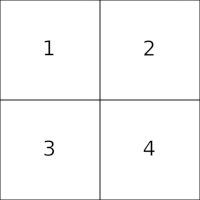
## Simple use case
```python
from ImageMerger import Merger, ImageToMerge, MERGE_GRID
# Initialize list of images
list_images = [
ImageToMerge(path='images/samples/1.png'),
ImageToMerge(path='images/samples/2.png'),
ImageToMerge(path='images/samples/3.png'),
ImageToMerge(path='images/samples/4.png')
]
# Load merger with different settings
m = Merger(list_images=list_images)
# Save merged image
m.save_image(filename="images/results/output_4_grid.png")
```
## Parameters
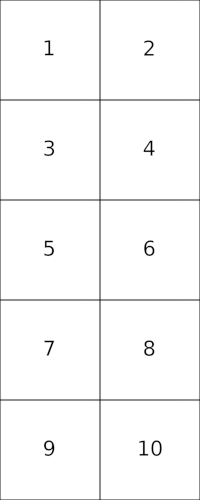
- `limit_horizontal: int`: Optional int to define the maximum number of images to append horizontally
- `limit_vertical: int`: Optional int to define the maximum number of images to append vertically
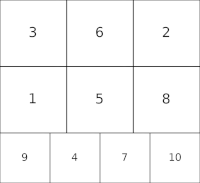
- `suffle: bool`: Optional boolean to decide if `list_images` must be shuffled prior to process. Default `False`
- `merge_strategy: int`: Optional int to set the merging strategy. Either `MERGE_HORIZONTALLY`, - `MERGE_VERTICALLY` or `MERGE_GRID`(default)
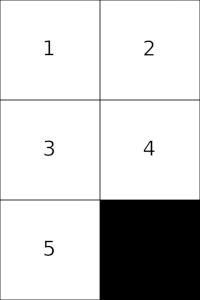
- `preserve_aspect_ratio: bool`: Optional boolean that defines if proportion of each image should be kept or if image can be squeezed/extended to fit. Default `False`
- Setting it to `True` can lead to images being distored to fit layout but there will be no gaps.
- Setting it to `False` will kept each image aspect ratio but can lead to black gaps in output image.
## Configuration examples
- `ImageToMerge.path` can either be a path(local or relative) or HTTP(S) URL
- `limit_horizontal` and `limit_vertical` are optional and can also be used at the same time
- If `limit_horizontal` and `limit_vertical` are not set, and `merge_strategy` is set to `MERGE_GRID` The process will try to fit as best as possible all images in a square grid.
- List of images can be shuffled randomly using `shuffle=True` parameter
## More examples
```python
from ImageMerger import Merger, ImageToMerge
# Initialize list of images
list_images = [
ImageToMerge(path='images/samples/1.png'),
ImageToMerge(path='images/samples/2.png'),
ImageToMerge(path='https://raw.githubusercontent.com/ggouzi/image-merger/main/images/samples/3.png'),
ImageToMerge(path='https://raw.githubusercontent.com/ggouzi/image-merger/main/images/samples/4.png'),
ImageToMerge(path='https://raw.githubusercontent.com/ggouzi/image-merger/main/images/samples/5.png')
]
# Load merger with different settings
m = Merger(
list_images=list_images,
preserve_aspect_ratio=True,
)
# Save merged image
m.save_image(filename="images/results/output_5_grid_keep_aspect_ratio.png")
```
```python
from ImageMerger import Merger, ImageToMerge
# Initialize list of images
list_images = [ImageToMerge(path=f"images/samples/{i}.png") for i in range(1, 11)]
# Load merger with different settings
m = Merger(
list_images=list_images,
limit_horizontal=2
)
# Save merged image
m.save_image(filename="images/results/output_10_2rows.png")
```
```python
from ImageMerger import Merger, ImageToMerge
# Initialize list of images
list_images = [ImageToMerge(path=f"images/samples/{i}.png") for i in range(1, 11)]
# Load merger with different settings
m = Merger(
list_images=list_images,
shuffle=True
)
# Save merged image
m.save_image(filename="images/results/output_10_grid_shuffled.png")
```
# References
- [Pillow](https://github.com/python-pillow/Pillow/)