https://github.com/gianlucajahn/pokematch-react-game
A pokemon-inspired React Game SPA (single-page-application) featuring a rich UX including a welcome screen, a rules popup, a popup containing copyright information, an introduction by a pokemon professor and the actual game.
https://github.com/gianlucajahn/pokematch-react-game
functional-components lifecycle-components react reactjs useeffect-hook
Last synced: 3 months ago
JSON representation
A pokemon-inspired React Game SPA (single-page-application) featuring a rich UX including a welcome screen, a rules popup, a popup containing copyright information, an introduction by a pokemon professor and the actual game.
- Host: GitHub
- URL: https://github.com/gianlucajahn/pokematch-react-game
- Owner: gianlucajahn
- Created: 2022-06-26T13:19:58.000Z (about 4 years ago)
- Default Branch: main
- Last Pushed: 2022-11-21T17:36:55.000Z (over 3 years ago)
- Last Synced: 2026-02-21T19:37:24.943Z (5 months ago)
- Topics: functional-components, lifecycle-components, react, reactjs, useeffect-hook
- Language: JavaScript
- Homepage: https://gianlucajahn.github.io/pokematch-react-game/
- Size: 22.7 MB
- Stars: 2
- Watchers: 1
- Forks: 1
- Open Issues: 0
-
Metadata Files:
- Readme: README.md
Awesome Lists containing this project
README
🐉 React PokéMatch Game

PokéMatch Browser Game built with React and NES.CSS
## Short Description 📋
A pokemon-inspired React Game SPA (single-page-application) featuring a rich UX including a welcome screen, a rules popup, a popup containing copyright information, an introduction by a pokemon professor and the actual game.
## 🔴 Demo
🎮 [Live Demo](https://gianlucajahn.github.io/pokematch-react-game)
## Showcase 🎬
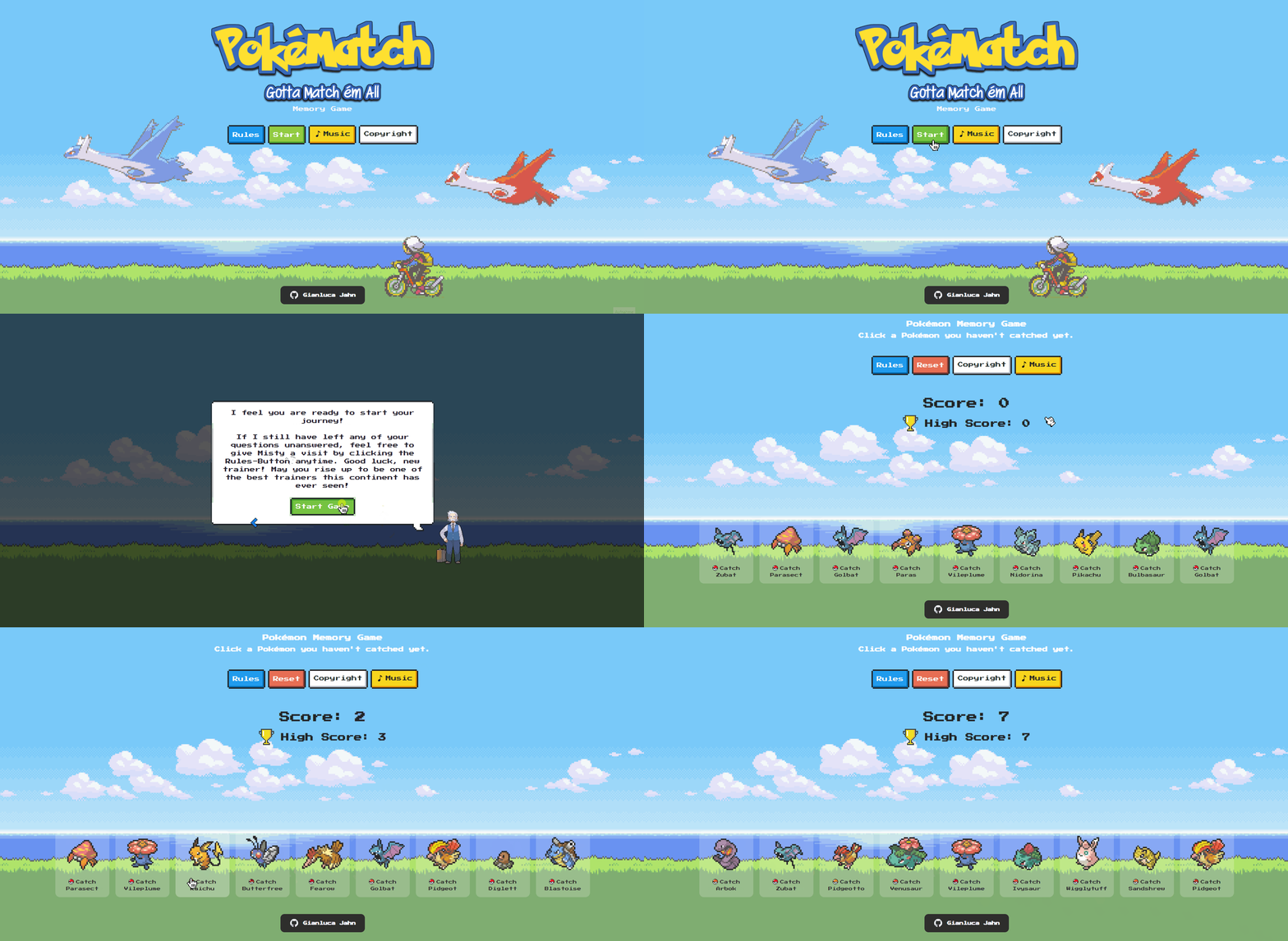
You can see a GIF of my application below. I am looking through the rules, skipping through the introduction, opening the copyright info popup and playing a couple of rounds..
## Performance ⏱
I let [Google Lighthouse](https://chrome.google.com/webstore/detail/lighthouse/blipmdconlkpinefehnmjammfjpmpbjk?hl=de) run over my application to check for it's **performance, accessibility, use of best practices and SEO optimization**. You can view the results right below this paragraph.

## Features ✨
- Immersive UX including Introduction, Rules and Welcome Screen
- Various popups with additional info
- High Score & Score Reset Feature
- Toggleable Soundtrack & onClick Sound Effects
## Technologies Used 💻
- React
- CSS (CSS Modules)
- NES.CSS
- Photoshop
- NPM
## What I learned 📚
- using component lifecycle hooks such as the useEffect hook to work with components throughout their lifespan
- refactoring code to fit the "Automatic Batching" approach of React State, including state updater functions
- using cleanup functions to improve an application's performance and prevent unintended side effects
## Motivation
My motivation in building this project was to learn more about functional components and the way they handled component lifecycles, which mostly reside in useEffect hooks. I certainly bumped into some issues when starting out and that's perfectly good, because that way I learnt why those issues occured, learnt to fix them and how to prevent them from happening in the future - more on that in the **"What I learned"** tab.
## Legal: Copyright Informations
All rights to all pictures, music and names on this website belong to Nintendo/Creatures Inc. and GAME FREAK. I only used them to build an environment for myself to learn coding in React with. If you are an owner of the copyrighted material, please let me know if you have any issues with this and I'll take the page down immediately.