https://github.com/giljr/docker_proj_01
Docker On Ubuntu — PROJECT#1 Php + Node.js + Mysql — dockerSeries — Episode#1
https://github.com/giljr/docker_proj_01
docker docker-compose docker-container docker-image dockerfile nodejs php7
Last synced: 2 months ago
JSON representation
Docker On Ubuntu — PROJECT#1 Php + Node.js + Mysql — dockerSeries — Episode#1
- Host: GitHub
- URL: https://github.com/giljr/docker_proj_01
- Owner: giljr
- Created: 2023-09-15T22:10:24.000Z (almost 3 years ago)
- Default Branch: master
- Last Pushed: 2023-09-16T15:02:13.000Z (almost 3 years ago)
- Last Synced: 2025-01-17T12:16:53.205Z (over 1 year ago)
- Topics: docker, docker-compose, docker-container, docker-image, dockerfile, nodejs, php7
- Language: PHP
- Homepage: https://medium.com/jungletronics/docker-on-ubuntu-project-1-511817acaa88
- Size: 62.5 KB
- Stars: 0
- Watchers: 1
- Forks: 0
- Open Issues: 0
-
Metadata Files:
- Readme: README.md
- Changelog: history.txt
Awesome Lists containing this project
README
# Project Docker - Project # 1
**Based on**: Ayrton Teshima - [Programador a Bordo Docker em 22 minutos - teoria e prática (Rápido!)](https://youtu.be/Kzcz-EVKBEQ?si=f9eCaj9hhruG3wV4)
Hello! Welcome to our Docker series.
We're here to delve into the intricacies of this technology as we believe in the "learning by doing" approach.
Join us on this journey by following our channel, and let's explore Docker together. Your participation is highly encouraged!
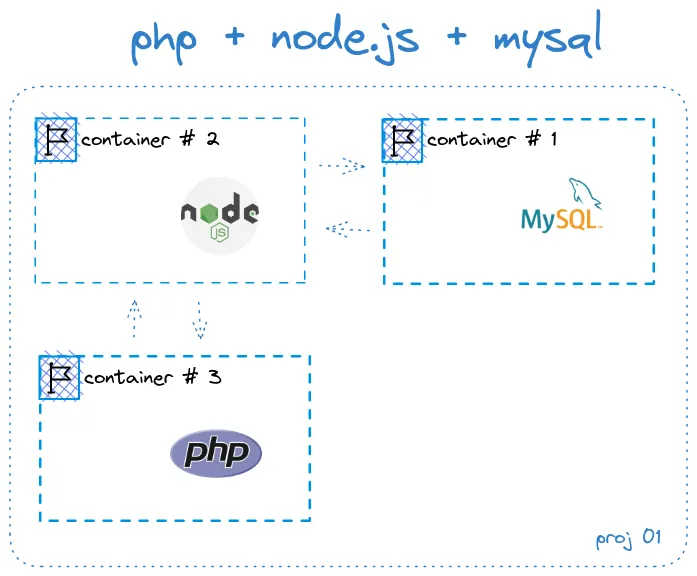
For this episode we are planning to develop a JavaScript API, establish a MySQL database, and create a PHP website to consume the API services.
Welcome!
## Screenshots
We are planning to develop a JavaScript API, establish a MySQL database, and create a PHP website to consume the API services.
## Run Locally
#### How to Install Node.js and NPM
To check if Node.js is installed on your machine,
Download the Installer:
[NodeJs official website](https://nodejs.org/en/download)
#### Clone the project
```bash
npm install
```
#### Go to the project directory
Create All Images
```bash
docker build -t mysql-image -f api/db/Dockerfile .
docker build -t node-image -f api/Dockerfile .
docker build -t php-image -f website/Dockerfile .
```
Run Docker Compose
```bash
docker-compose up -d
```
Start the server
```bash
api: localhost:9001/products/
app: localhost:8888/
```
## Acknowledgements
- [Docker em 22 minutos - teoria e prática (Rápido!) by Ayrton Teshima - Programador a Bordo ](https://youtu.be/Kzcz-EVKBEQ?si=f9eCaj9hhruG3wV4)
- [nodejs.org](https://nodejs.org/en/download)
- [Jungletronics - Tutorial](https://medium.com/jungletronics/)
- [Simple eCommerce API using Flask](https://medium.com/jungletronics/simple-ecommerce-api-using-flask-b192e2079791)