https://github.com/git-on-my-level/zcc
A lightweight Claude Code framework to set up multi-agent workflows, common repetitive tasks, and manage long-running projects
https://github.com/git-on-my-level/zcc
claude claude-code coding-agent
Last synced: 10 months ago
JSON representation
A lightweight Claude Code framework to set up multi-agent workflows, common repetitive tasks, and manage long-running projects
- Host: GitHub
- URL: https://github.com/git-on-my-level/zcc
- Owner: Git-on-my-level
- License: mit
- Created: 2025-07-14T05:18:31.000Z (about 1 year ago)
- Default Branch: main
- Last Pushed: 2025-09-11T11:06:17.000Z (10 months ago)
- Last Synced: 2025-09-11T11:55:24.518Z (10 months ago)
- Topics: claude, claude-code, coding-agent
- Language: TypeScript
- Homepage:
- Size: 1.26 MB
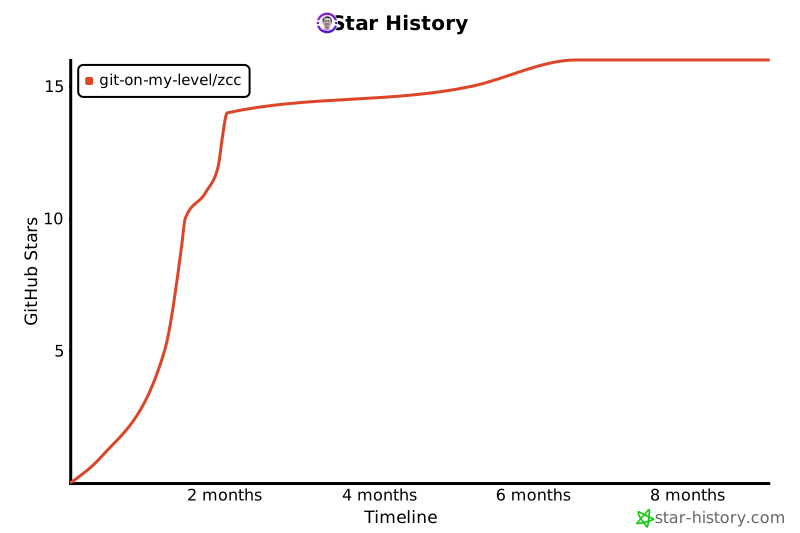
- Stars: 14
- Watchers: 0
- Forks: 0
- Open Issues: 1
-
Metadata Files:
- Readme: README.md
- Changelog: CHANGELOG.md
- Contributing: CONTRIBUTING.md
- License: LICENSE
Awesome Lists containing this project
README
# zcc: The zsh for Claude Code
[](https://badge.fury.io/js/z-claude-code)
**Transform Claude Code from a basic AI assistant into a project-aware, context-intelligent development powerhouse.**
## The Problem
Claude Code breaks down as your codebase grows:
- 😔 Re-adding the same CLAUDE.md instructions across projects
- 📝 Claude spams markdown files instead of organized task tracking
- 🔄 Goes in circles after context compacting, repeating failed approaches
- 🎭 Copy-pasting roleplay prompts: "Act as engineer..." "Be a reviewer..."
## The Solution: oh-my-zsh for AI
Just as zsh transformed terminals with themes and plugins, zcc transforms Claude Code with:
```bash
# Before: Basic Claude Code
"Please review my code" # Generic responses
# After: With zcc
/mode reviewer # Specialized AI personality
"Review the auth module" # Context-aware, focused analysis
```
## See It In Action
```bash
# 1. Install (30 seconds)
npx zcc init
# 2. Use enhanced features immediately
/mode architect # Switch to system design mode
/ticket create "Add authentication" # Persistent task tracking
/zcc # See project status
# 3. Claude becomes context-aware
"Implement the auth feature" # Claude knows about your ticket,
# project structure, git status, etc.
```
## Core Features
| **Feature** | **What It Does** | **zsh Equivalent** |
| ------------------ | -------------------------------------------------- | ------------------ |
| **AI Modes** | Switch personalities (architect/engineer/reviewer) | Themes |
| **Tickets** | Persistent task tracking across sessions | tmux sessions |
| **External Packs** | Install community packs from GitHub | oh-my-zsh plugins |
| **Fuzzy Matching** | `/mode eng` → finds `engineer` | Smart completions |
| **Hooks** | Auto-load context, expand acronyms | precmd/preexec |
| **Workflows** | Reusable procedures (review, deploy, audit) | Functions |
| **Agents** | Specialized tools (research, analysis) | Plugins |
## Getting Started
### Installation Options
#### 1. Quick Start (Recommended)
```bash
# Interactive setup - choose from available starter packs
npx zcc init
# Or install a specific starter pack directly (headless)
npx zcc init --pack essentials
npx zcc init --pack advanced-code-refactoring
```
#### 2. Global Installation
```bash
# Install globally for use across all projects
npm install -g z-claude-code
zcc init
```
#### 3. Local Development (From Source)
```bash
# Clone and build from source
git clone https://github.com/git-on-my-level/zcc.git
cd zcc
npm install
npm run build
# Use in your project
cd /your/project
node /path/to/zcc/dist/cli.js init
```
### Common Setup Scenarios
```bash
# Essential setup (recommended for new users)
zcc init --pack essentials
# Advanced code refactoring toolkit
zcc init --pack advanced-code-refactoring
# Start fresh (overwrite existing)
zcc init --force
# Automated CI/CD setup
zcc init --pack essentials --force
```
## Starter Packs: Ready-to-Use Bundles
Get up and running instantly with curated collections of modes, workflows, and agents:
```bash
# Interactive pack selection
npx zcc init
# Or specify a pack directly
npx zcc init --pack frontend-react
```
### Available Packs
| Pack | Description | Includes |
| ----------------------------- | --------------------------------------- | ------------------------------------------------------------------------------------------------------------------------------------------------------------------------------------------------------------------------------- |
| **essentials** | Essential setup for general development | Core modes (`autonomous-project-manager`, `engineer`, `architect`, `reviewer`, `ai-debt-maintainer`) + workflows (`review`, `summarize`, `openmemory-setup`) + hooks (routing, git context, project overview, acronym expander) |
| **advanced-code-refactoring** | AST/semantic refactoring toolkit | Mode (`refactoring-specialist`) + workflows (`semantic-search`, `safe-refactoring`) + agent (`code-archaeologist`) + hook (`ast-grep-awareness`) |
### Coming Soon
- **backend-api** - RESTful API development
- **fullstack** - End-to-end development combining frontend and backend capabilities
### Community Packs 🎉 NEW!
Install packs from external sources like GitHub:
```bash
# Add a community pack source
zcc source add awesome-packs --type github --owner community --repo zcc-packs
# Search and install packs
zcc search react
zcc add pack react-toolkit
```
[Learn more about external packs →](docs/external-packs.md)
*Just like oh-my-zsh themes transform your terminal experience, starter packs transform Claude Code for your project type.*
## Daily Workflow
```bash
# Morning: Architecture & Planning
/mode architect
"Design the payment system"
# Afternoon: Implementation
/mode engineer
"Implement stripe integration"
# Evening: Review
/mode reviewer
"Check for security issues"
# Track Everything
/ticket list # See all tasks
/ticket payment-system # Load ticket context
```
## Why It Works
**Problem**: Claude Code loses context and repeats mistakes
**Solution**: Persistent tickets + smart hooks = continuous context
**Problem**: Same prompts copy-pasted everywhere
**Solution**: Built-in modes with best practices baked in
**Problem**: Scattered markdown files everywhere
**Solution**: Organized ticket system with clear status tracking
## Documentation
### Essential Guides
- 🚀 [Quick Start Guide](docs/QUICK_START.md) - Get running in 5 minutes
- 🪝 [Hooks Guide](docs/HOOKS_GUIDE.md) - Event-driven automation
### Advanced Topics
- 🌍 [External Packs](docs/external-packs.md) - Install community packs from GitHub
- 📖 [API Reference](docs/API.md) - Programmatic usage
- 🛠️ [Troubleshooting](docs/TROUBLESHOOTING.md) - Common issues and solutions
## Examples
### Switch Modes with Fuzzy Matching
```bash
/mode arc # → architect
/mode eng # → engineer
/mode apm # → autonomous-project-manager
```
### Create and Track Tasks
```bash
/ticket create "Add user authentication"
/ticket move auth-task in-progress
/ticket finish auth-task
```
### Auto-Expand Acronyms
```bash
zcc acronym add API "Application Programming Interface"
zcc acronym add DDD "Domain-Driven Design"
# Now Claude automatically understands your project's terminology
```
## Philosophy
Like zsh enhances bash without replacing it, zcc enhances Claude Code while preserving everything that works. Start simple, add power as needed.
## Coming Soon
- 🌍 **Community Hub**: Share modes and workflows
- 📝 **~/.zcc/config.yaml**: Global config file (unified structure with project config)
- 🔌 **Plugin Manager**: Easy install/update (like zplug)
- 📊 **Analytics**: Track productivity and usage patterns
## Star History
[](https://www.star-history.com/#git-on-my-level/zcc&Timeline)
## Contributing
We welcome contributions! See [CONTRIBUTING.md](CONTRIBUTING.md) for guidelines.
## Support
- 🐛 [Issues](https://github.com/git-on-my-level/zcc/issues)
- 💬 [Discussions](https://github.com/git-on-my-level/zcc/discussions)
- 📖 [Wiki](https://github.com/git-on-my-level/zcc/wiki)
## License
MIT © zcc Contributors
---
⭐ Star us if this solved your Claude Code problems!
Transform your AI coding experience in 30 seconds