https://github.com/github/etcd-operator
etcd operator creates/configures/manages etcd clusters atop Kubernetes
https://github.com/github/etcd-operator
Last synced: 10 months ago
JSON representation
etcd operator creates/configures/manages etcd clusters atop Kubernetes
- Host: GitHub
- URL: https://github.com/github/etcd-operator
- Owner: github
- License: apache-2.0
- Archived: true
- Fork: true (coreos/etcd-operator)
- Created: 2017-05-18T16:34:35.000Z (about 9 years ago)
- Default Branch: master
- Last Pushed: 2017-05-18T19:18:57.000Z (about 9 years ago)
- Last Synced: 2024-09-30T00:23:31.513Z (almost 2 years ago)
- Language: Go
- Homepage: https://coreos.com/blog/introducing-the-etcd-operator.html
- Size: 1.79 MB
- Stars: 8
- Watchers: 2
- Forks: 9
- Open Issues: 0
-
Metadata Files:
- Readme: README.md
- Changelog: CHANGELOG.md
- Contributing: CONTRIBUTING.md
- License: LICENSE
- Code of conduct: code-of-conduct.md
Awesome Lists containing this project
README
# etcd operator
unit/integration:
[](https://jenkins-etcd-public.prod.coreos.systems/view/operator/job/etcd-operator-unit-master/)
e2e (Kubernetes stable):
[](https://jenkins-etcd-public.prod.coreos.systems/job/etcd-operator-master/)
e2e (Kubernetes master):
[](https://jenkins-etcd-public.prod.coreos.systems/job/etcd-operator-master-k8s-master/)
### Project status: beta
Major planned features have been completed and while no breaking API changes are currently planned, we reserve the right to address bugs and API changes in a backwards incompatible way before the project is declared stable. See [upgrade guide](./doc/user/upgrade/upgrade_guide.md) for safe upgrade process.
Currently user face etcd cluster objects are created as [Kubernetes Third Party Resources](https://kubernetes.io/docs/user-guide/thirdpartyresources/), however, taking advantage of [User Aggregated API Servers](https://github.com/kubernetes/community/blob/master/contributors/design-proposals/aggregated-api-servers.md) to improve reliability, validation and versioning is planned. The use of Aggregated API should be minimally disruptive to existing users but may change what Kubernetes objects are created or how users deploy the etcd operator.
We expect to consider the etcd operator stable soon; backwards incompatible changes will not be made once the project reaches stability.
## Overview
The etcd operator manages etcd clusters deployed to [Kubernetes][k8s-home] and automates tasks related to operating an etcd cluster.
- [Create and destroy](#create-and-destroy-an-etcd-cluster)
- [Resize](#resize-an-etcd-cluster)
- [Recover a member](#member-recovery)
- [Backup and restore a cluster](#disaster-recovery)
- [Rolling upgrade](#upgrade-an-etcd-cluster)
There are [more spec examples](./doc/user/spec_examples.md) on setting up clusters with backup, restore, and other configurations.
Read [Best Practices](./doc/best_practices.md) for more information on how to better use etcd operator.
Read [RBAC docs](./doc/user/rbac.md) for how to setup RBAC rules for etcd operator if RBAC is in place.
Read [Developer Guide](./doc/dev/developer_guide.md) for setting up development environment if you want to contribute.
## Requirements
- Kubernetes 1.6+
- etcd 3.0+
## Demo
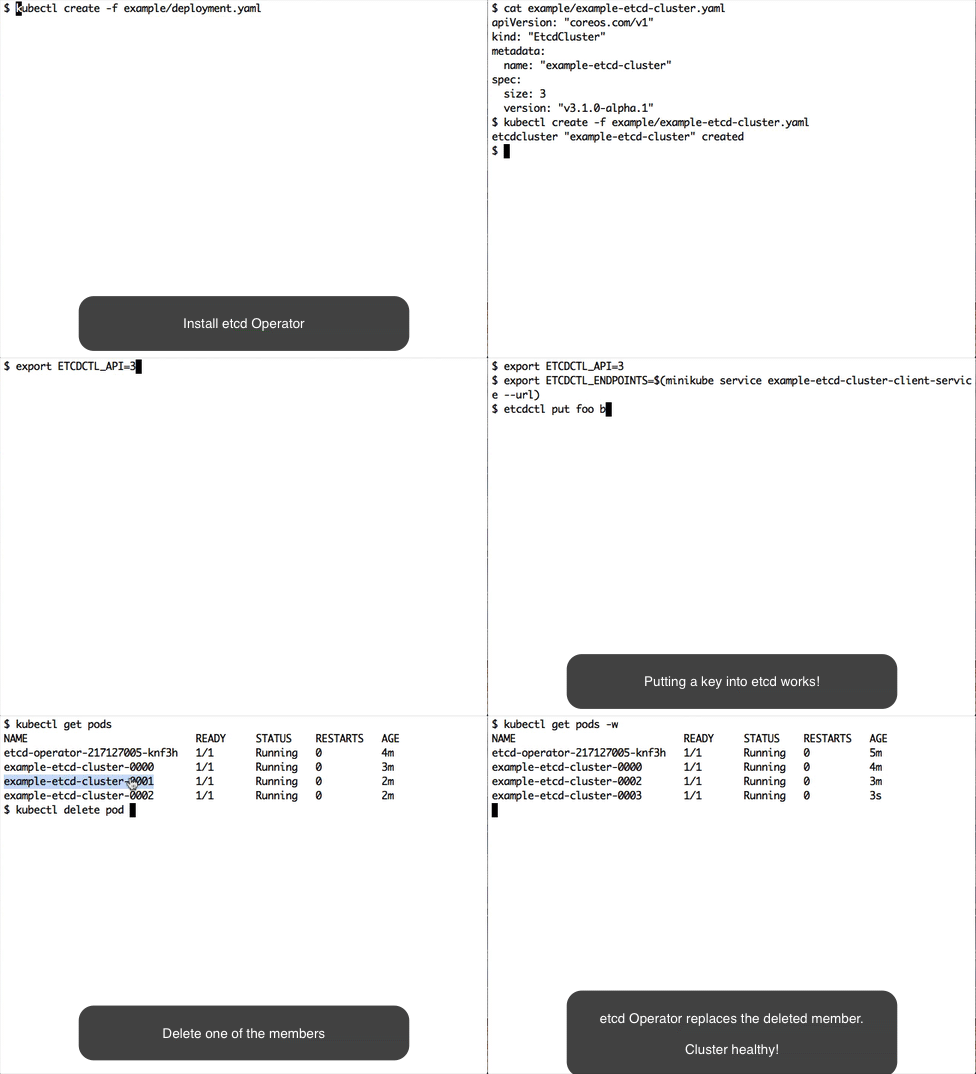
## Deploy etcd operator
See [instructions on how to install/uninstall etcd operator](doc/user/op_guide.md) .
## Create and destroy an etcd cluster
```bash
$ kubectl create -f example/example-etcd-cluster.yaml
```
A 3 member etcd cluster will be created.
```bash
$ kubectl get pods
NAME READY STATUS RESTARTS AGE
example-etcd-cluster-0000 1/1 Running 0 1m
example-etcd-cluster-0001 1/1 Running 0 1m
example-etcd-cluster-0002 1/1 Running 0 1m
```
See [client service](doc/user/client_service.md) for how to access etcd clusters created by operator.
If you are working with [minikube locally](https://github.com/kubernetes/minikube#minikube) create a nodePort service and test out that etcd is responding:
```bash
$ kubectl create -f example/example-etcd-cluster-nodeport-service.json
$ export ETCDCTL_API=3
$ export ETCDCTL_ENDPOINTS=$(minikube service example-etcd-cluster-client --url)
$ etcdctl put foo bar
```
Destroy etcd cluster:
```bash
$ kubectl delete -f example/example-etcd-cluster.yaml
```
## Resize an etcd cluster
**Note**: In order to use `kubectl apply` you will need Kubernetes 1.6 or higher. Otherwise you will have to post the changes to the API server directly using `curl`.
Create an etcd cluster:
```
$ kubectl apply -f example/example-etcd-cluster.yaml
```
In `example/example-etcd-cluster.yaml` the initial cluster size is 3.
Modify the file and change `size` from 3 to 5.
```
$ cat example/example-etcd-cluster.yaml
apiVersion: "etcd.coreos.com/v1beta1"
kind: "Cluster"
metadata:
name: "example-etcd-cluster"
spec:
size: 5
version: "3.1.4"
```
Apply the size change to the cluster TPR:
```
$ kubectl apply -f example/example-etcd-cluster.yaml
```
The etcd cluster will scale to 5 members (5 pods):
```
$ kubectl get pods
NAME READY STATUS RESTARTS AGE
example-etcd-cluster-0000 1/1 Running 0 1m
example-etcd-cluster-0001 1/1 Running 0 1m
example-etcd-cluster-0002 1/1 Running 0 1m
example-etcd-cluster-0003 1/1 Running 0 1m
example-etcd-cluster-0004 1/1 Running 0 1m
```
Similarly we can decrease the size of cluster from 5 back to 3 by changing the size field again and reapplying the change.
```
$ cat example/example-etcd-cluster.yaml
apiVersion: "etcd.coreos.com/v1beta1"
kind: "Cluster"
metadata:
name: "example-etcd-cluster"
spec:
size: 3
version: "3.1.4"
```
```
$ kubectl apply -f example/example-etcd-cluster.yaml
```
We should see that etcd cluster will eventually reduce to 3 pods:
```
$ kubectl get pods
NAME READY STATUS RESTARTS AGE
example-etcd-cluster-0002 1/1 Running 0 1m
example-etcd-cluster-0003 1/1 Running 0 1m
example-etcd-cluster-0004 1/1 Running 0 1m
```
## Member recovery
If the minority of etcd members crash, the etcd operator will automatically recover the failure.
Let's walk through in the following steps.
Create an etcd cluster:
```
$ kubectl create -f example/example-etcd-cluster.yaml
```
Wait until all three members are up. Simulate a member failure by deleting a pod:
```bash
$ kubectl delete pod example-etcd-cluster-0000 --now
```
The etcd operator will recover the failure by creating a new pod `example-etcd-cluster-0003`:
```bash
$ kubectl get pods
NAME READY STATUS RESTARTS AGE
example-etcd-cluster-0001 1/1 Running 0 1m
example-etcd-cluster-0002 1/1 Running 0 1m
example-etcd-cluster-0003 1/1 Running 0 1m
```
Destroy etcd cluster:
```bash
$ kubectl delete -f example/example-etcd-cluster.yaml
```
## etcd operator recovery
If the etcd operator restarts, it can recover its previous state.
Let's walk through in the following steps.
```
$ kubectl create -f example/example-etcd-cluster.yaml
```
Wait until all three members are up. Then
```bash
$ kubectl delete -f example/deployment.yaml
deployment "etcd-operator" deleted
$ kubectl delete pod example-etcd-cluster-0000 --now
pod "example-etcd-cluster-0000" deleted
```
Then restart the etcd operator. It should recover itself and the etcd clusters it manages.
```bash
$ kubectl create -f example/deployment.yaml
deployment "etcd-operator" created
$ kubectl get pods
NAME READY STATUS RESTARTS AGE
example-etcd-cluster-0001 1/1 Running 0 1m
example-etcd-cluster-0002 1/1 Running 0 1m
example-etcd-cluster-0003 1/1 Running 0 1m
```
## Disaster recovery
If the majority of etcd members crash, but at least one backup exists for the cluster, the etcd operator can restore the entire cluster from the backup.
By default, the etcd operator creates a storage class on initialization:
```
$ kubectl get storageclass
NAME TYPE
etcd-backup-gce-pd kubernetes.io/gce-pd
```
This is used to request the persistent volume to store the backup data. See [other backup options](doc/user/backup_config.md).
To enable backup, create an etcd cluster with [backup enabled spec](example/example-etcd-cluster-with-backup.yaml).
```
$ kubectl create -f example/example-etcd-cluster-with-backup.yaml
```
A persistent volume claim is created for the backup pod:
```
$ kubectl get pvc
NAME STATUS VOLUME CAPACITY ACCESSMODES AGE
example-etcd-cluster-with-backup-pvc Bound pvc-79e39bab-b973-11e6-8ae4-42010af00002 1Gi RWO 9s
```
Let's try to write some data into etcd:
```
$ kubectl run --rm -i --tty fun --image quay.io/coreos/etcd --restart=Never -- /bin/sh
/ # ETCDCTL_API=3 etcdctl --endpoints http://example-etcd-cluster-with-backup-client:2379 put foo bar
OK
(ctrl-D to exit)
```
Now let's kill two pods to simulate a disaster failure:
```
$ kubectl delete pod example-etcd-cluster-with-backup-0000 example-etcd-cluster-with-backup-0001 --now
pod "example-etcd-cluster-with-backup-0000" deleted
pod "example-etcd-cluster-with-backup-0001" deleted
```
Now quorum is lost. The etcd operator will start to recover the cluster by:
- Creating a new seed member to recover from the backup
- Add more members until the size reaches to specified number
```
$ kubectl get pods
NAME READY STATUS RESTARTS AGE
example-etcd-cluster-with-backup-0003 0/1 Init:0/2 0 11s
example-etcd-cluster-with-backup-backup-sidecar-e9gkv 1/1 Running 0 18m
...
$ kubectl get pods
NAME READY STATUS RESTARTS AGE
example-etcd-cluster-with-backup-0003 1/1 Running 0 3m
example-etcd-cluster-with-backup-0004 1/1 Running 0 3m
example-etcd-cluster-with-backup-0005 1/1 Running 0 3m
example-etcd-cluster-with-backup-backup-sidecar-e9gkv 1/1 Running 0 22m
```
Finally, besides destroying the cluster, also cleanup the backup if you don't need it anymore:
```
$ kubectl delete pvc example-etcd-cluster-with-backup-pvc
```
Note: There could be a race that it will fall to single member recovery if a pod is recovered before another is deleted.
## Upgrade an etcd cluster
Have the following yaml file ready:
```
$ cat 3.0-etcd-cluster.yaml
apiVersion: "etcd.coreos.com/v1beta1"
kind: "Cluster"
metadata:
name: "example-etcd-cluster"
spec:
size: 3
version: "3.0.16"
```
Create an etcd cluster with the version specified (3.0.16) in the yaml file:
```
$ kubectl apply -f 3.0-etcd-cluster.yaml
$ kubectl get pods
NAME READY STATUS RESTARTS AGE
example-etcd-cluster-0000 1/1 Running 0 37s
example-etcd-cluster-0001 1/1 Running 0 25s
example-etcd-cluster-0002 1/1 Running 0 14s
```
The container image version should be 3.0.16:
```
$ kubectl get pod example-etcd-cluster-0000 -o yaml | grep "image:" | uniq
image: quay.io/coreos/etcd:v3.0.16
```
Now modify the file `3.0-etcd-cluster.yaml` and change the `version` from 3.0.16 to 3.1.4:
```
$ cat 3.0-etcd-cluster.yaml
apiVersion: "etcd.coreos.com/v1beta1"
kind: "Cluster"
metadata:
name: "example-etcd-cluster"
spec:
size: 3
version: "3.1.4"
```
Apply the version change to the cluster TPR:
```
$ kubectl apply -f 3.0-etcd-cluster.yaml
```
Wait ~30 seconds. The container image version should be updated to v3.1.4:
```
$ kubectl get pod example-etcd-cluster-0000 -o yaml | grep "image:" | uniq
image: quay.io/coreos/etcd:v3.1.4
```
Check the other two pods and you should see the same result.
## Limitations
- The etcd operator only manages the etcd cluster created in the same namespace. Users need to create multiple operators in different namespaces to manage etcd clusters in different namespaces.
- Backup works only for data in etcd3 storage, not for data in etcd2 storage.
- PV Backup only works on GCE(kubernetes.io/gce-pd) and AWS(kubernetes.io/aws-ebs) for now.
- Migration, the process of allowing the etcd operator to manage existing etcd3 clusters, only supports a single-member cluster, with its node running in the same Kubernetes cluster.
**The operator collects anonymous usage statistics to help us learn how the software is being used and how we can improve it. To disable collection, run the operator with the flag `-analytics=false`.**
[k8s-home]: http://kubernetes.io