https://github.com/gleapsdk/gleap-ios-sdk
https://github.com/gleapsdk/gleap-ios-sdk
Last synced: about 2 months ago
JSON representation
- Host: GitHub
- URL: https://github.com/gleapsdk/gleap-ios-sdk
- Owner: GleapSDK
- License: other
- Created: 2021-09-25T11:54:52.000Z (over 4 years ago)
- Default Branch: main
- Last Pushed: 2025-07-25T16:23:44.000Z (11 months ago)
- Last Synced: 2025-07-25T21:12:23.785Z (11 months ago)
- Language: Objective-C
- Size: 40.9 MB
- Stars: 2
- Watchers: 3
- Forks: 4
- Open Issues: 1
-
Metadata Files:
- Readme: README.md
- License: LICENSE.md
Awesome Lists containing this project
README
# Gleap iOS SDK
The [Gleap SDK for iOS](https://www.gleap.io) is the easiest way to integrate Gleap into your apps!
You have two ways to set up the Gleap SDK for iOS. The easiest way ist to install and link the SDK with CocoaPods. If you haven't heard about [CocoaPods](https://cocoapods.org) yet, we strongly encourage you to check out their getting started here (it's super easy to get started & worth using 😍)
## Docs & Examples
Checkout our [documentation](https://docs.gleap.io/ios) for full reference.
## Installation with Swift Package Manager
The [Swift Package Manager](https://www.swift.org/package-manager/) is a tool for automating the distribution of Swift code and is integrated into the swift compiler. It is in early development, but Gleap does support its use on supported platforms.
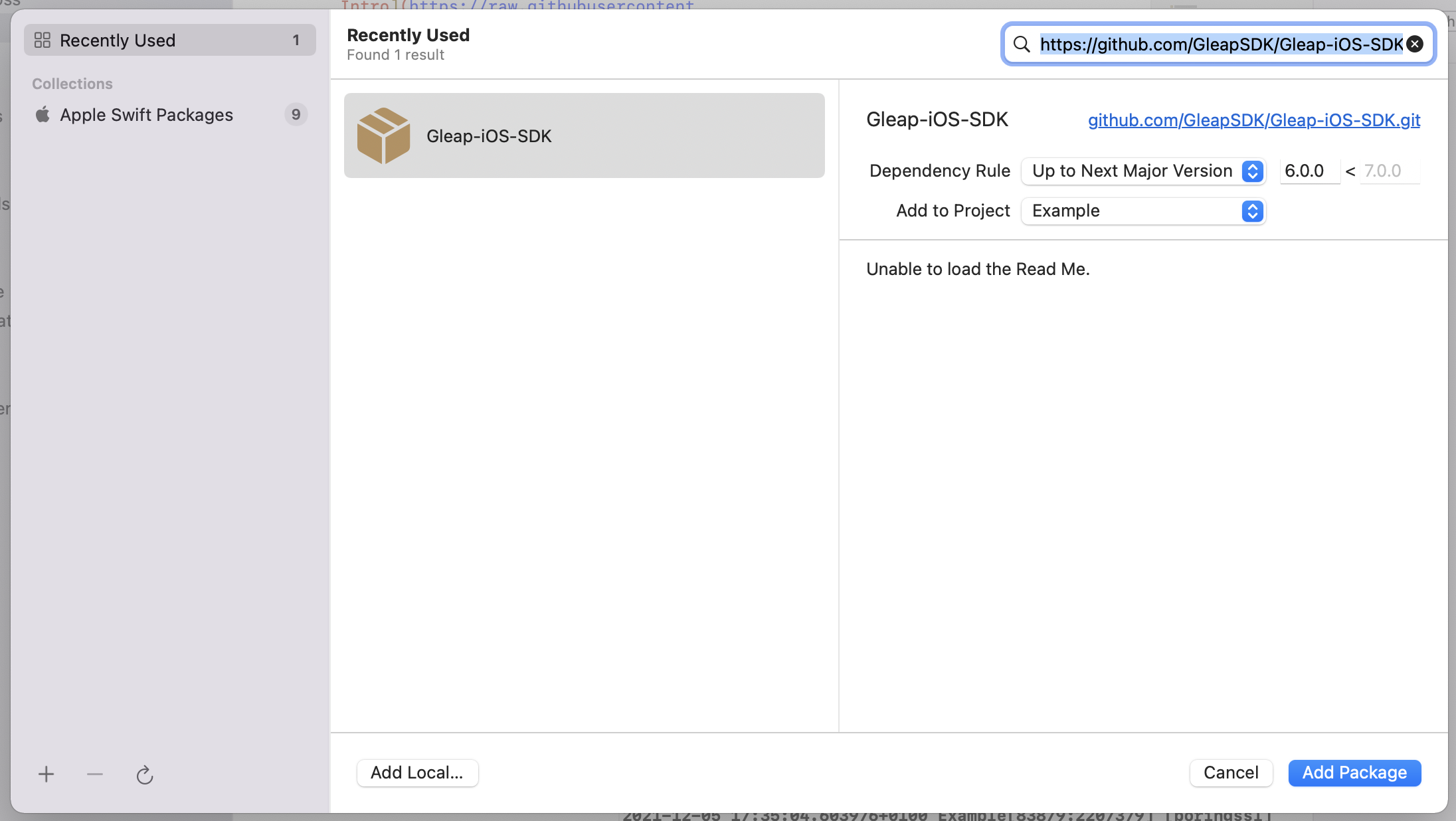
To get started, open your Xcode project and select File > Add packages...
Now you need to paste the following Package URL to the search bar in the top right corner. Hit enter to confirm.
**Package URL:**
```
https://github.com/GleapSDK/Gleap-iOS-SDK
```
Now confirm with add package. The Gleap SDK is almost installed successfully.
Let's carry on with the initialization 🎉
## Installation with CocoaPods
Open a terminal window and navigate to the location of the Xcode project for your app.
**Create a Podfile if you don't have one:**
```
$ pod init
```
**Open your Podfile and add:**
```
pod 'Gleap'
```
**Save the file and run:**
```
$ pod install
```
This creates an .xcworkspace file for your app. Use this file for all future development on your application.
The Gleap SDK is almost installed successfully.
Let's carry on with the initialization 🎉
Open your XCode project (.xcworkspace) and open your App Delegate (AppDelegate.swift)
**Import the Gleap SDK**
Import the Gleap SDK by adding the following import below your other imports.
```
import Gleap
```
**Initialize the SDK**
The last step is to initialize the Gleap SDK by adding the following Code to the end of the ```applicationDidFinishLaunchingWithOptions``` delegate:
```
Gleap.initialize(withToken: "YOUR_API_KEY")
```
(Your API key can be found in the project settings within Gleap)