https://github.com/globocom/enforcement
Project focused on the implementation of policies in Kubernetes clusters through GitOps.
https://github.com/globocom/enforcement
hacktoberfest kubernetes python
Last synced: 11 months ago
JSON representation
Project focused on the implementation of policies in Kubernetes clusters through GitOps.
- Host: GitHub
- URL: https://github.com/globocom/enforcement
- Owner: globocom
- License: bsd-3-clause
- Created: 2020-09-08T12:45:49.000Z (almost 6 years ago)
- Default Branch: master
- Last Pushed: 2022-11-01T00:57:44.000Z (almost 4 years ago)
- Last Synced: 2025-04-06T08:36:36.898Z (over 1 year ago)
- Topics: hacktoberfest, kubernetes, python
- Language: Python
- Homepage:
- Size: 1.24 MB
- Stars: 13
- Watchers: 10
- Forks: 6
- Open Issues: 5
-
Metadata Files:
- Readme: README.md
- License: LICENSE
Awesome Lists containing this project
README
[](https://github.com/{owner}/{repo}/actions)
# Enforcement
## Introduction
Enforcement is an open source project focused on the management and simultaneous deployment of applications and policies across multiple clusters through GitOps.
\
\
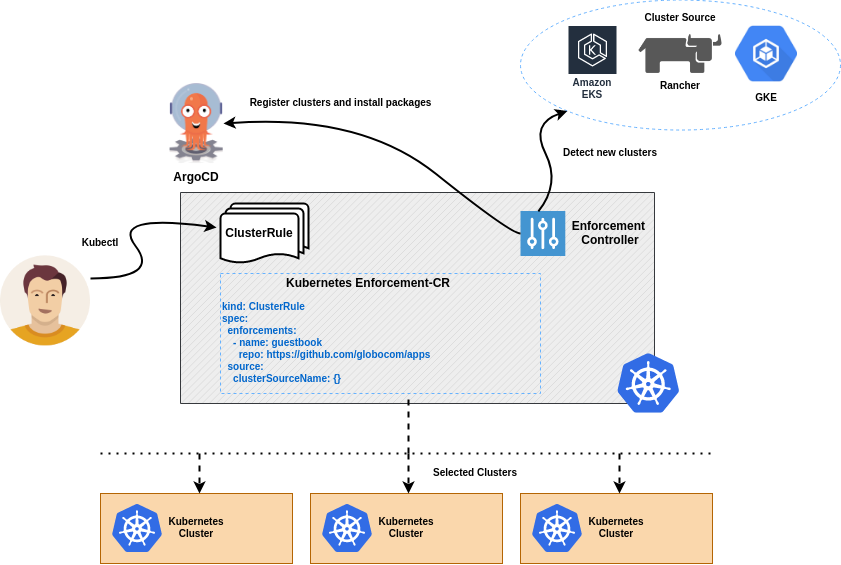
Enforcement allows users to manage many clusters as easily as one. Users can deploy packages (resource collection) to clusters created from a cluster source (Rancher, GKE, EKS, etc.) and control deployments by specifying rules, which define a filter to select a group of clusters and the packages that should be installed in that group.
\
\
When Enforcement detects the creation of a cluster in the cluster source, it checks whether the cluster fits into any specified rule, if there is any match, the packages configured in the rule are automatically installed in the cluster.
\
\
The packages include not just application deployment manifests, but anything that can be described as a feature of Kubernetes.
## How does it work?
Enforcement works as a Kubernetes Operator, which observes the creation of ClusterRule objects. These objects define rules that specify a set of clusters and the packages they are to receive.
\
\
When Enforcement detects the creation of a cluster in cluster source, it registers the cluster and asks ArgoCD to install the packages configured for the cluster.
\
\
ArgoCD installs all packages in the cluster and ensures that they are always present.
\
## Installation
Enforcement can be installed on Kubernetes using a helm chart. See the following page for information on how to get Enforcement up and running.
\
\
[Installing the helm chart](https://github.com/globocom/charts/tree/master/sources/enforcement)
## Running Local
Install the dependencies using PipEnv.
```shell
pipenv install
```
activate the Pipenv shell.
```shell
pipenv shell
```
Run the application.
```shell
kopf run main.py
```
Build the Docker image.
```shell
docker build -t enforcement .
```
## Configuration
Enforcement uses the environment variables described in the table below to run locally or in the production and you have
the option of create a config.ini to configure as well instead variables and last option is use secret to configure you
sources(rancher, gke, eks). You can see the examples below.
### Creating an environment variables
Environment Variable | Example | Description |
|:--------------------:|:----------------:|:----------------------------:|
| ARGO_URL | https://myargourl.domain.com | Argo URL |
| ARGO_USERNAME | admin | Argo Username |
| ARGO_PASSWORD | password | Argo Password |
| OPERATOR_NAMESPACE | argocd | Operator Namespace |
## Supported cluster sources
Enforcement aims to detect the creation of clusters in several services of managed Kubernetes and cluster orchestration. Currently, the only cluster source supported is Rancher. We are developing support for EKS, GKE and AKS.
## Creating a ClusterRule
See a complete example of creating ClusterRule for clusters created through Rancher.
\
\
The enforcements field defines all packages that will be installed in the clusters that match the criteria established within the source.rancher field.
```yaml
apiVersion: enforcement.globo.com/v1beta1
kind: ClusterRule
metadata:
name: dev-rules
spec:
enforcements:
- name: helm-guestbook
repo: https://github.com/argoproj/argocd-example-apps
path: helm-guestbook
namespace: default
helm:
parameters:
replicaCount: 1
- name: guestbook
repo: https://github.com/argoproj/argocd-example-apps
path: guestbook
source:
rancher:
filters:
driver: googleKubernetesEngine
labels:
cattle.io/creator: "norman"
ignore:
- cluster1
- cluster2
- cluster3
```
The rancher.filters, rancher.labels and rancher.ignore fields are specific to Rancher. Other cluster sources may have other values. You can get all the examples of ClusterRules objects [here](https://github.com/globocom/enforcement-service/tree/master/examples/sourcers).
A ClusterRule also supports dynamic configurations using the Jinja expression language. You can create dynamic models
using cluster fields returned by cluster source, or any other valid Python code.
```yaml
apiVersion: enforcement.globo.com/v1beta1
kind: ClusterRule
metadata:
name: dynamic-rule
spec:
enforcements:
#The variable name references the cluster name defined in the Cluster source.
- name: ${% if name=='cluster1' %} guestbook-cluster1 ${% else %} guestbook-other ${% endif %}
repo: https://github.com/argoproj/argocd-example-apps #Git repository
path: helm-guestbook
namespace: ${{ name }} #Cluster name
helm:
parameters:
replicaCount: ${{ 2*5 }}
clusterURL: ${{ url }} #Cluster URL
source:
rancher: {}
```
The ***name***, ***url*** and ***id*** fields are available for all cluster sources, however there are also specific fields for each
Cluster source, see the list [here](https://github.com/globocom/enforcement-service/tree/master/examples/dynamic/dynamic.md).
You can also configure your ClusterRule using HTTP request returns using the Python [requests](https://docs.python-requests.org/en/master/) library.
```yaml
apiVersion: enforcement.globo.com/v1beta1
kind: ClusterRule
metadata:
name: dynamic-rule
spec:
enforcements:
- name: guestbook
repo: https://github.com/argoproj/argocd-example-apps
path: helm-guestbook
helm:
parameters:
uuid: ${{ requests.get('https://httpbin.org/uuid').json()['uuid'] }}
source:
rancher: {}
```
## Triggers
You can configure triggers to be notified every time enforcement is installed on a cluster. Triggers are HTTP requests that Enforcement will make every time a package is installed on some cluster selected by cluster rule.
```yaml
apiVersion: enforcement.globo.com/v1beta1
kind: ClusterRule
metadata:
name: dev-rule #Rule name
spec:
enforcements:
- name: guestbook #Name
repo: https://github.com/argoproj/argocd-example-apps #Git repository
path: guestbook #Package folder within the repository
source:
rancher: {}
triggers:
beforeInstall:
endpoint: http://myendpoint.com/before
timeout: 5 #Optional. 5 seconds is the default
afterInstall:
endpoint: http://myendpoint.com/after
timeout: 15 #Optional. 5 seconds is the default
```
### Creating a Secret
Enforcement obtains the credentials to connect to the cluster source through a secret that must be previously created.
See an example of a secret created for the Rancher Cluster Source.
```yaml
apiVersion: v1
kind: Secret
metadata:
name: rancher-secret
type: Opaque
stringData:
token: abc94943#434!
url: https://rancher.test.com
```
In this example of a secret for Rancher, we need to put two values that are the url and token however for other sources
it could be different. You can see others example of secret objects [here](https://github.com/globocom/enforcement-service/tree/master/examples/secrets).
You can specify the name of the secret in the ***spec.source.secretName*** field of the cluster source object. When no secret name is specified, Enforcement looks for a secret with the same name as the source cluster used.
## HOW TO TEST
To run the tests without coverage you may call:
```shell
make test
```
To run the tests with coverage you may call and before called make test:
```shell
make coverage
```
To generate the html you may call and called make test and make coverage before:
```shell
make generate
```