https://github.com/globulus/swiftui-recipes-companion
Companion app and XCode extension for adding SwiftUI recipes to your code.
https://github.com/globulus/swiftui-recipes-companion
Last synced: 6 months ago
JSON representation
Companion app and XCode extension for adding SwiftUI recipes to your code.
- Host: GitHub
- URL: https://github.com/globulus/swiftui-recipes-companion
- Owner: globulus
- License: mit
- Created: 2021-07-28T10:47:42.000Z (about 5 years ago)
- Default Branch: main
- Last Pushed: 2024-03-19T05:54:12.000Z (over 2 years ago)
- Last Synced: 2025-05-09T18:32:11.521Z (over 1 year ago)
- Language: HTML
- Size: 3.4 MB
- Stars: 31
- Watchers: 3
- Forks: 4
- Open Issues: 0
-
Metadata Files:
- Readme: README.md
- License: LICENSE
Awesome Lists containing this project
- fucking-about-SwiftUI - SwiftUI Recipes - companion app and Xcode extension for adding 70+ community-sourced SwiftUI recipes to your code. __Available on Mac App Store__. (🌎 by the community)
README
# SwiftUI Recipes Companion
Free Companion app and XCode extension for adding SwiftUI recipes to your code.
Choose from a rich selection of SwiftUI recipes, that range from simple tasks to entire custom components:

Then, simply insert their code straight into yours via the **Editor** menu:
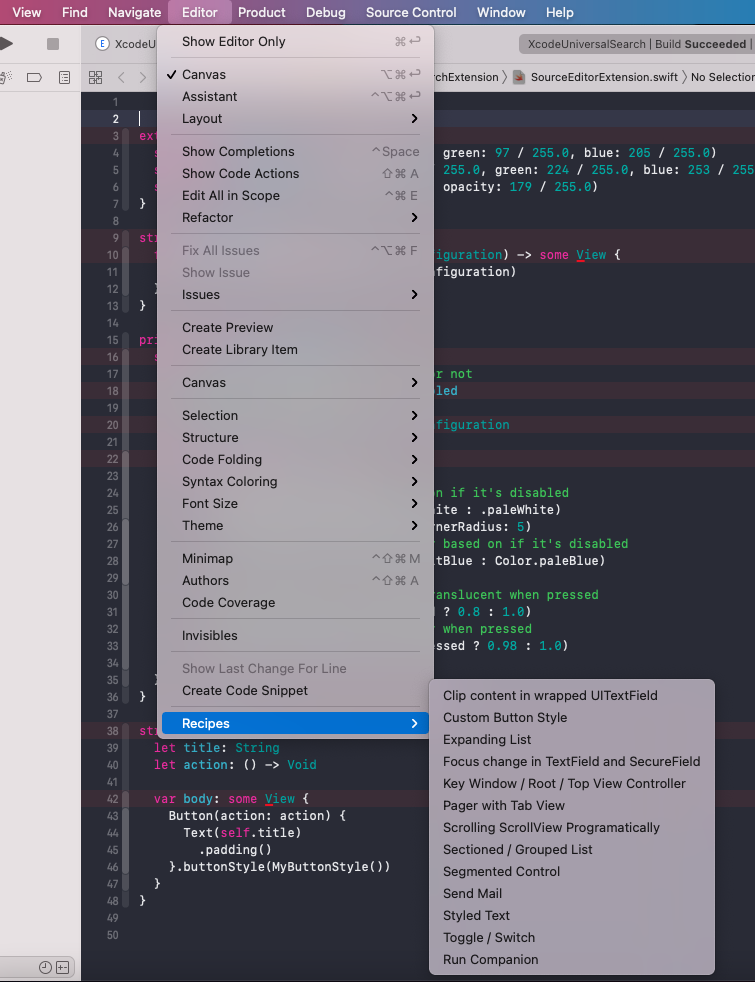
**Be sure to check out the [online version](https://swiftuirecipes.com/companion) as well!**
## Installation
* [Download and install the app from the App Store](https://apps.apple.com/us/app/swiftui-recipes/id1579235956).
* Run the **companion app first** (search **Applications -> SwiftUI Recipes**). It'll fetch the list of recipes from Github and allow you to preview their content/code and exclude those you don't want in your Editor menu. After you're done, be sure to press the **Save** button.
* Go to **System Preferences -> Extensions -> Xcode Source Editor -> Check `Helper` (with SwiftUI Recipes app icon)**.
* Run Xcode (or restart if it was open) and go to **Editor -> Recipes -> ...**. Pressing any recipe command will insert its code at your cursor. There's also the special **Run Companion** command that will start the companion app again.
## Usage
**Companion App**:
* The list of recipes will be fetched automatically, but you can pull it again with **Refresh**.
* Click the recipe to see its details, image and code.
* Checkmark on left-hand side means that the recipe will show up in your XCode Extension. If you click it, it turns into a red X and then the recipe is excluded.
* Click **Save** to store the recipes locally to that the XCode extension can use them.
* Regularly check for new recipes, as new ones are added on a daily basis.
**Source Editor Extension**:
* Open a project and one of its source files.
* Go to the menu, **Editor -> Recipes -> ..** and select a recipe to insert its code at your cursor.
* Click **Editor -> Recipes -> Run Companion** to open the companion app again. If you make any changes in the companion app, you'll have to restart XCode for the changes to take effect.
## Contributing Recipes
All the recipes are open source and live in the [Recipes folder in the Git](https://github.com/globulus/swiftui-recipes-companion/tree/main/Recipes).
**Any contributions are more than welcome! Let's grow the cookbook together!**
To contribute a recipe, simply **create a PR with a new recipe file**. A recipe file is a *yml* with the following structure:
```yaml
---
title: "Title of the recipe, as it'll appear in the App/Extension. Can only contain slash / and parentheses () as special characters."
description: "Give a short description of the recipe here."
author: "Your name or email address."
url: "Optional, URL to more details on the subject."
image: "Optional, URL to the image accompanying the recipe. Feel free to include the image in the PR."
updatedAt: "ISO-formatted timestamp of the latest recipe update."
minSwiftUIVersion: Minimum SwiftUI version that supports the recipe, e.g 1, 2, 3
maxSwiftUIVersion: Optional, if the recipe got deprecated in a newer SwiftUI version.
---
RECIPE CODE GOES HERE
```
## Blog
Check out [SwiftUIRecipes.com](https://swiftuirecipes.com) for in-depth explanations of common, yet puzzling SwiftUI tasks.