https://github.com/glubean/vscode
VS Code extension — API explorer that replaces Postman + test runner with structured traces. Same file for exploration and CI.
https://github.com/glubean/vscode
ai-testing api-explorer api-testing postman-alternative rest-client test-runner typescript vscode-extension
Last synced: 2 months ago
JSON representation
VS Code extension — API explorer that replaces Postman + test runner with structured traces. Same file for exploration and CI.
- Host: GitHub
- URL: https://github.com/glubean/vscode
- Owner: glubean
- License: mit
- Created: 2026-02-14T02:36:15.000Z (5 months ago)
- Default Branch: main
- Last Pushed: 2026-04-27T03:22:15.000Z (2 months ago)
- Last Synced: 2026-04-27T03:37:04.534Z (2 months ago)
- Topics: ai-testing, api-explorer, api-testing, postman-alternative, rest-client, test-runner, typescript, vscode-extension
- Language: TypeScript
- Homepage: https://glubean.com/extension
- Size: 625 KB
- Stars: 2
- Watchers: 0
- Forks: 0
- Open Issues: 0
-
Metadata Files:
- Readme: README.md
- Changelog: CHANGELOG.md
- Contributing: CONTRIBUTING.md
- License: LICENSE
- Agents: AGENTS.md
Awesome Lists containing this project
README

Glubean — API Explorer & Test Runner for VS Code
Replace Postman with code. Same file runs as API collection and CI test.
HTTP, GraphQL, gRPC, browser — anything Node.js supports.
explore · test · debug · traces · AI-native · CI-ready


## Demo


## Two roles, one extension
### 1. Postman replacement — in your editor, in git
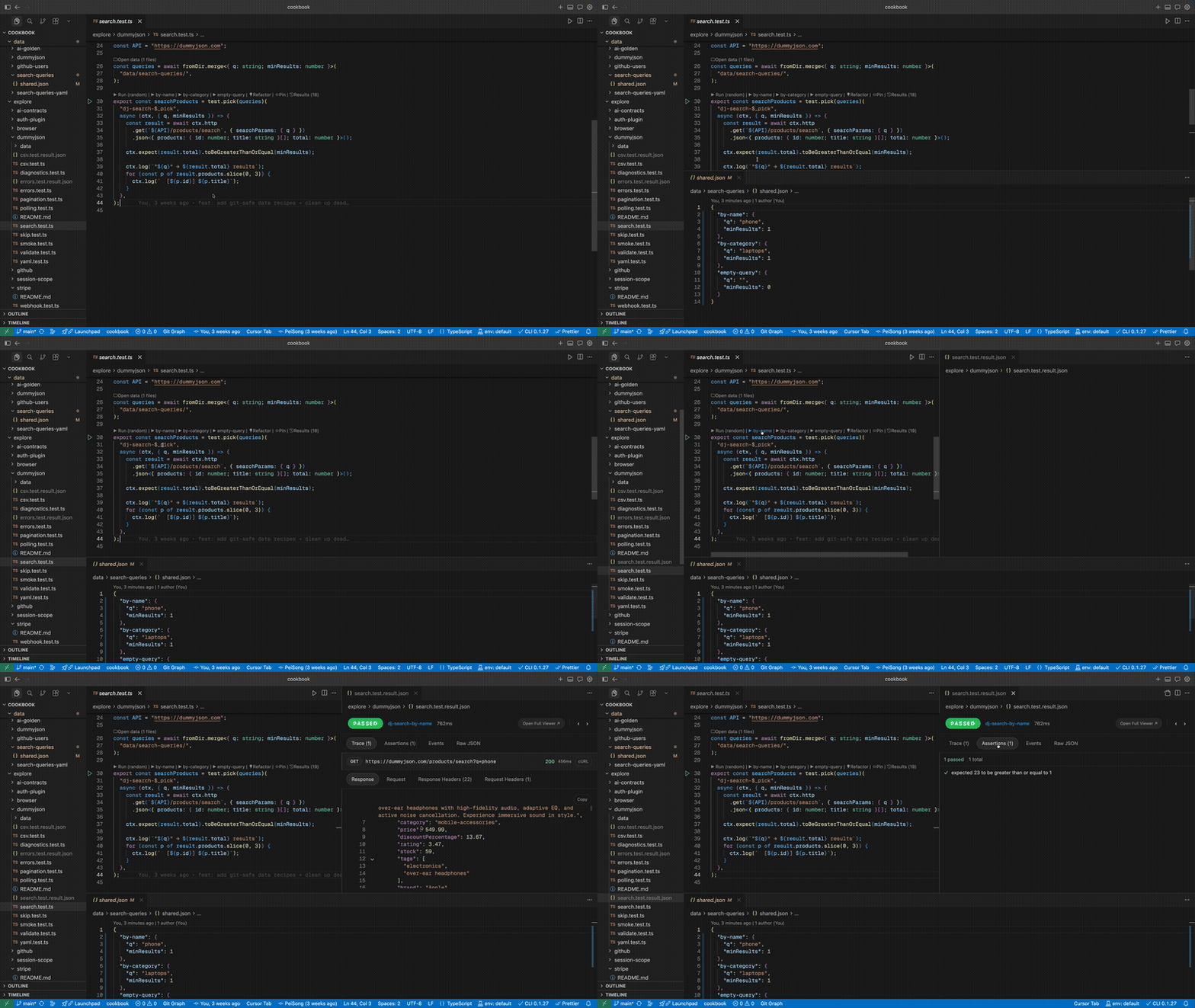
`explore/` is your API collection in code. Click the gutter play button to send a request, see full response (status, headers, body, timing) in the Result Viewer. Save parameter sets with `test.pick`, share via git.
No Postman account. No per-seat pricing. No export/import. No tool fragmentation.
### 2. Visual layer for test results
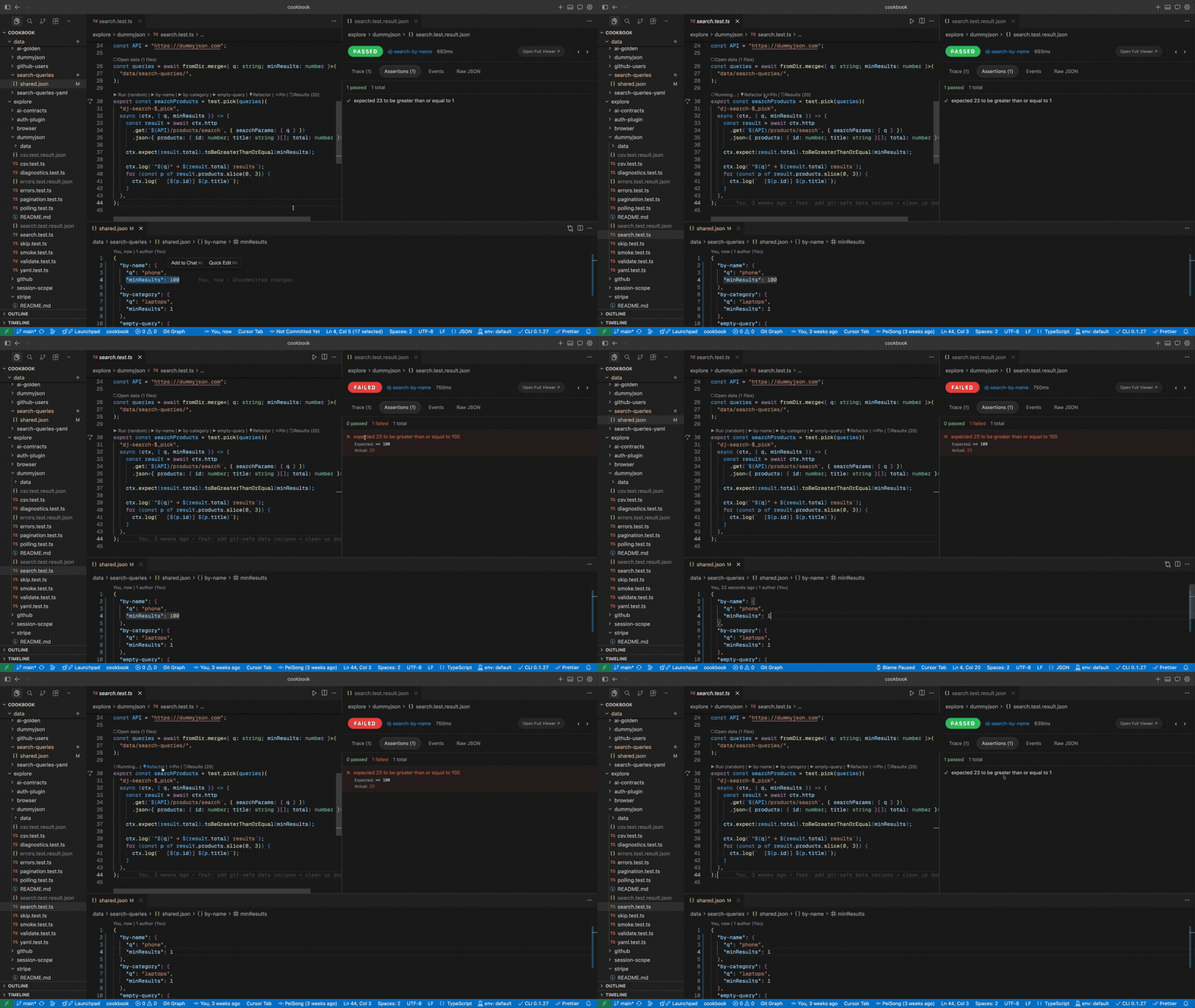
Run tests from the gutter or Test Explorer. Inspect structured traces — HTTP events, metrics, logs, step-by-step state. Debug failures with typed `expected` vs `actual`. Compare runs with trace diff.
This is the human review interface for what the SDK, CLI, and AI agents produce.
### The key insight
The same TypeScript file works as both an API collection entry (`explore/`) and a CI regression test (`tests/`). No export step, no format conversion. Start exploring, add assertions, commit, run in CI.
## What changes
| Without Glubean | With Glubean |
|---|---|
| Postman for exploring, Jest for testing, separate CI config | One TypeScript file for all three |
| API collection locked in Postman cloud, per-seat pricing | `explore/` in git, free, shared with `git push` |
| Failures are terminal noise | Structured traces with typed `expected` vs `actual` |
| AI generates a test, you paste it, run it manually | AI writes → runs via MCP → reads failure → fixes → reruns |
| Request drafts die in tabs | Same file graduates from draft → test → CI |
## Quick start
**Prerequisites:** Node.js 20+ ([download](https://nodejs.org))
**1. Install** — from the [VS Code Marketplace](https://marketplace.visualstudio.com/items?itemName=Glubean.glubean), [Open VSX](https://open-vsx.org/extension/Glubean/glubean), or download a [VSIX](https://github.com/glubean/vscode/releases) for Cursor / VSCodium.
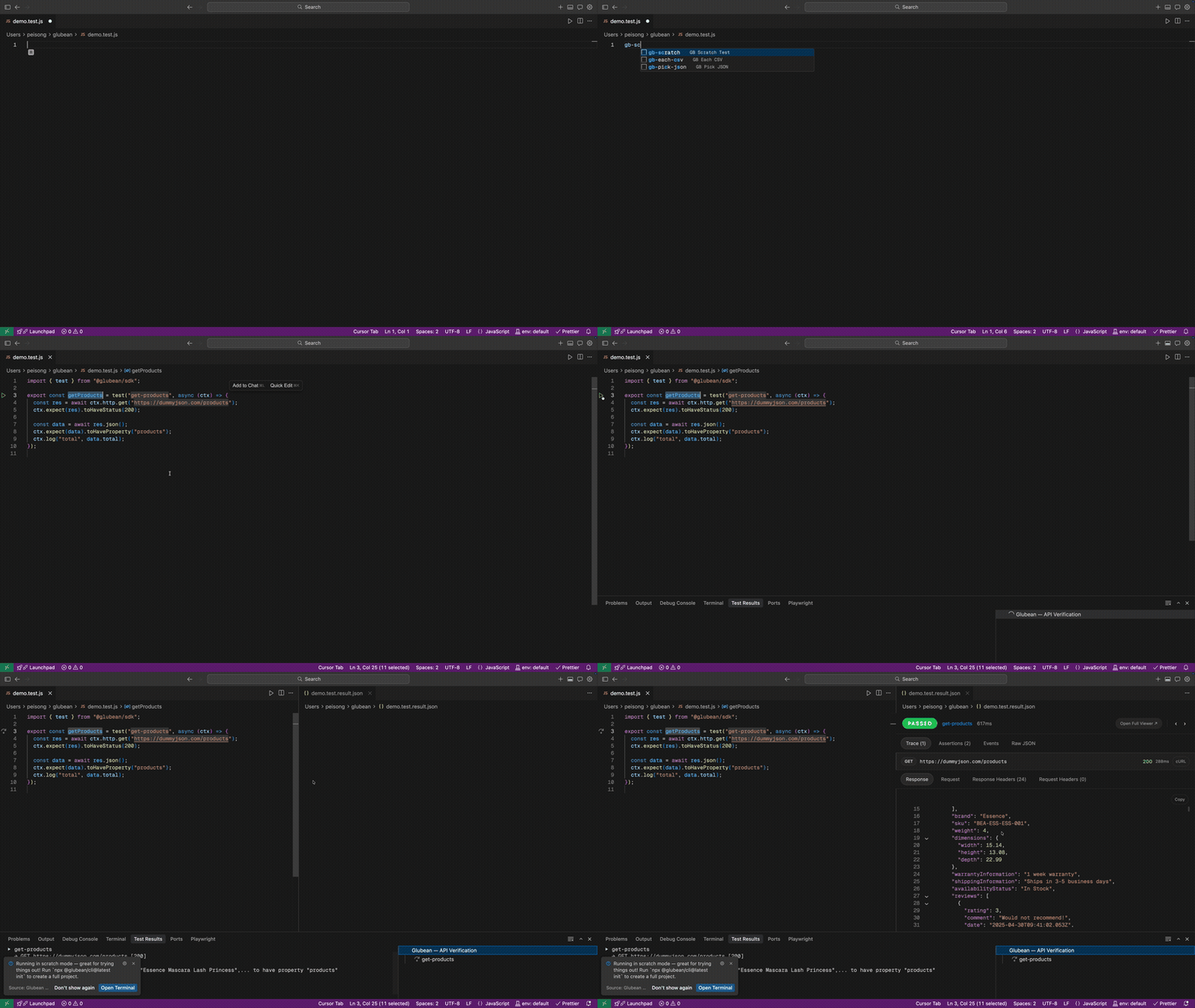
**2. Explore an API** — create `hello.test.js`, type `gb-scratch`, and click **Play**:
```javascript
import { test } from "@glubean/sdk";
export const getProducts = test("get-products", async (ctx) => {
const res = await ctx.http.get("https://dummyjson.com/products");
ctx.expect(res).toHaveStatus(200);
const data = await res.json();
ctx.expect(data).toHaveProperty("products");
ctx.log("total", data.total);
});
```
No `npm install`, no `package.json`, no setup. The response opens in the Result Viewer right beside your code.
**3. Create a project** — when you're ready, run `npx glubean init` to scaffold a project with environments, secrets, CI config, and more.
**4. Set up AI** — connect Glubean's MCP server and skill:
```bash
npx glubean config mcp # AI can discover, run, and diagnose tests
npx skills add glubean/skill # AI learns Glubean patterns
```
The agent writes tests, runs them via MCP, reads structured failures, and fixes until green — in one conversation. [Learn more →](https://docs.glubean.com/extension/generate-with-ai)
## Features
| Feature | Highlights |
|---|---|
| **[Explore APIs](https://docs.glubean.com/extension/quick-start)** | Scratch mode, zero config, `explore/` as Postman replacement |
| **[Run tests](https://docs.glubean.com/extension/running-tests)** | Play buttons, Test Explorer, right-click to debug, rerun failed only |
| **[Result Viewer](https://docs.glubean.com/extension/result-viewer)** | Traces, assertions, events, response schema — navigate history with prev/next |
| **[Trace diff](https://docs.glubean.com/extension/result-viewer)** | Compare two runs with native diff to see what changed |
| **[Data-driven](https://docs.glubean.com/sdk/data-driven)** | `test.each` + `test.pick` with JSON/YAML/CSV, CodeLens per case |
| **[Environments](https://docs.glubean.com/extension/environments)** | Status bar switcher for `.env` files, auto-loads secrets, hover preview |
| **[Debugging](https://docs.glubean.com/extension/debugging)** | Breakpoints, step-through, Debug Console — real TypeScript |
| **[AI Integration](https://docs.glubean.com/extension/generate-with-ai)** | MCP server + skill = AI writes, runs, and fixes tests |
| **[Diagnostics](https://docs.glubean.com/extension/diagnostics)** | `Glubean: Diagnose` — explains why something isn't working |
| **[Glubean Panel](https://docs.glubean.com/extension/running-tests#glubean-panel)** | Pin tests and files for quick access |
| **Refactor Hints** | CodeLens suggests extracting inline data, promoting explore→tests |
## Documentation
- [Quick Start](https://docs.glubean.com/extension/quick-start) — install and run your first test
- [Writing Tests](https://docs.glubean.com/extension/writing-tests) — CodeLens, snippets, data-driven patterns
- [Running Tests](https://docs.glubean.com/extension/running-tests) — play buttons, Test Explorer, Glubean Panel
- [Result Viewer](https://docs.glubean.com/extension/result-viewer) — traces, assertions, history, jump to source
- [Environments & Secrets](https://docs.glubean.com/extension/environments) — `.env` files, secrets, status bar switcher
- [AI Integration](https://docs.glubean.com/extension/generate-with-ai) — MCP server, skill, AI authoring loop
- [Debugging](https://docs.glubean.com/extension/debugging) — breakpoints, step-through, Debug Console
- [Migrate from Postman](https://docs.glubean.com/extension/migrate-from-postman) — phased migration with AI
- [Commands & Settings](https://docs.glubean.com/extension/reference) — full reference
Alternative install methods
### VS Code Marketplace
Search for **Glubean** in the Extensions panel, or install from the [Marketplace page](https://marketplace.visualstudio.com/items?itemName=Glubean.glubean).
### Open VSX (VSCodium, Gitpod, etc.)
Search for **Glubean** in [Open VSX](https://open-vsx.org/extension/Glubean/glubean).
### Manual VSIX (Cursor, Windsurf, other forks)
Download the `.vsix` for your platform from [GitHub Releases](https://github.com/glubean/vscode/releases), then:
`Cmd+Shift+P` (or `Ctrl+Shift+P`) → **Extensions: Install from VSIX...** → select the file.
## License
MIT