https://github.com/goderbauer/diagram-editor-for-google-plus
The ProcessWave.org editor for Google+ Hangouts
https://github.com/goderbauer/diagram-editor-for-google-plus
Last synced: about 1 year ago
JSON representation
The ProcessWave.org editor for Google+ Hangouts
- Host: GitHub
- URL: https://github.com/goderbauer/diagram-editor-for-google-plus
- Owner: goderbauer
- License: other
- Created: 2015-03-14T18:19:15.000Z (over 11 years ago)
- Default Branch: master
- Last Pushed: 2015-03-14T19:04:34.000Z (over 11 years ago)
- Last Synced: 2024-10-18T20:44:25.663Z (over 1 year ago)
- Language: JavaScript
- Homepage: http://www.processwave.org
- Size: 6.42 MB
- Stars: 7
- Watchers: 7
- Forks: 8
- Open Issues: 0
-
Metadata Files:
- Readme: README.md
- License: LICENSE
Awesome Lists containing this project
README
# Diagram Editor for Google+ Hangouts
The editor enables you to collaboratively create diagrams with your friends while you videochat with them in a Google+ Hangout: Everyone can contribute to the diagram and everyone sees your edit in realtime. It feels like all your friends are hanging out in the same conference room editing the diagram on a giant whiteboard without the need for being in the same physical location. Currently, six different diagram types like UML class diagrams and business process diagrams are supported. Watch the screencast to learn more!
Let me know what you think about my project on [Google+](https://plus.google.com/107095911821801860568/posts/bH1obxmdrg7).
# Video
Watch the [screencast](http://www.youtube.com/watch?v=W6U8L3lhAek&hd=1) to learn more about the editor:
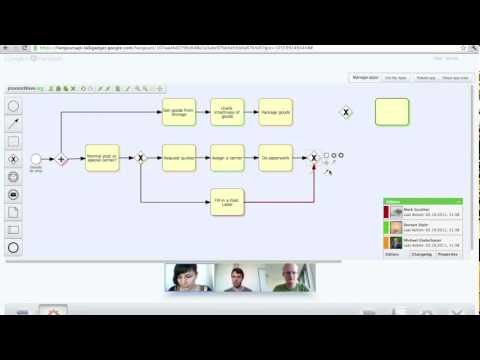
# Background
The Diagram Editor for Google+ Hangouts is based on the [processWave.org Editor](http://www.processwave.org ), a project I worked on at my university in a team with six other students. The processWave.org Editor was originally designed for Google Wave, whose API was similar to the now released [Hangouts API](https://developers.google.com/+/hangouts/ ). I therefore decided to adapt the editor for Google+ Hangouts, which are a great environment for collaborative editing in realtime.
# Where can I try the editor?
Unfortunately, Google has not yet released Apps for Hangouts to the general public. Once they do, you’ll be able to take the Diagram Editor for Google+ Hangouts for a test spin and I will tell you all about that right here. If you are really impatient, you can deploy the editor yourself and run it in the Developer Preview (see below).
# Deployment
The editor consists of static resources only (JavaScript and images) and can be deployed to any server. Just compile/minify the JavaScript by calling "[ant](http://ant.apache.org)" in the source directory. This will create a new folder in the parent directory whose content can be uploaded to any server (I use App Engine to host those static files). You can then embed the editor in a Google+ Hangout as explained [here](https://developers.google.com/+/hangouts/running). The URL of the Gadget XML file is `https://your-server/gadget/oryx.xml`.
During development it can be useful to deploy the editor without "compiling" the JavaScript. To do that, do not run "ant". Just upload the "gadget" and "oryx" folder of the source directory to any server. The URL of the "uncompiled" Gadget XML file is `https://your-server/gadget/oryx-dev.xml`.
Read the [UploadToAppEngine step-by-step guide](https://github.com/goderbauer/diagram-editor-for-google-plus/wiki/Upload-to-App-Engine) on how to upload the editor to Google App Engine, my service of choice for hosting those static files.
