https://github.com/goodboy008/r-shell
🚀 A modern SSH client built with Tauri, React & Rust. AI-powered development: Frontend generated from Figma Make, developed with GitHub Copilot. Features multi-session management, file browser, system monitoring & more.
https://github.com/goodboy008/r-shell
ai-assisted desktop-app figma github-copilot react rust sftp ssh-client system-monitor tauri terminal typescript
Last synced: about 1 month ago
JSON representation
🚀 A modern SSH client built with Tauri, React & Rust. AI-powered development: Frontend generated from Figma Make, developed with GitHub Copilot. Features multi-session management, file browser, system monitoring & more.
- Host: GitHub
- URL: https://github.com/goodboy008/r-shell
- Owner: GOODBOY008
- License: mit
- Created: 2025-10-30T08:16:36.000Z (5 months ago)
- Default Branch: main
- Last Pushed: 2026-02-04T07:34:45.000Z (2 months ago)
- Last Synced: 2026-02-06T00:30:18.572Z (2 months ago)
- Topics: ai-assisted, desktop-app, figma, github-copilot, react, rust, sftp, ssh-client, system-monitor, tauri, terminal, typescript
- Language: TypeScript
- Homepage: https://github.com/GOODBOY008/r-shell
- Size: 8.41 MB
- Stars: 13
- Watchers: 1
- Forks: 3
- Open Issues: 1
-
Metadata Files:
- Readme: README.md
- Changelog: CHANGELOG.md
- Contributing: CONTRIBUTING.md
- License: LICENSE
- Code of conduct: CODE_OF_CONDUCT.md
Awesome Lists containing this project
README
# R-Shell - SSH Client Application
[](https://github.com/GOODBOY008/r-shell/blob/main/LICENSE)
[](https://github.com/GOODBOY008/r-shell/actions/workflows/test.yml)
[](https://github.com/GOODBOY008/r-shell/actions/workflows/release.yml)
[](https://github.com/GOODBOY008/r-shell/stargazers)
[](https://github.com/GOODBOY008/r-shell/issues)
[](https://github.com/GOODBOY008/r-shell/network)
[](https://tauri.app/)
[](https://react.dev/)
[](https://www.rust-lang.org/)
A modern, feature-rich SSH client application built with React, TypeScript, and Tauri.
[Features](#features) • [Installation](#getting-started) • [Documentation](#documentation) • [Contributing](CONTRIBUTING.md) • [License](LICENSE)
---
## 📸 Screenshots

R-Shell's modern and intuitive interface
---
## 🎯 Project Purpose
This project is a **learning and practice project for vibe coding** methodology. It demonstrates:
- 🎨 **AI-Generated Frontend**: The entire frontend UI is generated from Figma designs using [Figma Make](https://www.figma.com/make/uUd7WO54vPnv03SmioKWqj/SSH-Client-Application?node-id=0-1&t=ZzB8GvFKHeoUIZpw-1)
- 🤖 **AI-Assisted Development**: The complete development process is powered by **GitHub Copilot**
- 🚀 **Modern Workflow**: Experience the efficiency of AI-driven development with minimal manual coding
> **Note**: This is an experimental project to explore the capabilities and limitations of AI-assisted development workflows. The goal is to understand how far we can go with AI pair programming tools in building a complete desktop application.
>
> 📐 **View the Figma Design**: Check out the [Figma Make preview](https://www.figma.com/make/uUd7WO54vPnv03SmioKWqj/SSH-Client-Application?node-id=0-1&t=ZzB8GvFKHeoUIZpw-1) to see how the frontend was generated.
## Overview
R-Shell is a desktop SSH client that provides a beautiful and intuitive interface for managing SSH connections, file transfers, and remote system monitoring. Built with modern web technologies and packaged as a native desktop application using Tauri.
## Features
### 🔌 Connection Management
- **Multi-Connection Support**: Manage multiple SSH connections simultaneously with an intuitive tabbed interface
- **Connection Profiles**: Save and organize your SSH connection profiles for quick access
- **Connection Persistence**: Automatically save and restore your connections across application restarts
- **Secure Authentication**: Support for password and SSH key-based authentication
### 💻 Terminal Experience
- **Full-Featured PTY Terminal**: Powered by xterm.js with complete terminal emulation
- **Customizable Themes**: Choose from multiple terminal color schemes and appearance settings
- **Keyboard Shortcuts**: Extensive keyboard shortcuts for improved productivity
- **Terminal Addons**: Advanced features including search, web links, and fit addon support
### 📁 File Management
- **Integrated SFTP Browser**: Browse, upload, and download files directly from the interface
- **Drag-and-Drop Support**: Easily transfer files between local and remote systems
- **File Operations**: Complete file management with rename, delete, move, and permission editing
- **Dual-Panel View**: Side-by-side local and remote file browsing
### 📊 System Monitoring
- **Real-Time Metrics**: Monitor CPU, memory, GPU, disk, and network usage in real-time
- **GPU Monitoring**: Track NVIDIA and AMD GPU utilization, memory, temperature, and power consumption
- **Resource Visualization**: Beautiful charts and graphs using Recharts
- **Network Monitor**: Track network traffic and connection statistics
- **Performance Logs**: View detailed system logs and application events
### 🎨 User Interface
- **Modern Design**: Clean and intuitive interface built with Radix UI primitives
- **Responsive Layout**: Resizable panels and flexible workspace arrangement
- **Dark/Light Themes**: Support for multiple UI themes
- **Accessibility**: Built with accessibility in mind using WAI-ARIA compliant components
### ⚡ Performance
- **Native Speed**: Powered by Tauri for true native performance
- **Low Memory Footprint**: Efficient resource usage compared to Electron-based alternatives
- **Fast Startup**: Quick application launch and connection establishment
- **Cross-Platform**: Works seamlessly on Windows, macOS, and Linux
## Tech Stack
### Frontend
- **React 19**: Modern React with latest features
- **TypeScript**: Type-safe development
- **Tailwind CSS**: Utility-first CSS framework
- **Radix UI**: Accessible component primitives
- **Lucide Icons**: Beautiful icon set
- **React Hook Form**: Form state management
- **Recharts**: Data visualization
### Backend/Desktop
- **Tauri 2**: Build native desktop apps with web technologies
- **Rust**: Fast and memory-efficient backend
## Project Structure
```
r-shell/
├── src/
│ ├── components/ # React components
│ │ ├── ui/ # Reusable UI components (Radix-based)
│ │ ├── pty-terminal.tsx # PTY terminal with xterm.js
│ │ ├── integrated-file-browser.tsx # SFTP file browser
│ │ ├── connection-manager.tsx # Connection management
│ │ ├── system-monitor.tsx # Real-time metrics
│ │ ├── connection-dialog.tsx # SSH connection form
│ │ ├── connection-tabs.tsx # Tab navigation
│ │ ├── menu-bar.tsx # Application menu
│ │ ├── settings-modal.tsx # Settings dialog
│ │ └── ... # Other components
│ ├── lib/ # Utility functions
│ │ ├── connection-storage.ts # Persistent connection profiles
│ │ ├── terminal-config.ts # Terminal appearance settings
│ │ └── utils.ts # Helper utilities
│ ├── styles/ # Global styles
│ ├── App.tsx # Main application shell
│ ├── main.tsx # React entry point
│ └── index.css # Global CSS with Tailwind directives
├── src-tauri/ # Tauri/Rust backend
│ ├── src/
│ │ ├── ssh/ # SSH/SFTP implementation
│ │ ├── commands.rs # Tauri command handlers
│ │ ├── websocket_server.rs # WebSocket terminal I/O
│ │ ├── connection_manager.rs # Connection lifecycle
│ │ ├── lib.rs # Library setup
│ │ └── main.rs # Application entry
│ ├── Cargo.toml # Rust dependencies
│ └── tauri.conf.json # Tauri configuration
├── docs/ # Documentation
└── index.html # HTML entry point
```
## Installation
### 🍺 Homebrew (macOS - Recommended)
The easiest way to install r-shell on macOS:
```bash
# Add the tap
brew tap GOODBOY008/tap
# Install r-shell
brew install --cask r-shell
```
**Update to the latest version:**
```bash
brew upgrade --cask r-shell
```
**Uninstall:**
```bash
# Remove the app
brew uninstall --cask r-shell
# Remove all app data
brew uninstall --zap --cask r-shell
```
### 📦 Download Releases
Download pre-built binaries from the [Releases](https://github.com/GOODBOY008/r-shell/releases) page:
- **macOS**:
- Apple Silicon: `r-shell_x.x.x_aarch64.dmg`
- Intel: `r-shell_x.x.x_x64.dmg`
- **Windows**: `r-shell_x.x.x_x64-setup.exe`
- **Linux**: `r-shell_x.x.x_amd64.AppImage` or `.deb`
## Getting Started (Development)
### Prerequisites
- Node.js (v18 or higher)
- pnpm (recommended) or npm
- Rust and Cargo (for Tauri)
### Build from Source
1. Clone the repository:
```bash
git clone https://github.com/GOODBOY008/r-shell.git
cd r-shell
```
2. Install dependencies:
```bash
pnpm install
```
3. Run in development mode:
```bash
# Web only
pnpm run dev
# Desktop with Tauri
pnpm tauri dev
```
### Building for Production
```bash
# Build web assets
pnpm run build
# Build desktop application
pnpm tauri build
```
## Development
### Available Scripts
- `pnpm run dev` - Start Vite development server
- `pnpm run build` - Build for production
- `pnpm run preview` - Preview production build
- `pnpm tauri dev` - Run Tauri app in development mode
- `pnpm tauri build` - Build Tauri app for production
### Key Components
#### App.tsx
Main application component that manages:
- Connection state and tabs
- Dialog modals (connection, SFTP, settings)
- Layout with resizable panels
- Connection selection and navigation
#### Terminal Component
Provides terminal emulation with:
- Command input/output
- Connection management
- Terminal themes
- Copy/paste support
#### Connection Manager
Tree-view interface for:
- Organizing connections into folders
- Quick connection access
- Edit, duplicate, and delete connections
- Connection status indicators (green dot for active)
#### File Browser
Integrated file management:
- Remote file browsing
- File upload/download
- Drag-and-drop support
- File operations (rename, delete, etc.)
#### System Monitor
Real-time monitoring:
- CPU usage
- Memory usage
- Network statistics
- Disk usage
## Contributing
Contributions are welcome! Please feel free to submit a Pull Request.
## Additional Resources
- [Tauri Documentation](https://tauri.app/)
- [Tauri API Reference](https://tauri.app/v2/api/js/)
- [React Documentation](https://react.dev/)
- [Vite Documentation](https://vitejs.dev/)
- [Rust Book](https://doc.rust-lang.org/book/)
## 🤝 Contributing
We welcome contributions from the community! This project is an experiment in AI-assisted development, and we're excited to see how the community can enhance it.
**Quick Links:**
- [Contributing Guidelines](CONTRIBUTING.md) - How to contribute
- [Code of Conduct](CODE_OF_CONDUCT.md) - Community guidelines
- [Version Bump Guide](docs/VERSION_BUMP.md) - How to bump versions
- [Layout Guide](LAYOUT_GUIDE.md) - Understanding the layout system
- [Quick Start](QUICKSTART.md) - Development setup
### How to Contribute
1. **Fork the repository**
2. **Create a feature branch** (`git checkout -b feature/amazing-feature`)
3. **Commit your changes** (`git commit -m 'feat: add amazing feature'`)
4. **Push to the branch** (`git push origin feature/amazing-feature`)
5. **Open a Pull Request**
Please read our [Contributing Guidelines](CONTRIBUTING.md) and [Code of Conduct](CODE_OF_CONDUCT.md) before contributing.
### Areas We Need Help
- 🐛 Bug fixes and issue reports
- 📝 Documentation improvements
- ✨ Feature enhancements
- 🧪 Test coverage
- 🌐 Internationalization (i18n)
- 🎨 UI/UX improvements
## 📄 License
This project is licensed under the MIT License - see the [LICENSE](LICENSE) file for details.
## 🌟 Star History
If you find this project useful, please consider giving it a star! ⭐
[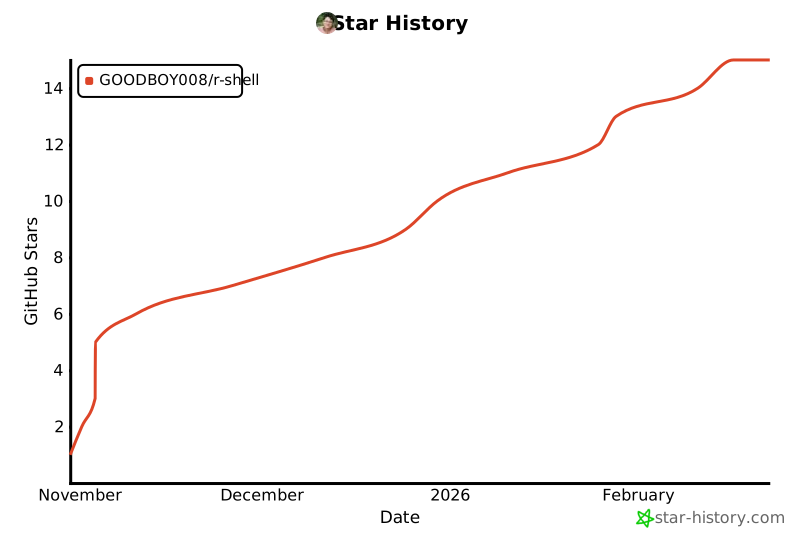](https://star-history.com/#GOODBOY008/r-shell&Date)
## 💬 Community & Support
- **Issues**: [GitHub Issues](https://github.com/GOODBOY008/r-shell/issues)
- **Discussions**: [GitHub Discussions](https://github.com/GOODBOY008/r-shell/discussions)
- **Pull Requests**: [GitHub PRs](https://github.com/GOODBOY008/r-shell/pulls)
## 🙏 Acknowledgments
- Built with components from [shadcn/ui](https://ui.shadcn.com/)
- UI design generated from [Figma Make](https://www.figma.com/make/)
- Icons from [Lucide](https://lucide.dev/)
- Powered by [GitHub Copilot](https://github.com/features/copilot)
---
**Made with ❤️ and 🤖 AI**
If you like this project, please give it a ⭐!