https://github.com/goodday360/hyperionbox
An open-source anime and movies streaming app that track watch progress and download for many sources through plugins.
https://github.com/goodday360/hyperionbox
android anime anime-app anime-app-free anime-downloader anime-scraper anime-streaming chlaty-core hyperion-box hyperionbox linux modern-ui movie-app movie-download movies-streaming rust solidjs tauri tv windows
Last synced: 2 months ago
JSON representation
An open-source anime and movies streaming app that track watch progress and download for many sources through plugins.
- Host: GitHub
- URL: https://github.com/goodday360/hyperionbox
- Owner: GoodDay360
- License: mit
- Created: 2025-03-09T14:18:16.000Z (over 1 year ago)
- Default Branch: main
- Last Pushed: 2026-02-08T20:49:34.000Z (6 months ago)
- Last Synced: 2026-02-09T01:48:44.297Z (6 months ago)
- Topics: android, anime, anime-app, anime-app-free, anime-downloader, anime-scraper, anime-streaming, chlaty-core, hyperion-box, hyperionbox, linux, modern-ui, movie-app, movie-download, movies-streaming, rust, solidjs, tauri, tv, windows
- Language: TypeScript
- Homepage:
- Size: 9.42 MB
- Stars: 26
- Watchers: 2
- Forks: 2
- Open Issues: 0
-
Metadata Files:
- Readme: README.md
- License: LICENSE.txt
Awesome Lists containing this project
README
# 🌟 This application continues to work as expected, but please note that future issues will not be maintained.
- You’re welcome to fork this project and maintain it yourself.
- For a stable, actively maintained alternative, check out [RecomBox](https://github.com/RecomBox/RecomBox).
#
[ ](https://github.com/GoodDay360/HyperionBox)




[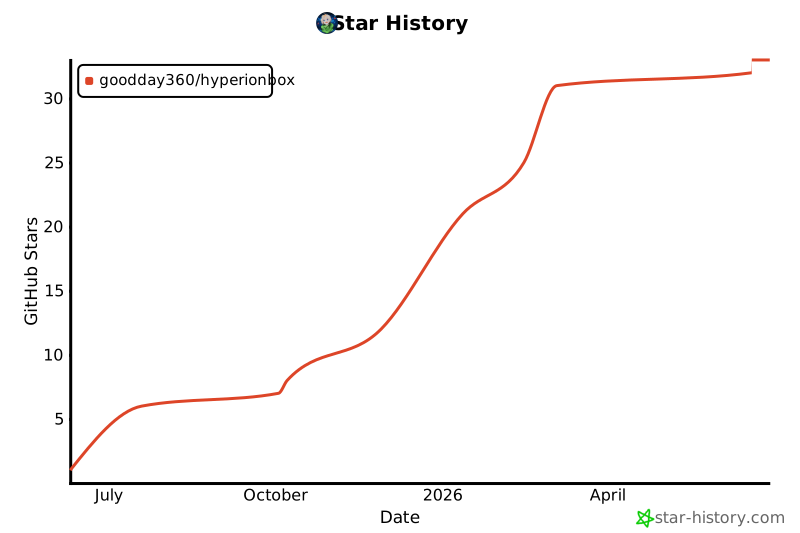](https://star-history.com/#GoodDay360/HyperionBox&Date)
# Download
###  Windows,
  Android,
  Linux
Linux
[](https://github.com/GoodDay360/HyperionBox/releases/latest)
### Linux Snap Store
Delayed release and laggy due to the sandbox
[](https://snapcraft.io/hyperionbox)
# What's HyperionBox?
An open-source anime and movie streaming app that supports many sources through plugins.
# ✨ Features
- 🎬 **Stream anime and movies** seamlessly from various sources.
- 📌 **Track your watch progress** and pick up where you left off.
- ☁️ **Integrate with [HyperSync](https://github.com/GoodDay360/HyperSync)** to sync your favorites and watch history across all your devices.
- ⬇️ **Download** for offline watching.
- 🎨 **Modern UI** for a smooth and intuitive experience.
- 🔍 **Advanced search** for quick content discovery.
- 🧩 **Plugins**: check source code in this repository [chlaty-core](https://github.com/chlaty/chlaty-core).
# How to use?
[Watch this video on YouTube](https://youtu.be/M32efmieHIg)
# How it works?
- Instead of spawning a local server like other apps, we uses [chlaty-core](https://github.com/chlaty/chlaty-core) to fetch available streaming sources from different plugins, and leverages [IPC](https://v2.tauri.app/concept/inter-process-communication/) to manage streaming logic in Rust and pass it to the video player.
- Plugins are built-in, so there is no need for manual installation.
- By using this method, when a plugin is updated, HyperionBox does not need to update the entire application; only the new plugin needs to be updated.
- HyperionBox can be compiled and used on almost every platform supported by Tauri, with minimal software limitations.
# 📸 Screenshot
### Home

### View

### Search

### Download

### Watch

# Contribution Guide
### Stack
- [Rust](https://www.rust-lang.org/pt-BR)
- [Tauri](https://v2.tauri.app/)
Tauri Plugins
- @tauri-apps/plugin-sql
- @tauri-apps/plugin-http
- @tauri-apps/plugin-fs
- @tauri-apps/plugin-updater
- @tauri-apps/plugin-single-instance
- @tauri-apps/plugin-opener
- @tauri-apps/plugin-os
- @CrossCopy/tauri-plugin-clipboard
- [Typescript](https://www.typescriptlang.org/)
- [SolidJS](https://www.solidjs.com/)
- [Bootstrap](https://getbootstrap.com/)
## Prerequisites
This project is built with [Tauri](https://v2.tauri.app/start/prerequisites/).
Make sure you have installed all required prerequisites for your operating system.
## Package Manager & Frameworks
I use [Bun](https://bun.sh/) for package management. While Bun doesn’t directly affect how the app runs (since Tauri handles rendering), I prefer it for convenience. You’re free to use another package manager, but please avoid committing changes that are only needed for your local setup.
The application itself is developed with **SolidJS** for the frontend and css reset from **Bootstrap**, all running inside Tauri.
## Setup
Install the dependencies:
```bash
bun install
```
### Start a development
```bash
bun tauri dev
```
### Production
Build the application for production:
```bash
bun tauri build
```