https://github.com/gotson/comics-utils
Scripts to manage my digital comics collection
https://github.com/gotson/comics-utils
Last synced: 9 months ago
JSON representation
Scripts to manage my digital comics collection
- Host: GitHub
- URL: https://github.com/gotson/comics-utils
- Owner: gotson
- Created: 2014-04-03T14:57:43.000Z (about 12 years ago)
- Default Branch: master
- Last Pushed: 2018-01-16T14:37:43.000Z (over 8 years ago)
- Last Synced: 2025-07-05T07:46:23.942Z (12 months ago)
- Language: Python
- Size: 85.9 KB
- Stars: 2
- Watchers: 2
- Forks: 0
- Open Issues: 0
-
Metadata Files:
- Readme: README.md
Awesome Lists containing this project
README
comics-utils
============
Scripts to manage my digital comics collection.
cbz.py
------
CBZ utility can be used on both archives, to cleanup existing cbz/cbr/cb7, and folders, to create a new cbz archive.
Folders are processed recursively to find folders containing files, but archives inside a processed folder won't be cleaned up.
Options include:
- preserving OSX tags (for archives only)
- flatten the directory structure (same as -j option on zip)
- rename files using natural sort
Thanks to The Unarchiver, you can also process **PDF files** for cleanup !
**Requires**
* Python 2.7+
* [jdberry/tag](https://github.com/jdberry/tag) (if using the --tags option) (`brew install tag`)
* [natsort](https://pypi.python.org/pypi/natsort) (`pip install natsort`)
* [The Unarchiver command line tools](http://unarchiver.c3.cx/commandline) (`brew install unar`)
**Usage**
```
usage: cbz.py [-h] [-t] [-r] [-f] [-d DESTINATION] infiles [infiles ...]
CBZ utility
positional arguments:
infiles
optional arguments:
-h, --help show this help message and exit
-t, --tags Preserve OSX tags (uses
https://github.com/jdberry/tag)
-r, --rename Rename files using natural sort
-f, --flatten Flatten archive by removing folder structure
-d DESTINATION, --destination DESTINATION
Destination for processed files. If unspecified
working directory is used instead
```
**OSX Automator**
You can hook up the scripts using Automator to have a right-click action:
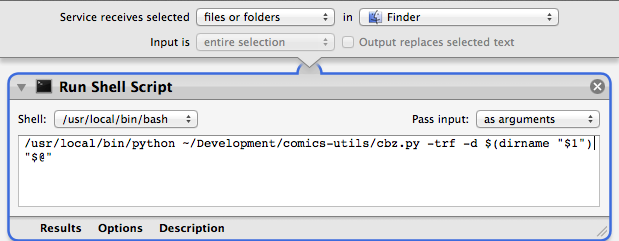
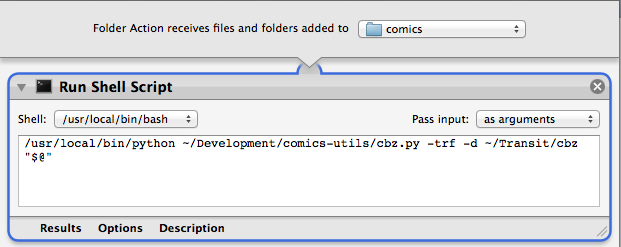
You can also configure it as a folder action, to automatically perform post-processing for instance:
sync-folder.py
--------------
Use OSX tags to create a replica of your directory structure for easy synchronization with any third party tool or cloud provider.
Folders have to be tagged `sync` (works on parent folders as well).
Files tagged `read` are ignored.
You have to edit the source code to change the source and destination folders.
**Requires**
* Python 2.7+
* [jdberry/tag](https://github.com/jdberry/tag)
**Usage**
```
> python sync-folder.py
```