https://github.com/gphalkes/tilde
The Tilde text editor
https://github.com/gphalkes/tilde
Last synced: 4 months ago
JSON representation
The Tilde text editor
- Host: GitHub
- URL: https://github.com/gphalkes/tilde
- Owner: gphalkes
- Created: 2013-02-02T13:29:48.000Z (over 13 years ago)
- Default Branch: master
- Last Pushed: 2025-01-19T11:17:04.000Z (over 1 year ago)
- Last Synced: 2025-08-28T05:43:40.009Z (10 months ago)
- Language: C++
- Size: 1.65 MB
- Stars: 479
- Watchers: 16
- Forks: 23
- Open Issues: 64
-
Metadata Files:
- Readme: README.md
Awesome Lists containing this project
- awesome-tuis - tilde
README
# The Tilde Text Editor
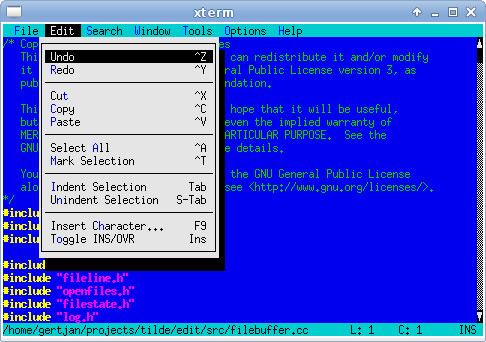
Tilde is a text editor for the console/terminal, which provides an intuitive
interface for people accustomed to GUI environments such as Gnome, KDE and
Windows. For example, the short-cut to copy the current selection is Control-C,
and to paste the previously copied text the short-cut Control-V can be used.
As another example, the File menu can be accessed by pressing Meta-F.
For more information, see [the homepage](https://os.ghalkes.nl/tilde)
## Installing Tilde
The easiest way to install Tilde is by using the repositories from the Tilde
homepage [download section](https://os.ghalkes.nl/tilde/download.html). If there
are no binary packages provided for your distribution or hardware, you can still
build Tilde from the official releases provided there. Be aware that Tilde
depends on several support libraries, which are also provided through the
Tilde homepage.
Building from the official release is recommended over attempting to build from
the git repositories for installing Tilde. Only for development of Tilde should
the git repositories be used.
## Getting help
There are several ways to get help, should you have problems using, installing
or building Tilde:
* For online support, try the #tilde IRC channel on freenode
([webchat](http://webchat.freenode.net/?channels=tilde)).
* Alternatively, questions, discussions etc. can be posted on the mailing list
tilde-text-editor <at> googlegroups.com.
* For bug reports or feature suggestions, please file a bug in the github
[bugtracker](https://github.com/gphalkes/tilde/issues).
## Developing Tilde
To help developing Tilde, you will need to build Tilde from the git
repositories. The repositories assume that all parts of Tilde, i.e. Tilde
itself and its support libraries, are built from the git repositories. Please
follow the steps below to build Tilde from the git repositories:
1. Install the dependencies of Tilde from the system libraries. On a typical
Debian/Ubuntu system this would include (packages for OpenSUSE and Fedora
have similar names):
* flex
* gettext
* libacl1-dev
* libattr1-dev
* libgpm-dev
* libncurses5-dev
* libpcre2-dev
* libtool-bin
* libunistring-dev
* libxcb1-dev and/or libx11-dev
* pkg-config
* LLnextgen (available [here](https://os.ghalkes.nl/LLnextgen/download.html))
* clang (unless building using COMPILER=gcc)
2. Clone the repositories:
```bash
for i in makesys transcript t3shared t3window t3widget t3key t3config t3highlight tilde ; do
git clone https://github.com/gphalkes/$i.git
done
```
3. Build all packages: `./t3shared/doall --skip-non-source --stop-on-error make -C src`
Once the build is complete, `tilde/src/.objects/edit` is the newly compiled
tilde. If the [termdebug](https://os.ghalkes.nl/termdebug.html) suite of tools
is installed, then `tilde/src/tedit` can be used to run the editor while
recording the input and output for debugging purposes.
## Other ways to contribute
* Answer questions on the IRC channel (see the [Getting help](#getting-help)
section).
* Creating and maintaining packages for different distributions.