https://github.com/graphsignal/graphsignal-profiler
Graphsignal Profiler
https://github.com/graphsignal/graphsignal-profiler
ai-agents artificial-intelligence debugging deep-learning huggingface inference langchain langchain-python machine-learning monitoring observability openai-api python pytorch tracer
Last synced: about 7 hours ago
JSON representation
Graphsignal Profiler
- Host: GitHub
- URL: https://github.com/graphsignal/graphsignal-profiler
- Owner: graphsignal
- License: apache-2.0
- Created: 2021-04-13T16:16:37.000Z (about 5 years ago)
- Default Branch: main
- Last Pushed: 2026-06-21T08:12:17.000Z (19 days ago)
- Last Synced: 2026-06-21T10:09:03.629Z (19 days ago)
- Topics: ai-agents, artificial-intelligence, debugging, deep-learning, huggingface, inference, langchain, langchain-python, machine-learning, monitoring, observability, openai-api, python, pytorch, tracer
- Language: Python
- Homepage: https://graphsignal.com
- Size: 529 KB
- Stars: 205
- Watchers: 2
- Forks: 11
- Open Issues: 0
-
Metadata Files:
- Readme: README.md
- License: LICENSE
- Notice: NOTICE
Awesome Lists containing this project
README
# Graphsignal: Inference Profiler
[](https://github.com/graphsignal/graphsignal-profiler/blob/main/LICENSE)
[](https://github.com/graphsignal/graphsignal-profiler)
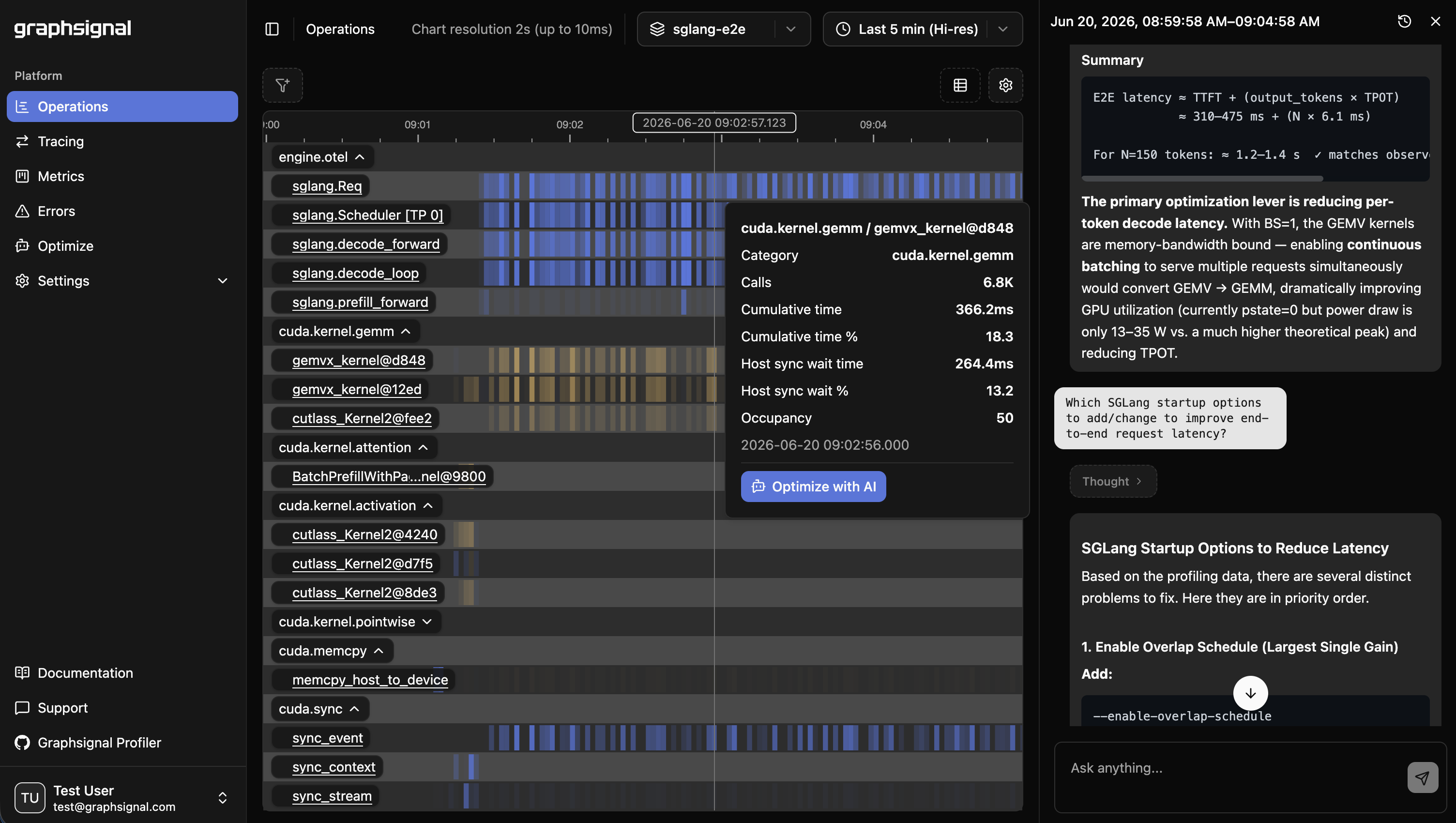
Graphsignal is a production-scale inference profiling platform that helps engineers optimize AI performance across models, engines, GPUs, and other accelerators. It provides essential visibility across the inference stack, including:
* Continuous, high-resolution profiling timelines exposing operation durations and resource utilization across inference workloads.
* LLM generation tracing with per-step timing, token throughput, and latency breakdowns for major inference frameworks.
* System-level metrics for inference engines and hardware (CPU, GPU, accelerators).
* Error monitoring for device-level failures and inference errors.
* Inference telemetry for AI agents to identify bottlenecks and drive targeted improvements across the inference stack.
[](https://graphsignal.com/)
Learn more at [graphsignal.com](https://graphsignal.com).
## Install
```bash
UV_TOOL_BIN_DIR=/usr/local/bin uv tool install 'graphsignal[cu12]' # CUDA 12.x
# or
UV_TOOL_BIN_DIR=/usr/local/bin uv tool install 'graphsignal[cu13]' # CUDA 13.x
```
### Alternative: install into your workload environment
If you prefer a single environment, or you use the `graphsignal.watch()` Python API (which requires `graphsignal` importable by your application), install it directly into your workload's environment instead:
```bash
pip install 'graphsignal[cu12]' # CUDA 12.x
# or
pip install 'graphsignal[cu13]' # CUDA 13.x
```
## Profile
Wrap your launch command with `graphsignal-run`:
```bash
export GRAPHSIGNAL_API_KEY=
graphsignal-run vllm serve --port 8001
```
Environment variables read by the profiler:
| Variable | Purpose |
| ------------------------------------- | ---------------------------------------------------------------------- |
| `GRAPHSIGNAL_API_KEY` *(required)* | Your account API key. |
| `GRAPHSIGNAL_TAG_=` | Arbitrary tag attached to all signals (e.g. `GRAPHSIGNAL_TAG_DEPLOYMENT=us-prod`). |
Sign up for a free account at [graphsignal.com](https://graphsignal.com); you'll find the API key in [Settings / API Keys](https://app.graphsignal.com/settings/api-keys).
See the [Profiler CLI](https://graphsignal.com/docs/reference/profile-cli/) reference for the full set of options.
Applications that bootstrap themselves can call `graphsignal.watch()` from Python instead — see the [Profiler API](https://graphsignal.com/docs/reference/profiler-api/) reference.
See integration documentation for libraries and inference engines:
* [PyTorch](https://graphsignal.com/docs/integrations/pytorch/)
* [vLLM](https://graphsignal.com/docs/integrations/vllm/)
* [SGLang](https://graphsignal.com/docs/integrations/sglang/)
## Optimize
[Log in](https://app.graphsignal.com/) to Graphsignal to monitor and analyze your application.
### Optimize with AI
Install the Graphsignal skill to let your AI coding agent (Claude Code, Codex, or Gemini) fetch and analyze signal context directly from your agent. See [AI Optimization](https://graphsignal.com/docs/guides/ai-optimization/) for setup instructions.
## Overhead
The profiler has minimal impact on production performance. CUDA kernel activity is collected via CUPTI with low-overhead APIs, and analysis and upload happen in the sidecar process.
## Security and Privacy
The profiler only establishes outbound connections to `api.graphsignal.com` to send data; inbound connections or commands are not possible.
Content and sensitive information, such as prompts and completions, are not recorded.
## Troubleshooting
If something doesn't look right, report it to our support team via your account.
In case of connection issues, please make sure outgoing connections to `https://api.graphsignal.com` are allowed.