https://github.com/grarak/dsvita
Experimental NDS Emulator for ARM32/PSVita
https://github.com/grarak/dsvita
arm32 nds psvita
Last synced: about 1 year ago
JSON representation
Experimental NDS Emulator for ARM32/PSVita
- Host: GitHub
- URL: https://github.com/grarak/dsvita
- Owner: Grarak
- License: gpl-3.0
- Created: 2023-11-12T23:21:55.000Z (over 2 years ago)
- Default Branch: main
- Last Pushed: 2024-10-29T08:18:59.000Z (over 1 year ago)
- Last Synced: 2024-10-29T09:38:52.742Z (over 1 year ago)
- Topics: arm32, nds, psvita
- Language: Rust
- Homepage:
- Size: 1.62 MB
- Stars: 116
- Watchers: 10
- Forks: 3
- Open Issues: 0
-
Metadata Files:
- Readme: README.md
- License: LICENSE
Awesome Lists containing this project
README
# DSVita
[](https://github.com/Grarak/DSVita/actions/workflows/rust.yml)
Fast NDS Emulator for ARM32/PSVita
## Status
[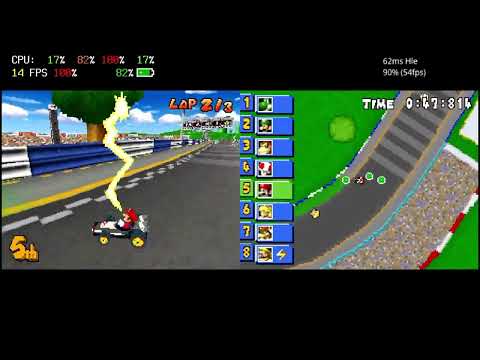](https://www.youtube.com/watch?v=en2EX8GLauk "DSVita Mario Kart")
This runs most games, however consider:
- 3D rendering
- Polygons and their textures are drawn, however no lighting, any other shading (e.g. toon) nor shadow volumes are implemented
- Games which swap screens every frame for displaying 3D on both screens at the same time, will flicker heavily
- 2D rendering is mostly complete
- Mosaic and some window objects (you will see black screens or silhouettes) are not implemented
- ARM7 HLE will not work with most games
- Disable it if certain games don't boot further, get struck, crash or have any issues
- There are other emulation modes like PartialHle or PartialSoundHle. You can pick them if full HLE breaks anything
- Auto frameskip is always used
- Games will feel choppy, you will most likely hover around 15 fps, even if they run at full game speed
- No scanline rendering, thus games that update VRAM mid frame will not render correctly
- Not many games do this, however games that do use it for scrolling texts
## Installation/Setup
- Grab the latest vpk from [releases](https://github.com/Grarak/DSVita/releases)
- Install `libshacccg.suprx`, follow this [guide](https://cimmerian.gitbook.io/vita-troubleshooting-guide/shader-compiler/extract-libshacccg.suprx)
- Install `kubridge.skprx` from https://github.com/bythos14/kubridge/releases
- It's strongly recommend to overclock your vita to 500MHz
- Create the folder ux0:data/dsvita and put your roms there
- They must have the file extensions `*.nds`
## Building
1. Install [Vitasdk](https://vitasdk.org/)
2. Install [cargo](https://doc.rust-lang.org/cargo/getting-started/installation.html)
3. Install [cargo vita](https://github.com/vita-rust/cargo-vita)
4. `RUSTFLAGS="-Zlocation-detail=none -Zfmt-debug=none" cargo vita build vpk -- --release`
## Credits
- [NooDS](https://github.com/Hydr8gon/NooDS) was used as reference. A lot of code was taken from there.
- [melonDS](https://github.com/melonDS-emu/melonDS) for ARM7 HLE implementation and jit optimizations.
- [DesmumePSPExperimental](https://github.com/Xiro28/DesmumePSPExperimental) for ARM7 HLE implementation.
- [pokediamond](https://github.com/pret/pokediamond) for ARM7 HLE implementation.
- [DSHBA](https://github.com/DenSinH/DSHBA) Copied some PPU hardware acceleration implementation (Thanks for xiro28 linking me the repo)
- [vitaGL](https://github.com/Rinnegatamante/vitaGL) 2D/3D hardware acceleration wouldn't be possible without it
- [Tonc](https://www.coranac.com/tonc/text/toc.htm) GBA PPU documentation
- [GBATEK](http://problemkaputt.de/gbatek-index.htm) GBA/NDS documentation
- [kubridge](https://github.com/bythos14/kubridge) For fastmem implementation
- @TheIronUniverse for livearea assets