https://github.com/graysonchen/ruby-openai-swarm
A Ruby-based educational framework adapted from OpenAI’s Swarm, exploring ergonomic, lightweight multi-agent orchestration.
https://github.com/graysonchen/ruby-openai-swarm
Last synced: 8 months ago
JSON representation
A Ruby-based educational framework adapted from OpenAI’s Swarm, exploring ergonomic, lightweight multi-agent orchestration.
- Host: GitHub
- URL: https://github.com/graysonchen/ruby-openai-swarm
- Owner: graysonchen
- Created: 2024-10-24T15:56:57.000Z (over 1 year ago)
- Default Branch: main
- Last Pushed: 2025-01-17T10:14:32.000Z (over 1 year ago)
- Last Synced: 2025-01-17T11:24:40.305Z (over 1 year ago)
- Language: Ruby
- Homepage:
- Size: 324 KB
- Stars: 7
- Watchers: 1
- Forks: 1
- Open Issues: 1
-
Metadata Files:
- Readme: README.md
Awesome Lists containing this project
README

# Ruby OpenAI Swarm
[](https://rubygems.org/gems/ruby-openai-swarm)
[](https://github.com/graysonchen/ruby-openai-swarm/actions)
A Ruby-based educational framework adapted from OpenAI’s [Swarm](https://github.com/openai/swarm), exploring ergonomic, lightweight multi-agent orchestration.
> The primary goal of Swarm is to showcase the handoff & routines patterns explored in the [Orchestrating Agents: Handoffs & Routines](https://cookbook.openai.com/examples/orchestrating_agents) cookbook. It is not meant as a standalone library, and is primarily for educational purposes.
## Contents
- [Ruby OpenAI Swarm](#ruby-openai-swarm)
- [Table of Contents](#table-of-contents)
- [Installation](#installation)
- [Bundler](#bundler)
- [Gem install](#gem-install)
- [Logger](#logger)
- [Quick start](#quick-start)
- [Documentation](#documentation)
## quick show
https://github.com/user-attachments/assets/ed84ef83-5ccb-4223-abb8-933d0ec66468
## Installation
### Bundler
Add this line to your application's Gemfile:
```ruby
gem "ruby-openai-swarm"
```
And then execute:
```bash
$ bundle install
```
### Gem install
Or install with:
```bash
$ gem install ruby-openai-swarm
```
and require with:
```ruby
require "ruby-openai-swarm"
```
## Usage
### With Config
For a more robust setup, you can configure the gem with your API keys, for example in an `openai.rb` initializer file. Never hardcode secrets into your codebase - instead use something like [dotenv](https://github.com/motdotla/dotenv) to pass the keys safely into your environments.
```ruby
OpenAI.configure do |config|
config.access_token = ENV['OPENAI_ACCESS_TOKEN']
end
```
OR
```ruby
# https://openrouter.ai
OpenAI.configure do |config|
config.access_token = ENV['OPEN_ROUTER_ACCESS_TOKEN']
config.uri_base = "https://openrouter.ai/api/v1"
end
```
more see: https://github.com/alexrudall/ruby-openai/tree/main?tab=readme-ov-file#ollama
Then you can create a client like this:
```ruby
client = OpenAISwarm.new
def spanish_agent
OpenAISwarm::Agent.new(
name: "Spanish Agent",
instructions: "You only speak Spanish.",
model: ENV['SWARM_AGENT_DEFAULT_MODEL']
)
end
transfer_to_spanish_agent = OpenAISwarm::FunctionDescriptor.new(
target_method: :spanish_agent,
description: 'Transfer spanish speaking users immediately.'
)
english_agent = OpenAISwarm::Agent.new(
name: "English Agent",
instructions: "You only speak English.",
model: ENV['SWARM_AGENT_DEFAULT_MODEL'],
functions: [transfer_to_spanish_agent]
)
messages = [{"role": "user", "content": "Hola. ¿Como estás?"}]
response = client.run(agent: english_agent, messages: messages, debug: true)
pp response.messages.last
```
```ruby
{"role"=>"assistant",
"content"=>"¡Hola! Estoy bien, gracias. ¿Y tú?",
"refusal"=>nil,
:sender=>"Spanish Agent"}
```
### Logger
```
OpenAISwarm.configure do |config|
# config.logger = Logger.new(STDOUT)
# config.logger = Rails.logger
config.log_file = Rails.root.join('log', 'openai_swarm.log')
# config.logger = Logger.new(Rails.root.join('log', 'openai_swarm.log'))
# config.logger = Rails.configuration.lograge.logger
end
```
## Quick Start
### Choose the default model name
`export SWARM_AGENT_DEFAULT_MODEL=gpt-4o-mini`
or
`export SWARM_AGENT_DEFAULT_MODEL=deepseek-chat`
DeepSeek V3 is 1/10 price of gpt-4o-mini, so try it!
### Setting ACCESS_TOKEN for AI Providers in examples
- For OpenRouter:
`OPEN_ROUTER_ACCESS_TOKEN=cxxxxx` or `export OPEN_ROUTER_ACCESS_TOKEN=cxxxxx`
- For OpenAI:
`OPENAI_ACCESS_TOKEN=cxxxxx` or `export OPENAI_ACCESS_TOKEN=cxxxxx`
- For DeepSeek:
`DEEPSEEK_ACCESS_TOKEN=cxxxxx` or `export DEEPSEEK_ACCESS_TOKEN=cxxxxx`
### Check out `/examples` for inspiration! Learn more about each one in its README.
- [X] [`basic`](examples/basic): Simple examples of fundamentals like setup, function calling, handoffs, and context variables
- running: `ruby examples/basic/agent_handoff.rb`
- running: `ruby examples/basic/bare_minimum.rb`
- running: `ruby examples/basic/context_variables.rb`
- running: `ruby examples/basic/function_calling.rb`
- running: `ruby examples/basic/simple_loop_no_helpers.rb`
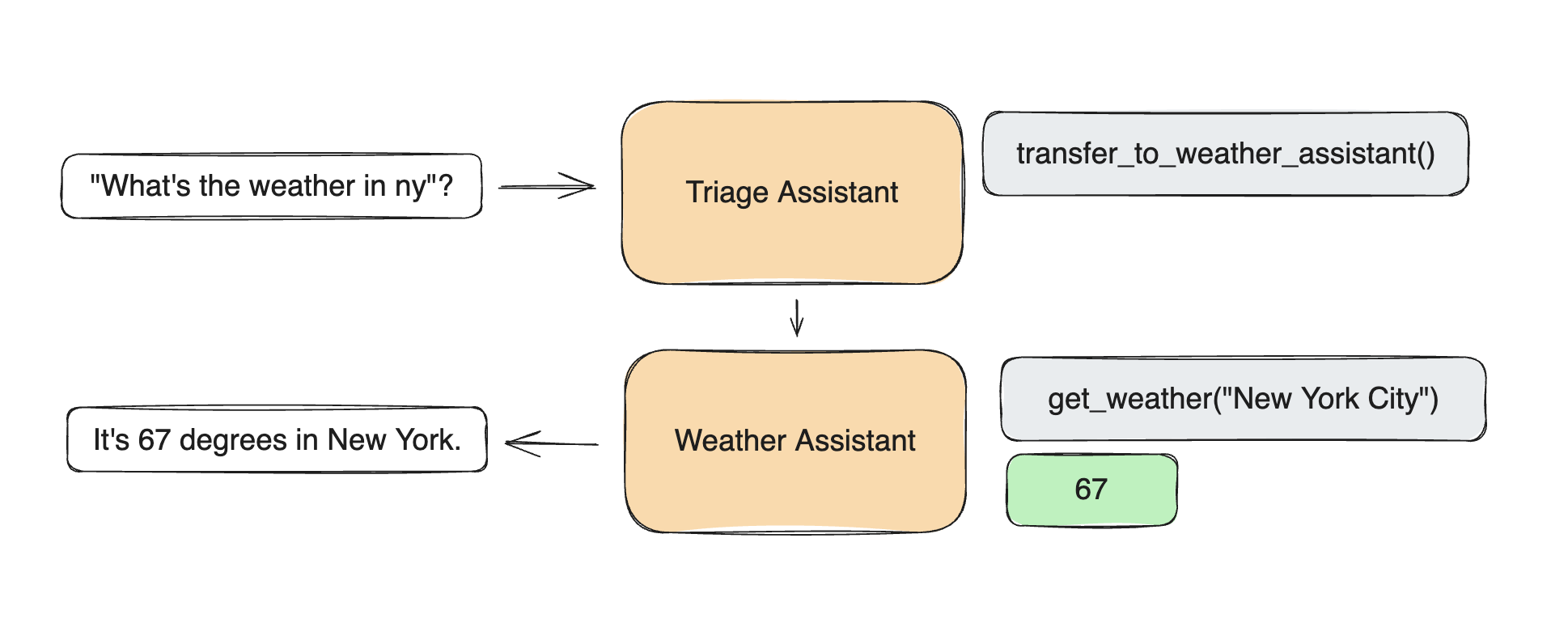
- [X] [`triage_agent`](examples/triage_agent): Simple example of setting up a basic triage step to hand off to the right agent
- running: `ruby examples/triage_agent/main.rb`
- [X] [`weather_agent`](examples/weather_agent): Simple example of function calling
- running: `ruby examples/weather_agent/run.rb`
- [X] [`airline`](examples/airline): A multi-agent setup for handling different customer service requests in an airline context.
- running: `DEBUG=1 ruby examples/airline/main.rb`
- [ ] [`support_bot`](examples/support_bot): A customer service bot which includes a user interface agent and a help center agent with several tools
- [ ] [`personal_shopper`](examples/personal_shopper): A personal shopping agent that can help with making sales and refunding orders
link: https://github.com/openai/swarm/tree/main?tab=readme-ov-file#examples
## Documentation
## Development
After checking out the repo, run `bin/setup` to install dependencies. Then, run `rake spec` to run the tests. You can also run `bin/console` for an interactive prompt that will allow you to experiment.
To install this gem onto your local machine, run `bundle exec rake install`. To release a new version, update the version number in `version.rb`, and then run `bundle exec rake release`, which will create a git tag for the version, push git commits and tags, and push the `.gem` file to [rubygems.org](https://rubygems.org).
## Contributing
Bug reports and pull requests are welcome on GitHub at https://github.com/graysonchen/ruby-openai-swarm. This project is intended to be a safe, welcoming space for collaboration, and contributors are expected to adhere to the [code of conduct](https://github.com/graysonchen/ruby-openai-swarm/blob/main/CODE_OF_CONDUCT.md).
## License
The gem is available as open source under the terms of the [MIT License](https://opensource.org/licenses/MIT).