https://github.com/gregspangenberg/shoulder
Landmark detection and humeral implant positioning with lightweight machine learning models.
https://github.com/gregspangenberg/shoulder
anatomy arthroplasty computer-vision glenoid humerus implant machine-learning python random-forest-classifier shoulder surgery unet-segmentation
Last synced: 9 months ago
JSON representation
Landmark detection and humeral implant positioning with lightweight machine learning models.
- Host: GitHub
- URL: https://github.com/gregspangenberg/shoulder
- Owner: gregspangenberg
- License: agpl-3.0
- Created: 2022-07-06T15:54:52.000Z (about 4 years ago)
- Default Branch: main
- Last Pushed: 2025-05-09T18:17:50.000Z (about 1 year ago)
- Last Synced: 2025-08-23T04:01:21.958Z (11 months ago)
- Topics: anatomy, arthroplasty, computer-vision, glenoid, humerus, implant, machine-learning, python, random-forest-classifier, shoulder, surgery, unet-segmentation
- Language: Python
- Homepage:
- Size: 113 MB
- Stars: 5
- Watchers: 1
- Forks: 1
- Open Issues: 0
-
Metadata Files:
- Readme: README.md
- License: LICENSE.md
Awesome Lists containing this project
README
# *shoulder*
[](https://pypi.org/project/shoulder/)
[](https://github.com/psf/black)
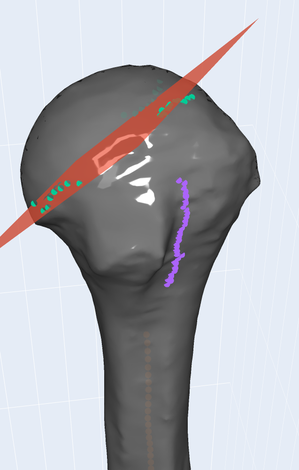
This package uses a collection of machine learning models to detect anatomic landmarks on 3d models of shoulder bones and also generates patient specific coordinate systems. An stl of the shoulder bone of interest is all that is needed to get started. Currently only implemented for the humerus, with expansion to the scapula in the future. Landmarks that *shoulder* can currently identify on the humerus are:
- canal
- transepicondylar axis
- bicipital groove
- anatomic neck
## Installation
compatible with python 3.10 and 3.11
```
pip install shoulder
```
## Example
Start by using the example bone stl's located in "tests/test_bones"
# pass stl into Humerus
hum = shoulder.Humerus("tests/test_bones/humerus_left.stl")
# apply coordinate sysytem
hum.apply_csys_canal_transepiconylar()
# calculate landmarks
hum.canal.axis()
hum.trans_epiconylar.axis()
hum.anatomic_neck.points()
hum.bicipital_groove.axis()
# calculate metrics
hum.radius_curvature()
hum.neckshaft()
hum.retroversion()
# construct plot from above humeral bone with landmarks and coordinate system
plot = shoulder.Plot(hum)
plot.figure.show()
The output of the plot will appear as shown below with landmarks included and transformed from the original CT coordinate system to a coordainte system defined by the canal and transepicondylar axis.
## Contributing
Clone the repo, open the cloned folder containing the poetry.lock file, then install the development dependencies using poetry.
```
poetry install --with dev
```