https://github.com/greynewell/mcpbr
Evaluate MCP servers with Model Context Protocol Benchmark Runner
https://github.com/greynewell/mcpbr
ai-tools anthropic benchmarking benchmarks claude-code claude-code-plugin claude-code-skills cli cybergym evaluations llm-agents mcp-server swe-bench
Last synced: 6 months ago
JSON representation
Evaluate MCP servers with Model Context Protocol Benchmark Runner
- Host: GitHub
- URL: https://github.com/greynewell/mcpbr
- Owner: greynewell
- License: mit
- Created: 2026-01-17T03:27:24.000Z (7 months ago)
- Default Branch: main
- Last Pushed: 2026-01-31T18:28:21.000Z (6 months ago)
- Last Synced: 2026-02-01T05:18:28.426Z (6 months ago)
- Topics: ai-tools, anthropic, benchmarking, benchmarks, claude-code, claude-code-plugin, claude-code-skills, cli, cybergym, evaluations, llm-agents, mcp-server, swe-bench
- Language: Python
- Homepage: https://greynewell.github.io/mcpbr/
- Size: 8.06 MB
- Stars: 20
- Watchers: 3
- Forks: 9
- Open Issues: 201
-
Metadata Files:
- Readme: README.md
- Changelog: CHANGELOG.md
- Contributing: CONTRIBUTING.md
- License: LICENSE
- Code of conduct: CODE_OF_CONDUCT.md
- Security: SECURITY.md
- Agents: AGENTS.md
Awesome Lists containing this project
- awesome-mcp - mcpbr - Benchmark runner for evaluating MCP server performance and agentic capabilities. (Tools / Community)
- awesome-mcp-devtools - greynewell/mcpbr - Benchmark runner for evaluating MCP server performance and agentic capabilities. (Testing Tools / Common Lisp)
- awesome-mcp-devtools - greynewell/mcpbr - Benchmark runner for evaluating MCP server performance and agentic capabilities. (Testing Tools / Common Lisp)
README
# mcpbr
```bash
# One-liner install (installs + runs quick test)
curl -sSL https://raw.githubusercontent.com/greynewell/mcpbr/main/install.sh | bash
# Or install and run manually
pip install mcpbr && mcpbr run -n 1
```
Benchmark your MCP server against real GitHub issues. One command, hard numbers.
---
**Model Context Protocol Benchmark Runner**
[](https://pypi.org/project/mcpbr/)
[](https://www.npmjs.com/package/mcpbr-cli)
[](https://www.python.org/downloads/)
[](https://github.com/greynewell/mcpbr/actions/workflows/ci.yml)
[](https://opensource.org/licenses/MIT)
[](https://greynewell.github.io/mcpbr/)

[](https://github.com/greynewell/mcpbr/labels/good%20first%20issue)
[](https://github.com/greynewell/mcpbr/labels/help%20wanted)
[](https://github.com/users/greynewell/projects/2)
> Stop guessing if your MCP server actually helps. Get hard numbers comparing tool-assisted vs. baseline agent performance on real GitHub issues.
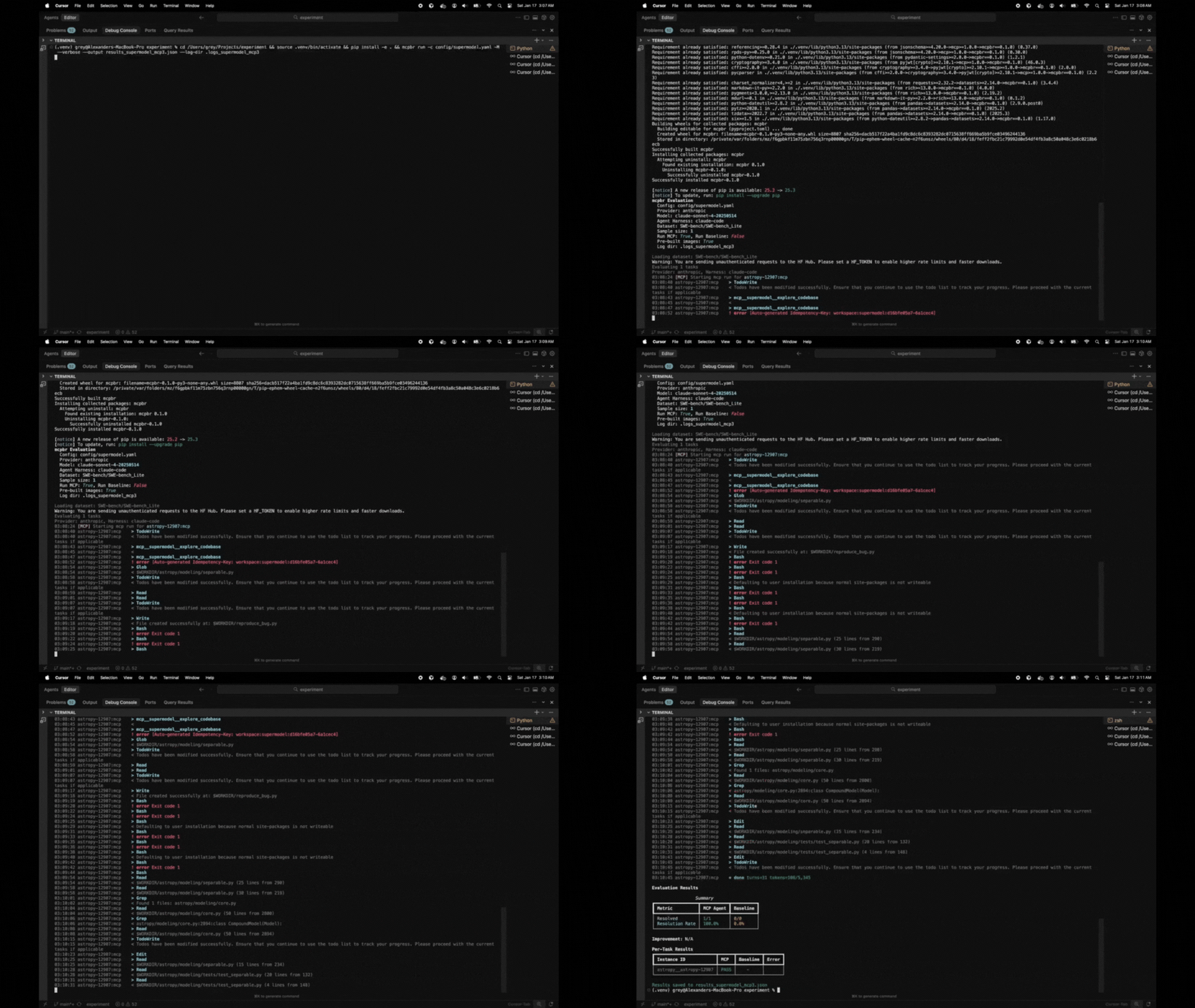
## What You Get
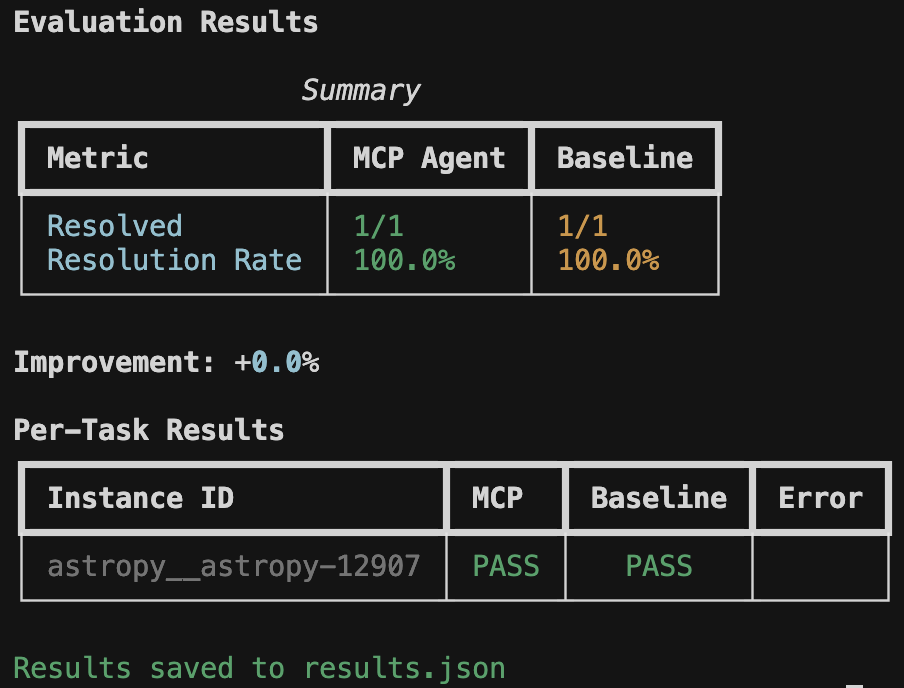
Real metrics showing whether your MCP server improves agent performance on SWE-bench tasks. No vibes, just data.
## Why mcpbr?
MCP servers promise to make LLMs better at coding tasks. But how do you *prove* it?
mcpbr runs controlled experiments: same model, same tasks, same environment - the only variable is your MCP server. You get:
- **Apples-to-apples comparison** against a baseline agent
- **Real GitHub issues** from SWE-bench (not toy examples)
- **Reproducible results** via Docker containers with pinned dependencies
## Supported Benchmarks
mcpbr supports 30+ benchmarks across 10 categories through a flexible abstraction layer:
| Category | Benchmarks |
|----------|-----------|
| **Software Engineering** | [SWE-bench](https://greynewell.github.io/mcpbr/benchmarks/swe-bench/) (Verified/Lite/Full), [APPS](https://greynewell.github.io/mcpbr/benchmarks/apps/), [CodeContests](https://greynewell.github.io/mcpbr/benchmarks/codecontests/), [BigCodeBench](https://greynewell.github.io/mcpbr/benchmarks/bigcodebench/), [LeetCode](https://greynewell.github.io/mcpbr/benchmarks/leetcode/), [CoderEval](https://greynewell.github.io/mcpbr/benchmarks/codereval/), [Aider Polyglot](https://greynewell.github.io/mcpbr/benchmarks/aider-polyglot/) |
| **Code Generation** | [HumanEval](https://greynewell.github.io/mcpbr/benchmarks/humaneval/), [MBPP](https://greynewell.github.io/mcpbr/benchmarks/mbpp/) |
| **Math & Reasoning** | [GSM8K](https://greynewell.github.io/mcpbr/benchmarks/gsm8k/), [MATH](https://greynewell.github.io/mcpbr/benchmarks/math/), [BigBench-Hard](https://greynewell.github.io/mcpbr/benchmarks/bigbench-hard/) |
| **Knowledge & QA** | [TruthfulQA](https://greynewell.github.io/mcpbr/benchmarks/truthfulqa/), [HellaSwag](https://greynewell.github.io/mcpbr/benchmarks/hellaswag/), [ARC](https://greynewell.github.io/mcpbr/benchmarks/arc/), [GAIA](https://greynewell.github.io/mcpbr/benchmarks/gaia/) |
| **Tool Use & Agents** | [MCPToolBench++](https://greynewell.github.io/mcpbr/benchmarks/mcptoolbench/), [ToolBench](https://greynewell.github.io/mcpbr/benchmarks/toolbench/), [AgentBench](https://greynewell.github.io/mcpbr/benchmarks/agentbench/), [WebArena](https://greynewell.github.io/mcpbr/benchmarks/webarena/), [TerminalBench](https://greynewell.github.io/mcpbr/benchmarks/terminalbench/), [InterCode](https://greynewell.github.io/mcpbr/benchmarks/intercode/) |
| **ML Research** | [MLAgentBench](https://greynewell.github.io/mcpbr/benchmarks/mlagentbench/) |
| **Code Understanding** | [RepoQA](https://greynewell.github.io/mcpbr/benchmarks/repoqa/) |
| **Multimodal** | MMMU |
| **Long Context** | LongBench |
| **Safety & Adversarial** | Adversarial (HarmBench) |
| **Security** | [CyberGym](https://greynewell.github.io/mcpbr/benchmarks/cybergym/) |
| **Custom** | User-defined benchmarks via YAML |
### Featured Benchmarks
**SWE-bench** (Default) - Real GitHub issues requiring bug fixes. Three variants: Verified (500 manually validated), Lite (300 curated), and Full (2,294 complete). Pre-built Docker images available.
**CyberGym** - Security vulnerabilities requiring PoC exploits. 4 difficulty levels controlling context. Uses AddressSanitizer for crash detection.
**MCPToolBench++** - Large-scale MCP tool use evaluation across 45+ categories. Tests tool discovery, selection, invocation, and result interpretation.
**GSM8K** - Grade-school math word problems testing chain-of-thought reasoning with numeric answer matching.
```bash
# Run SWE-bench Verified (default)
mcpbr run -c config.yaml
# Run any benchmark
mcpbr run -c config.yaml --benchmark humaneval -n 20
mcpbr run -c config.yaml --benchmark gsm8k -n 50
mcpbr run -c config.yaml --benchmark cybergym --level 2
# List all available benchmarks
mcpbr benchmarks
```
See the **[benchmarks guide](https://greynewell.github.io/mcpbr/benchmarks/)** for details on each benchmark and how to configure them.
## Overview
This harness runs two parallel evaluations for each task:
1. **MCP Agent**: LLM with access to tools from your MCP server
2. **Baseline Agent**: LLM without tools (single-shot generation)
By comparing these, you can measure the effectiveness of your MCP server for different software engineering tasks. See the **[MCP integration guide](https://greynewell.github.io/mcpbr/mcp-integration/)** for tips on testing your server.
## Regression Detection
mcpbr includes built-in regression detection to catch performance degradations between MCP server versions:
### Key Features
- **Automatic Detection**: Compare current results against a baseline to identify regressions
- **Detailed Reports**: See exactly which tasks regressed and which improved
- **Threshold-Based Exit Codes**: Fail CI/CD pipelines when regression rate exceeds acceptable limits
- **Multi-Channel Alerts**: Send notifications via Slack, Discord, or email
### How It Works
A regression is detected when a task that passed in the baseline now fails in the current run. This helps you catch issues before deploying new versions of your MCP server.
```bash
# First, run a baseline evaluation and save results
mcpbr run -c config.yaml -o baseline.json
# Later, compare a new version against the baseline
mcpbr run -c config.yaml --baseline-results baseline.json --regression-threshold 0.1
# With notifications
mcpbr run -c config.yaml --baseline-results baseline.json \
--regression-threshold 0.1 \
--slack-webhook https://hooks.slack.com/services/YOUR/WEBHOOK/URL
```
### Use Cases
- **CI/CD Integration**: Automatically detect regressions in pull requests
- **Version Comparison**: Compare different versions of your MCP server
- **Performance Monitoring**: Track MCP server performance over time
- **Team Notifications**: Alert your team when regressions are detected
### Example Output
```
======================================================================
REGRESSION DETECTION REPORT
======================================================================
Total tasks compared: 25
Regressions detected: 2
Improvements detected: 5
Regression rate: 8.0%
REGRESSIONS (previously passed, now failed):
----------------------------------------------------------------------
- django__django-11099
Error: Timeout
- sympy__sympy-18087
Error: Test suite failed
IMPROVEMENTS (previously failed, now passed):
----------------------------------------------------------------------
- astropy__astropy-12907
- pytest-dev__pytest-7373
- scikit-learn__scikit-learn-25570
- matplotlib__matplotlib-23913
- requests__requests-3362
======================================================================
```
For CI/CD integration, use `--regression-threshold` to fail the build when regressions exceed an acceptable rate:
```yaml
# .github/workflows/test-mcp.yml
- name: Run mcpbr with regression detection
run: |
mcpbr run -c config.yaml \
--baseline-results baseline.json \
--regression-threshold 0.1 \
-o current.json
```
This will exit with code 1 if the regression rate exceeds 10%, failing the CI job.
## Installation
> **[Full installation guide](https://greynewell.github.io/mcpbr/installation/)** with detailed setup instructions.
Prerequisites
- Python 3.11+
- Docker (running)
- `ANTHROPIC_API_KEY` environment variable
- Claude Code CLI (`claude`) installed
- Network access (for pulling Docker images and API calls)
**Supported Models (aliases or full names):**
- Claude Opus 4.5: `opus` or `claude-opus-4-5-20251101`
- Claude Sonnet 4.5: `sonnet` or `claude-sonnet-4-5-20250929`
- Claude Haiku 4.5: `haiku` or `claude-haiku-4-5-20251001`
Run `mcpbr models` to see the full list.
### via npm
[](https://www.npmjs.com/package/mcpbr-cli)
```bash
# Run with npx (no installation)
npx mcpbr-cli run -c config.yaml
# Or install globally
npm install -g mcpbr-cli
mcpbr run -c config.yaml
```
> **Package**: [`mcpbr-cli`](https://www.npmjs.com/package/mcpbr-cli) on npm
>
> **Note**: The npm package requires Python 3.11+ and the mcpbr Python package (`pip install mcpbr`)
### via pip
```bash
# Install from PyPI
pip install mcpbr
# Or install from source
git clone https://github.com/greynewell/mcpbr.git
cd mcpbr
pip install -e .
# Or with uv
uv pip install -e .
```
> **Note for Apple Silicon users**: The harness automatically uses x86_64 Docker images via emulation. This may be slower than native ARM64 images but ensures compatibility with all SWE-bench tasks.
## Quick Start
### Option 1: Use Example Configurations (Recommended)
Get started in seconds with our example configurations:
```bash
# Set your API key
export ANTHROPIC_API_KEY="your-api-key"
# Run your first evaluation using an example config
mcpbr run -c examples/quick-start/getting-started.yaml -v
```
This runs 5 SWE-bench tasks with the filesystem server. Expected runtime: 15-30 minutes, cost: $2-5.
**Explore 25+ example configurations** in the [`examples/`](examples/) directory:
- **Quick Start**: Getting started, testing servers, comparing models
- **Benchmarks**: SWE-bench Lite/Full, CyberGym basic/advanced
- **MCP Servers**: Filesystem, GitHub, Brave Search, databases, custom servers
- **Scenarios**: Cost-optimized, performance-optimized, CI/CD, regression detection
See the **[Examples README](examples/README.md)** for the complete guide.
### Option 2: Generate Custom Configuration
1. **Set your API key:**
```bash
export ANTHROPIC_API_KEY="your-api-key"
```
2. **Run mcpbr (config auto-created if missing):**
```bash
# Config is auto-created on first run
mcpbr run -n 1
# Or explicitly generate a config file first
mcpbr init
```
3. **Edit the configuration** to point to your MCP server:
```yaml
mcp_server:
command: "npx"
args:
- "-y"
- "@modelcontextprotocol/server-filesystem"
- "{workdir}"
env: {}
provider: "anthropic"
agent_harness: "claude-code"
model: "sonnet" # or full name: "claude-sonnet-4-5-20250929"
dataset: "SWE-bench/SWE-bench_Lite"
sample_size: 10
timeout_seconds: 300
max_concurrent: 4
# Optional: disable default logging (logs are saved to output_dir/logs/ by default)
# disable_logs: true
```
4. **Run the evaluation:**
```bash
mcpbr run --config config.yaml
```
## Infrastructure Modes
mcpbr supports running evaluations on different infrastructure platforms, allowing you to scale evaluations or offload compute-intensive tasks to cloud VMs.
### Local (Default)
Run evaluations on your local machine:
```yaml
infrastructure:
mode: local # default
```
This is the default mode - evaluations run directly on your machine using local Docker containers.
### Azure VM
Run evaluations on Azure Virtual Machines with automatic provisioning and cleanup:
```yaml
infrastructure:
mode: azure
azure:
resource_group: mcpbr-benchmarks
location: eastus
cpu_cores: 10
memory_gb: 40
```
**Key features:**
- Zero manual VM setup - provisioned automatically from config
- Automatic Docker, Python, and mcpbr installation
- Test task validation before full evaluation
- Auto-cleanup after completion (configurable)
- Cost-optimized with automatic VM deletion
**Example usage:**
```bash
# Run evaluation on Azure VM
mcpbr run -c azure-config.yaml
# VM is automatically created, evaluation runs, results are downloaded, VM is deleted
```
See [docs/infrastructure/azure.md](docs/infrastructure/azure.md) for full documentation including:
- Prerequisites and authentication
- VM sizing and cost estimation
- Debugging with `preserve_on_error`
- Troubleshooting guide
## Side-by-Side Server Comparison
Compare two MCP servers head-to-head in a single evaluation run to see which implementation performs better.
### Quick Example
```yaml
# comparison-config.yaml
comparison_mode: true
mcp_server_a:
name: "Task Queries"
command: node
args: [build/index.js]
cwd: /path/to/task-queries
mcp_server_b:
name: "Edge Identity"
command: node
args: [build/index.js]
cwd: /path/to/edge-identity
benchmark: swe-bench-lite
sample_size: 10
```
```bash
mcpbr run -c comparison-config.yaml -o results.json
```
### Results Output
```text
Side-by-Side MCP Server Comparison
┏━━━━━━━━━━━━━━━━━━━┳━━━━━━━━━━━━━━┳━━━━━━━━━━━━━━┳━━━━━━━━━━┓
┃ Metric ┃ Task Queries ┃ Edge Identity┃ Δ (A - B)┃
┡━━━━━━━━━━━━━━━━━━━╇━━━━━━━━━━━━━━╇━━━━━━━━━━━━━━╇━━━━━━━━━━┩
│ Resolved Tasks │ 4/10 │ 2/10 │ +2 │
│ Resolution Rate │ 40.0% │ 20.0% │ +100.0% │
└───────────────────┴──────────────┴──────────────┴──────────┘
✓ Task Queries unique wins: 2 tasks
- django__django-12286
- astropy__astropy-7606
```
**Use cases:**
- **A/B testing**: Compare optimized vs. baseline implementations
- **Tool evaluation**: Test different MCP tool sets
- **Version comparison**: Benchmark v2.0 vs. v1.5
See [docs/comparison-mode.md](docs/comparison-mode.md) for complete documentation.
## Claude Code Integration
[](https://claude.ai/download)
mcpbr includes a built-in Claude Code plugin that makes Claude an expert at running benchmarks correctly. The plugin provides specialized skills and knowledge about mcpbr configuration, execution, and troubleshooting.
### Installation Options
You have three ways to enable the mcpbr plugin in Claude Code:
#### Option 1: Clone Repository (Automatic Detection)
When you clone this repository, Claude Code automatically detects and loads the plugin:
```bash
git clone https://github.com/greynewell/mcpbr.git
cd mcpbr
# Plugin is now active - try asking Claude:
# "Run the SWE-bench Lite eval with 5 tasks"
```
**Best for**: Contributors, developers testing changes, or users who want the latest unreleased features.
#### Option 2: npm Global Install (Planned for v0.4.0)
Install the plugin globally via npm for use across any project:
```bash
# Planned for v0.4.0 (not yet released)
npm install -g @mcpbr/claude-code-plugin
```
> **Note**: The npm package is not yet published. This installation method will be available in a future release. Track progress in [issue #265](https://github.com/greynewell/mcpbr/issues/265).
**Best for**: Users who want plugin features available in any directory.
#### Option 3: Claude Code Plugin Manager (Planned for v0.4.0)
Install via Claude Code's built-in plugin manager:
1. Open Claude Code settings
2. Navigate to Plugins > Browse
3. Search for "mcpbr"
4. Click Install
> **Note**: Plugin manager installation is not yet available. This installation method will be available after plugin marketplace submission. Track progress in [issue #267](https://github.com/greynewell/mcpbr/issues/267).
**Best for**: Users who prefer a GUI and want automatic updates.
### Installation Comparison
| Method | Availability | Auto-updates | Works Anywhere | Latest Features |
|--------|-------------|--------------|----------------|-----------------|
| Clone Repository | Available now | Manual (git pull) | No (repo only) | Yes (unreleased) |
| npm Global Install | Planned (not yet released) | Via npm | Yes | Yes (published) |
| Plugin Manager | Planned (not yet released) | Automatic | Yes | Yes (published) |
### What You Get
The plugin includes three specialized skills that enhance Claude's ability to work with mcpbr:
#### 1. run-benchmark
Expert at running evaluations with proper validation and error handling.
**Capabilities**:
- Validates prerequisites (Docker running, API keys set, config files exist)
- Constructs correct `mcpbr run` commands with appropriate flags
- Handles errors gracefully with actionable troubleshooting steps
- Monitors progress and provides meaningful status updates
**Example interactions**:
- "Run the SWE-bench Lite benchmark with 10 tasks"
- "Evaluate my MCP server using CyberGym level 2"
- "Test my config with a single task"
#### 2. generate-config
Generates valid mcpbr configuration files with benchmark-specific templates.
**Capabilities**:
- Ensures required `{workdir}` placeholder is included in MCP server args
- Validates MCP server command syntax
- Provides templates for different benchmarks (SWE-bench, CyberGym, MCPToolBench++)
- Suggests appropriate timeouts and concurrency settings
**Example interactions**:
- "Generate a config for the filesystem MCP server"
- "Create a config for testing my custom MCP server"
- "Set up a CyberGym evaluation config"
#### 3. swe-bench-lite
Quick-start command for running SWE-bench Lite evaluations.
**Capabilities**:
- Pre-configured for 5-task evaluation (fast testing)
- Includes sensible defaults for output files and logging
- Perfect for demonstrations and initial testing
- Automatically sets up verbose output for debugging
**Example interactions**:
- "Run a quick SWE-bench Lite test"
- "Show me how mcpbr works"
- "Test the filesystem server"
### Benefits
When using Claude Code with the mcpbr plugin active, Claude will automatically:
- Verify Docker is running before starting evaluations
- Check for required API keys (`ANTHROPIC_API_KEY`)
- Generate valid configurations with proper `{workdir}` placeholders
- Use correct CLI flags and avoid deprecated options
- Provide contextual troubleshooting when issues occur
- Follow mcpbr best practices for optimal results
### Troubleshooting
**Plugin not detected in cloned repository**:
- Ensure you're in the repository root directory
- Verify the `claude-code.json` file exists in the repo
- Try restarting Claude Code
**Skills not appearing**:
- Check Claude Code version (requires v2.0+)
- Verify plugin is listed in Settings > Plugins
- Try running `/reload-plugins` in Claude Code
**Commands failing**:
- Ensure mcpbr is installed: `pip install mcpbr`
- Verify Docker is running: `docker info`
- Check API key is set: `echo $ANTHROPIC_API_KEY`
For more help, see the [troubleshooting guide](https://greynewell.github.io/mcpbr/troubleshooting/) or [open an issue](https://github.com/greynewell/mcpbr/issues).
## Configuration
> **[Full configuration reference](https://greynewell.github.io/mcpbr/configuration/)** with all options and examples.
### MCP Server Configuration
The `mcp_server` section defines how to start your MCP server:
| Field | Description |
|-------|-------------|
| `command` | Executable to run (e.g., `npx`, `uvx`, `python`) |
| `args` | Command arguments. Use `{workdir}` as placeholder for the task repository path |
| `env` | Additional environment variables |
### Example Configurations
**Anthropic Filesystem Server:**
```yaml
mcp_server:
command: "npx"
args: ["-y", "@modelcontextprotocol/server-filesystem", "{workdir}"]
```
**Custom Python MCP Server:**
```yaml
mcp_server:
command: "python"
args: ["-m", "my_mcp_server", "--workspace", "{workdir}"]
env:
LOG_LEVEL: "debug"
```
**Supermodel Codebase Analysis Server:**
```yaml
mcp_server:
command: "npx"
args: ["-y", "@supermodeltools/mcp-server"]
env:
SUPERMODEL_API_KEY: "${SUPERMODEL_API_KEY}"
```
### MCP Timeout Configuration
mcpbr supports configurable timeouts for MCP server operations to handle different server types and workloads.
#### Configuration Fields
| Field | Description | Default |
|-------|-------------|---------|
| `startup_timeout_ms` | Timeout in milliseconds for MCP server startup | 60000 (60s) |
| `tool_timeout_ms` | Timeout in milliseconds for MCP tool execution | 900000 (15 min) |
These fields map to the `MCP_TIMEOUT` and `MCP_TOOL_TIMEOUT` environment variables used by Claude Code. See the [Claude Code settings documentation](https://code.claude.com/docs/en/settings.md) for more details.
#### Example Configuration
```yaml
mcp_server:
command: "npx"
args: ["-y", "@modelcontextprotocol/server-filesystem", "{workdir}"]
startup_timeout_ms: 60000 # 60 seconds for server to start
tool_timeout_ms: 900000 # 15 minutes for long-running tools
```
#### Common Timeout Values
Different server types require different timeout settings based on their operational characteristics:
| Server Type | startup_timeout_ms | tool_timeout_ms | Notes |
|-------------|-------------------|-----------------|-------|
| Fast (filesystem, git) | 10000 (10s) | 30000 (30s) | Local operations with minimal overhead |
| Medium (web search, APIs) | 30000 (30s) | 120000 (2m) | Network I/O with moderate latency |
| Slow (code analysis, databases) | 60000 (60s) | 900000 (15m) | Complex processing or large datasets |
**When to adjust timeouts:**
- **Increase `startup_timeout_ms`** if your server takes longer to initialize (e.g., loading large models, establishing database connections)
- **Increase `tool_timeout_ms`** if your tools perform long-running operations (e.g., codebase analysis, file processing, AI inference)
- **Decrease timeouts** for fast servers to fail quickly on connection issues
### Custom Agent Prompt
You can customize the prompt sent to the agent using the `agent_prompt` field:
```yaml
agent_prompt: |
Fix the following bug in this repository:
{problem_statement}
Make the minimal changes necessary to fix the issue.
Focus on the root cause, not symptoms.
```
Use `{problem_statement}` as a placeholder for the SWE-bench issue text. You can also override the prompt via CLI with `--prompt`.
### Evaluation Parameters
| Parameter | Default | Description |
|-----------|---------|-------------|
| `provider` | `anthropic` | LLM provider |
| `agent_harness` | `claude-code` | Agent backend |
| `benchmark` | `swe-bench` | Benchmark to run (`swe-bench`, `cybergym`, or `mcptoolbench`) |
| `agent_prompt` | `null` | Custom prompt template (use `{problem_statement}` placeholder) |
| `model` | `sonnet` | Model alias or full ID |
| `dataset` | `null` | HuggingFace dataset (optional, benchmark provides default) |
| `cybergym_level` | `1` | CyberGym difficulty level (0-3, only for CyberGym benchmark) |
| `sample_size` | `null` | Number of tasks (null = full dataset) |
| `timeout_seconds` | `300` | Timeout per task |
| `max_concurrent` | `4` | Parallel task limit |
| `max_iterations` | `10` | Max agent iterations per task |
## CLI Reference
> **[Full CLI documentation](https://greynewell.github.io/mcpbr/cli/)** with all commands and options.
Get help for any command with `--help` or `-h`:
```bash
mcpbr --help
mcpbr run --help
mcpbr init --help
```
### Commands Overview
| Command | Description |
|---------|-------------|
| `mcpbr run` | Run benchmark evaluation with configured MCP server |
| `mcpbr init` | Generate an example configuration file |
| `mcpbr models` | List supported models for evaluation |
| `mcpbr providers` | List available model providers |
| `mcpbr harnesses` | List available agent harnesses |
| `mcpbr benchmarks` | List available benchmarks (SWE-bench, CyberGym, MCPToolBench++) |
| `mcpbr cleanup` | Remove orphaned mcpbr Docker containers |
### `mcpbr run`
Run SWE-bench evaluation with the configured MCP server.
All options
| Option | Short | Description |
|--------|-------|-------------|
| `--config PATH` | `-c` | Path to YAML configuration file (default: `mcpbr.yaml`, auto-created if missing) |
| `--model TEXT` | `-m` | Override model from config |
| `--benchmark TEXT` | `-b` | Override benchmark from config (`swe-bench`, `cybergym`, or `mcptoolbench`) |
| `--level INTEGER` | | Override CyberGym difficulty level (0-3) |
| `--sample INTEGER` | `-n` | Override sample size from config |
| `--mcp-only` | `-M` | Run only MCP evaluation (skip baseline) |
| `--baseline-only` | `-B` | Run only baseline evaluation (skip MCP) |
| `--no-prebuilt` | | Disable pre-built SWE-bench images (build from scratch) |
| `--output PATH` | `-o` | Path to save JSON results |
| `--report PATH` | `-r` | Path to save Markdown report |
| `--output-junit PATH` | | Path to save JUnit XML report (for CI/CD integration) |
| `--verbose` | `-v` | Verbose output (`-v` summary, `-vv` detailed) |
| `--log-file PATH` | `-l` | Path to write raw JSON log output (single file) |
| `--log-dir PATH` | | Directory to write per-instance JSON log files (default: `output_dir/logs/`) |
| `--disable-logs` | | Disable detailed execution logs (overrides default and config) |
| `--task TEXT` | `-t` | Run specific task(s) by instance_id (repeatable) |
| `--prompt TEXT` | | Override agent prompt (use `{problem_statement}` placeholder) |
| `--baseline-results PATH` | | Path to baseline results JSON for regression detection |
| `--regression-threshold FLOAT` | | Maximum acceptable regression rate (0-1). Exit with code 1 if exceeded. |
| `--slack-webhook URL` | | Slack webhook URL for regression notifications |
| `--discord-webhook URL` | | Discord webhook URL for regression notifications |
| `--email-to EMAIL` | | Email address for regression notifications |
| `--email-from EMAIL` | | Sender email address for notifications |
| `--smtp-host HOST` | | SMTP server hostname for email notifications |
| `--smtp-port PORT` | | SMTP server port (default: 587) |
| `--smtp-user USER` | | SMTP username for authentication |
| `--smtp-password PASS` | | SMTP password for authentication |
| `--profile` | | Enable comprehensive performance profiling (tool latency, memory, overhead) |
| `--help` | `-h` | Show help message |
Examples
```bash
# Full evaluation (MCP + baseline)
mcpbr run -c config.yaml
# Run only MCP evaluation
mcpbr run -c config.yaml -M
# Run only baseline evaluation
mcpbr run -c config.yaml -B
# Override model
mcpbr run -c config.yaml -m claude-3-5-sonnet-20241022
# Override sample size
mcpbr run -c config.yaml -n 50
# Save results and report
mcpbr run -c config.yaml -o results.json -r report.md
# Save JUnit XML for CI/CD
mcpbr run -c config.yaml --output-junit junit.xml
# Run specific tasks
mcpbr run -c config.yaml -t astropy__astropy-12907 -t django__django-11099
# Verbose output with per-instance logs
mcpbr run -c config.yaml -v --log-dir logs/
# Very verbose output
mcpbr run -c config.yaml -vv
# Run CyberGym benchmark
mcpbr run -c config.yaml --benchmark cybergym --level 2
# Run CyberGym with specific tasks
mcpbr run -c config.yaml --benchmark cybergym --level 3 -n 5
# Regression detection - compare against baseline
mcpbr run -c config.yaml --baseline-results baseline.json
# Regression detection with threshold (exit 1 if exceeded)
mcpbr run -c config.yaml --baseline-results baseline.json --regression-threshold 0.1
# Regression detection with Slack notifications
mcpbr run -c config.yaml --baseline-results baseline.json --slack-webhook https://hooks.slack.com/...
# Regression detection with Discord notifications
mcpbr run -c config.yaml --baseline-results baseline.json --discord-webhook https://discord.com/api/webhooks/...
# Regression detection with email notifications
mcpbr run -c config.yaml --baseline-results baseline.json \
--email-to team@example.com --email-from mcpbr@example.com \
--smtp-host smtp.gmail.com --smtp-port 587 \
--smtp-user user@gmail.com --smtp-password "app-password"
```
### `mcpbr init`
Generate an example configuration file.
Options and examples
| Option | Short | Description |
|--------|-------|-------------|
| `--output PATH` | `-o` | Path to write example config (default: `mcpbr.yaml`) |
| `--help` | `-h` | Show help message |
```bash
mcpbr init
mcpbr init -o my-config.yaml
```
### `mcpbr models`
List supported Anthropic models for evaluation.
### `mcpbr cleanup`
Remove orphaned mcpbr Docker containers that were not properly cleaned up.
Options and examples
| Option | Short | Description |
|--------|-------|-------------|
| `--dry-run` | | Show containers that would be removed without removing them |
| `--force` | `-f` | Skip confirmation prompt |
| `--help` | `-h` | Show help message |
```bash
# Preview containers to remove
mcpbr cleanup --dry-run
# Remove containers with confirmation
mcpbr cleanup
# Remove containers without confirmation
mcpbr cleanup -f
```
## Performance Profiling
mcpbr includes comprehensive performance profiling to understand MCP server overhead and identify optimization opportunities.
### Enable Profiling
```bash
# Via CLI flag
mcpbr run -c config.yaml --profile
# Or in config.yaml
enable_profiling: true
```
### What Gets Measured
- **Tool call latencies** with percentiles (p50, p95, p99)
- **Memory usage** (peak and average RSS/VMS)
- **Infrastructure overhead** (Docker and MCP server startup times)
- **Tool discovery speed** (time to first tool use)
- **Tool switching overhead** (time between tool calls)
- **Automated insights** from profiling data
### Example Profiling Output
```json
{
"profiling": {
"task_duration_seconds": 140.5,
"tool_call_latencies": {
"Read": {"count": 15, "avg_seconds": 0.8, "p95_seconds": 1.5},
"Bash": {"avg_seconds": 2.3, "p95_seconds": 5.1}
},
"memory_profile": {"peak_rss_mb": 512.3, "avg_rss_mb": 387.5},
"docker_startup_seconds": 2.1,
"mcp_server_startup_seconds": 1.8
}
}
```
### Automated Insights
The profiler automatically identifies performance issues:
```text
- Bash is the slowest tool (avg: 2.3s, p95: 5.1s)
- Docker startup adds 2.1s overhead per task
- Fast tool discovery: first tool use in 8.3s
```
See [docs/profiling.md](docs/profiling.md) for complete profiling documentation.
## Example Run
Here's what a typical evaluation looks like:
```bash
$ mcpbr run -c config.yaml -v -o results.json --log-dir my-logs
mcpbr Evaluation
Config: config.yaml
Provider: anthropic
Model: sonnet
Agent Harness: claude-code
Dataset: SWE-bench/SWE-bench_Lite
Sample size: 10
Run MCP: True, Run Baseline: True
Pre-built images: True
Log dir: my-logs
Loading dataset: SWE-bench/SWE-bench_Lite
Evaluating 10 tasks
Provider: anthropic, Harness: claude-code
14:23:15 [MCP] Starting mcp run for astropy-12907:mcp
14:23:22 astropy-12907:mcp > TodoWrite
14:23:22 astropy-12907:mcp < Todos have been modified successfully...
14:23:26 astropy-12907:mcp > Glob
14:23:26 astropy-12907:mcp > Grep
14:23:27 astropy-12907:mcp < $WORKDIR/astropy/modeling/separable.py
14:23:27 astropy-12907:mcp < Found 5 files: astropy/modeling/tests/test_separable.py...
...
14:27:43 astropy-12907:mcp * done turns=31 tokens=115/6,542
14:28:30 [BASELINE] Starting baseline run for astropy-12907:baseline
...
```
## Output
> **[Understanding evaluation results](https://greynewell.github.io/mcpbr/evaluation-results/)** - detailed guide to interpreting output.
### Console Output
The harness displays real-time progress with verbose mode (`-v`) and a final summary table:
```text
Evaluation Results
Summary
+-----------------+-----------+----------+
| Metric | MCP Agent | Baseline |
+-----------------+-----------+----------+
| Resolved | 8/25 | 5/25 |
| Resolution Rate | 32.0% | 20.0% |
+-----------------+-----------+----------+
Improvement: +60.0%
Per-Task Results
+------------------------+------+----------+-------+
| Instance ID | MCP | Baseline | Error |
+------------------------+------+----------+-------+
| astropy__astropy-12907 | PASS | PASS | |
| django__django-11099 | PASS | FAIL | |
| sympy__sympy-18087 | FAIL | FAIL | |
+------------------------+------+----------+-------+
Results saved to results.json
```
### JSON Output (`--output`)
```json
{
"metadata": {
"timestamp": "2026-01-17T07:23:39.871437+00:00",
"config": {
"model": "sonnet",
"provider": "anthropic",
"agent_harness": "claude-code",
"dataset": "SWE-bench/SWE-bench_Lite",
"sample_size": 25,
"timeout_seconds": 600,
"max_iterations": 30
},
"mcp_server": {
"command": "npx",
"args": ["-y", "@modelcontextprotocol/server-filesystem", "{workdir}"]
}
},
"summary": {
"mcp": {"resolved": 8, "total": 25, "rate": 0.32},
"baseline": {"resolved": 5, "total": 25, "rate": 0.20},
"improvement": "+60.0%"
},
"tasks": [
{
"instance_id": "astropy__astropy-12907",
"mcp": {
"patch_generated": true,
"tokens": {"input": 115, "output": 6542},
"iterations": 30,
"tool_calls": 72,
"tool_usage": {
"TodoWrite": 4, "Task": 1, "Glob": 4,
"Grep": 11, "Bash": 27, "Read": 22,
"Write": 2, "Edit": 1
},
"resolved": true,
"patch_applied": true,
"fail_to_pass": {"passed": 2, "total": 2},
"pass_to_pass": {"passed": 10, "total": 10}
},
"baseline": {
"patch_generated": true,
"tokens": {"input": 63, "output": 7615},
"iterations": 30,
"tool_calls": 57,
"tool_usage": {
"TodoWrite": 4, "Glob": 3, "Grep": 4,
"Read": 14, "Bash": 26, "Write": 4, "Edit": 1
},
"resolved": true,
"patch_applied": true
}
}
]
}
```
### Output Directory Structure
By default, mcpbr consolidates all outputs into a single timestamped directory:
```text
.mcpbr_run_20260126_133000/
├── config.yaml # Copy of configuration used
├── evaluation_state.json # Task results and state
├── logs/ # Detailed MCP server logs
│ ├── task_1_mcp.log
│ ├── task_2_mcp.log
│ └── ...
└── README.txt # Auto-generated explanation
```
This makes it easy to:
- **Archive results**: `tar -czf results.tar.gz .mcpbr_run_*`
- **Clean up**: `rm -rf .mcpbr_run_*`
- **Share**: Just zip one directory
You can customize the output directory:
```bash
# Custom output directory
mcpbr run -c config.yaml --output-dir ./my-results
# Or in config.yaml
output_dir: "./my-results"
```
**Note:** The `--output-dir` CLI flag takes precedence over the `output_dir` config setting. This ensures that the README.txt file in the output directory reflects the final effective configuration values after all CLI overrides are applied.
### Markdown Report (`--report`)
Generates a human-readable report with:
- Summary statistics
- Per-task results table
- Analysis of which tasks each agent solved
### Per-Instance Logs (`--log-dir`)
**Logging is enabled by default** to prevent data loss. Detailed execution traces are automatically saved to `output_dir/logs/` unless disabled.
To disable logging:
```bash
# Via CLI flag
mcpbr run -c config.yaml --disable-logs
# Or in config file
disable_logs: true
```
Creates a directory with detailed JSON log files for each task run. Filenames include timestamps to prevent overwrites:
```text
my-logs/
astropy__astropy-12907_mcp_20260117_143052.json
astropy__astropy-12907_baseline_20260117_143156.json
django__django-11099_mcp_20260117_144023.json
django__django-11099_baseline_20260117_144512.json
```
Each log file contains the full stream of events from the agent CLI:
```json
{
"instance_id": "astropy__astropy-12907",
"run_type": "mcp",
"events": [
{
"type": "system",
"subtype": "init",
"cwd": "/workspace",
"tools": ["Task", "Bash", "Glob", "Grep", "Read", "Edit", "Write", "TodoWrite"],
"model": "claude-sonnet-4-5-20250929",
"claude_code_version": "2.1.12"
},
{
"type": "assistant",
"message": {
"content": [{"type": "text", "text": "I'll help you fix this bug..."}]
}
},
{
"type": "assistant",
"message": {
"content": [{"type": "tool_use", "name": "Grep", "input": {"pattern": "separability"}}]
}
},
{
"type": "result",
"num_turns": 31,
"usage": {"input_tokens": 115, "output_tokens": 6542}
}
]
}
```
This is useful for debugging failed runs or analyzing agent behavior in detail.
### JUnit XML Output (`--output-junit`)
The harness can generate JUnit XML reports for integration with CI/CD systems like GitHub Actions, GitLab CI, and Jenkins. Each task is represented as a test case, with resolved/unresolved tasks mapped to pass/fail states.
```bash
mcpbr run -c config.yaml --output-junit junit.xml
```
The JUnit XML report includes:
- **Test Suites**: Separate suites for MCP and baseline evaluations
- **Test Cases**: Each task is a test case with timing information
- **Failures**: Unresolved tasks with detailed error messages
- **Properties**: Metadata about model, provider, benchmark configuration
- **System Output**: Token usage, tool calls, and test results per task
#### CI/CD Integration Examples
**GitHub Actions:**
```yaml
name: MCP Benchmark
on: [push, pull_request]
jobs:
benchmark:
runs-on: ubuntu-latest
steps:
- uses: actions/checkout@v3
- name: Set up Python
uses: actions/setup-python@v4
with:
python-version: '3.11'
- name: Install mcpbr
run: pip install mcpbr
- name: Run benchmark
env:
ANTHROPIC_API_KEY: ${{ secrets.ANTHROPIC_API_KEY }}
run: |
mcpbr run -c config.yaml --output-junit junit.xml
- name: Publish Test Results
uses: EnricoMi/publish-unit-test-result-action@v2
if: always()
with:
files: junit.xml
```
**GitLab CI:**
```yaml
benchmark:
image: python:3.11
services:
- docker:dind
script:
- pip install mcpbr
- mcpbr run -c config.yaml --output-junit junit.xml
artifacts:
reports:
junit: junit.xml
```
**Jenkins:**
```groovy
pipeline {
agent any
stages {
stage('Benchmark') {
steps {
sh 'pip install mcpbr'
sh 'mcpbr run -c config.yaml --output-junit junit.xml'
}
}
}
post {
always {
junit 'junit.xml'
}
}
}
```
The JUnit XML format enables native test result visualization in your CI/CD dashboard, making it easy to track benchmark performance over time and identify regressions.
## How It Works
> **[Architecture deep dive](https://greynewell.github.io/mcpbr/architecture/)** - learn how mcpbr works internally.
1. **Load Tasks**: Fetches tasks from the selected benchmark (SWE-bench, CyberGym, or MCPToolBench++) via HuggingFace
2. **Create Environment**: For each task, creates an isolated Docker environment with the repository and dependencies
3. **Run MCP Agent**: Invokes Claude Code CLI **inside the Docker container**, letting it explore and generate a solution (patch or PoC)
4. **Run Baseline**: Same as MCP agent but without the MCP server
5. **Evaluate**: Runs benchmark-specific evaluation (test suites for SWE-bench, crash detection for CyberGym, tool use accuracy for MCPToolBench++)
6. **Report**: Aggregates results and calculates improvement
### Pre-built Docker Images
The harness uses pre-built SWE-bench Docker images from [Epoch AI's registry](https://github.com/orgs/Epoch-Research/packages) when available. These images come with:
- The repository checked out at the correct commit
- All project dependencies pre-installed and validated
- A consistent environment for reproducible evaluations
The agent (Claude Code CLI) runs **inside the container**, which means:
- Python imports work correctly (e.g., `from astropy import ...`)
- The agent can run tests and verify fixes
- No dependency conflicts with the host machine
If a pre-built image is not available for a task, the harness falls back to cloning the repository and attempting to install dependencies (less reliable).
## Architecture
```
mcpbr/
├── src/mcpbr/
│ ├── cli.py # Command-line interface
│ ├── config.py # Configuration models
│ ├── models.py # Supported model registry
│ ├── providers.py # LLM provider abstractions (extensible)
│ ├── harnesses.py # Agent harness implementations (extensible)
│ ├── benchmarks/ # Benchmark abstraction layer (25+ benchmarks)
│ │ ├── __init__.py # Registry and factory
│ │ ├── base.py # Benchmark protocol
│ │ ├── swebench.py # SWE-bench (Verified/Lite/Full)
│ │ ├── cybergym.py # CyberGym security
│ │ ├── humaneval.py # HumanEval code generation
│ │ ├── gsm8k.py # GSM8K math reasoning
│ │ ├── mcptoolbench.py # MCPToolBench++ tool use
│ │ ├── apps.py # APPS coding problems
│ │ ├── mbpp.py # MBPP Python problems
│ │ ├── math_benchmark.py # MATH competition math
│ │ └── ... # 15+ more benchmarks
│ ├── harness.py # Main orchestrator
│ ├── agent.py # Baseline agent implementation
│ ├── docker_env.py # Docker environment management + in-container execution
│ ├── evaluation.py # Patch application and testing
│ ├── log_formatter.py # Log formatting and per-instance logging
│ └── reporting.py # Output formatting
├── tests/
│ ├── test_*.py # Unit tests
│ ├── test_benchmarks.py # Benchmark tests
│ └── test_integration.py # Integration tests
├── Dockerfile # Fallback image for task environments
└── config/
└── example.yaml # Example configuration
```
The architecture uses Protocol-based abstractions for providers, harnesses, and **benchmarks**, making it easy to add support for additional LLM providers, agent backends, or software engineering benchmarks in the future. See the **[API reference](https://greynewell.github.io/mcpbr/api/)** and **[benchmarks guide](https://greynewell.github.io/mcpbr/benchmarks/)** for more details.
### Execution Flow
```
┌─────────────────────────────────────────────────────────────────┐
│ Host Machine │
│ ┌───────────────────────────────────────────────────────────┐ │
│ │ mcpbr Harness (Python) │ │
│ │ - Loads SWE-bench tasks from HuggingFace │ │
│ │ - Pulls pre-built Docker images │ │
│ │ - Orchestrates agent runs │ │
│ │ - Collects results and generates reports │ │
│ └─────────────────────────┬─────────────────────────────────┘ │
│ │ docker exec │
│ ┌─────────────────────────▼─────────────────────────────────┐ │
│ │ Docker Container (per task) │ │
│ │ ┌─────────────────────────────────────────────────────┐ │ │
│ │ │ Pre-built SWE-bench Image │ │ │
│ │ │ - Repository at correct commit │ │ │
│ │ │ - All dependencies installed (astropy, django...) │ │ │
│ │ │ - Node.js + Claude CLI (installed at startup) │ │ │
│ │ └─────────────────────────────────────────────────────┘ │ │
│ │ │ │
│ │ Agent (Claude Code CLI) runs HERE: │ │
│ │ - Makes API calls to Anthropic │ │
│ │ - Executes Bash commands (with working imports!) │ │
│ │ - Reads/writes files │ │
│ │ - Generates patches │ │
│ │ │ │
│ │ Evaluation runs HERE: │ │
│ │ - Applies patch via git │ │
│ │ - Runs pytest with task's test suite │ │
│ └───────────────────────────────────────────────────────────┘ │
└─────────────────────────────────────────────────────────────────┘
```
## Troubleshooting
> **[FAQ](https://greynewell.github.io/mcpbr/FAQ/)** - Quick answers to common questions
>
> **[Full troubleshooting guide](https://greynewell.github.io/mcpbr/troubleshooting/)** - Detailed solutions to common issues
### Docker Issues
Ensure Docker is running:
```bash
docker info
```
### Pre-built Image Not Found
If the harness can't pull a pre-built image for a task, it will fall back to building from scratch. You can also manually pull images:
```bash
docker pull ghcr.io/epoch-research/swe-bench.eval.x86_64.astropy__astropy-12907
```
### Slow on Apple Silicon
On ARM64 Macs, x86_64 Docker images run via emulation which is slower. This is normal. If you're experiencing issues, ensure you have Rosetta 2 installed:
```bash
softwareupdate --install-rosetta
```
### MCP Server Not Starting
Test your MCP server independently:
```bash
npx -y @modelcontextprotocol/server-filesystem /tmp/test
```
### API Key Issues
Ensure your Anthropic API key is set:
```bash
export ANTHROPIC_API_KEY="sk-ant-..."
```
### Timeout Issues
Increase the timeout in your config:
```yaml
timeout_seconds: 600
```
### Claude CLI Not Found
Ensure the Claude Code CLI is installed and in your PATH:
```bash
which claude # Should return the path to the CLI
```
## Development
```bash
# Install dev dependencies
pip install -e ".[dev]"
# Run unit tests
pytest -m "not integration"
# Run integration tests (requires API keys and Docker)
pytest -m integration
# Run all tests
pytest
# Lint
ruff check src/
```
### Creating Releases
We use an automated workflow for releases. See the **[Release Guide](docs/RELEASE.md)** for full details.
**Quick start for maintainers:**
```bash
# Patch release (bug fixes) - most common
gh workflow run release.yml -f version_bump=patch
# Minor release (new features)
gh workflow run release.yml -f version_bump=minor
# Major release (breaking changes)
gh workflow run release.yml -f version_bump=major
```
**For AI agents:** See the **[AI Agent Guide](docs/AI_AGENT_GUIDE.md)** for a quick reference.
The workflow automatically:
- Bumps version in `pyproject.toml`
- Syncs version to all package files
- Creates git tag and GitHub release
- Triggers PyPI and npm publication
## Roadmap
We're building the defacto standard for MCP server benchmarking! Our [v1.0 Roadmap](https://github.com/greynewell/mcpbr/projects/2) includes 200+ features across 11 strategic categories:
🎯 **[Good First Issues](https://github.com/greynewell/mcpbr/labels/good%20first%20issue)** | 🙋 **[Help Wanted](https://github.com/greynewell/mcpbr/labels/help%20wanted)** | 📋 **[View Roadmap](https://github.com/greynewell/mcpbr/projects/2)**
[](https://github.com/greynewell/mcpbr/labels/good%20first%20issue)
[](https://github.com/greynewell/mcpbr/labels/help%20wanted)
[](https://github.com/greynewell/mcpbr/projects/2)
### Roadmap Highlights
**Phase 1: Foundation** (v0.3.0)
- ✅ JUnit XML output format for CI/CD integration
- CSV, YAML, XML output formats
- Config validation and templates
- Results persistence and recovery
- Cost analysis in reports
**Phase 2: Benchmarks** (v0.4.0)
- ✅ 30+ benchmarks across 10 categories
- ✅ Custom benchmark YAML support
- ✅ Custom metrics, failure analysis, sampling strategies
- ✅ Dataset versioning, latency metrics, GPU support, few-shot learning
**Phase 3: Developer Experience** (v0.5.0)
- Real-time dashboard
- Interactive config wizard
- Shell completion
- Pre-flight checks
**Phase 4: Platform Expansion** (v0.6.0)
- NPM package
- GitHub Action for CI/CD
- Homebrew formula
- Official Docker image
**Phase 5: MCP Testing Suite** (v1.0.0)
- Tool coverage analysis
- Performance profiling
- Error rate monitoring
- Security scanning
### Get Involved
We welcome contributions! Check out our **30+ good first issues** perfect for newcomers:
- **Output Formats**: CSV/YAML/XML export
- **Configuration**: Validation, templates, shell completion
- **Platform**: Homebrew formula, Conda package
- **Documentation**: Best practices, examples, guides
See the [contributing guide](https://greynewell.github.io/mcpbr/contributing/) to get started!
## Best Practices
New to mcpbr or want to optimize your workflow? Check out the **[Best Practices Guide](https://greynewell.github.io/mcpbr/best-practices/)** for:
- Benchmark selection guidelines
- MCP server configuration tips
- Performance optimization strategies
- Cost management techniques
- CI/CD integration patterns
- Debugging workflows
- Common pitfalls to avoid
## Contributing
Please see [CONTRIBUTING.md](CONTRIBUTING.md) or the **[contributing guide](https://greynewell.github.io/mcpbr/contributing/)** for guidelines on how to contribute.
All contributors are expected to follow our [Community Guidelines](CODE_OF_CONDUCT.md).
## License
MIT - see [LICENSE](LICENSE) for details.
---
Built by [Grey Newell](https://greynewell.com)