https://github.com/gri-gus/loremflickr-streamdeck-plugin
Stream Deck Plugin for installing images from LoremFlickr to keys.
https://github.com/gri-gus/loremflickr-streamdeck-plugin
loremflickr python stream-deck-plugin streamdeck streamdeck-plugin streamdeck-plugins streamdeck-python-sdk streamdeckplugin
Last synced: over 1 year ago
JSON representation
Stream Deck Plugin for installing images from LoremFlickr to keys.
- Host: GitHub
- URL: https://github.com/gri-gus/loremflickr-streamdeck-plugin
- Owner: gri-gus
- License: apache-2.0
- Created: 2023-03-20T11:51:15.000Z (over 3 years ago)
- Default Branch: main
- Last Pushed: 2024-09-24T15:26:01.000Z (almost 2 years ago)
- Last Synced: 2025-03-24T13:43:54.872Z (over 1 year ago)
- Topics: loremflickr, python, stream-deck-plugin, streamdeck, streamdeck-plugin, streamdeck-plugins, streamdeck-python-sdk, streamdeckplugin
- Language: CSS
- Homepage:
- Size: 587 KB
- Stars: 6
- Watchers: 1
- Forks: 0
- Open Issues: 1
-
Metadata Files:
- Readme: README.md
- License: LICENSE
Awesome Lists containing this project
README

# loremflickr-streamdeck-plugin
Stream Deck Plugin for installing images from LoremFlickr to button.
**LoremFlickr official website:** https://loremflickr.com/
**Property Inspector
preview:** [click](https://htmlpreview.github.io/?https://github.com/gri-gus/loremflickr-streamdeck-plugin/blob/main/com.ggusev.loremflickr.sdPlugin/property_inspector/setkeyimage_pi.html)
## Requirements
**Operating systems:**
* MacOS: 10.14 or later
* Windows: 10 or later
**Stream Deck application:** 6.0, 6.1, 6.2, 6.3, 6.4, 6.5, 6.6, 6.7
**Python:** 3.8 or later
## Installation
### Python
> If you have difficulty, then look at articles or videos on the Internet about it.
1. Download Python from the official website and install it: https://www.python.org/downloads/
> ⚠️ Python version must be 3.8.0 or later.
2. Check that Python is available from the command line:
MacOS
Open the `Terminal` application, enter the command below and press Return(Enter):
```shell
python3 -V
```
If you get a response that looks like `Python 3.10.4`, then you have done everything right.
If there is no response, then you have installed Python incorrectly.
Windows
Open the `Command Prompt` application, enter the command below and press Return(Enter):
```shell
python -V
```
If you get a response that looks like `Python 3.10.4`, then you have done everything right.
If there is no response, then you have installed Python incorrectly.
3. Restart your computer.
### Stream Deck
Download the Stream Deck app from the official website and install it: https://www.elgato.com/en/downloads
### LoremFlickr Stream Deck Plugin
> ⚠️ During the installation of the plugin, you must have internet access.
> Errors may occur during installation. If they are, then a message about it will appear on the screen.
Latest release: https://github.com/gri-gus/loremflickr-streamdeck-plugin/releases
You need to download a file called `com.ggusev.loremflickr.streamDeckPlugin`. Once downloaded, double-click on it. The
Stream Deck application prompts you to install the plugin.
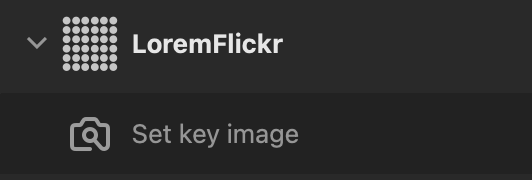
After installation, you will have a `LoremFlickr` category and actions:
## Usage
> ⚠️ The button may not start working immediately after installing the plugin, but after about 40 seconds. At this time,
> dependencies are installed. If you do not receive an error message on the screen, but an exclamation mark is displayed
> when you click on the button, then the plugin is not fully installed yet, and you need to wait. This only happens
> after installing the plugin. There is no need to wait for the next use.
Drag the `Set key image` action from `LoremFlickr` category to the desired button.
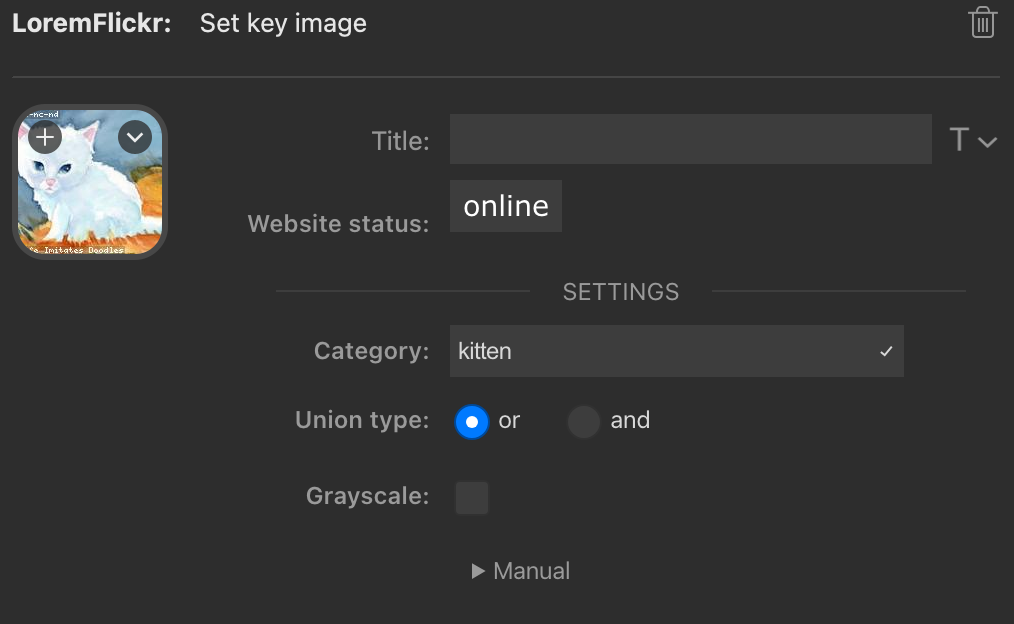
Click on the button, and you will see the Property Inspector where you can adjust some settings. See the `Manual`
section
in the Property Inspector for more details.
Each time you press the button on the Stream Deck, the picture will be updated.
## How does it work internally?
Stream Deck does not have the ability to run Python files, but it does have the ability to run `.bat` and `.sh` files.
But it all starts with the `manifest.json` file, which contains `"CodePathMac": "run.sh"` and `"CodePathWin": "run.bat"`
. These are scripts that are run depending on the system.
Files `run.sh` for MacOS or `run.bat` for Windows: startup scripts, entry points. They set environment variables, check
whether Python is installed (if not, an error window pops up), and run the `init.py` script. Based on the result
from `init.py`, if everything is fine, then the `main.py` file is launched and the plugin is launched, and if not, then
an error window pops up. This happens every time you restart the Stream Deck application and when you reinstall/update
the plugin.
What is the `init.py` file? This is a script that is responsible for the virtual environment and dependencies. Why can't
we immediately add `venv` to the built version of the plugin? Because a user with a system/hardware different from the
one on which `venv` was made may encounter compatibility problems. Therefore, for Python, everyone should have their own
virtual environment for each project. The `init.py` file is responsible for creating the virtual environment, installing
dependencies from `requirements.txt`, and checking that everything is installed correctly. It also runs every time you
restart the Stream Deck application and when you reinstall/update the plugin. But if the virtual environment has already
been created and the dependencies are installed, then `init.py` simply checks that everything is installed correctly.
Later, the `main.py` file comes into play, which contains the plugin logic.
## Dependencies
[streamdeck-python-sdk](https://github.com/gri-gus/streamdeck-python-sdk)
[streamdeck-python-sdk-pi](https://github.com/gri-gus/streamdeck-python-sdk-pi)
[streamdeck-javascript-sdk](https://github.com/elgatosf/streamdeck-javascript-sdk)