https://github.com/gridcat/gridcoinresearch-tui
https://github.com/gridcat/gridcoinresearch-tui
Last synced: about 1 month ago
JSON representation
- Host: GitHub
- URL: https://github.com/gridcat/gridcoinresearch-tui
- Owner: gridcat
- License: mit
- Created: 2026-04-15T15:24:00.000Z (2 months ago)
- Default Branch: master
- Last Pushed: 2026-04-16T07:51:55.000Z (2 months ago)
- Last Synced: 2026-04-16T09:21:25.100Z (about 2 months ago)
- Language: Go
- Size: 584 KB
- Stars: 0
- Watchers: 0
- Forks: 0
- Open Issues: 0
-
Metadata Files:
- Readme: README.md
- License: LICENSE
Awesome Lists containing this project
README
# gridcoinresearch-tui
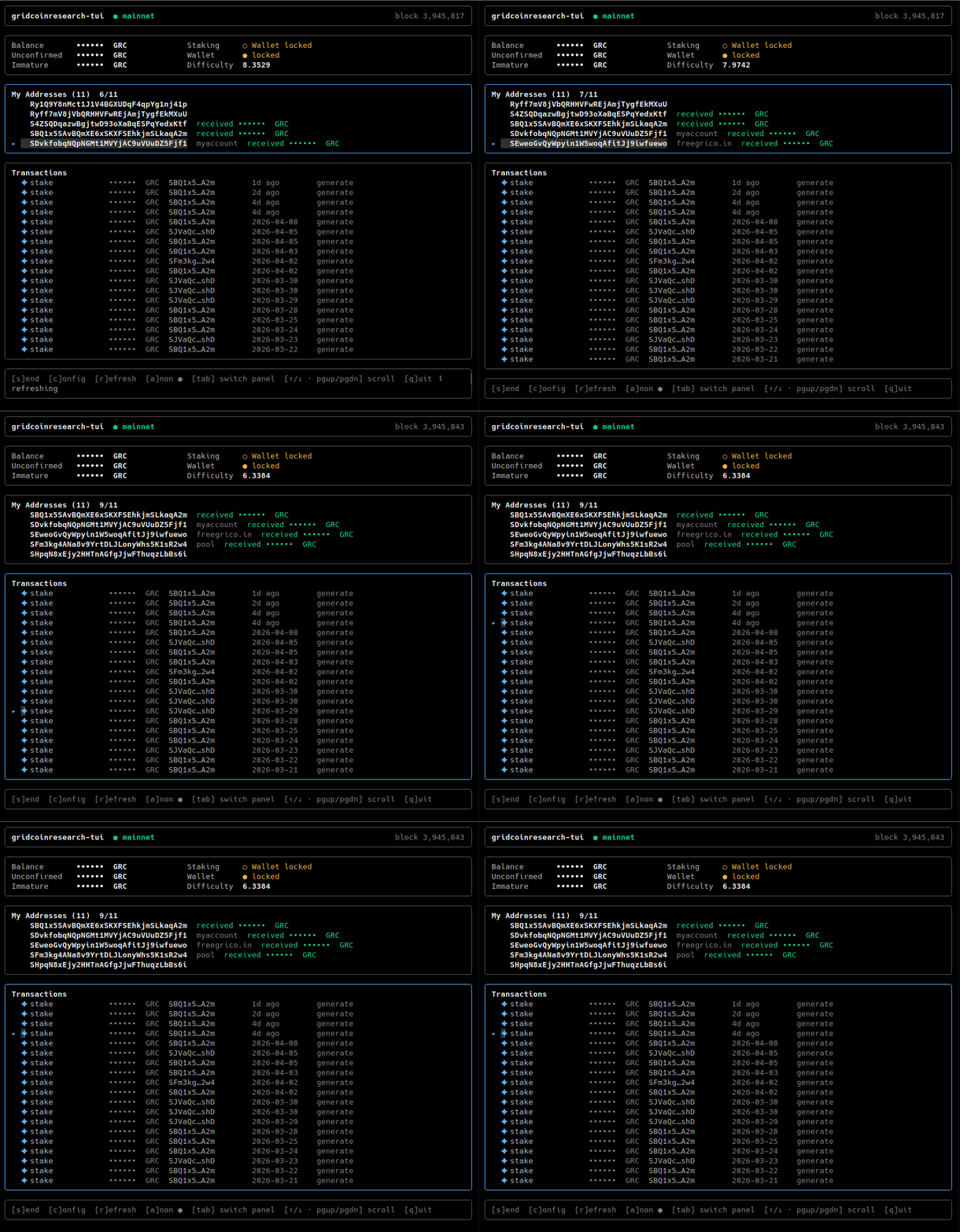
A tiny, full-screen terminal dashboard for a running [Gridcoin Research](https://gridcoin.us) wallet daemon (`gridcoinresearchd`). One static binary, zero runtime dependencies.
Shows:
- **Balance** (confirmed / unconfirmed / immature)
- **Staking** status and difficulty
- **Wallet lock** state with live unlock countdown
- **Current block height**
- **Your wallet addresses** with labels and amounts received
- **Recent transactions** with human-readable status (`upcoming` / `incoming` / `sending` / `confirmed` / `stake`)
- **Transaction details** (full txid, address, fee, block hash, timestamps) — press `enter` on a selected row
- **Send GRC** to any address, with pre-flight address validation and on-demand wallet unlock
- **Live config panel** — edit network / host / port / credentials / refresh interval at runtime without restarting
Supports both **mainnet** and **testnet** via a CLI flag.
## Install
Download a pre-built binary from the [Releases](https://github.com/gridcat/gridcoinresearch-tui/releases) page. Every release is notarised on the Gridcoin blockchain via [gridcoin-stamp-action](https://github.com/gridcat/gridcoin-stamp-action) — the `checksums.txt` hash is recorded on-chain so you can independently verify the artifacts.
```sh
curl -sSL https://github.com/gridcat/gridcoinresearch-tui/releases/latest/download/gridcoinresearch-tui_linux_amd64.tar.gz | tar -xz
./gridcoinresearch-tui
```
Or build from source:
```sh
git clone https://github.com/gridcat/gridcoinresearch-tui
cd gridcoinresearch-tui
make build
./gridcoinresearch-tui
```
## Usage
### Local (same machine as the wallet)
Zero config — reads `~/.GridcoinResearch/gridcoinresearch.conf`, connects to `127.0.0.1`:
```sh
./gridcoinresearch-tui # mainnet
./gridcoinresearch-tui --testnet # testnet (reads ~/.GridcoinResearch/testnet/gridcoinresearch.conf)
```
### Remote (laptop → server)
No local Gridcoin install required:
```sh
./gridcoinresearch-tui \
--rpc-host node.example.com \
--rpc-port 15715 \
--rpc-user myuser \
--rpc-password mypass
```
Or via env vars (recommended for the password):
```sh
export GRC_RPC_HOST=node.example.com
export GRC_RPC_USER=myuser
export GRC_RPC_PASSWORD=mypass
./gridcoinresearch-tui
```
### All flags
| Flag | Env var | Default | Notes |
|------|---------|---------|-------|
| `--testnet` | — | off | Use testnet conf path and default port. |
| `--rpc-host HOST` | `GRC_RPC_HOST` | `127.0.0.1` | |
| `--rpc-port PORT` | `GRC_RPC_PORT` | `15715` mainnet / `25715` testnet | |
| `--rpc-user USER` | `GRC_RPC_USER` | empty | If both user and password are empty, no `Authorization` header is sent. |
| `--rpc-password PASS` | `GRC_RPC_PASSWORD` | empty | Prefer env var over flag to keep it out of `ps`. |
| `--conf PATH` | — | `~/.GridcoinResearch[/testnet]/gridcoinresearch.conf` | Best-effort; missing file is fine. |
| `--refresh DUR` | — | `5s` | How often to poll the daemon. |
Resolution order, highest wins: **flag → env var → conf file → built-in default**.
## Keybindings
| Key | Action |
|-----|--------|
| `↑` / `↓` / `k` / `j` | Move the transaction cursor |
| `enter` | Open details for the selected transaction |
| `g` / `G` / `home` / `end` | Jump to first / last transaction |
| `s` | Open the send dialog |
| `c` | Open the live config panel |
| `r` | Force a refresh now |
| `tab` / `shift+tab` | Navigate fields inside a modal |
| `esc` | Close a modal |
| `q` / `ctrl+c` | Quit |
Inside the send and config modals the focused field is marked with `▸ ` so you can tell what is active on terminals without colour support. The selected transaction row gets the same marker.
## Addresses
The "My Addresses" panel lists every address `listreceivedbyaddress` returns for your wallet, including ones that have never received any coins. Addresses are printed at full length so you can select them with your terminal's native mouse selection and copy them with your usual terminal shortcut. On small terminals the panel is capped so it cannot push the transactions list off screen — a `+N more` line appears when addresses don't fit; resize the window taller to see all of them.
## Config panel
Edits in the config panel are **session-only** — they apply immediately (the RPC client is rebuilt against the new endpoint and a fresh fetch runs) but are not written to disk. Next launch re-resolves from flags/env/conf as usual. Toggling the network auto-updates the port field if it still held the old network's default, so you don't need to remember port numbers.
## Security notes
- The TUI never stores your wallet passphrase. It is held in memory only for the duration of a single `sendtoaddress` call, then the wallet is immediately re-locked via `walletlock`.
- Pass `--rpc-password` via env var, not the command line — flags are visible in `ps`.
- This tool talks plain HTTP JSON-RPC. Do not expose your daemon's RPC port over the public internet. Use an SSH tunnel for remote access:
```sh
ssh -L 15715:127.0.0.1:15715 user@node.example.com
./gridcoinresearch-tui --rpc-user X --rpc-password Y
```
## License
MIT
---
Made with ❤️ by @gridcat