https://github.com/gskartwii/teehee
A modal terminal hex editor
https://github.com/gskartwii/teehee
hex-editor kakoune terminal vim
Last synced: 12 months ago
JSON representation
A modal terminal hex editor
- Host: GitHub
- URL: https://github.com/gskartwii/teehee
- Owner: Gskartwii
- License: apache-2.0
- Created: 2020-06-23T17:53:02.000Z (about 6 years ago)
- Default Branch: main
- Last Pushed: 2022-12-08T12:22:49.000Z (over 3 years ago)
- Last Synced: 2025-04-09T14:14:40.272Z (over 1 year ago)
- Topics: hex-editor, kakoune, terminal, vim
- Language: Rust
- Homepage: https://sr.ht/~aleksi/teehee/
- Size: 285 KB
- Stars: 118
- Watchers: 3
- Forks: 5
- Open Issues: 6
-
Metadata Files:
- Readme: README.md
- Contributing: CONTRIBUTING.md
- License: LICENSE
- Code of conduct: CODE_OF_CONDUCT.md
Awesome Lists containing this project
README
# Teehee - a modal terminal hex editor

Inspired by Vim, Kakoune and Hiew.
## Installation
Arch Linux users: The package for Arch Linux is available on [AUR](https://aur.archlinux.org/packages/teehee/).
Others: Just run `cargo install teehee`! If you don't have rust, you can get it from [rustup.rs](https://rustup.rs).
The application will be available as the executable `teehee`. More installation options may be coming in the future.
## Motivation
Reverse engineers, software engineers and other IT people often need to work with binary files. Hex editors are usually the go-to tool for dealing with binary file formats when a more specialized tool isn't available. Many of the existing hex editors lack support for modal editing, which Vim/Kakoune/Emacs users will miss. Hiew supports it to an extent, but it's non-free software, and its keybinds are unintuitive. Teehee is designed to offer a native-feeling experience to Kakoune and Vim users, while also providing additional hex editing capabilities like coloured marks for regions of data and encryption/compression scripts.
## Demo
[](https://asciinema.org/a/349728)
Teehee supports multiple selections, efficient selection modifying commands and various data editing operations.
## Design
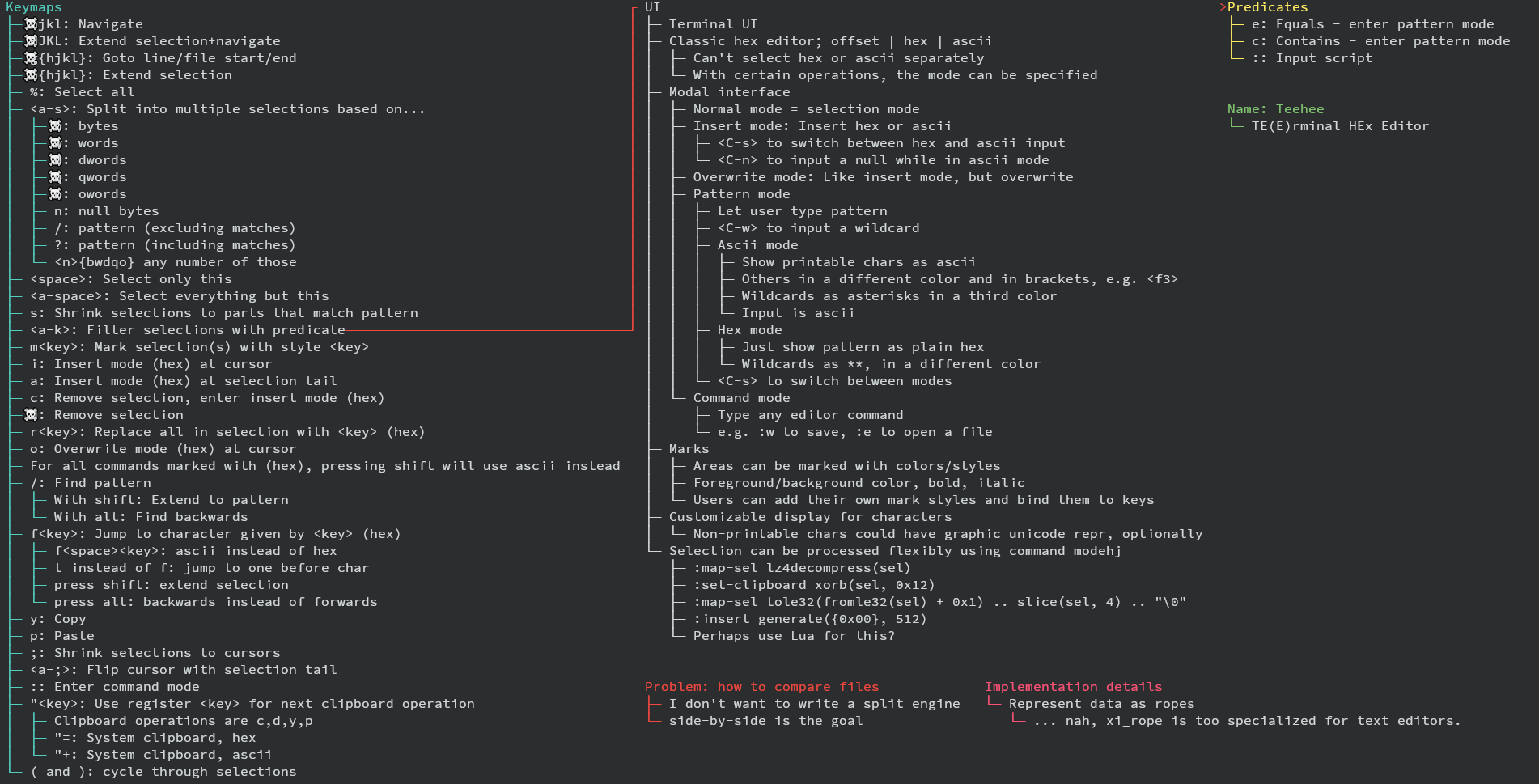
## Implemented keybinds
* `hjkl` for movement (press shift to extend selection instead)
```
^
k
< h l >
j
v
```
* `g`[`hjkl`] for jumping (`G`[`hjkl`] to extend selection instead)
* `h`: to line start
* `l`: to line end
* `k`: to file start
* `j`: to file end
* `g` jumps to offset, `G` extends to offset
* `` to scroll down/up
* `;` to collapse selections to cursors
* `` (alt and ;) to swap cursor and selection end
* `` (alt and s) to split selection to multiple selections of size...
* `b`: 1 byte
* `w`: 2 bytes (Word)
* `d`: 4 bytes (Dword)
* `q`: 8 bytes (Qword)
* `o`: 16 bytes (Oword)
* `n`: delimited by null bytes
* `/`: matching a text pattern (`?` for hex pattern)
* `d` to delete selected data from buffer
* `i` to enter insert mode at the beginning of selections (`I` to insert hex instead of ascii)
* `a` instead of `i` to enter append mode instead
* `o` instead of `i` to enter overwrite mode instead
* `c` instead of `i` to delete selection contents, then enter insert mode
* `` to insert a null byte in ascii mode
* `` to switch between ascii and hex inserting
* `(` and `)` to cycle main selection
* `` to keep only main selection, `` to keep all selections but main
* `r` to replace a each selected character with the ASCII character given
* `R` instead of `r` to replace with a single hex character instead
* `r` to replace with null bytes
* `y` to yank/copy selections to register `"`
* `p` to paste register `"` contents from `y`/`d`/`c`
* `s` to collapse selections to those matching a text pattern (`S` for hex pattern)
* `M` to measure length of current main selection (in bytes)
* `u` to undo, `U` to redo
* `:` to enter command mode
* `:q` to quit
* `:q!` to force quit (even if buffer dirty)
* `:w` to flush buffer to disk
* `:w ` to save buffer to named file
* `:wa` to flush all buffers to disk
* `:e ` to open a new buffer
* `:db` to close a buffer
* `:db!` to close a buffer even if dirty
* `:wq` to flush buffer, then quit
Entering a pattern:
* `` to insert a wildcard
* `` to switch input mode (ascii <-> hex)
* `` to go back to normal mode
* `` to accept pattern
* arrow keys, `` and `` also supported
Counts:
* The following commands maybe prefixed by a count:
* Movement (`hjkl` and `HJKL`)
* Selection modification (`()`)
* Jump to offset (`g` and `G`)
* Paste (`p`)
* (In split mode) `bwdqon`
* Counts are inputted by typing digits 0-9 (in hex mode, 0-f).
* `x` switches between hex and decimal mode.
* Note that `a-f` may shadow some keys, so switch out of hex mode before running
a command.
* Example: `y5p`: yank the selection and paste it 5 times.
* Example: `50l`: Move 50 bytes to the right.
* Example: `x500g`: Jump to offset 0x500
* Example: `x12xb`: Split selection into parts of 0x12 bytes.
# Releases
Releases are signed with the following PGP key:
`9330E5D6861507BEFBF1893347E208E66179DC94`. The source code can be found on
the [GitHub releases page](https://github.com/Gskartwii/teehee/releases), along
with the signature of the source code tgz.