https://github.com/guibranco/dotnet-aicommitmessage
🧠 🤖 This tool generates AI-powered commit messages via Git hooks, automating meaningful message suggestions from OpenAI and others to improve commit quality and efficiency.
https://github.com/guibranco/dotnet-aicommitmessage
ai ai-powered api dotnet-tool git-commit-messages git-hooks hacktoberfest ia openai
Last synced: 2 months ago
JSON representation
🧠 🤖 This tool generates AI-powered commit messages via Git hooks, automating meaningful message suggestions from OpenAI and others to improve commit quality and efficiency.
- Host: GitHub
- URL: https://github.com/guibranco/dotnet-aicommitmessage
- Owner: guibranco
- License: mit
- Created: 2024-09-16T19:45:47.000Z (almost 2 years ago)
- Default Branch: main
- Last Pushed: 2026-04-01T18:50:48.000Z (3 months ago)
- Last Synced: 2026-04-02T05:49:03.294Z (3 months ago)
- Topics: ai, ai-powered, api, dotnet-tool, git-commit-messages, git-hooks, hacktoberfest, ia, openai
- Language: C#
- Homepage: http://guilherme.stracini.com.br/dotnet-aicommitmessage/
- Size: 1.18 MB
- Stars: 4
- Watchers: 1
- Forks: 8
- Open Issues: 8
-
Metadata Files:
- Readme: README.md
- Contributing: CONTRIBUTING.MD
- License: LICENSE
Awesome Lists containing this project
README
# 
🧠 🤖 This tool generates AI-powered commit messages via Git hooks, automating meaningful message suggestions from OpenAI and others to improve commit quality and efficiency.
[](https://wakatime.com/badge/github/guibranco/dotnet-aicommitmessage)
[](https://wakatime.com/badge/github/guibranco/dotnet-aicommitmessage)
[](https://wakatime.com/badge/github/guibranco/dotnet-aicommitmessage)
[](https://github.com/guibranco/dotnet-aicommitmessage/actions/workflows/ci.yml)
[](https://github.com/guibranco/dotnet-aicommitmessage/actions/workflows/infisical-secrets-check.yml)
[](https://github.com/guibranco/dotnet-aicommitmessage/actions/workflows/linter.yml)
---
## What this tool does
Generates a commit message based on the `git diff` result using the [OpenAI API](https://platform.openai.com/docs/overview).
---
## Requirements
- [OpenAI API key](https://platform.openai.com/api-keys).
- [.NET 8.0 (or higher) runtime](https://dotnet.microsoft.com/en-us/download/dotnet/8.0).
- [GIT client](https://git-scm.com/downloads).
---
## Getting started
[](https://www.nuget.org/packages/AICommitMessage/)
[](https://www.nuget.org/packages/AICommitMessage/)
This repository is available at [NuGet](https://www.nuget.org) under the name [AICommitMessage](https://www.nuget.org/packages/AICommitMessage/).
### Installation
1. Install the tool globally (or per project/repository).
2. Move to the project folder.
3. Install the Git hook on the default `hooks` directory.
```ps
dotnet tool install -g AiCommitMessage
cd my-project/
dotnet-aicommitmessage install-hook
git add .
git commit -m ""
```
Use `git log -1` to review the last commit details and find the automatically generated commit message.
---
### Model Configuration and Settings
To configure and use models with `dotnet-aicommitmessage`, users need to set their settings once. This setup involves specifying the model, API key, and API URL. These settings will be stored as environment variables for future use.
#### Initial Setup
Run the following commands to configure the model and related settings:
```bash
# OpenAI GPT-5.1 (flagship model - best quality)
dotnet-aicommitmessage set-settings -m gpt-5.1 -k {api-key} -u {api-url}
# OpenAI GPT-5 Mini (balanced performance and cost)
dotnet-aicommitmessage set-settings -m gpt-5-mini -k {api-key} -u {api-url}
# OpenAI GPT-5 Nano (fastest and most cost-effective)
dotnet-aicommitmessage set-settings -m gpt-5-nano -k {api-key} -u {api-url}
# OpenAI GPT-4o Mini
dotnet-aicommitmessage set-settings -m gpt-4o-mini -k {api-key} -u {api-url}
# Azure AI Llama
dotnet-aicommitmessage set-settings -m llama-3-1-405b-instruct -k {api-key} -u {api-url}
```
Replace `{api-key}` with your API key and `{api-url}` with the URL of your API provider.
#### Switching Models
After the initial setup, you can easily switch between models without needing to provide the API key or URL again:
```bash
dotnet-aicommitmessage set-settings -m gpt-5.1
dotnet-aicommitmessage set-settings -m gpt-5-mini
dotnet-aicommitmessage set-settings -m gpt-5-nano
dotnet-aicommitmessage set-settings -m gpt-4o-mini
dotnet-aicommitmessage set-settings -m llama-3-1-405b-instruct
```
This allows for quick model changes while retaining your previously configured API details.
---
#### Supported Models
The tool supports the following AI models:
| Model | Provider | Description |
|-------|----------|-------------|
| `gpt-5.1` | OpenAI | Flagship GPT-5 model with best quality and capabilities |
| `gpt-5-mini` | OpenAI | Balanced model offering good performance at lower cost |
| `gpt-5-nano` | OpenAI | Most cost-effective option with fastest response times |
| `gpt-4o-mini` | OpenAI | Previous generation model, still highly capable |
| `llama-3-1-405b-instruct` | Azure AI | Meta's Llama model via Azure AI services |
**Default Model**: `gpt-5.1` (automatically used if no model is specified)
---
## Commit message pattern
The training model for the AI used is designed using as reference these guidelines:
- [Conventional Commits v1.0.0](https://www.conventionalcommits.org/en/v1.0.0/).
- [Padrões de Commits](https://github.com/tiagolofi/padroes-de-commits) (in Portuguese).
- [Conventional Commit Messages](https://gist.github.com/qoomon/5dfcdf8eec66a051ecd85625518cfd13).
- [Emoji for Conventional Commits](https://gist.github.com/parmentf/359667bf23e08a1bd8241fbf47ecdef0).
- [conventional-commit-types](https://github.com/pvdlg/conventional-commit-types).
---
## Sequence of Execution
Here's a flow diagram showing the sequence of execution of the `prepare-commit-msg` hook and its integration with `dotnet-aicommitmessage` to generate commit messages using the OpenAI API:
```mermaid
graph TD
A[Git Commit] --> B[prepare-commit-msg Hook Trigger]
B --> C[Invoke dotnet-aicommitmessage Tool]
C --> D{API Disabled?}
D -->|No| E[Send Data to OpenAI API]
D -->|Yes| F[Use Fallback Message Generation]
E --> G[Generate Commit Message]
F --> G
G --> H[Check and append pre-defined commands to Commit Message]
H --> I[Return Generated Commit Message]
I --> J[Insert Commit Message into Git Commit]
J --> K[Finalize Commit]
```
---
## Commands
This tool accepts an argument as the command to execute. Here is a list of available commands:
| Command | Description |
| -------------------------- | --------------------------------------------------------------------------------------------------------------- |
| `install-hook` | Installs GIT hooks in the default `.git/hooks` directory or in the custom directory configured in GIT settings. |
| `generate-message` | Generates a commit message based on the current changes (`git diff` context). |
| `set-settings` | Set the OpenAI settings. |
| `help` | Display information about this program. |
| `version` | Display version information. |
---
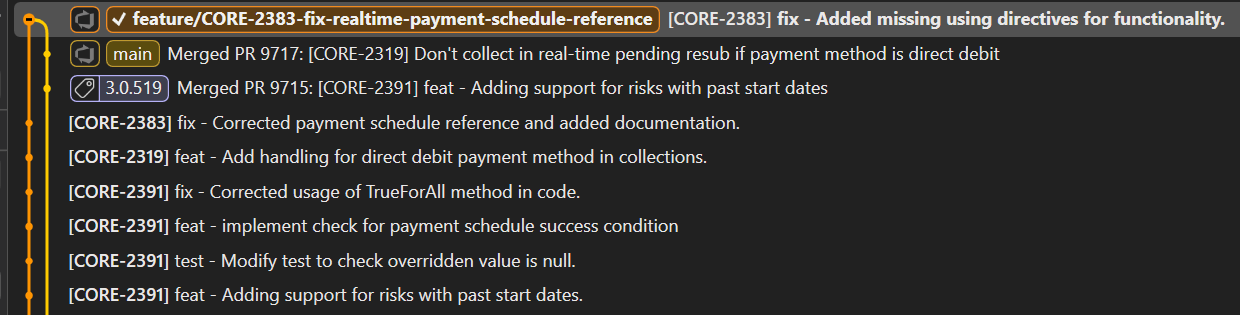
## Example output
Here is an example of the commit messages generated in a real-world project:
## Debug
You can run the message generation manually to debug it, but it will not commit the content to your GIT repository.
If you also want to check the OpenAI JSON response, append the `-D` parameter.
### Manually generating the commit message
To manually generate a commit message without committing the staged changes, run the following command:
```ps
dotnet-aicommitmessage generate-message -m "."
```
### Saving the OpenAI JSON response
If you want to persist the OpenAI JSON response, add the `-D` parameter, and a `debug.json` file will be created with the response JSON.
```ps
dotnet-aicommitmessage generate-message -Dm "."
```
Here is a sample `debug.json` content:
```json
{
"Value": {
"CreatedAt": "2024-11-20T12:54:03+00:00",
"FinishReason": 0,
"ContentTokenLogProbabilities": [],
"RefusalTokenLogProbabilities": [],
"Role": 2,
"Content": [
{
"Kind": 0,
"Text": "feat - add reactivation handling for refunds due today",
"ImageUri": null,
"ImageBytes": null,
"ImageBytesMediaType": null,
"ImageDetailLevel": null,
"Refusal": null
}
],
"ToolCalls": [],
"Refusal": null,
"FunctionCall": null,
"Id": "chatcmpl-[[REDACTED]]",
"Model": "gpt-4o-mini-2024-07-18",
"SystemFingerprint": "fp-[[REDACTED]]",
"Usage": {
"OutputTokenCount": 10,
"InputTokenCount": 6229,
"TotalTokenCount": 6239,
"OutputTokenDetails": {
"ReasoningTokenCount": 0
}
}
}
}
```
---
## Configuration Options
The tool supports several configuration options through environment variables:
### Set GIT hooks path
By default, the GIT hooks path is defined at the repository level as `.git\hooks\`.
If you want to override, or use the `.githooks` directory at the root level of your project, you will need to configure that.
Execute the following GIT command to set (per repository) the GIT hooks path:
`git config core.hooksPath '.githooks'`
### Disable API Calls
In some network environments, the OpenAI API may be blocked due to firewall or proxy restrictions. You can disable API calls entirely by setting the following environment variable:
```bash
export DOTNET_AICOMMITMESSAGE_DISABLE_API=true
```
Or on Windows:
```cmd
set DOTNET_AICOMMITMESSAGE_DISABLE_API=true
```
When this option is enabled, the tool will:
- Skip any calls to the OpenAI API
- Display a warning message indicating that API calls are disabled
- Use fallback commit message generation (either the provided message or a placeholder)
- Continue to work with branch name processing and issue number extraction
### Contributors

Guilherme Branco Stracini

Kris

Malay Kumar

Ryan Flores
### Bots
![dependabot[bot]](https://avatars.githubusercontent.com/in/29110?v=4)
dependabot[bot]
![penify-dev[bot]](https://avatars.githubusercontent.com/in/399279?v=4)
penify-dev[bot]
![gitauto-ai[bot]](https://avatars.githubusercontent.com/in/844909?v=4)
gitauto-ai[bot]
![github-actions[bot]](https://avatars.githubusercontent.com/in/15368?v=4)
github-actions[bot]
![pixeebot[bot]](https://avatars.githubusercontent.com/in/193111?v=4)
pixeebot[bot]

Snyk bot

CodeFactor