https://github.com/guilherme-v/aps_navigator
A wrapper around Navigator 2.0 and Router/Pages to make their use a easier.
https://github.com/guilherme-v/aps_navigator
dart dynamic-urls flutter flutter-package library navigation navigators router
Last synced: 4 months ago
JSON representation
A wrapper around Navigator 2.0 and Router/Pages to make their use a easier.
- Host: GitHub
- URL: https://github.com/guilherme-v/aps_navigator
- Owner: guilherme-v
- License: mit
- Created: 2021-04-22T02:33:26.000Z (about 5 years ago)
- Default Branch: develop
- Last Pushed: 2021-05-03T02:19:54.000Z (about 5 years ago)
- Last Synced: 2025-10-23T05:43:29.782Z (8 months ago)
- Topics: dart, dynamic-urls, flutter, flutter-package, library, navigation, navigators, router
- Language: Dart
- Homepage:
- Size: 16.9 MB
- Stars: 14
- Watchers: 1
- Forks: 3
- Open Issues: 1
-
Metadata Files:
- Readme: README.md
- Changelog: CHANGELOG.md
- License: LICENSE
Awesome Lists containing this project
README
# APS Navigator - App Pagination System
[](https://github.com/guilherme-v/aps_navigator/actions)
[](https://codecov.io/gh/guilherme-v/aps_navigator)
[](https://pub.dev/packages/lint)
[](https://opensource.org/licenses/MIT)
[](https://pub.dartlang.org/packages/aps_navigator)
This library is just a wrapper around Navigator 2.0 and Router/Pages API that tries to make their use easier:
## :wrench: Basic feature set
:rowboat: What we've tried to achieve:
- Simple API
- Easy setup
- Minimal amount of "new classes types" to learn:
- No need to extend(or implement) anything
- Web support (check the images in the following sections):
- Back/Forward buttons
- Dynamic URLs
- Static URLs
- Recover app state from web history
- Control of Route Stack:
- Add/remove Pages at a specific position
- Add multiples Pages at once
- Remove a range of pages at once
- Handles Operational System events
- Internal(Nested) Navigators
:warning: What we didn't try to achieve:
- To use code generation
- Don't get me wrong. Code generation is a fantastic technique that makes code clear and coding faster - we have great libraries that are reference in the community and use it
- The thing is: It doesn't seems natural to me have to use this kind of procedure for something "basic" as navigation
- To use Strongly-typed arguments passing
## :eyes: Overview
### 1 - Create the Navigator and define the routes:
```dart
final navigator = APSNavigator.from(
routes: {
'/dynamic_url_example{?tab}': DynamicURLPage.route,
'/': ...
},
);
```
### 2 - Configure MaterialApp to use it:
```dart
class MyApp extends StatelessWidget {
const MyApp({Key? key}) : super(key: key);
@override
Widget build(BuildContext context) {
return MaterialApp.router(
routerDelegate: navigator,
routeInformationParser: navigator.parser,
);
}
}
```
### 3 - Create the widget Page (route):
```dart
class DynamicURLPage extends StatefulWidget {
final int tabIndex;
const DynamicURLPage({Key? key, required this.tabIndex}) : super(key: key);
@override
_DynamicURLPageState createState() => _DynamicURLPageState();
// Builder function
static Page route(RouteData data) {
final tab = data.values['tab'] == 'books' ? 0 : 1;
return MaterialPage(
key: const ValueKey('DynamicURLPage'), // Important! Always include a key
child: DynamicURLPage(tabIndex: tab),
);
}
}
```
- You don't need to use a static function as PageBuilder, but it seems to be a good way to organize things.
- Important: **AVOID** using '**const**' keyword at `MaterialPage` or `DynamicURLPage` levels, or Pop may not work correctly with Web History.
- Important: **Always** include a Key.
### 4 - Navigate to it:
```dart
APSNavigator.of(context).push(
path: '/dynamic_url_example',
params: {'tab': 'books'},
);
```
- The browser's address bar will display: `/dynamic_url_example?tab=books`.
- The `Page` will be created and put at the top of the Route Stack.
The following sections describe better the above steps.
## :massage: Usage
### 1 - Creating the Navigator and defining the Routes:
```dart
final navigator = APSNavigator.from(
// Defines the initial route - default is '/':
initialRoute: '/dynamic_url_example',
// Defines the initial route params - default is 'const {}':
initialParams: {'tab': '1'},
routes: {
// Defines the location: '/static_url_example'
'/static_url_example': PageBuilder..,
// Defines the location (and queries): '/dynamic_url_example?tab=(tab_value)&other=(other_value)'
// Important: Notice that the '?' is used only once
'/dynamic_url_example{?tab,other}': PageBuilder..,
// Defines the location (and path variables): '/posts' and '/posts/(post_id_value)'
'/posts': PageBuilder..,
'/posts/{post_id}': PageBuilder..,
// Defines the location (with path and query variables): '/path/(id_value)?q1=(q1_value)&q2=(q2_value)'.
'/path/{id}?{?q1,q2}': PageBuilder..,
// Defines app root - default
'/': PageBuilder..,
},
);
```
`routes` is just a map between `Templates` and `Page Builders`:
- :postbox: `Templates` are simple strings with predefined markers to Path (`{a}`) and Query(`{?a,b,c..}`) values.
- :house: `Page Builders` are plain functions that return a `Page` and receive a `RouteData`. Check the section 3 bellow.
Given the configuration above, the app will open at: `/dynamic_url_example?tab=1`.
### 2 - Configure MaterialApp:
After creating a Navigator, we need to set it up to be used:
- :one: Set it as `MaterialApp.router.routeDelegate`.
- :two: Remember to also add the `MaterialApp.router.routeInformationParser`:
```dart
class MyApp extends StatelessWidget {
const MyApp({Key? key}) : super(key: key);
@override
Widget build(BuildContext context) {
return MaterialApp.router(
routerDelegate: navigator,
routeInformationParser: navigator.parser,
);
}
}
```
### 3 - Creating the widget Page(route):
When building a `Page`:
- :one: The library tries to match the address `templates` with the current address. E.g.:
- :postbox: Template: `/dynamic_url_example/{id}{?tab,other}'`
- :house: Address: `/dynamic_url_example/10?tab=1&other=abc`
- :two: All *paths* and *queries* values are extracted and included in a `RouteData.data` instance. E.g.:
- `{'id': '10', 'tab': '1', 'other': 'abc'}`
- :three: This istance is passed as param to the `PageBuilder` function - `static Page route(RouteData data)`...
- :four: A new Page instance is created and included at the Route Stack - you check that easily using the dev tools.
```dart
class DynamicURLPage extends StatefulWidget {
final int tabIndex;
const DynamicURLPage({Key? key, required this.tabIndex}) : super(key: key);
@override
_DynamicURLPageState createState() => _DynamicURLPageState();
// You don't need to use a static function as Builder,
// but it seems to be a good way to organize things
static Page route(RouteData data) {
final tab = data.values['tab'] == 'books' ? 0 : 1;
return MaterialPage(
key: const ValueKey('DynamicURLPage'), // Important! Always include a key
child: DynamicURLPage(tabIndex: tab),
);
}
}
```
### 4 - Navigating to Pages:
Example Link: [All Navigating Examples](https://github.com/guilherme-v/aps_navigator/blob/develop/example/lib/pages/home_page.dart)
4.1 - To navigate to a route with **query variables**:
- :postbox: Template: `/dynamic_url_example{?tab,other}`
- :house: Address: `/dynamic_url_example?tab=books&other=abc`
```dart
APSNavigator.of(context).push(
path: '/dynamic_url_example',
params: {'tab': 'books', 'other': 'abc'}, // Add query values in [params]
);
```
4.2 - To navigate to a route with **path variables**:
- :postbox: Template: `/posts/{post_id}`
- :house: Address: `/posts/10`
```dart
APSNavigator.of(context).push(
path: '/post/10', // set path values in [path]
);
```
4.3 - You can also include params that **aren't** used as query variables:
- :postbox: Template: `/static_url_example`
- :house: Address: `/static_url_example`
```dart
APSNavigator.of(context).push(
path: '/static_url_example',
params: {'tab': 'books'}, // It'll be added to [RouteData.values['tab']]
);
```
## :wine_glass: Details
### 1. Dynamic URLs Example
Example Link: [Dynamic URLs Example](https://github.com/guilherme-v/aps_navigator/blob/develop/example/lib/pages/examples/dynamic_url_page.dart)
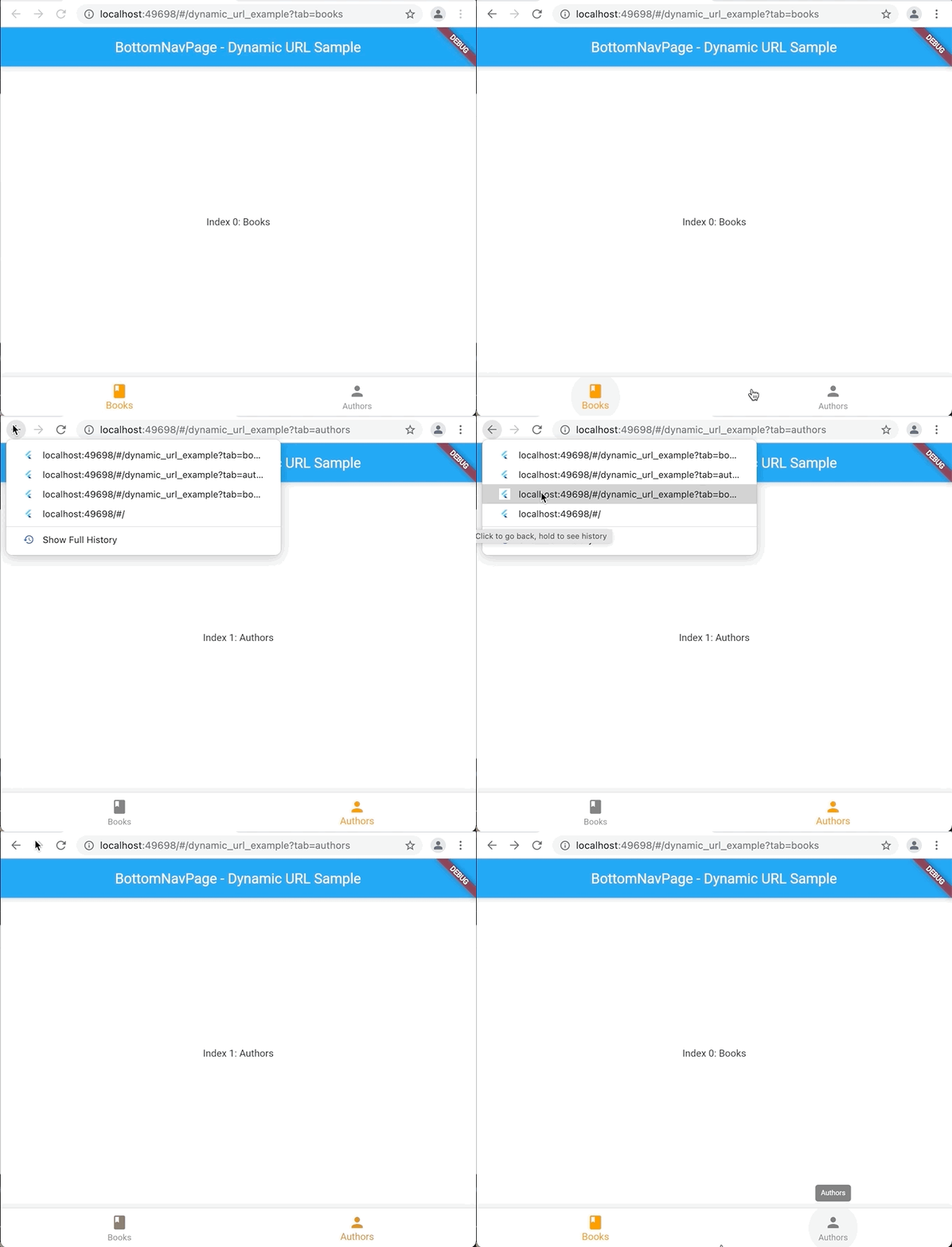
When using dynamic URLs, changing the app's state also changes the browser's URL. To do that:
- Include queries in the templates. E.g: `/dynamic_url_example{?tab}`
- Call `updateParams` method to update browser's URL:
```dart
final aps = APSNavigator.of(context);
aps.updateParams(
params: {'tab': index == 0 ? 'books' : 'authors'},
);
```
- The method above will include a new entry on the browser's history.
- Later, if the user selects such entry, we can recover the previous widget's `State` using:
```dart
@override
void didUpdateWidget(DynamicURLPage oldWidget) {
super.didUpdateWidget(oldWidget);
final values = APSNavigator.of(context).currentConfig.values;
tabIndex = (values['tab'] == 'books') ? 0 : 1;
}
```
:sleepy: What is important to know:
- Current limitation: Any value used at URL must be saved as `string`.
- Don't forget to include a `Key` on the `Page` created by the `PageBuilder` to everything works properly.
### 2. Static URLs Example
Example Link: [Static URLs Example](https://github.com/guilherme-v/aps_navigator/blob/develop/example/lib/pages/examples/static_url_page.dart)
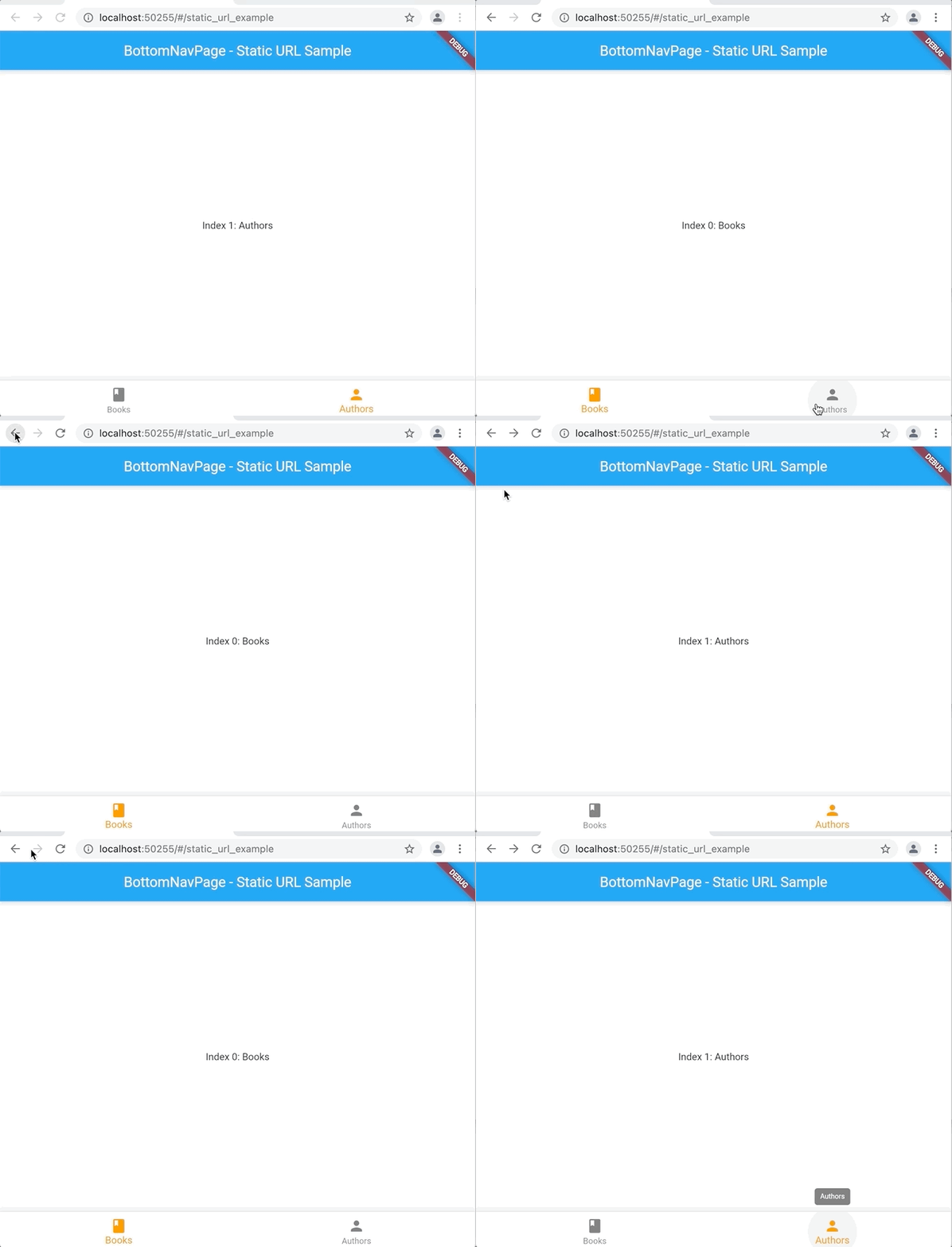
When using static URLs, changing the app's state doesn't change the browser's URL, but it'll generate a new entry on the history. To do that:
- Don't include queries on route templates. E.g: `/static_url_example`
- As we did with Dynamic's URL, call `updateParams` method again:
```dart
final aps = APSNavigator.of(context);
aps.updateParams(
params: {'tab': index == 0 ? 'books' : 'authors'},
);
```
- Then, allow `State` restoring from browser's history:
```dart
@override
void didUpdateWidget(DynamicURLPage oldWidget) {
super.didUpdateWidget(oldWidget);
final values = APSNavigator.of(context).currentConfig.values;
tabIndex = (values['tab'] == 'books') ? 0 : 1;
}
```
:sleepy: What is important to know:
- Don't forget to include a `Key` on the `Page` created by the `PageBuilder` to everything works properly.
### 3. Return Data Example
Example Link: [Return Data Example](https://github.com/guilherme-v/aps_navigator/blob/develop/example/lib/pages/examples/return_data_page.dart)
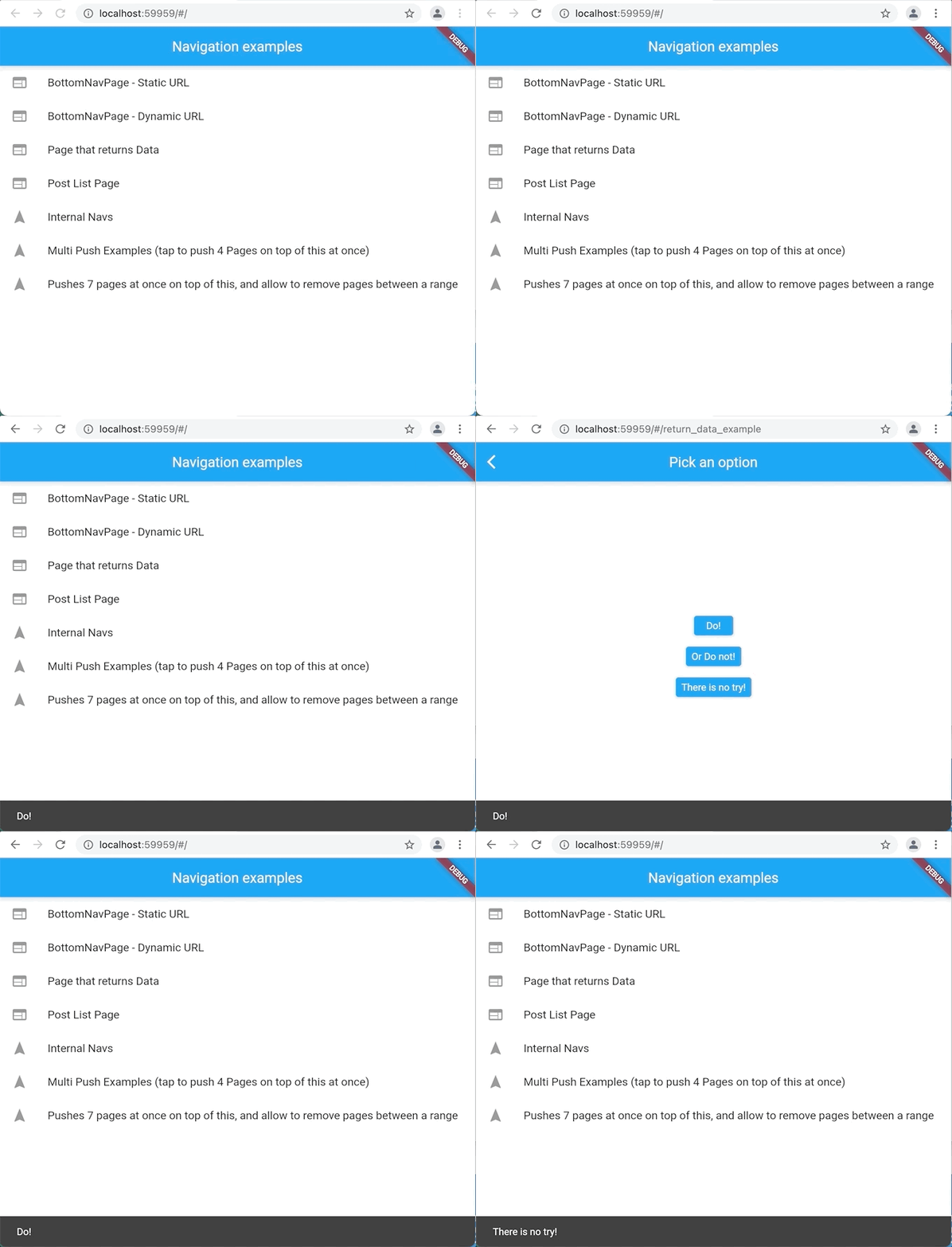
Push a new route and wait the result:
```dart
final selectedOption = await APSNavigator.of(context).push(
path: '/return_data_example',
);
```
Pop returning the data:
```dart
APSNavigator.of(context).pop('Do!');
```
:sleepy: What is important to know:
- Data will only be returned once.
- In case of user navigate your app and back again using the browser's history, the result will be returned at `didUpdateWidget` method as `result,` instead of `await` call.
```dart
@override
void didUpdateWidget(HomePage oldWidget) {
super.didUpdateWidget(oldWidget);
final params = APSNavigator.of(context).currentConfig.values;
result = params['result'] as String;
if (result != null) _showSnackBar(result!);
}
```
### 4. Multi Push
Example Link: [Multi Push Example](https://github.com/guilherme-v/aps_navigator/blob/develop/example/lib/pages/examples/multi/multi_push_page.dart)
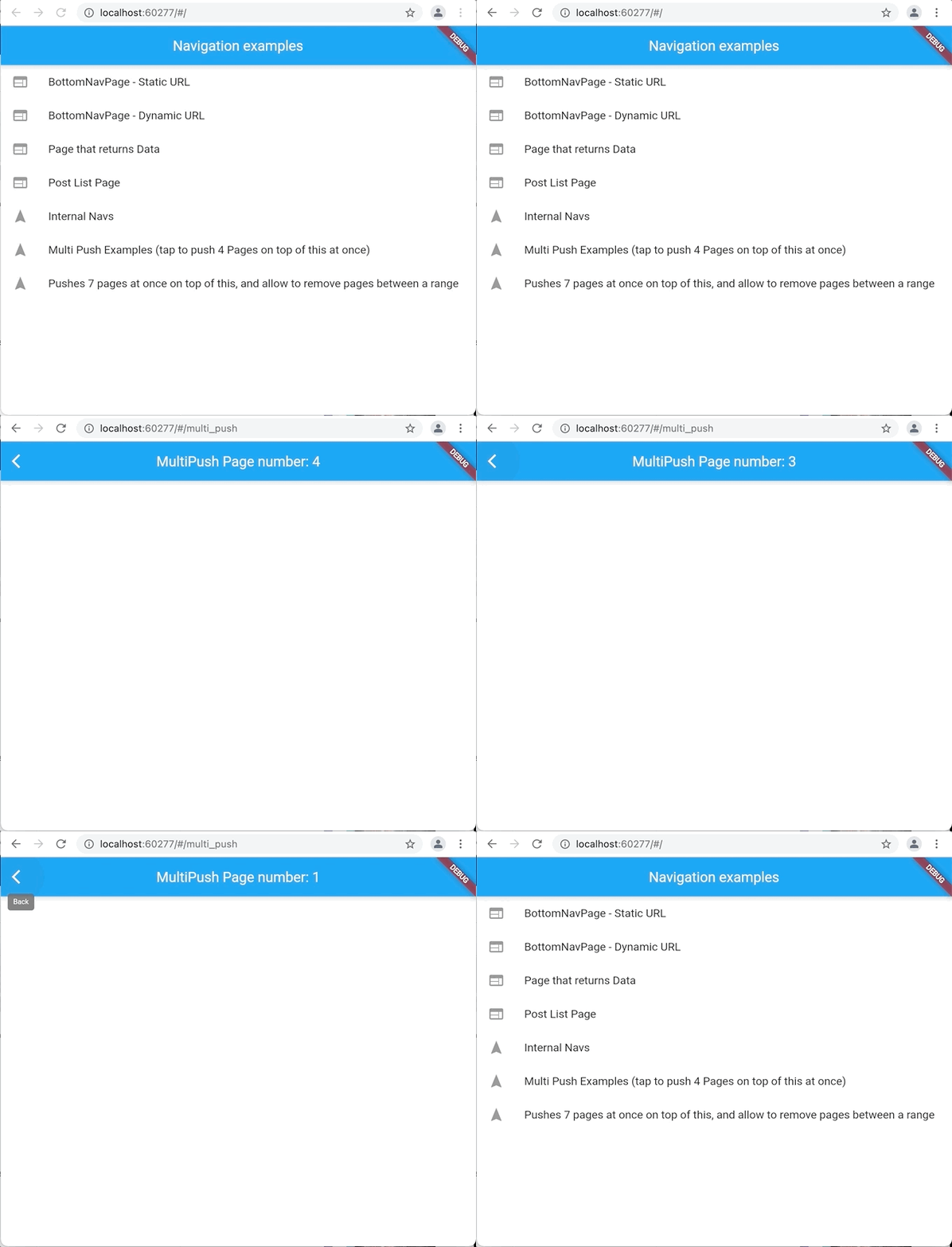
Push a list of the Pages at once:
```dart
APSNavigator.of(context).pushAll(
// position: (default is at top)
list: [
ApsPushParam(path: '/multi_push', params: {'number': 1}),
ApsPushParam(path: '/multi_push', params: {'number': 2}),
ApsPushParam(path: '/multi_push', params: {'number': 3}),
ApsPushParam(path: '/multi_push', params: {'number': 4}),
],
);
```
In the example above `ApsPushParam(path: '/multi_push', params: {'number': 4}),` will be the new top.
:sleepy: What is important to know:
- You don't necessarily have to add at the top; you can use the `position` param to add the routes at the middle of Route Stack.
- Don't forget to include a `Key` on the `Page` created by the `PageBuilder` to everything works properly.
### 5. Multi Remove
Example Link: [Multi Remove Example](https://github.com/guilherme-v/aps_navigator/blob/develop/example/lib/pages/examples/multi/multi_remove_page.dart)
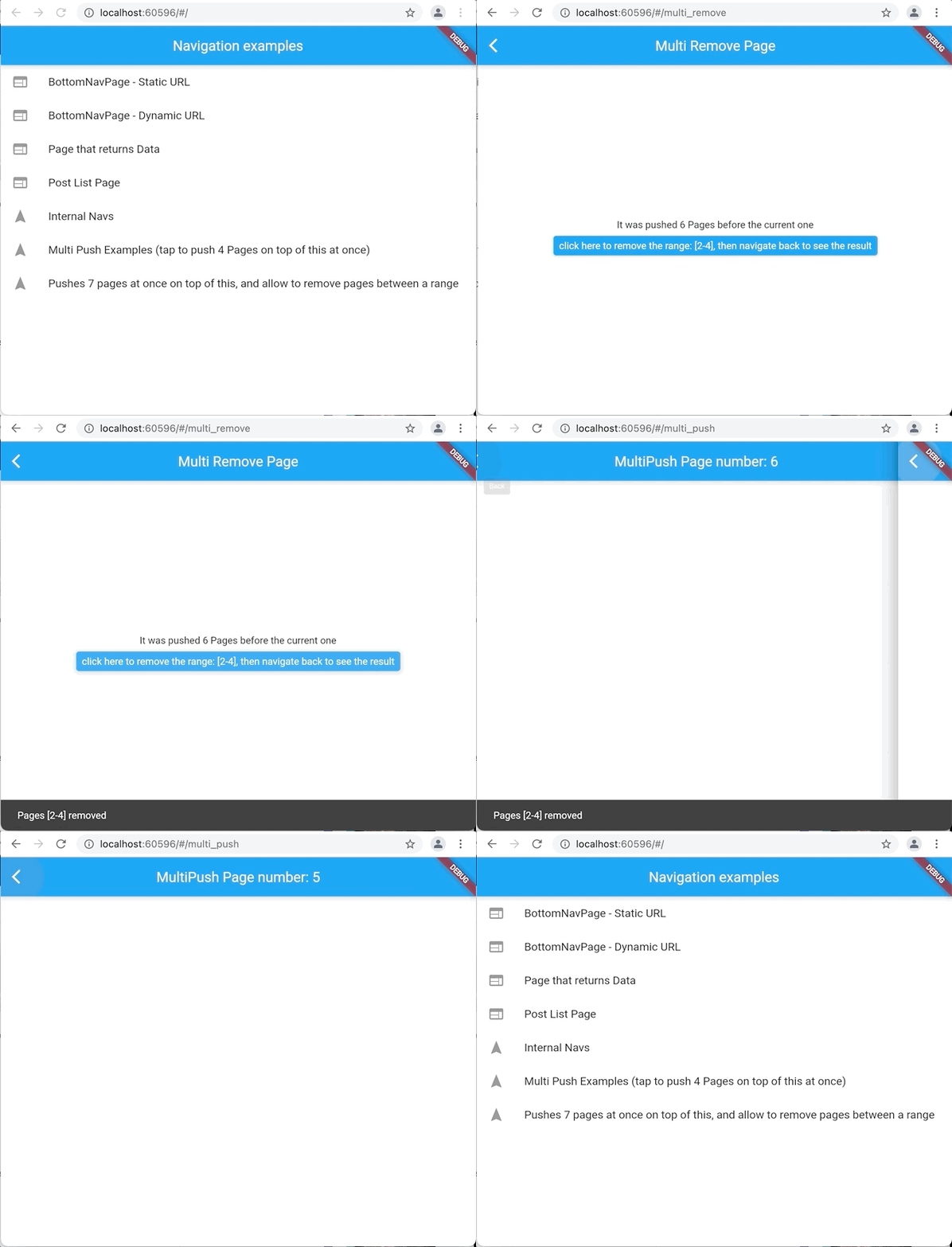
Remove all the Pages you want given a range:
```dart
APSNavigator.of(context).removeRange(start: 2, end: 5);
```
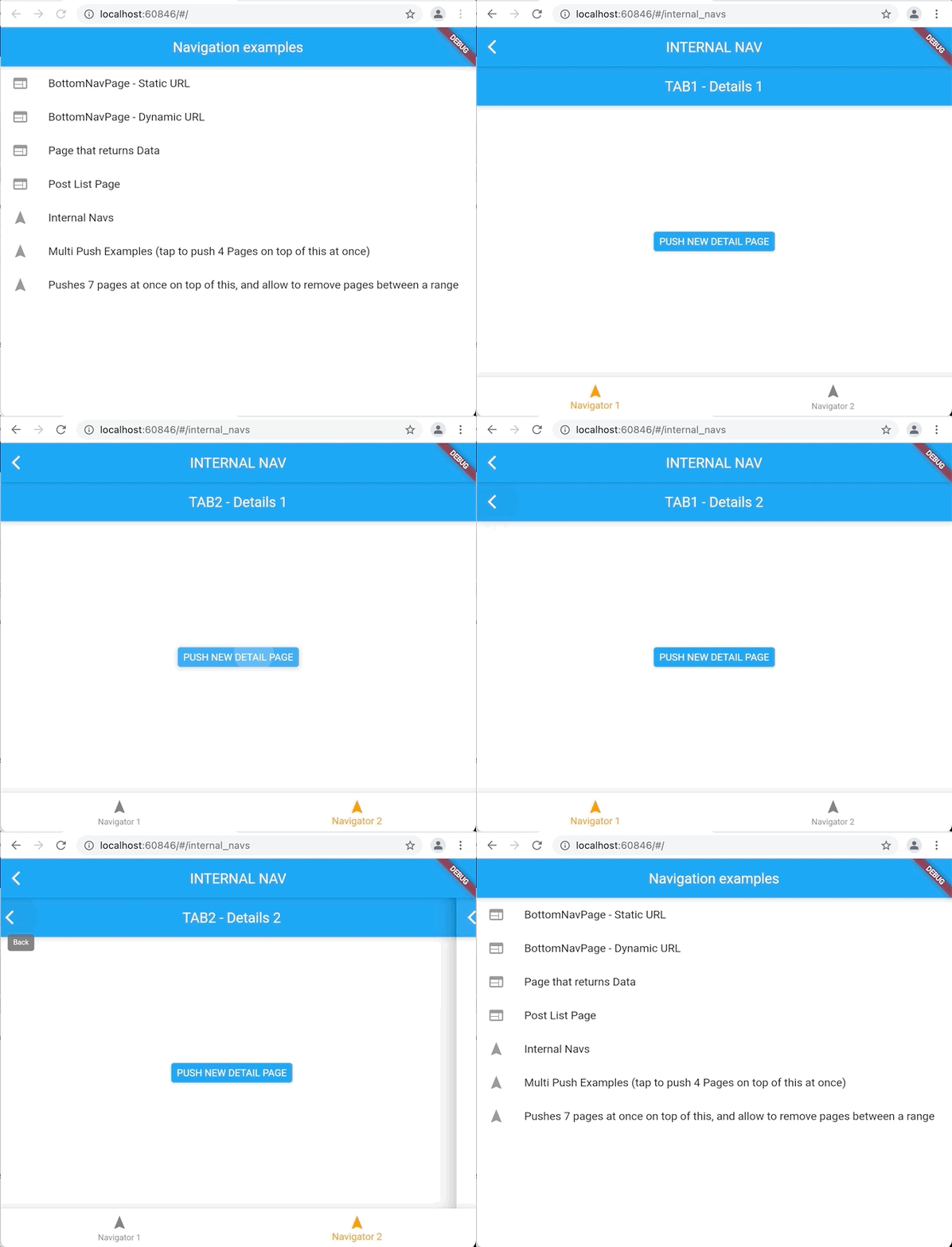
### 6. Internal (Nested) Navigators
Example Link: [Internal Navigator Example](https://github.com/guilherme-v/aps_navigator/blob/develop/example/lib/pages/examples/internal_navigator/internal_navigator.dart)
```dart
class InternalNavigator extends StatefulWidget {
final String initialRoute;
const InternalNavigator({Key? key, required this.initialRoute})
: super(key: key);
@override
_InternalNavigatorState createState() => _InternalNavigatorState();
}
class _InternalNavigatorState extends State {
late APSNavigator childNavigator = APSNavigator.from(
parentNavigator: navigator,
initialRoute: widget.initialRoute,
initialParams: {'number': 1},
routes: {
'/tab1': Tab1Page.route,
'/tab2': Tab2Page.route,
},
);
@override
void didChangeDependencies() {
super.didChangeDependencies();
childNavigator.interceptBackButton(context);
}
@override
Widget build(BuildContext context) {
return Router(
routerDelegate: childNavigator,
backButtonDispatcher: childNavigator.backButtonDispatcher,
);
}
}
```
:sleepy: What is important to know:
- Current limitation: Browser's URL won't update based on internal navigator state
## Warning & Suggestions
- :construction: Although this package is already useful, it's still in the **Dev stage**.
- :stuck_out_tongue: I'm not sure if creating yet another navigating library is something good - we already have a lot of confusion around it today.
- :hankey: This lib is not back-compatible with the old official Navigation API - at least for now (Is it worth it?).
- :bug: Do you have any ideas or found a bug? Fell free to open an issue! :)
- :information_desk_person: Do you want to know the current development stage? Check the [Project's Roadmap](https://github.com/guilherme-v/aps_navigator/projects/1).
## Maintainers
- [Gui Silva](https://github.com/guilherme-v)