https://github.com/guilhermeasn/mask-hooks
Lightweight package with functions and hooks for masking data inputs and outputs for Node.JS projects
https://github.com/guilhermeasn/mask-hooks
hooks input javascript-library lightweight mask react typescript usemask
Last synced: 8 months ago
JSON representation
Lightweight package with functions and hooks for masking data inputs and outputs for Node.JS projects
- Host: GitHub
- URL: https://github.com/guilhermeasn/mask-hooks
- Owner: guilhermeasn
- License: mit
- Created: 2021-03-16T20:59:34.000Z (about 5 years ago)
- Default Branch: master
- Last Pushed: 2024-09-28T12:53:23.000Z (over 1 year ago)
- Last Synced: 2025-10-02T11:58:55.842Z (9 months ago)
- Topics: hooks, input, javascript-library, lightweight, mask, react, typescript, usemask
- Language: TypeScript
- Homepage: http://maskhooks.gn.dev.br/
- Size: 2.98 MB
- Stars: 19
- Watchers: 2
- Forks: 3
- Open Issues: 0
-
Metadata Files:
- Readme: README.md
- License: LICENSE
Awesome Lists containing this project
README
# mask-hooks v3
[](https://github.com/guilhermeasn/mask-hooks/actions/workflows/tests.yml)
[](https://github.com/guilhermeasn/mask-hooks/actions/workflows/pages/pages-build-deployment)
[](https://www.npmjs.com/package/mask-hooks/v/latest)
[](https://bundlephobia.com/package/mask-hooks)
[](https://www.npmjs.com/package/mask-hooks/)
Lightweight package with functions and hooks for masking data inputs and outputs for Node.JS projects.
[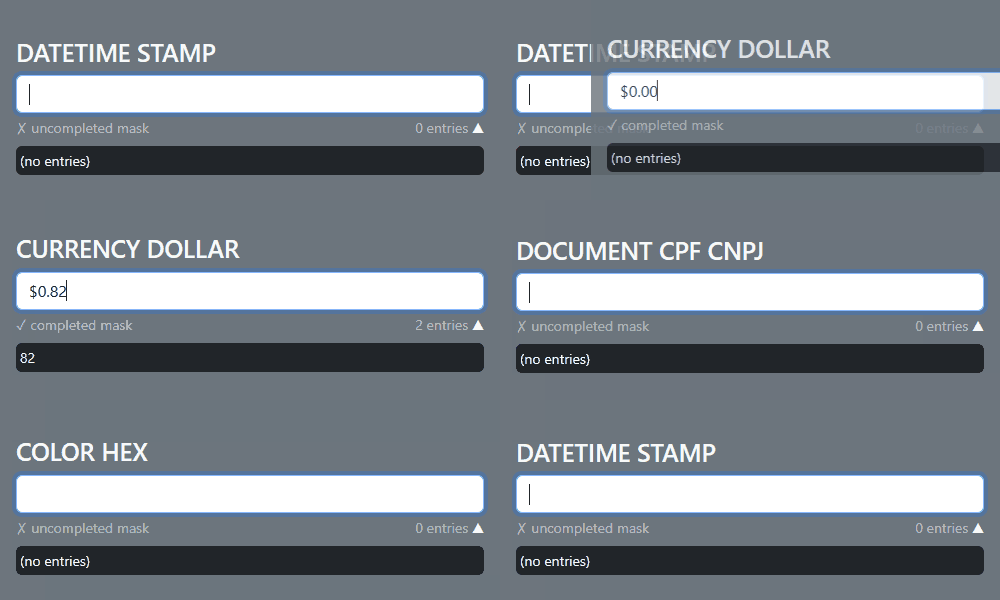](https://guilhermeasn.github.io/mask-hooks/)
[Examples page](https://guilhermeasn.github.io/mask-hooks/)
## Installation
Run the command below in the terminal to install **mask-hooks** in your project
```
npm install mask-hooks
```
Or with Yarn
```
yarn add mask-hooks
```
## Examples with React
- Custom Mask - [Sandbox](https://codesandbox.io/p/sandbox/amazing-sea-2m3m8j?file=%2Fsrc%2Fexamples%2FCustomMask.js)
```js
import { useMask } from "mask-hooks";
import { useState } from "react";
export default function InputMask() {
const mask = useMask({
masks: '$ #,##',
placeholder: '0',
reverse: true,
infinity: {
add: '.',
each: 3
},
maxentries: 8
});
const [ value, setValue ] = useState(mask(''));
return (
setValue(mask(input.currentTarget.value)) }
/>
);
}
```
- Custom Mask with Numerical Range - [Sandbox](https://codesandbox.io/p/sandbox/amazing-sea-2m3m8j?file=%2Fsrc%2Fexamples%2FCustomMaskNumericalRange.js)
```js
import { useMask } from 'mask-hooks';
export default function Time() {
const time = useMask({
masks: '[0-23]:[0-59]:[0-59]'
});
return (
Time: { time('71900') /* print 07:19:00 */ }
);
}
```
- Preset Mask - [Sandbox](https://codesandbox.io/p/sandbox/amazing-sea-2m3m8j?file=%2Fsrc%2Fexamples%2FPresetMask.js)
```js
import { useMask, presets } from 'mask-hooks';
export default function MaskDocs() {
const documentMask = useMask(presets.DOCUMENT_CPF_CNPJ);
return (
<>
{ documentMask('11122233345') /* print 111.222.333-45 */ }
{ documentMask('11222333000145') /* print 11.222.333/0001-45 */ }
>
);
}
```
- Changed Preset Mask - [Sandbox](https://codesandbox.io/p/sandbox/amazing-sea-2m3m8j?file=%2Fsrc%2Fexamples%2FChangedPresetMask.js)
```js
import { useMask, getPresetMask } from 'mask-hooks';
export default function MaskProduct() {
const productKeyMask = useMask(getPresetMask('PRODUCT_KEY', { placeholder: '_' }));
return (
{
productKeyMask('h3pbvfhb27rjtgh')
/* print H3PBV-FHB27-RJTGH-_____-_____ */
}
);
}
```
- Mask verification completed - [Sandbox](https://codesandbox.io/p/sandbox/amazing-sea-2m3m8j?file=%2Fsrc%2Fexamples%2FMaskVerificationCompleted.js)
```js
import { useCompleteMask, presets } from "mask-hooks";
import { useState } from "react";
export default function InputMask() {
const maskComplete = useCompleteMask(presets.DATETIME_STAMP_LIMITED);
const [ data, setData ] = useState(maskComplete(''));
return (
setData(maskComplete(input.currentTarget.value)) }
style={ { color: data.completed ? "#000000" : "#ff0000" } }
title={ `${ data.entries } entries: ${ data.cleaned }` }
/>
);
}
```
- Mask verification completed and tested - [Sandbox](https://codesandbox.io/p/sandbox/amazing-sea-2m3m8j?file=%2Fsrc%2Fexamples%2FMaskVerificationCompletedTested.js)
```js
import { useCompleteMask, presets } from "mask-hooks";
import { useState } from "react";
export default function InputMask() {
// When filling out the mask is completed a test function
// is applied to check whether a valid date was entered,
// the result is received by the 'passing' key
const maskTest = (result) => !isNaN(Date.parse(result));
const maskComplete = useCompleteMask(presets.DATE_STAMP, maskTest);
const [ data, setData ] = useState(maskComplete(''));
return (
setData(maskComplete(input.currentTarget.value)) }
style={ { color: data.passing ? "#00ff00" : "#ff0000" } }
/>
);
}
```
- use mask directly - [Sandbox](https://codesandbox.io/p/sandbox/amazing-sea-2m3m8j?file=%2Fsrc%2Fexamples%2FUseMaskDirectly.js)
```js
import { applyMask, presets } from 'mask-hooks';
export default function maskColor(target) {
return applyMask(target, presets.COLOR_HEX);
}
```
## Resources
Resources exported by the **mask-hooks** package:
- **Function `useMask`**: main resource to use package. Returns a function to use the preconfigured mask.
```ts
function useMask(settings: MaskProps): (target: T) => string
```
- **Function `useCompleteMask`**: Returns a function to use the preconfigured mask with additional information in the result.
```ts
function useCompleteMask(settings: MaskProps, onComplete ?: (result : string, cleaned: string) => boolean): (target: T) => { result: string, completed: boolean; entries: number; cleaned: string; passing : boolean | null; }
```
- **Function `applyMask`**: use a mask directly on the target
```ts
function applyMask(target : T, settingsOrMasks : MaskProps | string | string[]) : string
```
- **Class `Mask`**: application mask core
```ts
class Mask {
static defaultPatterns: {
'#': RegExp;
'@': RegExp;
'?': RegExp;
};
static reverser(target: string): string;
static transform(target: string, type: Required['transform']): string;
static padding(target: string | number, length: number, char?: string, left?: boolean): string;
constructor(props: MaskProps);
get props(): Readonly>;
get completed(): boolean;
get cleaned(): string;
get entries(): number;
apply(target: T): string;
}
```
- **Constant `presets`**: preconfigured masks
```ts
const presets: { [key in PresetOption]: MaskProps; }
```
- **Function `getPresetMask`**: get a preset, optionally being able to change its settings
```ts
function getPresetMask(preset: PresetOption, change: Partial = {}): MaskProps
```
## MaskProps
The useMask receives the settings parameter of type MaskProps. See available settings:
|Prop|Type|Default|Details|
|---|---|---|---|
|**masks**|`string`
`Array`||The masks that will be applied to the target. By default the characters `?`, `#`, `@` will be replaced by letters or numbers, numbers, letters, respectively. This character pattern can be changed. You can also use a Numerical Range to limit a numeric value to be entered using the pattern [\-\]. To escape a replacement character use `\` before it.|
|**placeholder**|`string`|`''`|Autofill of the mask to be filled|
|**reverse**|`boolean`|`false`|Mask fill in inverted mode|
|**transform**|`'uppercase'`
`'lowercase'`
`'capitalize'`
`'capitalizeAll'`
`'none'`|`'none'`|Apply a transformation to the result string|
|**infinity**|`boolean`
`{each:number;add:string;}`|`false`|Allows data entry indefinitely by the last mask replacement character|
|**maxentries**|`number`
`null`|`null`|If specified a number will limit the amount of user entries|
|**patterns**|`{[key in string]: RegExp}`|`{'#': /[0-9]/,'@': /[A-Za-z]/,'?': /[A-Za-z0-9]/}`|Characters to be substituted in the mask if approved by the regular expression|
## Presets
You can import pre-established mask configurations. See the options:
- ONLY_NUMBERS
- ONLY_LETTERS
- ONLY_CHARS
- DATE_STAMP
- DATE_PTBR
- DATETIME_STAMP
- DATETIME_PTBR
- DATE_STAMP_LIMITED
- DATE_PTBR_LIMITED
- DATETIME_STAMP_LIMITED
- DATETIME_PTBR_LIMITED
- PHONE_USA
- PHONE_BR
- CURRENCY_POINT
- CURRENCY_COMMA
- CURRENCY_DOLLAR
- CURRENCY_PTBR
- CURRENCY_DOLLAR_LIMITED
- CURRENCY_PTBR_LIMITED
- DOCUMENT_CPF
- DOCUMENT_CNPJ
- DOCUMENT_CPF_CNPJ
- ZIPCODE_USA
- ZIPCODE_BR
- PRODUCT_KEY
- COLOR_HEX
- CAPITALIZE_ALL
## Migrating v2 to v3
*The third version of the mask-hooks package now has the numerical range feature.*
## Author
* **Guilherme Neves** - [github](https://github.com/guilhermeasn/) - [website](https://gn.dev.br/)
## License
This project is under the MIT license - see file [LICENSE](https://github.com/guilhermeasn/mask-hooks/blob/master/LICENSE) for details.