https://github.com/guisouza/DSS
:fire: Dynamic Style Sheets
https://github.com/guisouza/DSS
dss dynamic dynamic-style-sheets
Last synced: about 1 year ago
JSON representation
:fire: Dynamic Style Sheets
- Host: GitHub
- URL: https://github.com/guisouza/DSS
- Owner: guisouza
- License: other
- Created: 2015-09-16T23:40:33.000Z (almost 11 years ago)
- Default Branch: master
- Last Pushed: 2016-04-29T00:39:19.000Z (about 10 years ago)
- Last Synced: 2024-12-15T09:20:56.784Z (over 1 year ago)
- Topics: dss, dynamic, dynamic-style-sheets
- Language: JavaScript
- Homepage:
- Size: 161 KB
- Stars: 511
- Watchers: 43
- Forks: 38
- Open Issues: 2
-
Metadata Files:
- Readme: README.md
- License: LICENSE
Awesome Lists containing this project
README
# DSS (NOT SAFE FOR PRODUCTION)
Dynamic Style Sheets
for dynamic projects
[](https://gitter.im/guisouza/dss?utm_source=badge&utm_medium=badge&utm_campaign=pr-badge&utm_content=badge)

***[LIVE DEMO (Apple TV)](https://s3-sa-east-1.amazonaws.com/dss-examples/Interstellar/index.html "LIVE DEMO (Apple TV)")***
# Dynamic Style Sheets
Dynamic Style Sheets gives you the ability to dynamically set values to your css properties on the go.
***First things first ...***
```bash
bower install dss;
```
```html
```
***then ...***
```html
```
***DSS loaded!***
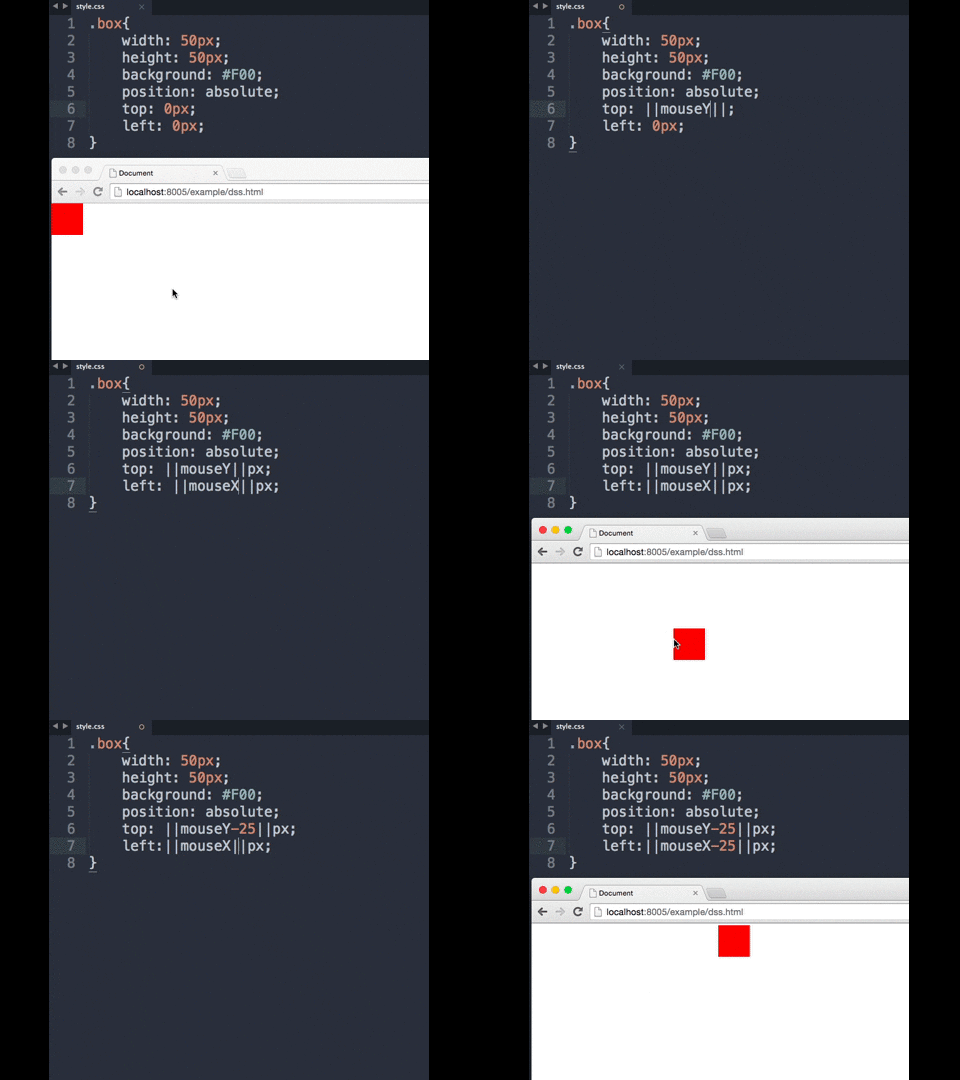
***Now you can put DSS declarations in your sheet in three different flavours:***
##### - Double pipe
```css
.box{
width: 50px;
height: 50px;
background: ||companyColor:red||;
position: absolute;
top: ||mouseY-25||px;
left: ||mouseX-25||px;
}
```
##### - Pseudo dss selector
```css
.box:dss{
width: 50px;
height: 50px;
background: companyColor:red;
position: absolute;
top: mouseY-25;
left: mouseX-25;
}
```
##### - "dss-" preffix property
```css
.box{
width: 50px;
height: 50px;
dss-background: companyColor:red;
position: absolute;
dss-top: mouseY-25;
dss-left: mouseX-25;
}
```
The **mouseY** and **mouseX** identifiers will automatically receive the mouse position on the screen, every time it changes.
The **companyColor** identifier must be set over javascript, but until you do, it will receive the default value **red**.
```js
dss.setProperty('companyColor','#1616FF')
```
# Default Auto-Binded Properties
##### **mouseX**
Automatically receives the x position of the cursor related to the document.
##### **mouseY**
Automatically receives the y position of the cursor related to the document.
##### **mouseClientX**
Automatically receives the x position of the cursor related to the viewport
##### **mouseClientY**
Automatically receives the y position of the cursor related to the viewport
##### **scrollX**
Automatically receives the x position of the window scroll.
##### **scrollY**
Automatically receives the y position of the window scroll.
##### **windowWidth**
Automatically receives the window width.
##### **windowHeight**
Automatically receives the window height.
# DSS Helpers
**dss.floor**
```css
/*margin-top will aways be 200 or more*/
header{
margin-top : ||dss.floor(200)(scrollY)||px;
}
```
**dss.ceil**
```css
/*margin-top will aways be 200 or less*/
header{
margin-top : ||dss.ceil(200)(scrollY)||px;
}
```
**dss.bounds**
```css
/*margin-top will aways be something between 100 and 200*/
header{
margin-top : ||dss.bounds(100,200)(scrollY)||px;
}
```
**dss.pon**
```css
/*return a positive number or 0, opacity will never be less than 0*/
header{
opacity : ||dss.pon(-200+scrollX)||;
}
```
**dss.if**
```css
/*if the scrollX is greater than 200 so opacity will be 1 else will be 0*/
header{
opacity : ||dss.if(scrollX > 200)(1)(0)||;
}
```
# Javascript API
## Managing properties
**dss.setProperty**
```js
dss.setProperty('companyColor','#1616FF')
//OR
dss.setProperty({
companyColor:'#1616FF'
})
```
**dss.setDynamicProperty**
```js
//will generate mouseX and mouseY property everytime document fires mousemove
dss.setDynamicProperty('mouse',function(){
return{
context : document,
event : 'mousemove',
getter : function(e){
return {
x : e.pageX,
y : e.pageY,
};
}
};
});
```
## Events
**init**
```javascript
dss.on('init',function(){
console.log('DSS initialized with its first render Cycle =D ')
})
```
**render**
```javascript
dss.on('render',function(){
console.log('there is a render cycle =D')
})
```
# Version
0.1.2 **Beta**
# Building
```bash
npm install && grunt
```