https://github.com/guomaimang/jade
JADE is a social application that means to revolutionalize the way travelers meet and document their journeys through the integration of social networking and travel related functions.
https://github.com/guomaimang/jade
android azure devops java kotlin
Last synced: 3 months ago
JSON representation
JADE is a social application that means to revolutionalize the way travelers meet and document their journeys through the integration of social networking and travel related functions.
- Host: GitHub
- URL: https://github.com/guomaimang/jade
- Owner: guomaimang
- License: gpl-3.0
- Created: 2024-10-24T14:37:07.000Z (over 1 year ago)
- Default Branch: main
- Last Pushed: 2025-03-19T18:21:35.000Z (over 1 year ago)
- Last Synced: 2025-03-19T19:28:58.704Z (over 1 year ago)
- Topics: android, azure, devops, java, kotlin
- Language: JavaScript
- Homepage: https://hub.docker.com/r/hanjiaming/jade
- Size: 4.82 MB
- Stars: 1
- Watchers: 1
- Forks: 0
- Open Issues: 0
-
Metadata Files:
- Readme: README.md
- License: LICENSE
Awesome Lists containing this project
README
# Jade
JADE is a social application that means to revolutionalize the way travelers meet and document their journeys through the integration of social networking and travel related functions.
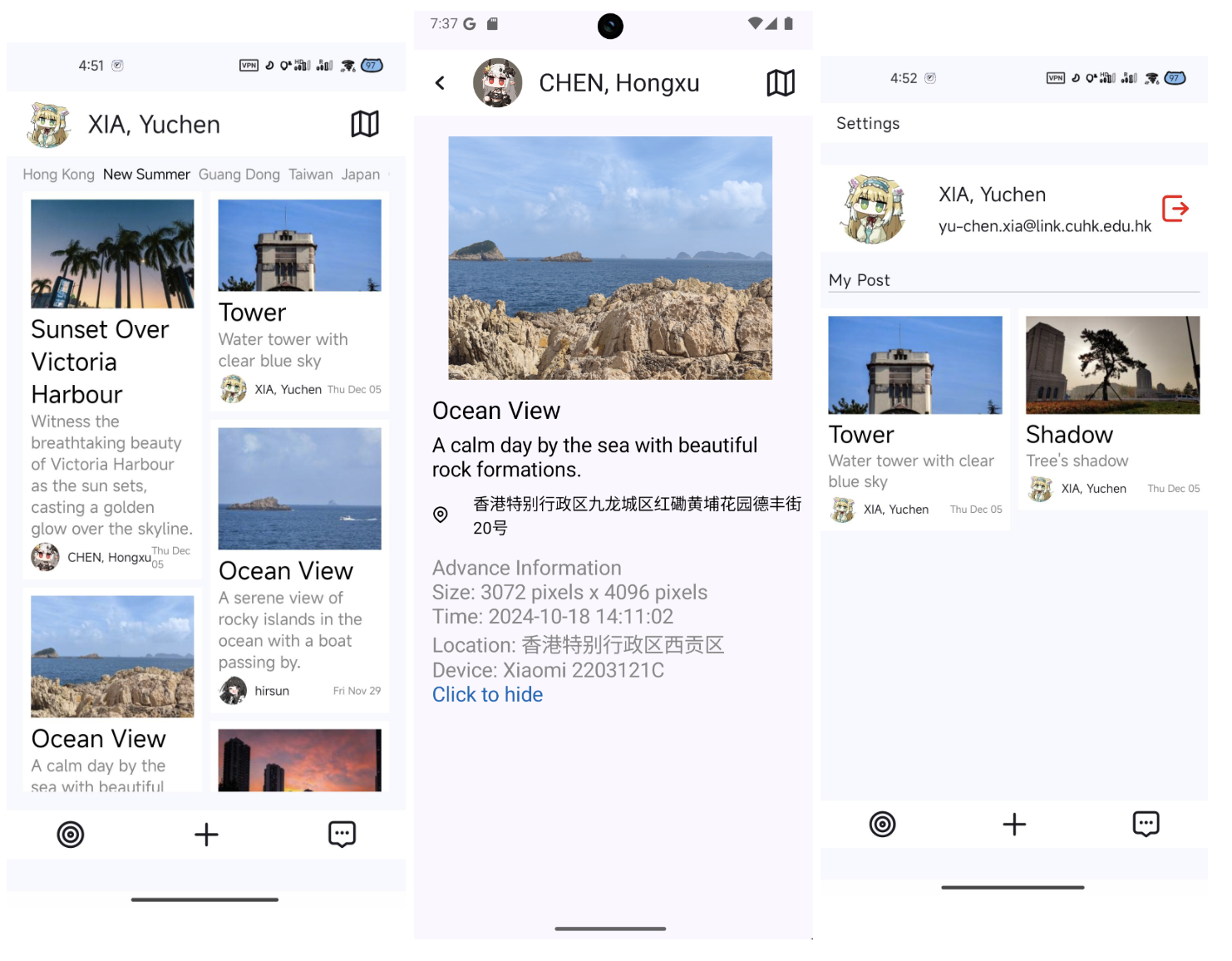
Jade是基于Spring Boot和Android的现代化全栈应用程序,提供了后端服务和移动端前端应用。
## 项目结构
- `Server/`: 后端服务,基于Spring Boot实现
- `jade/`: Spring Boot应用源码
- `database/`: 数据库脚本
- `FrontEnd/`: 前端应用
- `Jade/`: Android应用项目
## 技术栈
### 后端
- Spring Boot 3.3.5
- Java 17+
- MySQL 8.4.0
- Redis
- JWT认证
- Azure AD OAuth2集成
- Kafka消息队列
### 前端
- Android (Kotlin)
- Gradle Kotlin DSL构建
## 功能特性
- 用户认证与授权(支持JWT和Azure AD SSO)
- 数据存储与检索
- 文件上传与管理
- 消息通知系统
- RESTful API接口
## 开发环境配置
### 后端要求
- JDK 17+
- Maven 3.9+
- MySQL 8.4.0
- Redis
### 前端要求
- Android Studio
- Gradle 8.0+
## 构建与运行
### 后端
1. 导入数据库脚本
```bash
mysql -u username -p jade < Server/database/jade.sql
```
2. 配置环境变量或修改配置文件
3. 使用Maven构建
```bash
cd Server/jade
mvn clean package
```
4. 运行应用
```bash
java -jar target/jade-0.0.1-SNAPSHOT.jar
```
### 前端
1. 使用Android Studio打开`FrontEnd/Jade`目录
2. 配置应用连接到后端服务
3. 构建并运行应用
## Deployment
### Docker
您可以使用Docker快速部署后端服务。首先,将SQL脚本导入到MySQL数据库中(MySQL 8.4.0)。
```bash
docker run -p 3127:8080 -d --name jade \
-e MYSQL_URL="jdbc:mysql://172.17.0.1:3306/jade?useUnicode=true&characterEncoding=utf-8&useSSL=false&useAffectedRows=true&allowPublicKeyRetrieval=true" \
-e MYSQL_USERNAME=jade \
-e MYSQL_PASSWORD=123456 -e REDIS_HOST=172.17.0.1 \
-e REDIS_PORT=6379 \
-e REDIS_PASSWORD=1234 \
-e REDIS_DATABASE=4 \
-e AZURE_AD_CLIENT_ID=12345 \
-e AZURE_AD_CLIENT_SECRET=23456
hanjiaming/jade:latest
```
请根据您的环境修改环境变量。
### 环境变量
以下是可配置的环境变量:
| 变量名 | 描述 | 默认值 |
|---|---|---|
| MYSQL_URL | MySQL数据库连接URL | jdbc:mysql://172.17.0.1:3306/jade?useUnicode=true&characterEncoding=utf-8&useSSL=false&useAffectedRows=true&allowPublicKeyRetrieval=true |
| MYSQL_USERNAME | MySQL用户名 | jade |
| MYSQL_PASSWORD | MySQL密码 | 123456 |
| REDIS_HOST | Redis主机 | 172.17.0.1 |
| REDIS_PORT | Redis端口 | 6379 |
| REDIS_PASSWORD | Redis密码 | 1234 |
| REDIS_DATABASE | Redis数据库索引 | 4 |
| PICTURES_PATH | 图片存储路径 | resource |
| PICTURES_MAX_SIZE | 图片最大大小 | 10MB |
| JWT_SIGN_KEY | JWT签名密钥 | NuwhbujHwsvJpwq2peJGkw23ejTmhqoqh2tydkei9izheoo9 |
| JWT_EXPIRE_PERIOD | JWT过期时间(毫秒) | 1209600000 |
| AZURE_AD_CLIENT_ID | Azure AD客户端ID | 12345 |
| AZURE_AD_CLIENT_SECRET | Azure AD客户端密钥 | 23456 |
| AZURE_AD_TENANT_ID | Azure AD租户ID | common |
| AZURE_AD_REDIRECT_URI | OAuth2重定向URI | http://localhost:8080/oauth2.html |
| KAFKA_BOOTSTRAP_SERVERS | Kafka服务器地址 | 10.1.0.8:9092 |
## 开源许可
本项目基于LICENSE文件中指定的许可协议开源。