https://github.com/gupta-aryaman/blogger
A blogging webapp made via flask connected to a sqlite database via SQLAlchemy
https://github.com/gupta-aryaman/blogger
flask python
Last synced: 3 months ago
JSON representation
A blogging webapp made via flask connected to a sqlite database via SQLAlchemy
- Host: GitHub
- URL: https://github.com/gupta-aryaman/blogger
- Owner: Gupta-Aryaman
- Created: 2022-12-31T09:45:20.000Z (over 3 years ago)
- Default Branch: main
- Last Pushed: 2024-01-23T18:05:49.000Z (over 2 years ago)
- Last Synced: 2025-02-03T21:34:32.761Z (over 1 year ago)
- Topics: flask, python
- Language: HTML
- Homepage: http://www.blogger-app.me
- Size: 27.1 MB
- Stars: 1
- Watchers: 2
- Forks: 1
- Open Issues: 0
-
Metadata Files:
- Readme: README.md
Awesome Lists containing this project
README

## Overview
blogger is web application made using flask (a microweb framework) and
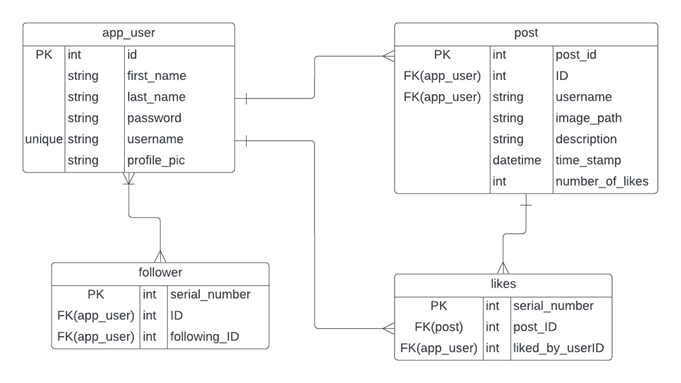
connected to a sqlite database using sqlalchemy as an ORM (Object Relational Model). The web app contains basic functionalities such as
signing up a user, logging in, seeing another user’s profile, seeing your own profile, editing your own profile,
adding posts, following/unfollowing other users, interaction with other user’s posts et cetera.
## Requirements
* `python` (Python 3.7 up to 3.10 supported)
* `pip` (Python package manager)
## Setup
Create a virtual environment to run the web app prevent any issues (optional):
1) Open the project folder and right click there and click open terminal
2) Create a virtual environment there by using this command -
```
python3 -m venv my-project-env
```
3) Activate virutal environment by using this command(on ubnutu) -
```
source my-project-env/bin/activate
```
Now you are in a virtual environment!
4) Install all the packages listed in requirements.txt using this command -
```
pip install -r requirements.txt
```
5) To run the program write this command in terminal -
```
python app.py
```
6) The url on which the app is running will be shown as - `Running on http://127.0.0.1:5000`
7) Copy the url and paste it in the browser, if you see the login page the flask app is running successfully
## ER Diagram