https://github.com/gusta01010/progressivepiano
An easy-to-use virtual piano player that simplifies playing sheet music on your keyboard.
https://github.com/gusta01010/progressivepiano
autoplay autoplayer roblox roblox-script virtual-keyboard virtual-piano-auto-player virtual-piano-keys virtual-piano-player
Last synced: 8 months ago
JSON representation
An easy-to-use virtual piano player that simplifies playing sheet music on your keyboard.
- Host: GitHub
- URL: https://github.com/gusta01010/progressivepiano
- Owner: gusta01010
- License: mit
- Created: 2024-10-09T20:57:30.000Z (over 1 year ago)
- Default Branch: multikey
- Last Pushed: 2025-06-07T15:08:03.000Z (about 1 year ago)
- Last Synced: 2025-06-22T18:51:51.581Z (about 1 year ago)
- Topics: autoplay, autoplayer, roblox, roblox-script, virtual-keyboard, virtual-piano-auto-player, virtual-piano-keys, virtual-piano-player
- Language: Python
- Homepage:
- Size: 560 KB
- Stars: 1
- Watchers: 1
- Forks: 0
- Open Issues: 0
-
Metadata Files:
- Readme: .github/README.md
- License: LICENSE
Awesome Lists containing this project
README


***
Progressive Piano provides a modern way of playing virtual-piano based sheets on your computer keyboard, offering support for `.txt` sheets.
## What is Progressive Piano?
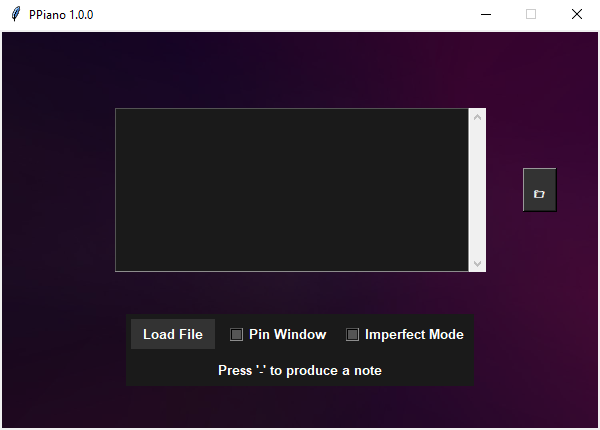
Progressive Piano (or PPiano for short) is an application designed for learning and entertainment. It features a clean, dark-mode user interface that allows you to play virtual piano sheets using your keyboard.
## Key Features
* **Advanced Keypress Progression:** Play notes accurately and fluidly.
* **Simple Keyboard Controls:** Easy-to-learn controls for playing sheets.
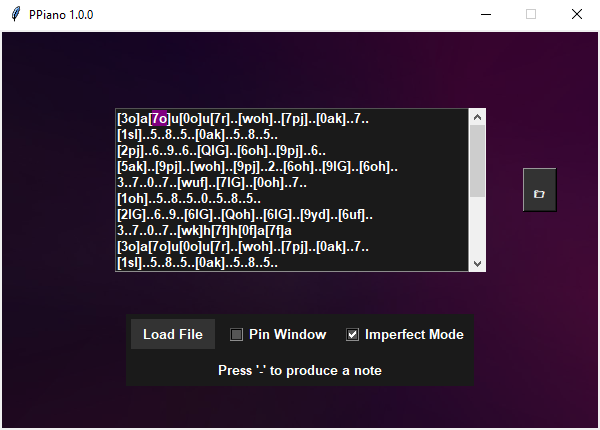
* **`.txt` Sheet Support:** Loads `.txt` sheets from the application's directory or a dedicated `Sheets` subfolder.
* **User-Friendly Dark Mode UI:** Reduces eyestrain during extended use.
* **Imperfect Mode:** Simulates subtle human variations in note timing for a more realistic sound (optional feature).
* **Current Note Highlight:** Visually tracks the note to be played.
* **Window Pinning:** Keeps the application window on top for easy sheet reading.
## Installation and Usage
1. **Download:** Download the latest release from the [Releases](https://github.com/gusta01010/ProgressivePiano/releases) section of this repository.
2. **Extract:** Extract the downloaded archive to a folder of your choice.
3. **Run:** Run `PPiano.exe`.
4. **Sheets:** Place `.txt` sheet files in the same directory as `PPiano.exe` or in a subfolder named `Sheets`.
## Branches
Progressive Piano offers two branches to cater to different user needs:
* **`main` (or `singlekey`):** The stable branch, recommended for most users. Provides a reliable and polished experience.
* **`multikey`:** The experimental branch, for users who want to try out the latest features (may have occasional bugs). This branch enables playing chords and simultaneous notes.
## Commands
### Multikey Branch (`multikey`)
| Hotkey | Action |
| :------------ | :---------------------------------------------------------------------------- |
| `-` `+` `*` | Produces a note (can be held) and progresses to the next note. |
| `end` | Selects a random sheet from the application's directory or the `Sheets` folder. |
| `del` `,` (comma) | Returns to the beginning of the sheet. |
### Singlekey Branch (`main` or `singlekey`)
| Hotkey | Action |
| :------------ | :---------------------------------------------------------------------------- |
| `-` | Produces a note (can be held) and progresses to the next note. |
| `del` `,` (comma) | Returns to the beginning of the sheet. |
## Contributing
Contributions are very welcome! If you'd like to contribute, please follow these steps:
1. Fork the repository.
2. Create a new branch for your feature or bug fix.
3. Make your changes and commit them.
4. Submit a pull request to the `singlekey` or `multikey` branch.
## Questions or Suggestions?
Feel free to open an issue on GitHub or send me a direct message on Discord:
* Discord: sonic\_8783
## Screenshots
## License
This project is licensed under the [MIT License](../LICENSE) - see the `LICENSE` file for details.