https://github.com/hackerb9/ugrep
find unicode characters based on their names
https://github.com/hackerb9/ugrep
emoji emoji-picker emoji-searcher emoji-unicode grep unicode unicode-character-database unicode-characters unicode-data
Last synced: about 2 months ago
JSON representation
find unicode characters based on their names
- Host: GitHub
- URL: https://github.com/hackerb9/ugrep
- Owner: hackerb9
- License: gpl-3.0
- Created: 2018-01-22T00:09:39.000Z (over 8 years ago)
- Default Branch: master
- Last Pushed: 2024-07-16T05:18:53.000Z (about 2 years ago)
- Last Synced: 2024-07-16T07:46:41.181Z (about 2 years ago)
- Topics: emoji, emoji-picker, emoji-searcher, emoji-unicode, grep, unicode, unicode-character-database, unicode-characters, unicode-data
- Language: Python
- Size: 347 KB
- Stars: 15
- Watchers: 7
- Forks: 2
- Open Issues: 5
-
Metadata Files:
- Readme: README.md
- License: LICENSE
Awesome Lists containing this project
README

# ☙ ugrep ❧
_Find unicode characters based on their names_
ugrep is essentially [grep](https://www.gnu.org/software/grep/) for
the Unicode table. It prints out the resulting unicode characters
literally, so you can easily cut-and-paste. Ugrep is useful for
looking up Emojis 😤, finding obscure symbols ⚸⅗ℏ℞☧☭, or beautiful
glyphs to decorate your text. 🙶❡✯🟔❢🙷
You can also use it for the reverse operation to lookup a single
character (or a string of them) you've pasted into the terminal.
As a bonus, it can list which fonts are installed that contain a
particular unicode character and — through the magic of sixels — will
show a rendering in each font.
## Installation
It's just a Python 3 shell script. Download it to `/usr/local/bin` or `~/bin`
and make it executable.
cd /usr/local/bin
wget https://github.com/hackerb9/ugrep/raw/master/ugrep
chmod +x ugrep
## Usage
* Search by name: **ugrep** [**-w**] _regex_
Look up a character name where _regex_ is a regular
expression. If you don't know [regular
expressions](https://docs.python.org/3/howto/regex.html),
don't worry. Just use plain strings and you'll rarely be
wrong.
ugrep runic
If you find ugrep returning too many hits because the phrase you used
is found in other terms, e.g., _thema_ found in _mathematical_, use
the **-w** option to limit the search to complete words.
* Search by number: **ugrep** _codepoint_**[..**_codepoint_**[..**_increment_**]]**
Look up a character (or a range of them) using Unicode code points in
hexadecimal. For example,
ugrep 03c0
ugrep 23b0..f
ugrep 0..10ffff..1000
* Search by character: **ugrep** [**-c**] _character string_
Look up each character in a string. Note that if the string is a
single character, e.g., `ugrep X`, then **-c** is implied and need not
be specified.
ugrep -c "(゚∀゚)"
* List fonts for a character: **ugrep** [**-l**] _character_
After showing the usual character information, list installed
fonts that contain that character and show an example in each:
ugrep -l mho
☝ *When `ssh`ed to another machine, `ugrep` shows the fonts
installed on the remote machine.*
* List fonts, scaled larger: **ugrep** [**-L** _scale_] _character_
Same as `-l`, but scale up the example rendering in each font to
be easier to read:
ugrep -L2 -w om
Useful scale values range from 2 to 8.
## Examples
Note: output from all examples has been excerpted. (You'd be amazed
how many heart emojis Unicode has. 😜)
### Fun things to try:
To see some useful and lovely glyphs, try this:
ugrep face
ugrep alchemical
ugrep ornament
ugrep bullet
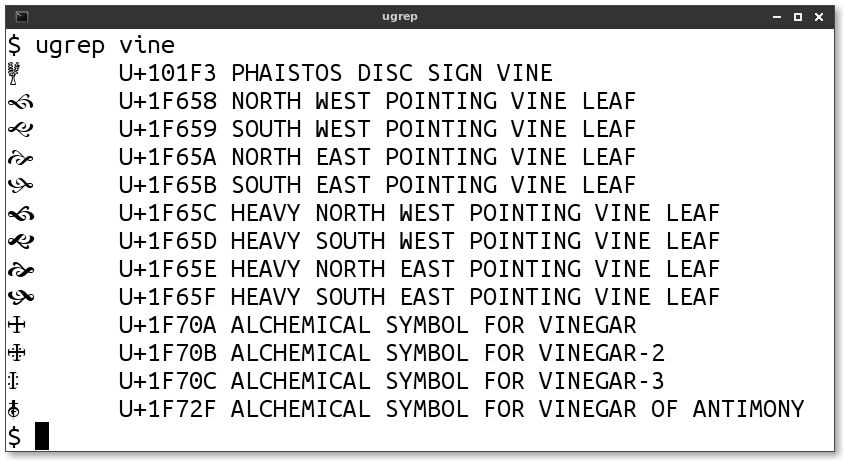
ugrep '(vine|bud)'
ugrep vai
ugrep heavy
ugrep drawing
ugrep combining
### Plain text search is simple:
$ ugrep heart
☙ U+2619 REVERSED ROTATED FLORAL HEART BULLET
❣ U+2763 HEAVY HEART EXCLAMATION MARK ORNAMENT
❤ U+2764 HEAVY BLACK HEART
⋮ [ ... truncated for brevity ... ]
💞 U+1F49E REVOLVING HEARTS
💟 U+1F49F HEART DECORATION
😍 U+1F60D SMILING FACE WITH HEART-SHAPED EYES
😻 U+1F63B SMILING CAT FACE WITH HEART-SHAPED EYES
### Paste in a single character to lookup its codepoint:
$ ugrep ☺
☺ U+263A WHITE SMILING FACE
### Arguments on the command line have an implicit wildcard between them:
$ ugrep right.*gle
$ ugrep right gle # Equivalent
» U+00BB RIGHT-POINTING DOUBLE ANGLE QUOTATION MARK
’ U+2019 RIGHT SINGLE QUOTATION MARK
∟ U+221F RIGHT ANGLE
⊿ U+22BF RIGHT TRIANGLE
### You can use regular expressions for fancier searches:
$ ugrep -w '(wo|hu)?m(a|e)ns?'
ᛗ U+16D7 RUNIC LETTER MANNAZ MAN M
⛀ U+26C0 WHITE DRAUGHTS MAN
⛂ U+26C2 BLACK DRAUGHTS MAN
⼈ U+2F08 KANGXI RADICAL MAN
⼥ U+2F25 KANGXI RADICAL WOMAN
𝌂 U+1D302 DIGRAM FOR HUMAN EARTH
𝌄 U+1D304 DIGRAM FOR EARTHLY HUMAN
🕴 U+1F574 MAN IN BUSINESS SUIT LEVITATING
🕺 U+1F57A MAN DANCING
🚹 U+1F6B9 MENS SYMBOL
🚺 U+1F6BA WOMENS SYMBOL
🤰 U+1F930 PREGNANT WOMAN
🤵 U+1F935 MAN IN TUXEDO
$ ugrep ^x # Regex anchors ^ and $ work
⊻ U+22BB XOR
⌧ U+2327 X IN A RECTANGLE BOX (clear key)
### Use the `-w` flag to search only for complete words:
$ ugrep -w R # The letter R used as a word
$ ugrep "\bR\b" # (regex equivalent)
R U+0052 LATIN CAPITAL LETTER R
Ŗ U+0156 LATIN CAPITAL LETTER R WITH CEDILLA
ℛ U+211B SCRIPT CAPITAL R (Script r)
ℜ U+211C BLACK-LETTER CAPITAL R (Black-letter r)
ℝ U+211D DOUBLE-STRUCK CAPITAL R (Double-struck r)
### Use -c to display info for each character in a string.
$ ugrep -c "ᕕ( ᐛ )ᕗ"
ᕕ U+1555 CANADIAN SYLLABICS FI
( U+0028 LEFT PARENTHESIS (opening parenthesis)
U+0020 SPACE
ᐛ U+141B CANADIAN SYLLABICS NASKAPI WAA
U+0020 SPACE
) U+0029 RIGHT PARENTHESIS (closing parenthesis)
ᕗ U+1557 CANADIAN SYLLABICS FO
### Aliases (alternate names) are also searched:
$ ugrep backslash
\ U+005C REVERSE SOLIDUS (backslash)
### Use **..** to browse through a range of Unicode characters:
$ ugrep 26b3..b
⚳ U+26B3 CERES
⚴ U+26B4 PALLAS
⚵ U+26B5 JUNO
⚶ U+26B6 VESTA
⚷ U+26B7 CHIRON
⚸ U+26B8 BLACK MOON LILITH
⚹ U+26B9 SEXTILE
⚺ U+26BA SEMISEXTILE
⚻ U+26BB QUINCUNX
$ ugrep 1f470..ff | less
👰 U+1F470 BRIDE WITH VEIL
👱 U+1F471 PERSON WITH BLOND HAIR
👲 U+1F472 MAN WITH GUA PI MAO
👳 U+1F473 MAN WITH TURBAN
👴 U+1F474 OLDER MAN
👵 U+1F475 OLDER WOMAN
👶 U+1F476 BABY
👷 U+1F477 CONSTRUCTION WORKER
👸 U+1F478 PRINCESS
👹 U+1F479 JAPANESE OGRE
👺 U+1F47A JAPANESE GOBLIN
👻 U+1F47B GHOST
👼 U+1F47C BABY ANGEL
👽 U+1F47D EXTRATERRESTRIAL ALIEN
⋮ [ ... truncated for brevity ... ]
📼 U+1F4FC VIDEOCASSETTE
📽 U+1F4FD FILM PROJECTOR
📾 U+1F4FE PORTABLE STEREO
📿 U+1F4FF PRAYER BEADS
Sometimes it's useful (or just fun) to page through the Unicode
table and see what characters are defined in a region. (`ugrep
2700..ff`) Ranges are convenient, but very slow. Use regular
expressions if you want speed. (`ugrep U+27..`)
### Ranges can have an optional increment:
```
$ ugrep 0..ffff..1000
� U+0000 (null)
က U+1000 MYANMAR LETTER KA
[ ] U+2000 EN QUAD
[ ] U+3000 IDEOGRAPHIC SPACE
䀀 U+4000 cups; small cups ( M: fàn, C: fan3 fan4 fan6 )
倀 U+5000 bewildered; rash, wildly ( M: chāng, C: caang1 caang4 coeng1 zaang1, J: KURUU TAORERU, K: CHANG, V: trành )
怀 U+6000 bosom, breast; carry in bosom ( M: huái, C: waai4 )
瀀 U+7000 [CJK Unified Ideographs] ( M: yōu, J: ATSUI )
耀 U+8000 shine, sparkle, dazzle; glory ( M: yào, C: jiu6, J: KAGAYAKU, K: YO )
退 U+9000 step back, retreat, withdraw ( M: tuì, C: teoi3, J: SHIRIZOKU SHIRIZOKERU, K: THOY, V: thoái )
ꀀ U+A000 YI SYLLABLE IT
뀀 U+B000 Block: [Hangul Syllables]
쀀 U+C000 Block: [Hangul Syllables]
퀀 U+D000 Block: [Hangul Syllables]
� U+E000
U+F000 Block: [Private Use Area]
```
* Tip: pipe long output to `less` and search for a code point by
pressing `/U\+A60F`.
### Use -l to list which installed fonts contain a certain glyph:

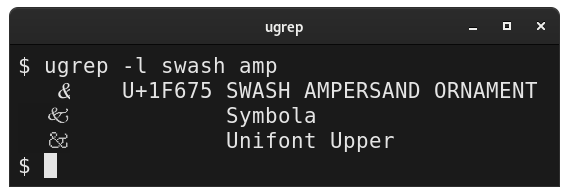
ugrep -l swash amp
* Requires FontConfig. (Most GNU/Linux boxes should already be set).
* The requested character may also be displayed in each of the
listed typefaces, but only if your terminal supports sixel
graphics (e.g., `xterm -ti vt340`) and you have ImageMagick
installed.
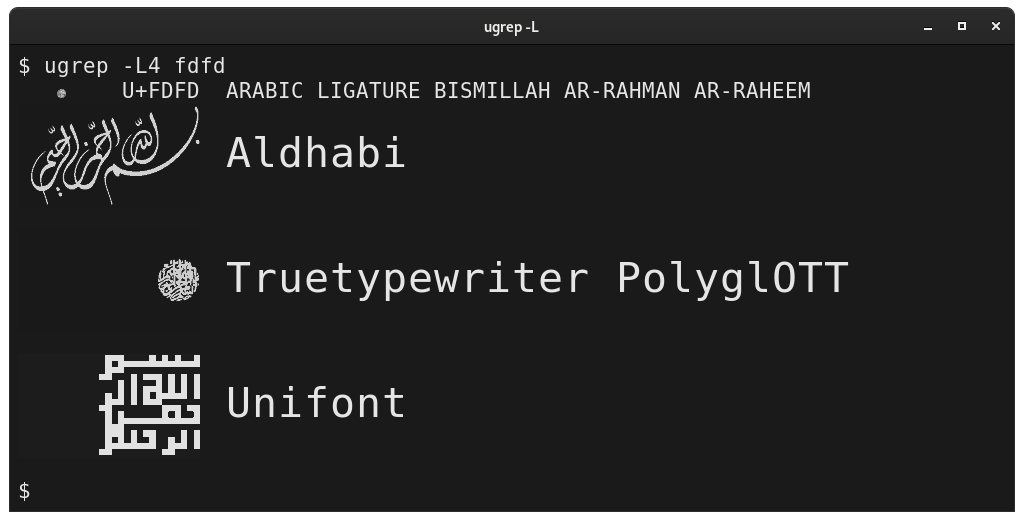
### Use -L to scale up the font examples when listing fonts

```
ugrep -L4 fdfd
﷽ U+FDFD ARABIC LIGATURE BISMILLAH AR-RAHMAN AR-RAHEEM
Aldhabi
Trutypewriter PolyglOTT
Unifont
```
* Note that increasing the glyph size also increased the text size.
Not all terminals are capable of "double height" text. If yours
shows two lines of the same text in the usual size, try using
`--never-double-text`.
### Copy whitespace from the terminal
$ ugrep -w space
[ ] U+0020 SPACE (SP)
[ ] U+00A0 NO-BREAK SPACE (non-breaking space) (NBSP)
[ ] U+1680 OGHAM SPACE MARK
[ ] U+2002 EN SPACE
[ ] U+2003 EM SPACE
[ ] U+2004 THREE-PER-EM SPACE
[ ] U+2005 FOUR-PER-EM SPACE
[ ] U+2006 SIX-PER-EM SPACE
[ ] U+2007 FIGURE SPACE
[ ] U+2008 PUNCTUATION SPACE
[ ] U+2009 THIN SPACE
[ ] U+200A HAIR SPACE
Whitespace characters are printed with square brackets around them
to make it easy to highlight and copy them from the terminal. They
will also be shown with a yellow background, if the terminal allows.
### Determine if an alias is actually a correction
Ugrep shows the character name in all caps and aliases are usually
lowercase in parentheses. Some aliases are treated differently.
For aesthetic reasons, abbreviations are also shown in uppercase.
For example:
� U+FEFF ZERO WIDTH NO-BREAK SPACE (byte order mark) (BOM) (ZWNBSP)
There are 31 characters in Unicode which have the wrong name in the
UnicodeData.txt database. Unicode includes the correct name as an
alias in NameAliases.txt. If that file exists on your system, then
ugrep will show the correction in Title Case Letters and in red
letters, if the terminal supports color text.
︘ U+FE18 PRESENTATION FORM FOR VERTICAL RIGHT WHITE LENTICULAR BRAKCET (Presentation Form For Vertical Right White Lenticular Bracket)
### View CJK (Chinese-Japanese-Korean) characters
Unicode does not actually define most CJK characters, except
indirectly via Unihan, which maps certain blocks of characters to
other standards.
* Ugrep allows one to specify the code point or paste in an example
character to look up.
$ ugrep 𰻞
𰻞 U+30EDE biangbiang noodles ( M: biáng )
$ ugrep 8000
耀 U+8000 shine, sparkle, dazzle; glory ( M: yào, C: jiu6, J: KAGAYAKU, K: YO )

### View _all_ characters defined by Unicode:
$ ugrep .? | less
⋮ [ ... over 30,000 glyphs elided for brevity ... ]
* Want just Unicode glyphs without the description? Please use
[fonttable](https://github.com/hackerb9/fonttable). It shows all
defined Unicode characters by default.
### Show all possible code points, even the ones _not_ defined in Unicode:
$ ugrep 0..10FFFF | less
⋮ [ ... over a million lines elided for brevity ... ]
☝ This is currently very slow due to the way `ugrep` is implemented.
You likely want to use
[fonttable -u](https://github.com/hackerb9/fonttable) instead.
## Prerequisite: UnicodeData.txt
Ugrep requires the Unicode data file
[UnicodeData.txt](https://unicode.org/Public/UNIDATA/UnicodeData.txt)
which can be installed on your system, in your home, or in the current
directory.
**Easiest**: On Ubuntu and Debian GNU/Linux, simply `apt install unicode-data`.
**Still easy**: Or, you can download it by hand from
[unicode.org](https://unicode.org/Public/UNIDATA/UnicodeData.txt)
and place it in `~/.local/share/unicode/UnicodeData.txt`
**Not hard**: Or, if you wish the file to be accessible to all users on
your machine, place it in `/usr/local/share/unicode/UnicodeData.txt`.
## Unihan CJK Support
If the file `Unihan_Readings.txt` exists, then ugrep will
automatically use it to show an English gloss describing a character
in the CJK (Chinese-Japanese-Korean) Ideographs region.
Your OS may make it easy to install (e.g., `apt install unicode-data`).
On other systems, you can do this
mkdir -p ~/.local/share/unicode
cd ~/.local/share/unicode
wget ftp://ftp.unicode.org/Public/UNIDATA/Unihan.zip
unzip Unihan.zip
### CJK example
#### Example 1: Unicode code point
```
$ ugrep 8000
耀 U+8000 shine, sparkle, dazzle; glory ( M: yào, C: jiu6, J: KAGAYAKU, K: YO )
```
The parenthesized text at the end shows the romanized pronunciation of
the character in **M**andarin (pinyin), **C**antonese (jyutping),
**J**apanese (Hepburn), and **K**orean (Yale).
#### Example 2: Using -c to see characters in a string
```
$ ugrep -c 「⿺辶⿳穴⿰月⿰⿲⿱幺長⿱言馬⿱幺長刂心」
「 U+300C LEFT CORNER BRACKET (opening corner bracket)
⿺ U+2FFA IDEOGRAPHIC DESCRIPTION CHARACTER SURROUND FROM LOWER LEFT
辶 U+8FB6 walk; walking; KangXi radical 162 ( M: chuò, J: SHINNYOU )
⿳ U+2FF3 IDEOGRAPHIC DESCRIPTION CHARACTER ABOVE TO MIDDLE AND BELOW
穴 U+7A74 cave, den, hole; KangXi radical 116 ( M: xué, C: jyut6, J: ANA, K: HYEL, V: huyệt )
⿰ U+2FF0 IDEOGRAPHIC DESCRIPTION CHARACTER LEFT TO RIGHT
月 U+6708 moon; month; KangXi radical 74 ( M: yuè, C: jyut6, J: TSUKI, K: WEL, V: nguyệt )
⿰ U+2FF0 IDEOGRAPHIC DESCRIPTION CHARACTER LEFT TO RIGHT
⿲ U+2FF2 IDEOGRAPHIC DESCRIPTION CHARACTER LEFT TO MIDDLE AND RIGHT
⿱ U+2FF1 IDEOGRAPHIC DESCRIPTION CHARACTER ABOVE TO BELOW
幺 U+5E7A one; tiny, small ( M: yāo, C: jiu1, J: CHIISAI, K: YO )
長 U+9577 long; length; excel in; leader ( M: zhǎng, C: coeng4 zoeng2, J: NAGAI TAKERU OSA, K: CANG, V: trường )
⿱ U+2FF1 IDEOGRAPHIC DESCRIPTION CHARACTER ABOVE TO BELOW
言 U+8A00 words, speech; speak, say ( M: yán, C: jin4, J: KOTO IU KOTOBA, K: EN UN, V: ngôn )
馬 U+99AC horse; surname; KangXi radical 187 ( M: mǎ, C: maa5, J: UMA, K: MA, V: mã )
⿱ U+2FF1 IDEOGRAPHIC DESCRIPTION CHARACTER ABOVE TO BELOW
幺 U+5E7A one; tiny, small ( M: yāo, C: jiu1, J: CHIISAI, K: YO )
長 U+9577 long; length; excel in; leader ( M: zhǎng, C: coeng4 zoeng2, J: NAGAI TAKERU OSA, K: CANG, V: trường )
刂 U+5202 knife; radical number 18 ( M: dāo, C: dou1, J: RITSUTOU, K: TO )
心 U+5FC3 heart; mind, intelligence; soul ( M: xīn, C: sam1, J: KOKORO, K: SIM, V: tâm )
」 U+300D RIGHT CORNER BRACKET (closing corner bracket)
```
### Note 1: A "definition" is not a translation
Unihan calls the English gloss the character's "definition", but that
is meant in a very loose sense. CJK characters change meaning based
upon the context they are used in. For example, most Chinese words are
made of two characters, such as "蜂鳥", which means "hummingbird", but
ugrep would shows it as:
```
$ ugrep -c 蜂鳥
蜂 U+8702 bee, wasp, hornet ( M: fēng, C: fung1, J: HACHI, K: PONG, V: ong )
鳥 U+9CE5 bird; KangXi radical 196 ( M: niǎo, C: niu5, J: TORI, K: CO, V: điểu )
```
### Note 2: Not all characters have readings
Unihan refers to this supplemental information — both the English
gloss and the romanizations — as "readings". Readings are meant to be
helpful, but are not normative and are only available for some
characters.
| | Count | Percent |
|--------------------|-------:|--------:|
| All CJK Characters | 93,858 | 100% |
| Have any reading | 47,429 | 51% |
| Mandarin Pinyin | 41,378 | 44% |
| Cantonese Jyutping | 23,112 | 25% |
| English definition | 21,076 | 23% |
| Japanese Hepburn | 11,293 | 12% |
| Korean Yale | 9,051 | 10% |
| Vietnamese | 8,301 | 9% |
#### Example of CJK with no Mandarin
```
$ ugrep 2bac3
𫫃 U+2BAC3 (Cant.) sarcastic interrogative ( C: e1 )
```
#### Example of CJK with no pronunciation
```
$ ugrep 20015
𠀕 U+20015 Variant of U+4E99 亙
```
#### Example of CJK with no English definition
```
$ ugrep 20016
𠀖 U+20016 [CJK Unified Ideographs Extension B] ( V: khạng )
```
#### Example of CJK with no readings whatsoever
```
$ ugrep 2abcd
𪯍 U+2ABCD [CJK Unified Ideographs Extension C]
```
Note that ugrep currently prints just the name of the block the
character is in [within square brackets] if it has no better way to
identify the character.
- - - - - - - - - - - - - - - - - - - - - - - - - - - - - - - -
## Boring Implementation notes
This is a rewrite of b9's AWK ugrep into Python. While AWK makes more
sense for what this program does (comparing fields based on regexps),
a rewrite was necessary because GNU awk, while plenty powerful, uses
`\y` for word edges instead of the standard `\b`. Gawk does this for
backwards compatibility with historic AWK, but lacks a way to disable
it for new scripts.
Switching to Python did have the benefit of allowing more powerful
Perlesque regexes (not that anyone has requested that).
### Why not use the unicodedata module?
I do not use Python's `unicodedata` module because it is woefully
insufficient. It allows one to search by character name only by
specifying it fully and exactly: `unicodedata.lookup("ROTATED HEAVY
BLACK HEART BULLET")`.
## Future Work
### Rename this project
Although I believe this `ugrep` existed first, there is now another
[ugrep](https://github.com/Genivia/ugrep) which is quite widely known
— with good reason as it looks pretty nifty — which hasnothing to do
with looking up Unicode characters. The 'U' appears to stand for
_Ultra-fast_ as it is a very speedy `grep` with lots of bells and
whistles.
What shall this project's new name be? `ug` is also taken by the other
ugrep. How about `ugre`? It's an ugly, ogreish name, but it's probably
a safe bet nobody is going to use that name for something else.
### Maybe use Unihan_Readings.txt for grepping
Currently if `Unihan_Readings.txt` is installed — which is the default if
the user has done `apt install unicode-data`) — and the user requests a
character that is not in UnicodeData.txt, then the Readings data is
used to show information about the character. However, Unihan_Readings
could be used in the future for searching for characters to show.
Example data from Unihan_Readings for U+9B44 (魄):
U+9B44 kCantonese bok3 paak3 tok3
U+9B44 kDefinition vigor; body; dark part of moon
U+9B44 kHangul 백:0N
U+9B44 kHanyuPinlu pò(11)
U+9B44 kHanyuPinyin 74431.090:pò,bó,tuò
U+9B44 kJapaneseKun TAMASHII
U+9B44 kJapaneseOn HAKU BAKU
U+9B44 kKorean PAYK
U+9B44 kMandarin pò
U+9B44 kTGHZ2013 287.140:pò
U+9B44 kTang *pæk
U+9B44 kVietnamese phách
U+9B44 kXHC1983 0084.110:bó 0887.020:pò 1175.020:tuò
See [UAX #38: Unicode Han Database](https://www.unicode.org/reports/tr38/tr38-31.html).
Two levels of Unihan support:
1. Show kDefinition if block name is *CJK Ideographs*
2. Search Unihan_Readings when searching for a word. Possible example:
$ ugrep mononoke
魅 U+9B45 MONONOKE BAKEMONO SUDAMA (kind of forest demon, elf)
Number 1 is finished and working, but number 2 may require a command
line switch or some other way of enabling/disabling it as searching
through the Readings file may be slow or cause other problems.
### Maybe use NamesList.txt
It looks like
[`NamesList.txt`](https://unicode.org/Public/UNIDATA/NamesList.txt)
might be useful to also parse as it allows multiple aliases for a
character. For example (from `grep -B1 [=%] NamesList.txt`):
0023 NUMBER SIGN
= pound sign, hash, crosshatch, octothorpe
002E FULL STOP
= period, dot, decimal point
--
002F SOLIDUS
= slash, virgule
1F70A ALCHEMICAL SYMBOL FOR VINEGAR
= crucible; acid; distill; atrament; vitriol; red
sulfur; borax; wine; alkali salt; mercurius vivus,
quick silver
I'm not sure how useful this will be (who is going to look up the
number sign by searching on "octothorpe"), but it'd be nice to be able
to at least show them as aliases.
Also, NamesList.txt has a fascinating "cross reference" feature:
0021 EXCLAMATION MARK
= factorial
= bang
x (inverted exclamation mark - 00A1)
x (latin letter retroflex click - 01C3)
x (double exclamation mark - 203C)
x (interrobang - 203D)
x (heavy exclamation mark ornament - 2762)
How would one find the interrobang (‽) without such a cross reference?
Note that the NamesList.txt file actually starts with a warning *not*
to parse it as it says it is generated mechanically from
UnicodeData.txt plus "manually created annotations". However, those
annotations are what is interesting about the file (the aliases and
cross references) and there appears to be no other official source of
that data.
## Bugs, Misfeatures, and Workarounds
* ugrep 3400 shows the text defined in UnicodeData.txt, which states
that it is "". Now that ugrep can
show ideograph definitions using Unihan_Readings.txt, we should
(probably) replace any string in angle brackets with more useful info.
* Brace expansion is confusing because of needing to be quoted from
the shell. It is supported for ranges (not sequences), but is not
currently documented because usage is tricky and the functionality
is not actually that helpful. For example, the following works:
ugrep {0..F}{0,4,8,C}00
but is easier to understand using range expansion:
ugrep 0..FFFF..400
* Range expansion and a seemingly equivalent regular expression search
will give different results.
ugrep 0..FFFF..400 | wc -l
64
ugrep U+[0-9A-F][048C]00 | wc -l
22
This is because regexes currently only return valid code points from
the UnicodeData.txt file, whereas range expansions can generate code
points which are in regions not directly defined by Unicode. For
example, the range from U+4E00 to U+9FEF is a block of CJK Ideographs.
Both are useful: regexes are blazingly fast, while range expansions
have more functionality.
* [Note: The following is not a problem for people who are willing to
use vector fonts (truetype, opentype, postscript) that may be
antialiased. Xterm uses fontconfig just fine.]
For bitmap fonts, Xterm (as of version 369) seems to be able to only
use one font at a time, which means a single font must have all the
glyphs you want shown. (Yes, you can have a second bitmap font for
"wide" CJK, but that's still not enough.)
The author (hackerb9) currently prefers using the Neep bitmap font
like so in `~/.Xresources`:
! Neep looks nice, has good unicode coverage. Requires xfonts-jmk.
xterm*vt100.font : *neep-medium-r-normal--20*10646*
! Neep lacks Asian characters
xterm*vt100.wideFont : *fixed-medium-r-normal-ja-18*10646*
Neep has two major downsides. 1. It is a bitmap font with only one
size well implemented, so you can't zoom in or out. 2. It is limited
to 65536 characters, which means it cannot show characters outside
of Unicode's Basic Multilingual Plane, such as new emojis. Neep can
be installed on Debian GNU/Linux systems with `apt install
xfonts-jmk`.
* Mlterm appears to have the same single font limitation as Xterm.
Also, it right aligns text that has even a single character in a
right-to-left alphabet, such as Arabic, so the output from ugrep
will look a little funny.
* Gnome-terminal uses `font-config`, so it has very nice Unicode
support and can easily zoom in with Ctrl-+⃣ and Ctrl--⃣. Older
versions had a bug where combining characters were combined with the
following character instead of the previous, but this is now fixed.
It does not support sixel graphics, so the -l option cannot show
examples of the character in different fonts.