https://github.com/hackergrrl/ipfs-blog
:globe_with_meridians: Host a blog ..without the hosting!
https://github.com/hackergrrl/ipfs-blog
Last synced: 10 months ago
JSON representation
:globe_with_meridians: Host a blog ..without the hosting!
- Host: GitHub
- URL: https://github.com/hackergrrl/ipfs-blog
- Owner: hackergrrl
- Created: 2016-04-12T05:04:00.000Z (about 10 years ago)
- Default Branch: master
- Last Pushed: 2016-09-24T01:21:31.000Z (over 9 years ago)
- Last Synced: 2024-12-28T17:44:43.960Z (over 1 year ago)
- Language: JavaScript
- Homepage:
- Size: 27.3 KB
- Stars: 46
- Watchers: 4
- Forks: 6
- Open Issues: 1
-
Metadata Files:
- Readme: README.md
Awesome Lists containing this project
README
# ipfs-blog
> opinionated ipfs-powered blog
## Background
Wouldn't it be nice to have a simple static HTML blog that you didn't need to
worry about hosting?
## Prerequisites
You'll need [IPFS](https://ipfs.io) installed, at least
[0.4.0](http://dist.ipfs.io/#go-ipfs).
## Usage
```sh
$ npm install -g ipfs-blog
$ cd /tmp
$ cat > article.md
# Hello world!
This is my very first blog entry to the permanent web! Huzzah!
^D
$ ipfs-blog --title "My Permanent Blarg"
wrote article.md
https://ipfs.io/ipfs/QmR8kn6CQzBADU6BvHPnvnkpXKykkJVwjJVujPqZz3nWDj
```
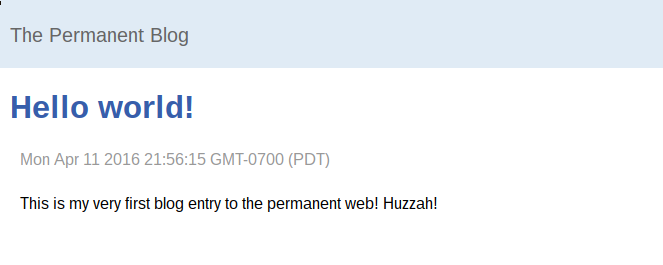
Note that you'll need a local [IPFS daemon](https://dist.ipfs.io/#go-ipfs)
running in order to publish.
## CLI
All markdown files (`*.markdown`, `*.md`) in the current directory will be
published.
Each article will use its `mtime` (last modified time) as its publish date. You
can use e.g. `touch` to fudge this to a custom time if you'd like: `touch -d
"Fri Sep 23 17:44:32 PDT 2016" article.md`.
You can pass `-t | --title` with a string to specify the name of the blog.
## Customization
All flavour text is hard-coded for now. PRs that better facilitate user
customization (color scheme, etc) are very welcome!
## License
ISC