https://github.com/hackiftekhar/iqkeyboardreturnmanager
Keyboard Return Key Observation to navigate next responder
https://github.com/hackiftekhar/iqkeyboardreturnmanager
Last synced: 11 months ago
JSON representation
Keyboard Return Key Observation to navigate next responder
- Host: GitHub
- URL: https://github.com/hackiftekhar/iqkeyboardreturnmanager
- Owner: hackiftekhar
- License: mit
- Created: 2024-07-22T09:50:47.000Z (almost 2 years ago)
- Default Branch: main
- Last Pushed: 2024-10-29T14:09:39.000Z (over 1 year ago)
- Last Synced: 2025-07-30T12:30:58.511Z (11 months ago)
- Language: Swift
- Size: 229 KB
- Stars: 0
- Watchers: 1
- Forks: 1
- Open Issues: 0
-
Metadata Files:
- Readme: README.md
- Contributing: CONTRIBUTING.md
- License: LICENSE
- Code of conduct: CODE_OF_CONDUCT.md
- Security: SECURITY.md
Awesome Lists containing this project
README
# IQKeyboardReturnManager
[](https://travis-ci.org/hackiftekhar/IQKeyboardReturnManager)
[](https://cocoapods.org/pods/IQKeyboardReturnManager)
[](https://cocoapods.org/pods/IQKeyboardReturnManager)
[](https://cocoapods.org/pods/IQKeyboardReturnManager)
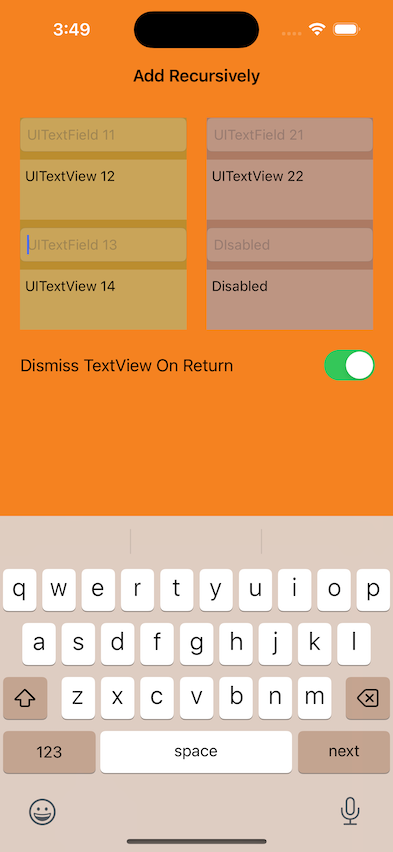
## Example
To run the example project, clone the repo, and run `pod install` from the Example directory first.
## Requirements
## Installation
IQKeyboardReturnManager is available through [CocoaPods](https://cocoapods.org). To install
it, simply add the following line to your Podfile:
```ruby
pod 'IQKeyboardReturnManager'
```
## Usage
To handle keyboard return key automatically:-
```swift
import IQKeyboardReturnManager
class ViewController: UIViewController {
let returnManager: IQKeyboardReturnManager = .init()
override func viewDidLoad() {
super.viewDidLoad()
// This will add all textInputView of the controller and start observing for textFieldShouldReturn events
returnManager.addResponderSubviews(of: self.view, recursive: true)
// If you would like to dismiss the UITextView on tapping on return then add this
returnManager.dismissTextViewOnReturn = true
// If you would like to change last textInputView return key type to done or something else, then add this
returnManager.lastTextInputViewReturnKeyType = .done
// If you would like to customize the navigation between textField by your own order then add them manually
returnManager.add(textInputView: textField1)
returnManager.add(textInputView: textField2)
returnManager.add(textInputView: textField3)
returnManager.add(textInputView: textField4)
}
}
// IQKeyboardReturnManager will forward all delegate callbacks to you, so you can customize the decisions
extension ViewController: UITextFieldDelegate {
@objc public func textFieldShouldBeginEditing(_ textField: UITextField) -> Bool {...}
}
```
## Author
Iftekhar Qurashi hack.iftekhar@gmail.com
## License
IQKeyboardReturnManager is available under the MIT license. See the LICENSE file for more info.