https://github.com/hackiftekhar/iqkeyboardtoolbarmanager
Used for maintaining IQKeyboardToolbar throughout the app.
https://github.com/hackiftekhar/iqkeyboardtoolbarmanager
Last synced: 12 months ago
JSON representation
Used for maintaining IQKeyboardToolbar throughout the app.
- Host: GitHub
- URL: https://github.com/hackiftekhar/iqkeyboardtoolbarmanager
- Owner: hackiftekhar
- License: mit
- Created: 2024-07-22T16:31:35.000Z (almost 2 years ago)
- Default Branch: main
- Last Pushed: 2025-02-15T15:05:50.000Z (over 1 year ago)
- Last Synced: 2025-06-26T19:11:46.966Z (12 months ago)
- Language: Swift
- Size: 354 KB
- Stars: 10
- Watchers: 1
- Forks: 2
- Open Issues: 3
-
Metadata Files:
- Readme: README.md
- Contributing: CONTRIBUTING.md
- License: LICENSE
- Code of conduct: CODE_OF_CONDUCT.md
- Security: SECURITY.md
Awesome Lists containing this project
README
# IQKeyboardToolbarManager
[](https://travis-ci.org/hackiftekhar/IQKeyboardToolbarManager)
[](https://cocoapods.org/pods/IQKeyboardToolbarManager)
[](https://cocoapods.org/pods/IQKeyboardToolbarManager)
[](https://cocoapods.org/pods/IQKeyboardToolbarManager)
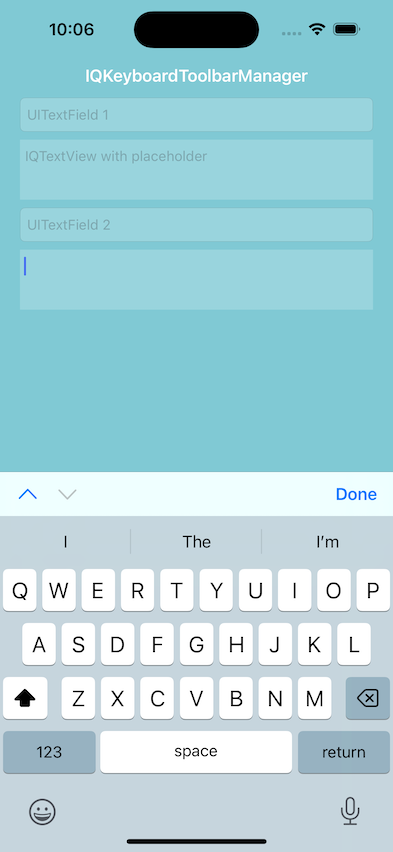
## Example
To run the example project, clone the repo, and run `pod install` from the Example directory first.
## Requirements
## Installation
IQKeyboardToolbarManager is available through [CocoaPods](https://cocoapods.org). To install
it, simply add the following line to your Podfile:
```ruby
pod 'IQKeyboardToolbarManager'
```
## Usage
Enable toolbar handling in AppDelegate
```swift
import UIKit
import IQKeyboardToolbarManager
@UIApplicationMain
class AppDelegate: UIResponder, UIApplicationDelegate {
func application(_ application: UIApplication, didFinishLaunchingWithOptions launchOptions: [UIApplication.LaunchOptionsKey: Any]?) -> Bool {
IQKeyboardToolbarManager.shared.isEnabled = true
return true
}
```
Cuistomize Behavior
```swift
IQKeyboardToolbarManager.shared.toolbarConfiguration.useTextInputViewTintColor = true
IQKeyboardToolbarManager.shared.toolbarConfiguration.tintColor = UIColor.systemGreen
IQKeyboardToolbarManager.shared.toolbarConfiguration.barTintColor = UIColor.systemYellow
IQKeyboardToolbarManager.shared.toolbarConfiguration.previousNextDisplayMode = .alwaysShow
IQKeyboardToolbarManager.shared.toolbarConfiguration.manageBehavior = .byPosition
IQKeyboardToolbarManager.shared.toolbarConfiguration.previousBarButtonConfiguration = ... // BarButton configuration to change title, image or system image etc
IQKeyboardToolbarManager.shared.toolbarConfiguration.nextBarButtonConfiguration = ... // BarButton configuration to change title, image or system image etc
IQKeyboardToolbarManager.shared.toolbarConfiguration.doneBarButtonConfiguration = ... // BarButton configuration to change title, image or system image etc
IQKeyboardToolbarManager.shared.toolbarConfiguration.placeholderConfiguration.showPlaceholder = false
IQKeyboardToolbarManager.shared.toolbarConfiguration.placeholderConfiguration.font = UIFont.italicSystemFont(ofSize: 14)
IQKeyboardToolbarManager.shared.toolbarConfiguration.placeholderConfiguration.color = UIColor.systemPurple
IQKeyboardToolbarManager.shared.toolbarConfiguration.placeholderConfiguration.buttonColor = UIColor.systemBrown // This is used only if placeholder is an action button
IQKeyboardToolbarManager.shared.playInputClicks = false
IQKeyboardToolbarManager.shared.disabledToolbarClasses.append(ChatViewController.self)
IQKeyboardToolbarManager.shared.enabledToolbarClasses.append(LoginViewController.self)
IQKeyboardToolbarManager.shared.deepResponderAllowedContainerClasses.append(UIStackView.self)
```
Useful functions and variables
```swift
if IQKeyboardToolbarManager.shared.canGoPrevious {
...
}
if IQKeyboardToolbarManager.shared.canGoNext {
...
}
IQKeyboardToolbarManager.shared.goPrevious()
IQKeyboardToolbarManager.shared.goNext()
IQKeyboardToolbarManager.shared.reloadInputViews() // If some textInputView hierarchy are changed on the fly then use this to reload button states
```
Useful functions and variables for TextInputView
```swift
textField.iq.ignoreSwitchingByNextPrevious = false
```
## Author
Iftekhar Qurashi hack.iftekhar@gmail.com
## License
IQKeyboardToolbarManager is available under the MIT license. See the LICENSE file for more info.