https://github.com/hackiftekhar/iqpaywallui
Paywall UI screen with simple configuration and offline Purchase and Subscription Tracker using StoreKit2
https://github.com/hackiftekhar/iqpaywallui
Last synced: 5 months ago
JSON representation
Paywall UI screen with simple configuration and offline Purchase and Subscription Tracker using StoreKit2
- Host: GitHub
- URL: https://github.com/hackiftekhar/iqpaywallui
- Owner: hackiftekhar
- License: mit
- Created: 2025-11-17T14:23:59.000Z (7 months ago)
- Default Branch: main
- Last Pushed: 2026-01-02T13:39:33.000Z (6 months ago)
- Last Synced: 2026-01-10T23:24:27.094Z (6 months ago)
- Language: Swift
- Size: 400 KB
- Stars: 2
- Watchers: 0
- Forks: 0
- Open Issues: 0
-
Metadata Files:
- Readme: README.md
- Contributing: CONTRIBUTING.md
- License: LICENSE
- Code of conduct: CODE_OF_CONDUCT.md
- Security: SECURITY.md
Awesome Lists containing this project
README
# IQPaywallUI
[](https://travis-ci.org/hackiftekhar/IQPaywallUI)
[](https://cocoapods.org/pods/IQPaywallUI)
[](https://cocoapods.org/pods/IQPaywallUI)
[](https://cocoapods.org/pods/IQPaywallUI)
[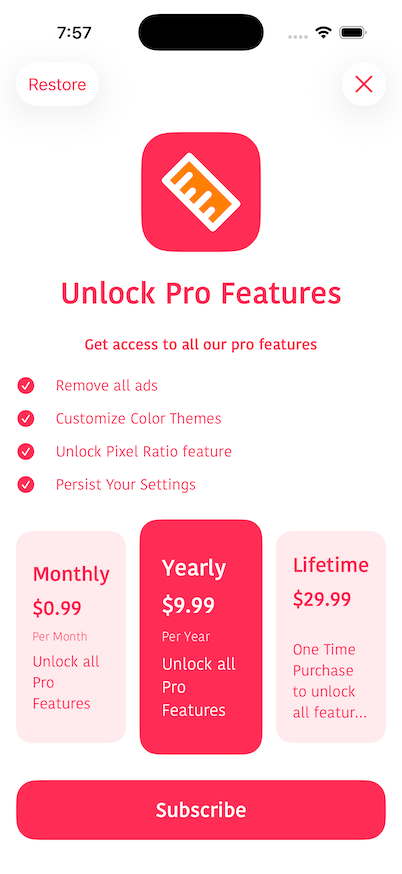]
## Example
To run the example project, clone the repo, and run `pod install` from the Example directory first.
## Requirements
## Installation
IQPaywallUI is available through [CocoaPods](https://cocoapods.org). To install
it, simply add the following line to your Podfile:
```ruby
pod 'IQPaywallUI'
```
## Usage
In AppDelegate, setup all your product ids
```swift
import IQPaywallUI
class AppDelegate: UIResponder, UIApplicationDelegate {
func application(_ application: UIApplication, didFinishLaunchingWithOptions launchOptions: [UIApplication.LaunchOptionsKey: Any]?) -> Bool {
IQPaywallUI.configure(productIds: [
"com.paywall.ui.monthly",
"com.paywall.ui.yearly",
"com.paywall.ui.lifetime"
])
return true
}
}
```
When you'll need to present the PaywallUI, create a configuration object and present it like below
```swift
@IBAction func showPaywallAction(_ sender: UIButton) {
let semibold30 = UIFont(name: "KohinoorBangla-Semibold", size: 30)!
let semibold20 = UIFont(name: "KohinoorBangla-Semibold", size: 20)!
let semibold15 = UIFont(name: "KohinoorBangla-Semibold", size: 15)!
let regular15 = UIFont(name: "KohinoorBangla-Regular", size: 15)!
let light12 = UIFont(name: "KohinoorBangla-Light", size: 12)!
let themeColor = UIColor.systemPink
var configuration = IQPaywallConfiguration()
configuration.elements.append(.logo(.init(UIImage(named:"your_logo")!, backgroundColor: themeColor)))
configuration.elements.append(.title(.init("Unlock Pro Features", style: .init(font: semibold30, color: themeColor))))
configuration.elements.append(.subtitle(.init("Get access to all our pro features", style: .init(font: semibold15, color: themeColor))))
configuration.elements.append(.feature(.init(titles: ["Remove all ads",
"Customize Color Themes",
"Unlock Pixel Ratio feature",
"Persist Your Settings"],
icon: .init(UIImage(systemName: "checkmark.circle.fill")!, color: themeColor),
style: .init(font: regular15, color: themeColor))))
configuration.elements.append(.product(.init(style: .card,
nameStyle: .init(font: semibold20, color: themeColor),
priceStyle: .init(font: semibold20, color: themeColor),
subscriptionPeriodStyle: .init(font: light12, color: themeColor),
descriptionStyle:.init(font: regular15, color: themeColor)
))
)
// Set the productID's you would like to show in the screen
configuration.productIds = ["com.paywall.ui.monthly",
"com.paywall.ui.lifetime"
]
//Optionally select the recommended product id which will be selected by default in the PaywallUI
configuration.recommendedProductId = "com.infoenum.ruler.yearly"
configuration.actionButton.font = semibold20
configuration.terms = .init("Terms & Conditions", url: URL(string: "https://www.terms.com")!)
configuration.privacyPolicy = .init("Privacy Policy", url: URL(string: "https://www.privacy.com")!)
configuration.backgroundColor = UIColor.white
configuration.foregroundColor = themeColor
configuration.linkStyle = .init(font: regular15, color: themeColor)
let hostingController = UIHostingController(rootView: PaywallView(configuration: configuration))
hostingController.modalPresentationStyle = .fullScreen
self.present(hostingController, animated: true)
}
```
To dynamically get notified when product status has changed. You can always observe it's notification
```swift
NotificationCenter.default.addObserver(forName: PurchaseStatusManager.purchaseStatusDidChangedNotification, object: nil, queue: nil) { _ in
...
}
```
To get status of the purchase by the product id, you can always get it's snapshot which contains most of the information.
```swift
let isMonthlySubscriptionActive = PurchaseStatusManager.shared.isActive(productID: "com.paywall.ui.monthly")
// Currently active plan from the subscription
let currentlyActivePlan: ProductStatus? = PurchaseStatusManager.shared.currentlyActivePlan
// Detailed snapshot of a product id
let snapshot: ProductStatus? = PurchaseStatusManager.shared.snapshot(for: "com.paywall.ui.monthly")
// Check if any plan is currently active
let isSubscribed = PurchaseStatusManager.shared.isAnyPlanActive
```
## Author
hackiftekhar, ideviftekhar@gmail.com
## License
IQPaywallUI is available under the MIT license. See the LICENSE file for more info.