https://github.com/hackinggate/country-ip-blocks
Latest country IP ranges in CIDR notation updates at the end of every week day (Monday to Friday at 9:22PM UTC)
https://github.com/hackinggate/country-ip-blocks
Last synced: over 1 year ago
JSON representation
Latest country IP ranges in CIDR notation updates at the end of every week day (Monday to Friday at 9:22PM UTC)
- Host: GitHub
- URL: https://github.com/hackinggate/country-ip-blocks
- Owner: HackingGate
- License: unlicense
- Created: 2019-03-26T14:41:18.000Z (over 7 years ago)
- Default Branch: master
- Last Pushed: 2025-04-11T21:31:40.000Z (over 1 year ago)
- Last Synced: 2025-04-11T22:33:35.994Z (over 1 year ago)
- Language: Shell
- Homepage: https://hackinggate.github.io/Country-IP-Blocks/
- Size: 82.3 MB
- Stars: 41
- Watchers: 4
- Forks: 7
- Open Issues: 2
-
Metadata Files:
- Readme: README.md
- License: LICENSE
Awesome Lists containing this project
README
# Country-IP-Blocks
[](https://github.com/HackingGate/Country-IP-Blocks/raw/master/LICENSE)
[](https://github.com/HackingGate/Country-IP-Blocks/actions/workflows/ci.yml)
[](https://github.com/HackingGate/Country-IP-Blocks/actions/workflows/pages/pages-build-deployment)
Generate the latest country IP ranges in CIDR notation
## How it works
The shell script `generate.sh` will download the latest RIR statistics files ([RIR statistics exchange format](https://www.apnic.net/about-apnic/corporate-documents/documents/resource-guidelines/rir-statistics-exchange-format/)) from the following five Regional Internet Registries (RIRs).
[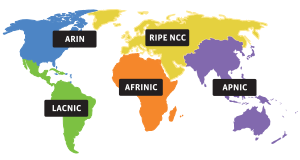](https://www.iana.org/numbers)
URLs:
```sh
https://ftp.apnic.net/stats/apnic/delegated-apnic-latest
https://ftp.arin.net/pub/stats/arin/delegated-arin-extended-latest
https://ftp.ripe.net/ripe/stats/delegated-ripencc-latest
https://ftp.afrinic.net/pub/stats/afrinic/delegated-afrinic-latest
https://ftp.lacnic.net/pub/stats/lacnic/delegated-lacnic-latest
```
It then grabs entries from the files above. Generate `country_code.txt`. Convert IP ranges to CIDR notation. Generate IP files for each country.
### Example
Generate Japan IPv4 ranges from [APNIC](https://www.apnic.net) and save them to `JP_IPv4.txt`.
```sh
curl -sL https://ftp.apnic.net/stats/apnic/delegated-apnic-latest | \
grep "apnic|JP|ipv4" | \
awk -F '|' '{ printf("%s/%d\n", $4, 32-log($5)/log(2)) }' | \
tee JP_IPv4.txt
```
## Usage
This will generate all countries and save IP files to your current directory.
```sh
curl -sL https://github.com/HackingGate/Country-IP-Blocks/raw/master/generate.sh | sh
```
The country code is under [ISO 3166-2](https://en.wikipedia.org/wiki/ISO_3166-2) standard.
## GitHub Pages
The following files are hosted on GitHub Pages.
- Mirror files of `delegated-*-latest`
- `country_code.txt`
- Country IP Block files
Available at [https://hackinggate.github.io/Country-IP-Blocks/](https://hackinggate.github.io/Country-IP-Blocks/)
and auto-updates by [GitHub Workflows](https://github.com/HackingGate/Country-IP-Blocks/actions).
## IP change history
Since this project uses git.
You can view IP changes from [gh-pages branch](https://github.com/HackingGate/Country-IP-Blocks/tree/gh-pages).
Such as comparing files between git commits to see when and what entries are added or deleted.