https://github.com/hacktoolkit/htk-ios-twitter
Basic Twitter client
https://github.com/hacktoolkit/htk-ios-twitter
Last synced: over 1 year ago
JSON representation
Basic Twitter client
- Host: GitHub
- URL: https://github.com/hacktoolkit/htk-ios-twitter
- Owner: hacktoolkit
- License: mit
- Created: 2014-09-26T14:00:39.000Z (almost 12 years ago)
- Default Branch: master
- Last Pushed: 2014-10-08T22:51:42.000Z (almost 12 years ago)
- Last Synced: 2025-01-22T20:16:05.626Z (over 1 year ago)
- Language: Swift
- Homepage: http://hacktoolkit.com
- Size: 9.46 MB
- Stars: 1
- Watchers: 4
- Forks: 1
- Open Issues: 2
-
Metadata Files:
- Readme: README.md
- License: LICENSE
Awesome Lists containing this project
README
htk-ios-Twitter
============
This is a basic Twitter client.
[CodePath iOS Bootcamp](http://codepath.com/iosbootcamp) September 2014 - Week 3 & 4 Project
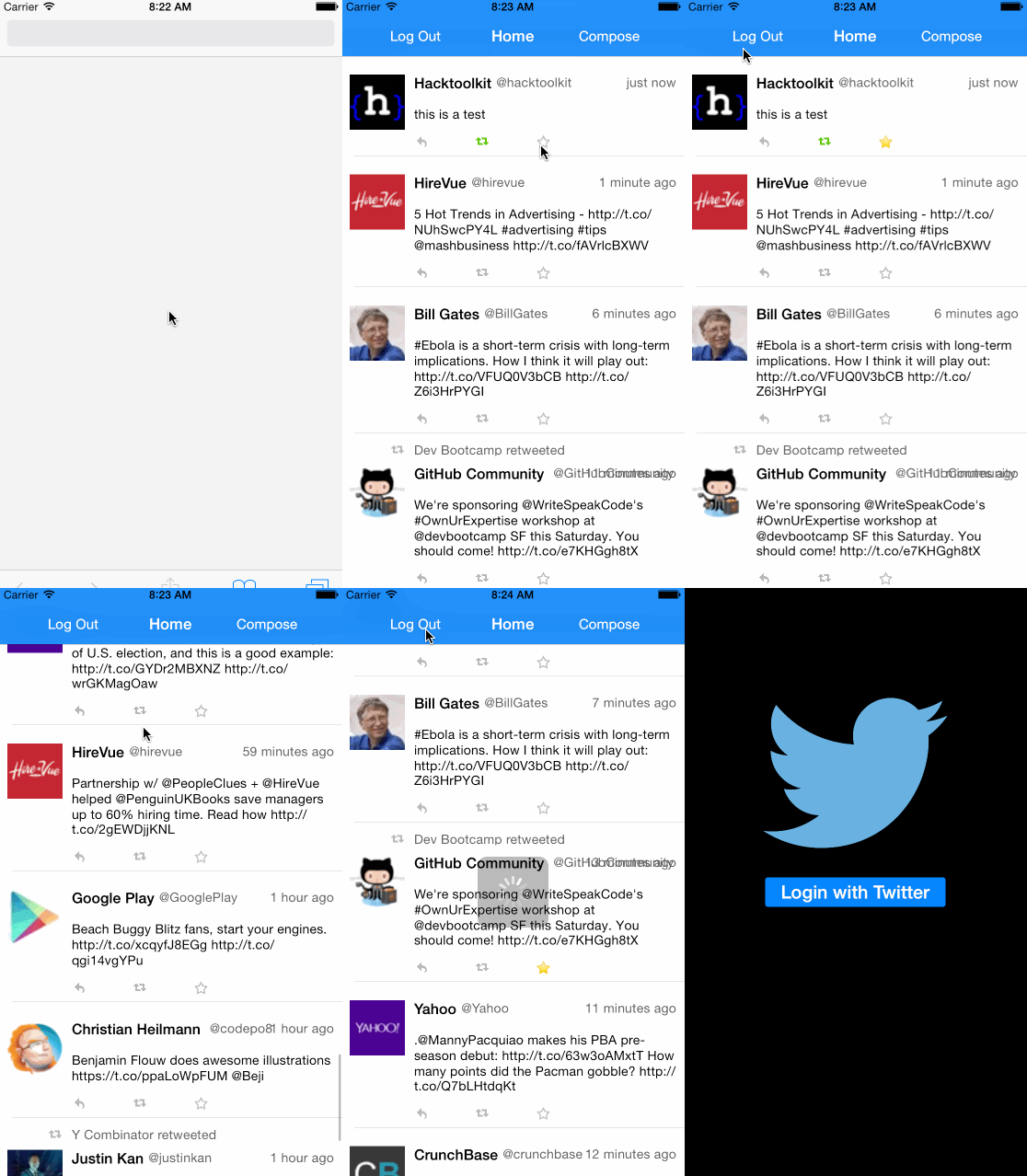
## GIF Screen Cap
Here's an animated GIF (made with [LiceCAP](http://www.cockos.com/licecap/)) of what it looks like:

## Download and Build Instructions
* Clone the repository
* Install [CocoaPods](http://cocoapods.org/)
* `sudo gem install cocoapods`
* Install Pods
* `pod install`
* Update/initialize the [hacktoolkit-ios_lib](https://github.com/hacktoolkit/hacktoolkit-ios_lib) submodule (temporary step until CocoaPods supports Swift source files natively)
* `git submodule init`
* `git submodule update`
* Set up API keys
* Create a `secrets.xcconfig` config file based on `secrets.xcconfig.template`
* Obtain API keys from the [Twitter Developers page](http://www.twitter.com/developers/manage_api_keys) and add the keys to `secrets.xcconfig`
* Run it!
## Features
### Part 1 - Basic Twitter Client

Time spent: 26 hours
**Core User Stories**
* [x] User can sign in using OAuth login flow
* [x] User can view last 20 tweets from their home timeline
* [x] The current signed in user will be persisted across restarts
* [x] In the home timeline, user can view tweet with the user profile picture, username, tweet text, and timestamp.
* [x] User can pull to refresh
* [x] User can compose a new tweet by tapping on a compose button.
* [x] User can tap on a tweet to view it, with controls to retweet, favorite, and reply.
**Optional User Stories**
* [x] Countdown in the upper right for the Tweet limit. Turns red and prevents posting Tweet when it exceeds the limit.
* [x] After creating a new tweet, a user can view it in the timeline immediately without refetching the timeline from the network.
* [x] Retweeting and favoriting increments the retweet and favorite count.
* [x] User can unretweet and unfavorite, and decrements the retweet and favorite count.
* [x] Replies are prefixed with the username and the reply_id is set when posting the tweet,
* [x] User can load more tweets once they reach the bottom of the feed using infinite loading similar to the actual Twitter client.
### Part 2 - Twitter Redux

Time spent: 14 hours
* [x] Hamburger menu
* [x] Dragging anywhere in the view reveals the menu
* [wip] except when a Navigation controller has pushed above the sidebar menu controller, or Tweet details
* [x] The menu includes links to the home timeline, profile, mentions view, settings view, and log out
* [x] The menu was inspired by the LinkedIn menu
* [75%] Profile page - getting nil for outlets when using property observer for user and/or `viewDidLoad`
* [x] Contains the user header view
* [x] Contains a section with the users basic stats: # tweets, # following, # followers
* [wip] Optional: Implement the paging view for the user description.
* [wip] Optional: As the paging view moves, increase the opacity of the background screen. See the actual Twitter app for this effect
* [wip] Optional: Pulling down the profile page should blur and resize the header image.
* [wip] Home Timeline
* [wip] Tapping on a user image should bring up that user's profile page
* [wip] Optional: Account switching
* [wip] Long press on tab bar to bring up Account view with animation
* [wip] Tap account to switch to
* [wip] Include a plus button to Add an Account
* [wip] Swipe to delete an account
### License
See `LICENSE`
* The Font Awesome font is licensed under the SIL OFL 1.1:
*
* Font Awesome by Dave Gandy -
* Full details: