https://github.com/hacktoolkit/python-htk-lite
Lightweight convenience utils for Python without any external dependencies.
https://github.com/hacktoolkit/python-htk-lite
Last synced: over 1 year ago
JSON representation
Lightweight convenience utils for Python without any external dependencies.
- Host: GitHub
- URL: https://github.com/hacktoolkit/python-htk-lite
- Owner: hacktoolkit
- License: mit
- Created: 2019-07-10T22:18:25.000Z (about 7 years ago)
- Default Branch: master
- Last Pushed: 2023-06-10T04:46:21.000Z (about 3 years ago)
- Last Synced: 2025-02-25T03:35:46.977Z (over 1 year ago)
- Language: Python
- Size: 23.4 KB
- Stars: 1
- Watchers: 3
- Forks: 0
- Open Issues: 0
-
Metadata Files:
- Readme: README.md
- License: LICENSE.md
Awesome Lists containing this project
README
[](https://pypi.org/project/htk-lite/)
[](https://pypi.org/project/htk-lite/)
# HTK Lite for Python
A set of convenience utils for Python requiring no external libs. Some of the best tricks from [`django-htk`](https://github.com/hacktoolkit/django-htk), without the bloat and Django dependency.
# Features
1. Debug via Slack using `slack_debug` and `slack_debug_json`. The best of `println` debugging, without the inconvenience of visually fishing for one message out of thousands of log lines.
# How To Use This Awesome?
## Installation
1. Install via PIP:
`pip install htk-lite`
1. (**Alternative install via clone**) Installe via local clone: clone this repository into a directory named `htk` (preferred) or `htk_lite`
SSH: `git clone git@github.com:hacktoolkit/python-htk-lite.git htk`
HTTPS: `git clone https://github.com/hacktoolkit/python-htk-lite.git`
1. Create `local_settings.py` and add your [Slack incoming webhook](https://slack.com/apps/A0F7XDUAZ-incoming-webhooks) URL to `SLACK_WEBHOOK_URL`.
### Tips on Location of HTK Module
1. You can place it outside of your app directory tree, and then symlink it inside.
1. To not be nagged by the presence of the `htk` directory whenever you do `git status`, add `htk` to your `.git/info/exclude` file (like `.gitignore`, but only in your local repository, not checked in).
## Slack Debug
1. Example usage in Python Shell
```
In [1]: from htk import slack_debug
In [2]: from htk import slack_debug_json
In [3]: slack_debug('This is seriously awesome!')
Out[3]:
In [4]: slack_debug('Yeah, no kidding.')
Out[4]:
In [5]: slack_debug_json({'A':1,'B':2,'C':3,'X':['foo','bar','baz'],'Z':{'nested_key':'nested_val
...: ue'}}),
Out[5]: (None,)
```
1. Check your Slack to verify that the message was posted. If not, perhaps your token was wrong, or the Slack integration was disabled.
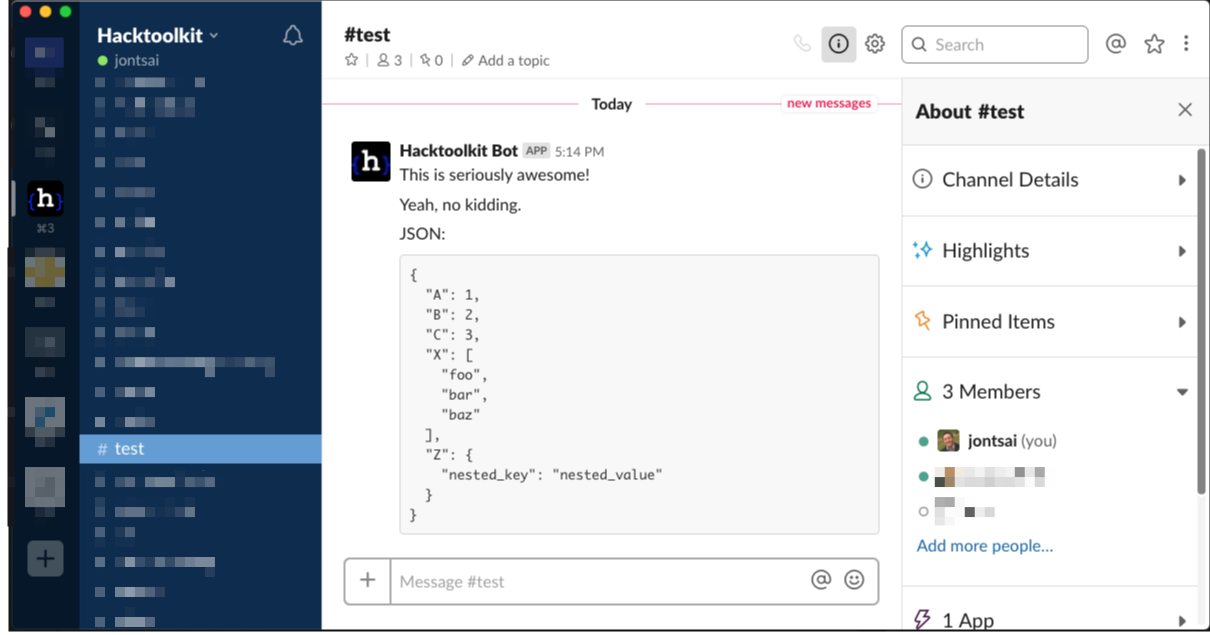
(Alternative link to screenshot above: https://cl.ly/436cfb4383a2)
1. Profit!
## FDebug (FDB)
1. (**Recommended**) Create a BASH alias or similar: `alias fdb='touch /tmp/fdebug.log; tail -f /tmp/fdebug.log'`
1. In a separate window used for debugging, run `fdb` to watch the logs roll in.
1. `from htk import fdb`
1. `fdb('Not all heroes wear capes')`
# See Also
- C# - https://github.com/hacktoolkit/csharp-htk
- PHP - https://github.com/hacktoolkit/php-htk
- Python (full) - https://github.com/hacktoolkit/python-htk
- Python (lite) - https://github.com/hacktoolkit/python-htk-lite
- Ruby - https://github.com/hacktoolkit/htk-rb
# Authors and Maintainers
- [Hacktoolkit](https://github.com/hacktoolkit)
- [Jonathan Tsai](https://github.com/jontsai)
# License
MIT. See `LICENSE.md`