https://github.com/hadilq/cleanarchitecture
A sample app for clean architecture.
https://github.com/hadilq/cleanarchitecture
android android-architecture clean-architecture mvvm mvvm-android mvvm-architecture
Last synced: over 1 year ago
JSON representation
A sample app for clean architecture.
- Host: GitHub
- URL: https://github.com/hadilq/cleanarchitecture
- Owner: hadilq
- Created: 2018-09-22T08:41:34.000Z (almost 8 years ago)
- Default Branch: main
- Last Pushed: 2021-06-26T04:39:51.000Z (about 5 years ago)
- Last Synced: 2025-03-22T21:06:14.895Z (over 1 year ago)
- Topics: android, android-architecture, clean-architecture, mvvm, mvvm-android, mvvm-architecture
- Language: Kotlin
- Homepage:
- Size: 4.47 MB
- Stars: 35
- Watchers: 3
- Forks: 5
- Open Issues: 0
-
Metadata Files:
- Readme: README.md
Awesome Lists containing this project
README
# Clean Architecture
This is a sample app to show best practices up to author's knowledge by trying to
stay close to standard technologies for a highly scalable, maintainable, and testable
Android app.
## Technologies
- Clean Architecture
- Public/Impl modules to handle Dependency Inversion Principle on module level
- Anvil to handle Inversion of Control
- Compile time feature flags
- Dagger to handle Dependency Injection
- Single Activity for faster initialization of pages
- AndroidX
- MVVM
- Kotlin Coroutines
- KotlinX Serialization
- Room database
- JUnit 5
- Mockk
### Dependency Inversion Principle
All modules are depending on each other only by `:public` interfaces, except the `:app`
where is the only user of `:impl` modules. Also by keeping the `:app` as light as possible,
rebuilding time of any `:impl` module will be short.
### Dagger
Defined scopes in Dagger
- AppScope
- SingleActivityScope
- FragmentScope
- RetainScope
### Modules
Here we have one root module, which is the `:app`, and one feature module `:guidomia` that
is following clean architecture practices.
Other modules considered as library modules.
- core
- database
- single-activity
- di
- feature-flags
For your convenient you may want to put them in separated directories, such as `features`, `libraries`, etc.
### Feature Flags
The idea is to switch on/off modules in compile time. We call this concept compile time feature
flags, because they use the same logic of runtime feature flags, the concept that we had before.
Here we have switches for `:database` and `:guidomia` modules, one library module and one feature
module. In this project, where you can find part of its dependency tree here
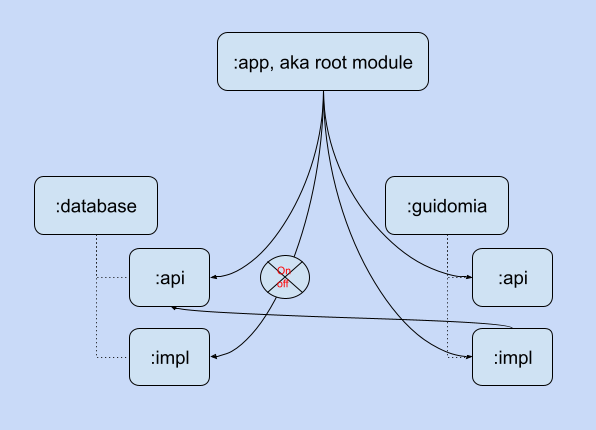
the feature flag logic to handle switch off of `:database:impl` is in the `:guidomia:impl`, and
feature flag logic to handle switch off of `:guimomia:impl` is in `:single-activity:impl`.
To switch them on and off, we developed this sample to use "scenario" concept. You can put
`scenario` variable like
```properties
scenario=>guidomia>database
```
in `local.properties` file. It will enable `guidomia` and `database` modules, and it's the default
`scenario`, when the developer didn't provide any `scenario` variable in the `local.properties`.
For this project there are two different `scenario`s that developer can use to decrease the
overall build time of the project. They are as following.
```properties
scenario=>guidomia
```
or
```properties
scenario=>
```
The last one is the root scenario that switch off all plugable modules in this project. Plugable
modules are the one that has a switch.