https://github.com/hainesr/mos6502
A ruby implementation of the 6502 microprocessor
https://github.com/hainesr/mos6502
6502 6502-processor ruby
Last synced: about 2 months ago
JSON representation
A ruby implementation of the 6502 microprocessor
- Host: GitHub
- URL: https://github.com/hainesr/mos6502
- Owner: hainesr
- License: other
- Created: 2020-10-07T21:03:39.000Z (almost 6 years ago)
- Default Branch: main
- Last Pushed: 2021-05-19T18:45:23.000Z (about 5 years ago)
- Last Synced: 2025-10-07T23:44:23.600Z (9 months ago)
- Topics: 6502, 6502-processor, ruby
- Language: Ruby
- Homepage:
- Size: 313 KB
- Stars: 2
- Watchers: 1
- Forks: 0
- Open Issues: 0
-
Metadata Files:
- Readme: README.md
- Code of conduct: CODE_OF_CONDUCT.md
Awesome Lists containing this project
README
# Ruby MOS 6502
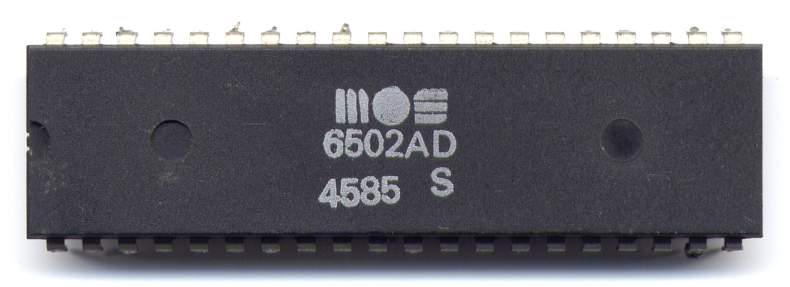
A ruby implementation of the [MOS Technology 6502 microprocessor][wp-6502].
[](https://badge.fury.io/rb/mos6502)

[](https://coveralls.io/github/hainesr/mos6502?branch=main)
[](https://codeclimate.com/github/hainesr/mos6502/maintainability)
## Installation
Add this line to your application's Gemfile:
```ruby
gem 'mos6502'
```
And then execute:
$ bundle install
Or install it yourself as:
$ gem install mos6502
## Usage
The entry point to this library is `Mos6502::Cpu`. You can create a new `Cpu` with the program counter (PC) set to a specific memory address as follows:
```ruby
cpu = Mos6502::Cpu.new(initial_pc: 0x400)
```
You can load a snippet of code like this:
```ruby
cpu.load!([0xa9, 0x33, 0x69, 0x55])
```
`Cpu#load!` also resets the CPU; all memory is cleared first, then the registers are set to zero, the PC is returned to its initial value, the stack pointer (SP) is reset to `0xff` and the status bits are set to their defaults.
There is no assembler (yet?). The above code is:
```
LDA #$33 ; load immediate
ADC #$55 ; add with carry
```
It will load the hex value `0x33` (51) into the accumulator and add the hex value `0x55` (85) to it and store the result back in the accumulator.
To run the next instruction, call `Cpu#step`. The PC will be advanced to point to the next instruction. To run the above code, which is just two instructions, use:
```ruby
cpu.step
cpu.step
```
You can then inspect the current state of the CPU with:
```ruby
puts cpu.inspect
# a: 0x88, x: 0x00, y: 0x00, sp: 0xff, pc: 0x0404, op: 0x00, status: 0b11110000
```
You can see here that the accumulator (`a`) holds the result of `0x33` + `0x55` = `0x88` and that the PC has moved on 4 places to `0x404`. You can also see from the status bits that the result is negative in two's complement (bit 7) and that overflow has occurred (bit 6).
For more complex code, you will need to load in an assembled image:
```ruby
image = File.read(IMAGE_PATH)
cpu.load_image!(image, 0x400)
```
You will need to know the entry point, and set the initial PC when initializing the `Cpu` upfront. The above example loads the image at memory location 1024. `Cpu#load_image!` will reset the CPU in the same way as `Cpu#load!` above. If you need to load an image in parts (e.g. assembled code and data) you can use `Cpu#load_image`, which is non-destructive.
There is loads more information on the 6502, and how to program it here:
* [Obelisk][obelisk]
* [6502.org][6502org]
* [Visual 6502][vis6502]
## Development
After checking out the repo, run `bin/setup` to install dependencies. Then, run `rake` to run the tests. You can also run `bin/console` for an interactive prompt that will allow you to experiment.
### 6502 test suites
This repository includes external test suites to more comprehensively test all the features of the 6502 microprocessor. They are not run by default because they can take a few minutes to complete, but can be turned on with environment variables passed into `rake`. Once this code supports all of a test suite's features it will be run by default in CI.
#### Klaus Dormann's test suite
This is included as a submodule. Once you've initialized it you can run it as part of the normal test suite with:
```shell
MOS6502_KLAUS2M5=on rake
```
If you want to see a full debug stream of it running, use `MOS6502_KLAUS2M5=debug` instead.
## Contributing
Bug reports and pull requests are welcome on GitHub at https://github.com/hainesr/mos6502.
## Code of Conduct
This project is intended to be a safe, welcoming space for collaboration, and contributors are expected to adhere to the [code of conduct][coc].
Everyone interacting in the MOS 6502 project's codebases, issue trackers, chat rooms and mailing lists is expected to follow the code of conduct.
## Licence
Copyright (c) 2020, Robert Haines.
Released under the BSD Licence. See LICENCE for details.
[wp-6502]: https://en.wikipedia.org/wiki/MOS_Technology_6502
[coc]: https://github.com/hainesr/mos6502/blob/master/CODE_OF_CONDUCT.md
[obelisk]: http://www.obelisk.me.uk/6502/
[6502org]: http://www.6502.org/
[vis6502]: http://www.visual6502.org/