https://github.com/hal-42/alchemycat
Alchemy Cat —— 🔥Config System for SOTA
https://github.com/hal-42/alchemycat
auto-tuning computer-vision config deep-learning machine-learning parameter-tuning
Last synced: 6 months ago
JSON representation
Alchemy Cat —— 🔥Config System for SOTA
- Host: GitHub
- URL: https://github.com/hal-42/alchemycat
- Owner: HAL-42
- License: apache-2.0
- Created: 2019-12-07T15:43:49.000Z (over 6 years ago)
- Default Branch: master
- Last Pushed: 2025-12-18T14:21:36.000Z (7 months ago)
- Last Synced: 2025-12-21T17:36:54.877Z (7 months ago)
- Topics: auto-tuning, computer-vision, config, deep-learning, machine-learning, parameter-tuning
- Language: Python
- Homepage: https://github.com/HAL-42/AlchemyCat
- Size: 4.01 MB
- Stars: 111
- Watchers: 5
- Forks: 7
- Open Issues: 2
-
Metadata Files:
- Readme: README.md
- License: LICENSE
Awesome Lists containing this project
README
# Alchemy Cat —— 🔥Config System for SOTA




[](https://badge.fury.io/py/alchemy-cat)


[🚀Introduction](https://github.com/HAL-42/AlchemyCat/blob/master/README.md#-introduction) | [📦Installation](https://github.com/HAL-42/AlchemyCat/blob/master/README.md#-installation) | [🚚Migration](https://github.com/HAL-42/AlchemyCat/blob/master/README.md#-migration) | [📖Documentation](https://github.com/HAL-42/AlchemyCat/blob/master/README.md#-documentation-)
#
🚀 Introduction
When developing machine learning algorithms, we often bother with:
* Config files (YAML / YACS / MMCV) are lengthy and complex. If entries are interdependent, extra caution is needed to avoid errors when modifying them.
* Parameter tuning requires rewriting the config for each parameter set, leading to code duplication and difficulty in tracking changes.
* Manually traversing the parameter space and summarizing results during parameter tuning is time-consuming and inefficient.
* Insufficient parameter tuning can obscure effective designs.
* Effective methods may not achieve SOTA due to insufficient parameter tuning, reducing persuasiveness.
AlchemyCat is a config system designed for machine learning research to address such issues. It helps researchers to fully explore the parameter tuning potential by simplifying repetitive tasks like reproduction, modifying configs, and hyperparameter tuning
The table below compares AlchemyCat with existing config systems (😡 not support, 🤔 limited support, 🥳 supported):
| Feature | argparse | yaml | YACS | mmcv | AlchemyCat |
|----------------------------|----------|------|------|------|------------|
| Reproducible | 😡 | 🥳 | 🥳 | 🥳 | 🥳 |
| IDE Jump | 😡 | 😡 | 🥳 | 🥳 | 🥳 |
| Inheritance | 😡 | 😡 | 🤔 | 🤔 | 🥳 |
| Composition | 😡 | 😡 | 🤔 | 🤔 | 🥳 |
| dependency | 😡 | 😡 | 😡 | 😡 | 🥳 |
| Automatic Parameter Tuning | 😡 | 😡 | 😡 | 😡 | 🥳 |
AlchemyCat implements all features of current popular config systems, while fully considering various special cases, ensuring stability. AlchemyCat distinguishes itself by:
* Readable: The syntax is simple, elegant, and Pythonic.
* Reusable: Supports **inheritance** and **composition** of configs, reducing redundancy and enhancing reusability.
* Maintainable: Allows for establishing **dependency** between config items, enabling global synchronization with a single change.
* Supports auto parameter tuning and result summarization without needing to modify original configs or training codes.
[Migrate](https://github.com/HAL-42/AlchemyCat/blob/master/README.md#-migration) from config systems listed above to AlchemyCat is effortless. Just spend 15 minutes reading the [documentation](https://github.com/HAL-42/AlchemyCat/blob/master/README.md#-documentation-) and apply AlchemyCat to your project, and your GPU will never be idle again!
## Quick Glance
Deep learning relies on numerous empirical hyperparameters, such as learning rate, loss weights, max iterations, sliding window size, drop probability, thresholds, and even random seeds.
The relationship between hyperparameters and performance is hard to predict theoretically. The only certainty is that arbitrarily chosen hyperparameters are unlikely to be optimal. Practice has shown that grid search through the hyperparameter space can significantly enhance model performance; sometimes its effect even surpasses so-called "contributions." Achieving SOTA often depends on this!
AlchemyCat offers an auto parameter-tuner that seamlessly integrates with existing config systems to explore the hyperparameter space and summarize experiment results automatically. Using this tool requires no modifications to the original config or training code.
For example, with [MMSeg](https://github.com/open-mmlab/mmsegmentation) users only need to write a tunable config inherited from MMSeg's base config and define the parameter search space:
```python
# -- configs/deeplabv3plus/tune_bs,iter/cfg.py --
from alchemy_cat import Cfg2Tune, Param2Tune
# Inherit from standard mmcv config.
cfg = Cfg2Tune(caps='configs/deeplabv3plus/deeplabv3plus_r50-d8_4xb4-40k_voc12aug-512x512.py')
# Inherit and override
cfg.model.auxiliary_head.loss_decode.loss_weight = 0.2
# Tuning parameters: grid search batch_size and max_iters
cfg.train_dataloader.batch_size = Param2Tune([4, 8])
cfg.train_cfg.max_iters = Param2Tune([20_000, 40_000])
# ...
```
Next, write a script specifying how to run a single config and read its results:
```python
# -- tools/tune_dist_train.py --
import argparse, subprocess
from alchemy_cat.dl_config import Cfg2TuneRunner, Config
from alchemy_cat.dl_config.examples.read_mmcv_metric import get_metric
parser = argparse.ArgumentParser()
parser.add_argument('--cfg2tune', type=str) # Path to the tunable config
parser.add_argument('--num_gpu', type=int, default=2) # Number of GPUs for each task
args = parser.parse_args()
runner = Cfg2TuneRunner(args.cfg2tune, experiment_root='work_dirs', work_gpu_num=args.num_gpu)
@runner.register_work_fn # Run experiment for each param combination with mmcv official train script
def work(pkl_idx: int, cfg: Config, cfg_pkl: str, cfg_rslt_dir: str, cuda_env: dict[str, str]):
mmcv_cfg = cfg.save_mmcv(cfg_rslt_dir + '/mmcv_config.py')
subprocess.run(f'./tools/dist_train.sh {mmcv_cfg} {args.num_gpu}', env=cuda_env, shell=True)
@runner.register_gather_metric_fn # Optional, gather metric of each config
def gather_metric(cfg: Config, cfg_rslt_dir: str, run_rslt, param_comb) -> dict[str, float]:
return get_metric(cfg_rslt_dir) # {'aAcc': xxx, 'mIoU': xxx, 'mAcc': xxx}
runner.tuning()
```
Run `CUDA_VISIBLE_DEVICES=0,1,2,3 python tools/tune_dist_train.py --cfg2tune configs/deeplabv3plus/tune_bs,iter/cfg.py`, which will automatically search the parameter space in parallel and summarize the experiment results as follows:
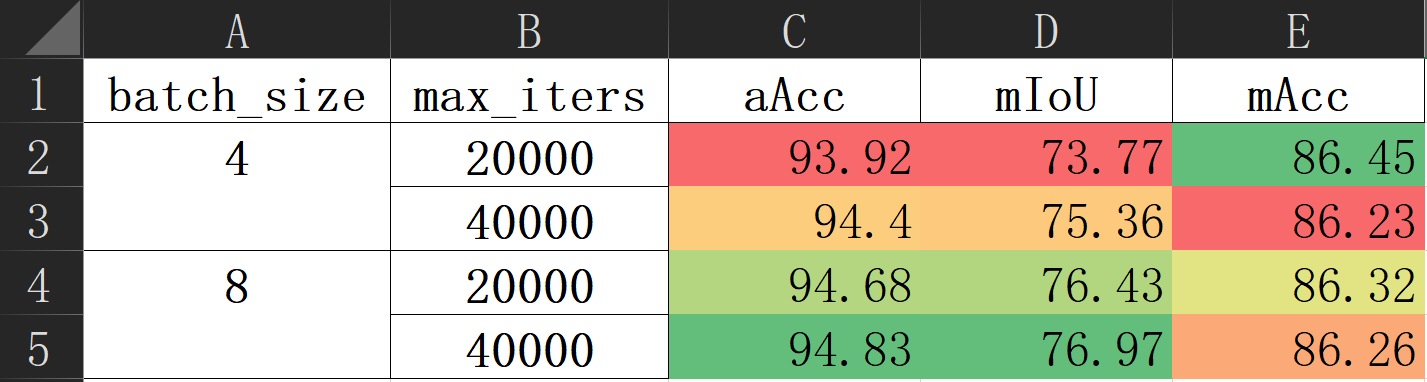
In fact, the above config is still incomplete for some hyperparameters are interdependent and need to be adjusted together. For instance, the learning rate should scale with the batch size. AlchemyCat uses **dependency** to manage these relationships; when a dependency source changes, related dependencies automatically update for consistency. The complete config with dependencies is:
```python
# -- configs/deeplabv3plus/tune_bs,iter/cfg.py --
from alchemy_cat import Cfg2Tune, Param2Tune, P_DEP
# Inherit from standard mmcv config.
cfg = Cfg2Tune(caps='configs/deeplabv3plus/deeplabv3plus_r50-d8_4xb4-40k_voc12aug-512x512.py')
# Inherit and override
cfg.model.auxiliary_head.loss_decode.loss_weight = 0.2
# Tuning parameters: grid search batch_size and max_iters
cfg.train_dataloader.batch_size = Param2Tune([4, 8])
cfg.train_cfg.max_iters = Param2Tune([20_000, 40_000])
# Dependencies:
# 1) learning rate increase with batch_size
cfg.optim_wrapper.optimizer.lr = P_DEP(lambda c: (c.train_dataloader.batch_size / 8) * 0.01)
# 2) end of param_scheduler increase with max_iters
@cfg.set_DEP()
def param_scheduler(c):
return dict(
type='PolyLR',
eta_min=1e-4,
power=0.9,
begin=0,
end=c.train_cfg.max_iters,
by_epoch=False)
```
> [!NOTE]
> In the example above, defining dependencies might seem needless since they can be computed directly. However, when combined with **inheritance**, setting dependencies in the base config allows tunable configs to focus on key hyperparameters without worrying about trivial dependency details. Refer to the [documentation](#dependency) for details.
#
📦 Installation
```bash
pip install alchemy-cat
```
#
🚚 Migration
How to migrate from YAML / YACS / MMCV
σ`∀´)σ Just kidding! No migration is needed. AlchemyCat can direct read and write YAML / YACS / MMCV config files:
```python
from alchemy_cat.dl_config import load_config, Config
# READ YAML / YACS / MMCV config to alchemy_cat.Config
cfg = load_config('path/to/yaml_config.yaml or yacs_config.py or mmcv_config.py')
# Init alchemy_cat.Config with YAML / YACS / MMCV config
cfg = Config('path/to/yaml_config.yaml or yacs_config.py or mmcv_config.py')
# alchemy_cat.Config inherits from YAML / YACS / MMCV config
cfg = Config(caps='path/to/yaml_config.yaml or yacs_config.py or mmcv_config.py')
print(cfg.model.backbone) # Access config item
cfg.save_yaml('path/to/save.yaml') # Save to YAML config
cfg.save_mmcv('path/to/save.py') # Save to MMCV config
cfg.save_py('path/to/save.py') # Save to AlchemyCat config
```
We also provide a script to convert between different config formats:
```bash
python -m alchemy_cat.dl_config.from_x_to_y --x X --y Y --y_type=yaml/mmcv/alchemy-cat
```
where:
* `--x`: Source config file path, can be YAML / YACS / MMCV / AlchemyCat config.
* `--y`: Target config file path.
* `--y_type`: Target config format, can be `yaml`, `mmcv`, or `alchemy-cat`.
#
📖 Documentation
## Basic Usage
AlchemyCat ensures a one-to-one correspondence between each configuration and its unique experimental record, with the bijective relationship ensuring the experiment's reproducibility.
```text
config C + algorithm code A ——> reproducible experiment E(C, A)
```
The experimental directory is automatically generated, mirroring the relative path of the configuration file. This path can include multi-level directories and special characters such as spaces, commas, and equal signs. Such flexibility aids in categorizing experiments for clear management. For instance:
```text
.
├── configs
│ ├── MNIST
│ │ ├── resnet18,wd=1e-5@run2
│ │ │ └── cfg.py
│ │ └── vgg,lr=1e-2
│ │ └── cfg.py
│ └── VOC2012
│ └── swin-T,γ=10
│ └── 10 epoch
│ └── cfg.py
└── experiment
├── MNIST
│ ├── resnet18,wd=1e-5@run2
│ │ └── xxx.log
│ └── vgg,lr=1e-2
│ └── xxx.log
└── VOC2012
└── swin-T,γ=10
└── 10 epoch
└── xxx.log
```
> [!TIP]
> **Best Practice: Avoid having '.' in the path. By following this best practice, relative imports can be used in `cfg.py`, and functions and classes defined within it can be pickled.**
Let's begin with an incomplete example to demonstrate writing and loading a config. First, create the [config file](alchemy_cat/dl_config/examples/configs/mnist/plain_usage/cfg.py):
```python
# -- [INCOMPLETE] configs/mnist/plain_usage/cfg.py --
from torchvision.datasets import MNIST
from alchemy_cat.dl_config import Config
cfg = Config()
cfg.rand_seed = 0
cfg.dt.cls = MNIST
cfg.dt.ini.root = '/tmp/data'
cfg.dt.ini.train = True
# ... Code Omitted.
```
Here, we first instantiate a `Config` object `cfg`, and then add config items through attribute operator `.`. Config items can be any Python objects, including functions, methods, and classes.
> [!TIP]
> **Best Practice: We prefer specifying functions or classes directly in config over using strings/semaphores to control the program behavior. This enables IDE navigation, simplifying reading and debugging.** Refer to the "Advanced Usage" chapter's "Dependency Injection Configuration" for details.
`Config` is a subclass of Python's `dict`. The above code defines a nested dictionary with a **tree structure**:
```text
>>> print(cfg.to_dict())
{'rand_seed': 0,
'dt': {'cls': ,
'ini': {'root': '/tmp/data', 'train': True}}}
```
`Config` implements all API of Python `dict`:
```test
>>> cfg.keys()
dict_keys(['rand_seed', 'dt'])
>>> cfg['dt']['ini']['root']
'/tmp/data'
>>> {**cfg['dt']['ini'], 'download': True}
{'root': '/tmp/data', 'train': True, 'download': True}
```
You can initialize a `Config` object using `dict` (yaml, json) or its subclasses (YACS, mmcv.Config).
```text
>>> Config({'rand_seed': 0, 'dt': {'cls': MNIST, 'ini': {'root': '/tmp/data', 'train': True}}})
{'rand_seed': 0, 'dt': {'cls': , 'ini': {'root': '/tmp/data', 'train': True}}}
```
Using operator `.` to read and write `cfg` will be clearer. For instance, the following code creates and initializes the `MNIST` dataset based on the config:
```text
>>> dataset = cfg.dt.cls(**cfg.dt.ini)
>>> dataset
Dataset MNIST
Number of datapoints: 60000
Root location: /tmp/data
Split: Train
```
Accessing a non-existent key returns an empty dictionary, which should be treated as `False`:
```text
>>> cfg.not_exit
{}
```
In the [main code](alchemy_cat/dl_config/examples/train.py), use the following code to load the config:
```python
# # [INCOMPLETE] -- train.py --
from alchemy_cat.dl_config import load_config
cfg = load_config('configs/mnist/base/cfg.py', experiments_root='/tmp/experiment', config_root='configs')
# ... Code Omitted.
torch.save(model.state_dict(), f"{cfg.rslt_dir}/model_{epoch}.pth") # Save all experiment results to cfg.rslt_dir.
```
The `load_config` imports `cfg` from `configs/mnist/base/cfg.py`, handling inheritance and dependencies. Given the experiment root directory `experiments_root` and config root directory `config_root`, it auto creates an experiment directory at `experiment/mnist/base` and assign it to `cfg.rslt_dir`. All experimental results should be saved to `cfg.rslt_dir`.
The loaded `cfg` is read-only by default (`cfg.is_frozen == True`). To modify, unfreeze `cfg` with `cfg.unfreeze()`.
### Summary of This Chapter
* The config file offers a `Config` object `cfg`, a nested dictionary with a tree structure, allowing read and write via the `.` operator.
* Accessing non-existent keys in `cfg` returns a one-time empty dictionary considered as `False`.
* Use `load_config` to load the config file. The experiment path will be auto created and assigned to `cfg.rslt_dir`.
## Inheritance
The new config can inherit the existing base config, written as `cfg = Config(caps='base_cfg.py')`. The new config only needs to override or add items, with rest items reusing the base config. For example, with [base config](alchemy_cat/dl_config/examples/configs/mnist/plain_usage/cfg.py):
```python
# -- [INCOMPLETE] configs/mnist/plain_usage/cfg.py --
# ... Code Omitted.
cfg.loader.ini.batch_size = 128
cfg.loader.ini.num_workers = 2
cfg.opt.cls = optim.AdamW
cfg.opt.ini.lr = 0.01
# ... Code Omitted.
```
To double the batch size, [new config](alchemy_cat/dl_config/examples/configs/mnist/plain_usage,2xbs/cfg.py) can be written as:
```python
# -- configs/mnist/plain_usage,2xbs/cfg.py --
from alchemy_cat.dl_config import Config
cfg = Config(caps='configs/mnist/plain_usage/cfg.py') # Inherit from base config.
cfg.loader.ini.batch_size = 128 * 2 # Double batch size.
cfg.opt.ini.lr = 0.01 * 2 # Linear scaling rule, see https://arxiv.org/abs/1706.02677
```
Inheritance behaves like `dict.update`. The key difference is that if both config have keys with the same name and their values are `Config` instance (naming config subtree), we recursively update within these subtrees. Thus, the new config can modify `cfg.loader.ini.batch_size` while inheriting `cfg.loader.ini.num_workers`.
```text
>>> base_cfg = load_config('configs/mnist/plain_usage/cfg.py', create_rslt_dir=False)
>>> new_cfg = load_config('configs/mnist/plain_usage,2xbs/cfg.py', create_rslt_dir=False)
>>> base_cfg.loader.ini
{'batch_size': 128, 'num_workers': 2}
>>> new_cfg.loader.ini
{'batch_size': 256, 'num_workers': 2}
```
To overwrite the entire config subtree in the new config, set this subtree to "override", [e.g.](alchemy_cat/dl_config/examples/configs/mnist/plain_usage,override_loader/cfg.py) :
```python
# -- configs/mnist/plain_usage,override_loader/cfg.py --
from alchemy_cat.dl_config import Config
cfg = Config(caps='configs/mnist/plain_usage/cfg.py') # Inherit from base config.
cfg.loader.ini.override() # Set subtree as whole.
cfg.loader.ini.shuffle = False
cfg.loader.ini.drop_last = False
```
`cfg.loader.ini` will now be solely defined by the new config:
```text
>>> base_cfg = load_config('configs/mnist/plain_usage/cfg.py', create_rslt_dir=False)
>>> new_cfg = load_config('configs/mnist/plain_usage,2xbs/cfg.py', create_rslt_dir=False)
>>> base_cfg.loader.ini
{'batch_size': 128, 'num_workers': 2}
>>> new_cfg.loader.ini
{'shuffle': False, 'drop_last': False}
```
Naturally, a base config can inherit from another base config, known as chain inheritance.
Multiple inheritance is also supported, written as `cfg = Config(caps=('base.py', 'patch1.py', 'patch2.py', ...))`, creating an inheritance chain of `base -> patch1 -> patch2 -> current cfg`. The base configs on the right are often used patches to batch add config items. For example, this [patch](alchemy_cat/dl_config/examples/configs/patches/cifar10.py) includes CIFAR10 dataset configurations:
```python
# -- configs/patches/cifar10.py --
import torchvision.transforms as T
from torchvision.datasets import CIFAR10
from alchemy_cat.dl_config import Config
cfg = Config()
cfg.dt.override()
cfg.dt.cls = CIFAR10
cfg.dt.ini.root = '/tmp/data'
cfg.dt.ini.transform = T.Compose([T.ToTensor(), T.Normalize((0.5, 0.5, 0.5), (0.5, 0.5, 0.5))])
```
To switch to CIFAR10, [new config](alchemy_cat/dl_config/examples/configs/mnist/plain_usage,cifar10/cfg.py) only need to inherit the patch:
```python
# -- configs/mnist/plain_usage,cifar10/cfg.py --
from alchemy_cat.dl_config import Config
cfg = Config(caps=('configs/mnist/plain_usage/cfg.py', 'alchemy_cat/dl_config/examples/configs/patches/cifar10.py'))
```
```text
>>> cfg = load_config('configs/mnist/plain_usage,cifar10/cfg.py', create_rslt_dir=False)
>>> cfg.dt
{'cls': torchvision.datasets.cifar.CIFAR10,
'ini': {'root': '/tmp/data',
'transform': Compose(
ToTensor()
Normalize(mean=(0.5, 0.5, 0.5), std=(0.5, 0.5, 0.5))
)}}
```
> _Inheritance Implementation Details_
>
> We copy the base config tree and update it with the new config, ensuring isolation between them. This means changes to the new config do not affect the base. Complex inheritance like diamond inheritance is supported but not recommended due to readability issues. \
> Note that leaf node values are passed by reference; modifying them inplace will affect the entire inheritance chain.
### Summary of This Chapter
* The new config can leverage inheritance to reuse the base config and modifies or adds some items.
* The new config updates the base config recursively. Use `Config.override` to revert to the `dict.update` method for updates.
* `Config` supports chain and multiple inheritance, allowing for more fine-grained reuse.
## Dependency
In the [previous](#inheritance) example, changing the batch size in the new configuration also alters the learning rate. This interdependence is called "dependency."
When modifying a config item, it's common to forget its dependencies. AlchemyCat lets you define dependencies, changing the dependency source updates all dependent items automatically. [For example](alchemy_cat/dl_config/examples/configs/mnist/base/cfg.py):
```python
# -- [INCOMPLETE] configs/mnist/base/cfg.py --
from alchemy_cat.dl_config import Config, DEP
# ... Code Omitted.
cfg.loader.ini.batch_size = 128
# ... Code Omitted.
cfg.opt.ini.lr = DEP(lambda c: c.loader.ini.batch_size // 128 * 0.01) # Linear scaling rule.
# ... Code Omitted.
```
The learning rate `cfg.opt.ini.lr` is calculated as a dependency `DEP` using the batch size `cfg.loader.ini.batch_size`. `DEP` takes a function with `cfg` as an argument and returns the dependency value.
In the [new config](alchemy_cat/dl_config/examples/configs/mnist/base,2xbs/cfg.py), we only need to modify the batch size, and the learning rate will update automatically:
```python
# -- configs/mnist/base,2xbs/cfg.py --
from alchemy_cat.dl_config import Config
cfg = Config(caps='configs/mnist/base/cfg.py')
cfg.loader.ini.batch_size = 128 * 2 # Double batch size, learning rate will be doubled automatically.
```
```text
>>> cfg = load_config('configs/mnist/base,2xbs/cfg.py', create_rslt_dir=False)
>>> cfg.loader.ini.batch_size
256
>>> cfg.opt.ini.lr
0.02
```
Below is a more complex [example](alchemy_cat/dl_config/examples/configs/mnist/base/cfg.py):
```python
# -- configs/mnist/base/cfg.py --
# ... Code Omitted.
cfg.sched.epochs = 30
@cfg.sched.set_DEP(name='warm_epochs', priority=0) # kwarg `name` is not necessary
def warm_epochs(c: Config) -> int: # warm_epochs = 10% of total epochs
return round(0.1 * c.sched.epochs)
cfg.sched.warm.cls = sched.LinearLR
cfg.sched.warm.ini.total_iters = DEP(lambda c: c.sched.warm_epochs, priority=1)
cfg.sched.warm.ini.start_factor = 1e-5
cfg.sched.warm.ini.end_factor = 1.
cfg.sched.main.cls = sched.CosineAnnealingLR
cfg.sched.main.ini.T_max = DEP(lambda c: c.sched.epochs - c.sched.warm.ini.total_iters,
priority=2) # main_epochs = total_epochs - warm_epochs
# ... Code Omitted.
```
```text
>>> print(cfg.sched.to_txt(prefix='cfg.sched.')) # A pretty print of the config tree.
cfg.sched = Config()
# ------- ↓ LEAVES ↓ ------- #
cfg.sched.epochs = 30
cfg.sched.warm_epochs = 3
cfg.sched.warm.cls =
cfg.sched.warm.ini.total_iters = 3
cfg.sched.warm.ini.start_factor = 1e-05
cfg.sched.warm.ini.end_factor = 1.0
cfg.sched.main.cls =
cfg.sched.main.ini.T_max = 27
```
In the code, `cfg.sched.epochs` determines total training epochs, which is also the dependency source. Warm-up epochs `cfg.sched.warm_epochs` are 10% of this total, and main epochs `cfg.sched.main.ini.T_max` is the remainder. Adjusting total training epochs updates both warm-up and main epochs automatically.
The dependency `cfg.sched.warm_epochs` is defined using the `Config.set_DEP` decorator. The decorated function, passed as the first parameter of `DEP`, computes the dependency. The key name of dependency can be specified via the keyword argument `name`; if omitted, it defaults to the function's name. For complex computations, using a decorator for definition is recommended.
When a dependency relies on another dependency, they must be computed in the correct order. By default, this is the defined order. The `priority` parameter can specify computation order: smaller `priority` compute earlier. For instance, `cfg.sched.warm_epochs` depended by `cfg.sched.warm.ini.total_iters`, which is depended by `cfg.sched.main.ini.T_max`, so their `priority` increase sequentially.
### Summary of This Chapter
* A dependency is defined when one config item relies on another. Changing the dependency source will automatically recalculate the dependency based on the calculation function.
* Dependencies can be defined by `DEP(...)` or the `Config.set_DEP` decorator.
* If dependencies are interdependent, use the `priority` parameter to specify the computation order; otherwise, they resolve in the order of definition.
## Composition
Composition allows reusing configs by compose predefined config subtrees to form a complete config. For instance, the following [config subtree](alchemy_cat/dl_config/examples/configs/addons/linear_warm_cos_sched.py) defines a learning rate strategy:
```python
# -- configs/addons/linear_warm_cos_sched.py --
import torch.optim.lr_scheduler as sched
from alchemy_cat.dl_config import Config, DEP
cfg = Config()
cfg.epochs = 30
@cfg.set_DEP(priority=0) # warm_epochs = 10% of total epochs
def warm_epochs(c: Config) -> int:
return round(0.1 * c.epochs)
cfg.warm.cls = sched.LinearLR
cfg.warm.ini.total_iters = DEP(lambda c: c.warm_epochs, priority=1)
cfg.warm.ini.start_factor = 1e-5
cfg.warm.ini.end_factor = 1.
cfg.main.cls = sched.CosineAnnealingLR
cfg.main.ini.T_max = DEP(lambda c: c.epochs - c.warm.ini.total_iters,
priority=2) # main_epochs = total_epochs - warm_epochs
```
In the [final config](alchemy_cat/dl_config/examples/configs/mnist/base,sched_from_addon/cfg.py), we compose this set of learning rate strategy:
```python
# -- configs/mnist/base,sched_from_addon/cfg.py --
# ... Code Omitted.
cfg.sched = Config('configs/addons/linear_warm_cos_sched.py')
# ... Code Omitted.
```
```text
>>> print(cfg.sched.to_txt(prefix='cfg.sched.')) # A pretty print of the config tree.
cfg.sched = Config()
# ------- ↓ LEAVES ↓ ------- #
cfg.sched.epochs = 30
cfg.sched.warm_epochs = 3
cfg.sched.warm.cls =
cfg.sched.warm.ini.total_iters = 3
cfg.sched.warm.ini.start_factor = 1e-05
cfg.sched.warm.ini.end_factor = 1.0
cfg.sched.main.cls =
cfg.sched.main.ini.T_max = 27
```
It looks very simple! Just assign/mount the predefined config sub-subtree to the final config. `Config('path/to/cfg.py')` returns a copy of the `cfg` object in the config file, ensuring modifications before and after copying are isolated.
> _Implementation Details of Composition and Dependency_
>
> Attentive readers might wonder how `DEP` determines the parameter `c` for the dependency computation function, specifically which Config object is passed. In this chapter's example, `c` is the config subtree of learning rate; thus, the calculation function for `cfg.warm.ini.total_iters` is `lambda c: c.warm_epochs`. However, in the [previous chapter's](#dependency) example, `c` is the final config; hence, the calculation function for `cfg.sched.warm.ini.total_iters` is `lambda c: c.sched.warm_epochs`.
>
> In fact, `c` is the root node of the configuration tree where `DEP` was first mounted. The `Config` is a bidirectional tree. When `DEP` is first mounted, it records its relative distance to the root. During computation, it traces back this distance to find and pass the corresponding config tree into the computation function.
>
> To prevent this default behavior, set `DEP(lambda c: ..., rel=False)`, ensuring `c` is always the complete configuration.
**Best Practice: Both composition and inheritance aim to reuse config. Composition is more flexible and loosely coupled, so it should be prioritized over inheritance.**
### Summary of This Chapter
* Define config subtree and compose them to create a complete config.
## Full Example
Expand full example
[Config subtree](alchemy_cat/dl_config/examples/configs/addons/linear_warm_cos_sched.py) related to learning rate:
```python
# -- configs/addons/linear_warm_cos_sched.py --
import torch.optim.lr_scheduler as sched
from alchemy_cat.dl_config import Config, DEP
cfg = Config()
cfg.epochs = 30
@cfg.set_DEP(priority=0) # warm_epochs = 10% of total epochs
def warm_epochs(c: Config) -> int:
return round(0.1 * c.epochs)
cfg.warm.cls = sched.LinearLR
cfg.warm.ini.total_iters = DEP(lambda c: c.warm_epochs, priority=1)
cfg.warm.ini.start_factor = 1e-5
cfg.warm.ini.end_factor = 1.
cfg.main.cls = sched.CosineAnnealingLR
cfg.main.ini.T_max = DEP(lambda c: c.epochs - c.warm.ini.total_iters,
priority=2) # main_epochs = total_epochs - warm_epochs
```
The composed [base config](alchemy_cat/dl_config/examples/configs/mnist/base,sched_from_addon/cfg.py):
```python
# -- configs/mnist/base/cfg.py --
import torchvision.models as model
import torchvision.transforms as T
from torch import optim
from torchvision.datasets import MNIST
from alchemy_cat.dl_config import Config, DEP
cfg = Config()
cfg.rand_seed = 0
# -* Set datasets.
cfg.dt.cls = MNIST
cfg.dt.ini.root = '/tmp/data'
cfg.dt.ini.transform = T.Compose([T.Grayscale(3), T.ToTensor(), T.Normalize((0.1307,), (0.3081,)),])
# -* Set data loader.
cfg.loader.ini.batch_size = 128
cfg.loader.ini.num_workers = 2
# -* Set model.
cfg.model.cls = model.resnet18
cfg.model.ini.num_classes = DEP(lambda c: len(c.dt.cls.classes))
# -* Set optimizer.
cfg.opt.cls = optim.AdamW
cfg.opt.ini.lr = DEP(lambda c: c.loader.ini.batch_size // 128 * 0.01) # Linear scaling rule.
# -* Set scheduler.
cfg.sched = Config('configs/addons/linear_warm_cos_sched.py')
# -* Set logger.
cfg.log.save_interval = DEP(lambda c: c.sched.epochs // 5, priority=1) # Save model at every 20% of total epochs.
```
Inherited from the base config, batch size doubled, number of epochs halved [new config](alchemy_cat/dl_config/examples/configs/mnist/base,sched_from_addon,2xbs,2÷epo/cfg.py):
```python
# -- configs/mnist/base,sched_from_addon,2xbs,2÷epo/cfg.py --
from alchemy_cat.dl_config import Config
cfg = Config(caps='configs/mnist/base,sched_from_addon/cfg.py')
cfg.loader.ini.batch_size = 256
cfg.sched.epochs = 15
```
Note that dependencies such as learning rate, warm-up epochs, and main epochs will be automatically updated:
```text
>>> cfg = load_config('configs/mnist/base,sched_from_addon,2xbs,2÷epo/cfg.py', create_rslt_dir=False)
>>> print(cfg)
cfg = Config()
cfg.override(False).set_attribute('_cfgs_update_at_parser', ('configs/mnist/base,sched_from_addon/cfg.py',))
# ------- ↓ LEAVES ↓ ------- #
cfg.rand_seed = 0
cfg.dt.cls =
cfg.dt.ini.root = '/tmp/data'
cfg.dt.ini.transform = Compose(
Grayscale(num_output_channels=3)
ToTensor()
Normalize(mean=(0.1307,), std=(0.3081,))
)
cfg.loader.ini.batch_size = 256
cfg.loader.ini.num_workers = 2
cfg.model.cls =
cfg.model.ini.num_classes = 10
cfg.opt.cls =
cfg.opt.ini.lr = 0.02
cfg.sched.epochs = 15
cfg.sched.warm_epochs = 2
cfg.sched.warm.cls =
cfg.sched.warm.ini.total_iters = 2
cfg.sched.warm.ini.start_factor = 1e-05
cfg.sched.warm.ini.end_factor = 1.0
cfg.sched.main.cls =
cfg.sched.main.ini.T_max = 13
cfg.log.save_interval = 3
cfg.rslt_dir = 'mnist/base,sched_from_addon,2xbs,2÷epo'
```
[Training code](alchemy_cat/dl_config/examples/train.py):
```python
# -- train.py --
import argparse
import json
import torch
import torch.nn.functional as F
from rich.progress import track
from torch.optim.lr_scheduler import SequentialLR
from alchemy_cat.dl_config import load_config
from utils import eval_model
parser = argparse.ArgumentParser(description='AlchemyCat MNIST Example')
parser.add_argument('-c', '--config', type=str, default='configs/mnist/base,sched_from_addon,2xbs,2÷epo/cfg.py')
args = parser.parse_args()
# Folder 'experiment/mnist/base' will be auto created by `load` and assigned to `cfg.rslt_dir`
cfg = load_config(args.config, experiments_root='/tmp/experiment', config_root='configs')
print(cfg)
torch.manual_seed(cfg.rand_seed) # Use `cfg` to set random seed
dataset = cfg.dt.cls(**cfg.dt.ini) # Use `cfg` to set dataset type and its initial parameters
# Use `cfg` to set changeable parameters of loader,
# other fixed parameter like `shuffle` is set in main code
loader = torch.utils.data.DataLoader(dataset, shuffle=True, **cfg.loader.ini)
model = cfg.model.cls(**cfg.model.ini).train().to('cuda') # Use `cfg` to set model
# Use `cfg` to set optimizer, and get `model.parameters()` in run time
opt = cfg.opt.cls(model.parameters(), **cfg.opt.ini, weight_decay=0.)
# Use `cfg` to set warm and main scheduler, and `SequentialLR` to combine them
warm_sched = cfg.sched.warm.cls(opt, **cfg.sched.warm.ini)
main_sched = cfg.sched.main.cls(opt, **cfg.sched.main.ini)
sched = SequentialLR(opt, [warm_sched, main_sched], [cfg.sched.warm_epochs])
for epoch in range(1, cfg.sched.epochs + 1): # train `cfg.sched.epochs` epochs
for data, target in track(loader, description=f"Epoch {epoch}/{cfg.sched.epochs}"):
F.cross_entropy(model(data.to('cuda')), target.to('cuda')).backward()
opt.step()
opt.zero_grad()
sched.step()
# If cfg.log is defined, save model to `cfg.rslt_dir` at every `cfg.log.save_interval`
if cfg.log and epoch % cfg.log.save_interval == 0:
torch.save(model.state_dict(), f"{cfg.rslt_dir}/model_{epoch}.pth")
eval_model(model)
if cfg.log:
eval_ret = eval_model(model)
with open(f"{cfg.rslt_dir}/eval.json", 'w') as json_f:
json.dump(eval_ret, json_f)
```
Run `python train.py --config 'configs/mnist/base,sched_from_addon,2xbs,2÷epo/cfg.py'`, and it will use the settings in the config file to train with `train.py` and save the results to the `/tmp/experiment/mnist/base,sched_from_addon,2xbs,2÷epo` directory.
## Auto Parameter Tuning
In the [example above](#full-example), running `python train.py --config path/to/cfg.py` each time yields an experimental result for a set of parameters.
However, we often need to perform grid search over the parameter space to find the optimal parameter combination. Writing a config for each combination is laborious and error-prone. Can we define the entire parameter space in a "tunable config"? Then let the program automatically traverse all combinations, generate configs, run them, and summarize results for comparison.
The auto-tuner traverses through tunable config's parameter combinations, generates `N` sub-configs, runs them to obtain `N` experimental records, and summarizes all experimental results into an Excel sheet:
```text
config to be tuned T ───> config C1 + algorithm code A ───> reproducible experiment E1(C1, A) ───> summary table S(T,A)
│ │
├──> config C2 + algorithm code A ───> reproducible experiment E1(C2, A) ──│
... ...
```
### Tunable Config
To use the auto-tuner, we first need to write a tunable config:
```python
# -- configs/tune/tune_bs_epoch/cfg.py --
from alchemy_cat.dl_config import Cfg2Tune, Param2Tune
cfg = Cfg2Tune(caps='configs/mnist/base,sched_from_addon/cfg.py')
cfg.loader.ini.batch_size = Param2Tune([128, 256, 512])
cfg.sched.epochs = Param2Tune([5, 15])
```
Its writing style is similar to the [normal configuration](alchemy_cat/dl_config/examples/configs/mnist/base,sched_from_addon,2xbs,2÷epo/cfg.py) in the previous chapter. It supports attribute reading and writing, inheritance, dependency, and combination. The difference lies in:
* The type of config is `Cfg2Tune`, a subclass of `Config`.
* For grid search parameters, use `Param2Tune([v1, v2, ...])` with optional values `v1, v2, ...`.
The tunable config above will search a parameter space of size 3×2=6 and generate these 6 sub-configs:
```text
batch_size epochs child_configs
128 5 configs/tune/tune_bs_epoch/batch_size=128,epochs=5/cfg.pkl
15 configs/tune/tune_bs_epoch/batch_size=128,epochs=15/cfg.pkl
256 5 configs/tune/tune_bs_epoch/batch_size=256,epochs=5/cfg.pkl
15 configs/tune/tune_bs_epoch/batch_size=256,epochs=15/cfg.pkl
512 5 configs/tune/tune_bs_epoch/batch_size=512,epochs=5/cfg.pkl
15 configs/tune/tune_bs_epoch/batch_size=512,epochs=15/cfg.pkl
```
Set the `priority` parameter of `Param2Tune` to specify the search order. The default is the defined order. Use `optional_value_names` to assign readable names to parameter values. [For example](alchemy_cat/dl_config/examples/configs/tune/tune_bs_epoch,pri,name/cfg.py):
```python
# -- configs/tune/tune_bs_epoch,pri,name/cfg.py --
from alchemy_cat.dl_config import Cfg2Tune, Param2Tune
cfg = Cfg2Tune(caps='configs/mnist/base,sched_from_addon/cfg.py')
cfg.loader.ini.batch_size = Param2Tune([128, 256, 512], optional_value_names=['1xbs', '2xbs', '4xbs'], priority=1)
cfg.sched.epochs = Param2Tune([5, 15], priority=0)
```
whose search space is:
```text
epochs batch_size child_configs
5 1xbs configs/tune/tune_bs_epoch,pri,name/epochs=5,batch_size=1xbs/cfg.pkl
2xbs configs/tune/tune_bs_epoch,pri,name/epochs=5,batch_size=2xbs/cfg.pkl
4xbs configs/tune/tune_bs_epoch,pri,name/epochs=5,batch_size=4xbs/cfg.pkl
15 1xbs configs/tune/tune_bs_epoch,pri,name/epochs=15,batch_size=1xbs/cfg.pkl
2xbs configs/tune/tune_bs_epoch,pri,name/epochs=15,batch_size=2xbs/cfg.pkl
4xbs configs/tune/tune_bs_epoch,pri,name/epochs=15,batch_size=4xbs/cfg.pk
```
We can set constraints between parameters to eliminate unnecessary combinations. For example, the following [example](alchemy_cat/dl_config/examples/configs/tune/tune_bs_epoch,subject_to/cfg.py) limits total iterations to a maximum of 15×128:
```python
# -- configs/tune/tune_bs_epoch,subject_to/cfg.py --
from alchemy_cat.dl_config import Cfg2Tune, Param2Tune
cfg = Cfg2Tune(caps='configs/mnist/base,sched_from_addon/cfg.py')
cfg.loader.ini.batch_size = Param2Tune([128, 256, 512])
cfg.sched.epochs = Param2Tune([5, 15],
subject_to=lambda cur_val: cur_val * cfg.loader.ini.batch_size.cur_val <= 15 * 128)
```
whose search space is:
```text
batch_size epochs child_configs
128 5 configs/tune/tune_bs_epoch,subject_to/batch_size=128,epochs=5/cfg.pkl
15 configs/tune/tune_bs_epoch,subject_to/batch_size=128,epochs=15/cfg.pkl
256 5 configs/tune/tune_bs_epoch,subject_to/batch_size=256,epochs=5/cfg.pkl
```
### Running auto-tuner
We also need to write a small script to run the auto-tuner:
```python
# -- tune_train.py --
import argparse, json, os, subprocess, sys
from alchemy_cat.dl_config import Config, Cfg2TuneRunner
parser = argparse.ArgumentParser(description='Tuning AlchemyCat MNIST Example')
parser.add_argument('-c', '--cfg2tune', type=str)
args = parser.parse_args()
# Will run `torch.cuda.device_count() // work_gpu_num` of configs in parallel
runner = Cfg2TuneRunner(args.cfg2tune, experiment_root='/tmp/experiment', work_gpu_num=1)
@runner.register_work_fn # How to run config
def work(pkl_idx: int, cfg: Config, cfg_pkl: str, cfg_rslt_dir: str, cuda_env: dict[str, str]) -> ...:
subprocess.run([sys.executable, 'train.py', '-c', cfg_pkl], env=cuda_env)
@runner.register_gather_metric_fn # How to gather metric for summary
def gather_metric(cfg: Config, cfg_rslt_dir: str, run_rslt: ..., param_comb: dict[str, tuple[..., str]]) -> dict[str, ...]:
return json.load(open(os.path.join(cfg_rslt_dir, 'eval.json')))
runner.tuning()
```
The script performs these operations:
* Instantiates the auto-tuner with `runner = Cfg2TuneRunner(...)`, passing in the tunable config path. By default, it runs sub-configs sequentially. Set the parameter `work_gpu_num` to run `len(os.environ['CUDA_VISIBLE_DEVICES']) // work_gpu_num` sub-configs in parallel.
* Registers a worker that executes each sub-config. The function parameters are:
- `pkl_idx`: index of the sub-config
- `cfg`: the sub-config
- `cfg_pkl`: pickle save path for this sub-config
- `cfg_rslt_dir`: experiment directory.
- `cuda_env`: If `work_gpu_num` is set, then `cuda_env` will allocate non-overlapping `CUDA_VISIBLE_DEVICES` environment variables for parallel sub-configs.
Commonly, we only need to pass `cfg_pkl` as the config file into the training script, since `load_cfg` supports reading config in pickle format. For deep learning tasks, different `CUDA_VISIBLE_DEVICES` are needed for each sub-config.
* Registers a summary function that returns an experimental result as a `{metric_name: metric_value}` dictionary. The auto-tunner will traverse all experimental results and summary into a table. The summary function accepts these parameters:
- `cfg`: the sub-configuration
- `cfg_rslt_dir`: experiment directory
- `run_rslt`: returned from working functions
- `param_comb`: parameter combinations for that particular sub-configuration.
Generally, only need to read results from `cfg_rslt_dir` and return them.
* Calls `runner.tuning()` to start automatic tuning.
After tuning, the tuning results will be printed:
```text
Metric Frame:
test_loss acc
batch_size epochs
128 5 1.993285 32.63
15 0.016772 99.48
256 5 1.889874 37.11
15 0.020811 99.49
512 5 1.790593 41.74
15 0.024695 99.33
Saving Metric Frame at /tmp/experiment/tune/tune_bs_epoch/metric_frame.xlsx
```
As the prompt says, the tuning results will also be saved to the `/tmp/experiment/tune/tune_bs_epoch/metric_frame.xlsx` table:

> [!TIP]
> **Best Practice: The auto-tuner is separate from the standard workflow. Write configs and code without considering it. When tuning, add extra code to define parameter space, specify invocation and result methods. After tuning, remove the auto-tuner, keeping only the best config and algorithm.**
### Summary of This Chapter
* Define a tunable config `Cfg2Tune` with `Param2Tune` to specify the parameter space.
* Use the auto-tuner `Cfg2TuneRunner` to traverse the parameter space, generate sub-configs, run them, and summarize the results.
## Advanced Usage
Expand advanced usage
### Pretty Print
The `__str__` method of `Config` is overloaded to print the tree structure with keys separated by `.`:
```text
>>> cfg = Config()
>>> cfg.foo.bar.a = 1
>>> cfg.bar.foo.b = ['str1', 'str2']
>>> cfg.whole.override()
>>> print(cfg)
cfg = Config()
cfg.whole.override(True)
# ------- ↓ LEAVES ↓ ------- #
cfg.foo.bar.a = 1
cfg.bar.foo.b = ['str1', 'str2']
```
When all leaf nodes are built-in types, the pretty print output of `Config` can be executed as Python code to get the same configuration:
```text
>>> exec(cfg.to_txt(prefix='new_cfg.'), globals(), (l_dict := {}))
>>> l_dict['new_cfg'] == cfg
True
```
For invalid attribute names, `Config` will fall back to the print format of `dict`:
```text
>>> cfg = Config()
>>> cfg['Invalid Attribute Name'].foo = 10
>>> cfg.bar['def'] = {'a': 1, 'b': 2}
>>> print(cfg)
cfg = Config()
# ------- ↓ LEAVES ↓ ------- #
cfg['Invalid Attribute Name'].foo = 10
cfg.bar['def'] = {'a': 1, 'b': 2}
```
### Auto Capture Experiment Logs
For deep learning tasks, we recommend using `init_env` instead of `load_config`. In addition to loading the config, `init_env` can also initialize the deep learning environment, such as setting the torch device, gradient, random seed, and distributed training:
```python
from alchemy_cat.torch_tools import init_env
if __name__ == '__main__':
import argparse
parser = argparse.ArgumentParser()
parser.add_argument('-c', '--config', type=str)
parser.add_argument('--local_rank', type=int, default=-1)
args = parser.parse_args()
device, cfg = init_env(config_path=args.config, # config file path,read to `cfg`
is_cuda=True, # if True,`device` is cuda,else cpu
is_benchmark=bool(args.benchmark), # torch.backends.cudnn.benchmark = is_benchmark
is_train=True, # torch.set_grad_enabled(is_train)
experiments_root="experiment", # root of experiment dir
rand_seed=True, # set python, numpy, torch rand seed. If True, read cfg.rand_seed as seed, else use actual parameter as rand seed.
cv2_num_threads=0, # set cv2 num threads
verbosity=True, # print more env init info
log_stdout=True, # where fork stdout to log file
loguru_ini=True, # config a pretty loguru format
reproducibility=False, # set pytorch to reproducible mode
local_rank=..., # dist.init_process_group(..., local_rank=local_rank)
silence_non_master_rank=True, # if True, non-master rank will not print to stdout, but only log to file
is_debug=bool(args.is_debug)) # is debug mode
```
If `log_stdout=True`, `init_env` will fork `sys.stdout` and `sys.stderr` to the log file `cfg.rslt_dir/{local-time}.log`. This will not interfere with normal `print`, but all screen output will be recorded in the log. Therefore, there is no need to manually write logs, what you see on the screen is what you get in the log.
Details can be found in the docstring of `init_env`.
### Attribute Dict
If you are a user of [addict](https://github.com/mewwts/addict), our `ADict` can be used as a drop-in replacement for `addict.Dict`: `from alchemy_cat.dl_config import ADict as Dict`.
`ADict` has all the interfaces of `addict.Dict`. However, all methods are re-implemented to optimize execution efficiency and cover more corner cases (such as circular references). `Config` is actually a subclass of `ADict`.
If you haven't used `addict` before, read this [documentation](https://github.com/mewwts/addict). Research code often involves complex dictionaries. `addict.Dict` or `ADict` supports attribute-style access for nested dictionaries.
### Circular References
The initialization, inheritance, and composition of `ADict` and `Config` require a `branch_copy` operation, which is between shallow and deep copy, that is, copying the tree structure but not the leaf nodes. `ADict.copy`, `Config.copy`, and `copy.copy(cfg)` all call `branch_copy`, not the `copy` method of `dict`.
In theory, `ADict.branch_copy` can handle circular references, such as:
```text
>>> dic = {'num': 0,
'lst': [1, 'str'],
'sub_dic': {'sub_num': 3}}
>>> dic['lst'].append(dic['sub_dic'])
>>> dic['sub_dic']['parent'] = dic
>>> dic
{'num': 0,
'lst': [1, 'str', {'sub_num': 3, 'parent': {...}}],
'sub_dic': {'sub_num': 3, 'parent': {...}}}
>>> adic = ADict(dic)
>>> adic.sub_dic.parent is adic is not dic
True
>>> adic.lst[-1] is adic.sub_dic is not dic['sub_dic']
True
```
Different from `ADict`, the data model of `Config` is a bidirectional tree, and circular references will form a cycle. To avoid cycles, if a subtree is mounted to different parent configs multiple times, the subtree will be copied to an independent config tree before mounting. In normal use, circular references should not appear in the config tree.
In summary, although circular references are supported, they are neither necessary nor recommended.
### Traverse the Config Tree
`Config.named_branchs` and `Config.named_ckl` respectively traverse all branches and leaves of the config tree (the branch, key name, and value they are in):
```text
>>> list(cfg.named_branches)
[('', {'foo': {'bar': {'a': 1}},
'bar': {'foo': {'b': ['str1', 'str2']}},
'whole': {}}),
('foo', {'bar': {'a': 1}}),
('foo.bar', {'a': 1}),
('bar', {'foo': {'b': ['str1', 'str2']}}),
('bar.foo', {'b': ['str1', 'str2']}),
('whole', {})]
>>> list(cfg.ckl)
[({'a': 1}, 'a', 1), ({'b': ['str1', 'str2']}, 'b', ['str1', 'str2'])]
```
### Lazy Inheritance
```text
>>> from alchemy_cat.dl_config import Config
>>> cfg = Config(caps='configs/mnist/base,sched_from_addon/cfg.py')
>>> cfg.loader.ini.batch_size = 256
>>> cfg.sched.epochs = 15
>>> print(cfg)
cfg = Config()
cfg.override(False).set_attribute('_cfgs_update_at_parser', ('configs/mnist/base,sched_from_addon/cfg.py',))
# ------- ↓ LEAVES ↓ ------- #
cfg.loader.ini.batch_size = 256
cfg.sched.epochs = 15
```
When inheriting, the parent configs `caps` is not immediately updated, but is loaded when `load_config` is called. Lazy inheritance allows the config system to have an eager-view of the entire inheritance chain, and a few features rely on this.
### Work with Git
For `config C + algorithm code A ——> reproducible experiment E(C, A)`, meaning that when the config `C` and the algorithm code `A` are determined, the experiment `E` can always be reproduced. Therefore, it is recommended to submit the configuration file and algorithm code to the Git repository together for reproducibility.
We also provide a [script](alchemy_cat/torch_tools/scripts/tag_exps.py) that runs `pyhon -m alchemy_cat.torch_tools.scripts.tag_exps -s commit_ID -a commit_ID`, interactively lists the new configs added by the commit, and tags the commit according to the config path. This helps quickly trace back the config and algorithm of a historical experiment.
### Automatically Allocate idle GPUs
The `work` function receives the idle GPU automatically allocated by `Cfg2TuneRunner` through the `cuda_env` parameter. We can further control the definition of 'idle GPU':
```python
runner = Cfg2TuneRunner(args.cfg2tune, experiment_root='/tmp/experiment', work_gpu_num=1,
block=True, # Try to allocate idle GPU
memory_need=10 * 1024, # Need 10 GB memory
max_process=2) # Max 2 process already ran on each GPU
```
where:
- `block`: Defaults is `True`. If set to `False`, GPUs are allocated sequentially, regardless of whether they are idle.
- `memory_need`: The amount of GPU memory required for each sub-config, in MB. The free memory on an idle GPU must be ≥ `memory_need`. Default is `-1.`, indicating need all memory.
- `max_process`: Maximum number of existing processes. The number of existing processes on an idle GPU must be ≤ `max_process`. Default value is `-1`, indicating no limit.
### Pickling Lambda Functions
Sub-configs generated by `Cfg2Tune` will be saved using pickle. However, if `Cfg2Tune` defines dependencies as `DEP(lambda c: ...)`, these lambda functions cannot be pickled. Workarounds include:
* Using the decorator `@Config.set_DEP` to define the dependency's computation function.
* Defining the dependency's calculation function in a separate module and passing it to `DEP`.
* Defining dependencies in the parent configs since inheritance is handled lazily, so sub-configs temporarily exclude dependencies.
* If the dependency source is a tunable parameter, use `P_DEP`, which resolves after generating sub-configs of `Cfg2Tune` but before saving them as pickle.
### More Inheritance Tricks
#### Deleting During Inheritance
The `Config.empty_leaf()` combines `Config.clear()` and `Config.override()` to get an empty and "override" subtree. This is commonly used to represent the "delete" semantics during inheritance, that is, using an empty config to override a subtree of the base config.
#### `update` Method
Let `cfg` be a `Config` instance and `base_cfg` be a `dict` instance. The effects of `cfg.dict_update(base_cfg)`, `cfg.update(base_cfg)`, and `cfg |= base_cfg` are similar to inheriting `Config(base_cfg)` from `cfg`.
Run `cfg.dict_update(base_cfg, incremental=True)` to ensure only incremental updates, that is, only add keys that do not exist in `cfg` without overwriting existing keys.
### Best Practice: Dependency Injection Configuration
When configuring runtime data structures (such as functions, classes), there are two different writing styles.
Style A:
```python
# Config code snippet
cfg = Config()
cfg.dt.cls = 'MNIST'
cfg.dt.root = '/tmp/data'
cfg.dt.train = True
# Runtime code snippet
import torchvision.datasets as tv_datasets
dataset_cls = getattr(tv_datasets, cfg.dt.cls)
dataset = dataset_cls(root=cfg.dt.root, train=cfg.dt.train)
```
Style B:
```python
# Config code snippet
from torchvision.datasets import MNIST
cfg = Config()
cfg.dt.cls = MNIST # 免反射
cfg.dt.ini.root = '/tmp/data'
cfg.dt.ini.train = True
# Runtime code snippet
dataset = cfg.dt.cls(**cfg.dt.ini) # 直通传参
```
Compared to style A, style B is more robust, flexible, and maintainable due to these two improvements:
- *Reflection-free*: In style B, `cfg.dt.cls` directly references the class object, avoiding runtime reflection lookups. This approach is more IDE-friendly, allowing for error detection during code writing, facilitating auto-completion, definition navigation, and synchronized updates during refactoring.
- *Direct parameter passing*: In style B, `cfg.dt.ini` directly stores initialization key-value pairs, which are then passed to the constructor using `**` expansion, eliminating the need for manual parameter mapping in runtime code. This approach adheres to the "Open/Closed Principle," decoupling runtime code from parameters: changes to the class or parameter modifications only require updates to the configuration, without altering the runtime code. Additionally, direct parameter passing will immediately raise errors when setting redundant or incorrect parameters, whereas style A may lead to hidden bugs if the runtime code is not updated accordingly.
We collectively refer to the two changes in style B, *reflection-free* and *direct parameter passing*, as **Dependency Injection Configuration**. When using `alchemy_cat.dl_config`, it is strongly recommended to adopt Dependency Injection Configuration, as this approach is more robust, convenient, flexible, and safe.