https://github.com/halcy/makeansi
Turns images into ansi colour codes + utf-8
https://github.com/halcy/makeansi
Last synced: 12 months ago
JSON representation
Turns images into ansi colour codes + utf-8
- Host: GitHub
- URL: https://github.com/halcy/makeansi
- Owner: halcy
- Created: 2015-06-09T17:35:53.000Z (about 11 years ago)
- Default Branch: master
- Last Pushed: 2015-09-04T22:07:22.000Z (almost 11 years ago)
- Last Synced: 2025-04-30T22:46:13.682Z (about 1 year ago)
- Language: Perl
- Size: 157 KB
- Stars: 28
- Watchers: 2
- Forks: 1
- Open Issues: 0
-
Metadata Files:
- Readme: README.md
Awesome Lists containing this project
README
makeansi.pl
===========
Displays images in the terminal by converting them to
a sequence of ansi rgb colour code escapes combined
with unicode half block characters, or alternately
plays back a gif file right in the terminal.
For a list of terminals that actually support the
true color ansi escape sequences, refer to
[this list](https://gist.github.com/XVilka/8346728).
Usage:
> perl makeansi.pl some.png
> perl makeansi.pl some.gif
Results should look like so:
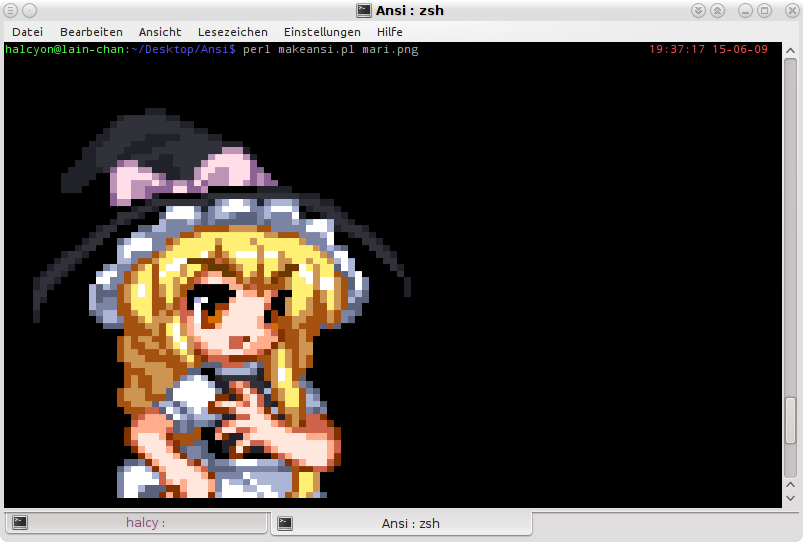
You can put the results in a text file and then just
cat it into the terminal for viewing, if you like. Yes,
even the animations. If you do that with an animation,
the frame delay is ignored, obviously, and if done
locally with a small image, it might not actually
look very animated at all.
Parameters:
* -pipegif, -pipepng: Use an image supplied via
STDIN as input. Default: Off.
* -scale (float): Scale image to this fraction of
its size. Default: 1.0.
* -scalefilter (string): Scale image with this
filter. For a list of filters, see imagemagick
documentation. Default: Bessel.
* -scalegamma (float): Apply gamma correction with
this value while scaling. Default: 2.2.
* -rmult (float), -gmult (float), -bmult (float):
Scale r, g, b components by this fraction before
display. Default: 1.0.
* -gamma (float): Apply gamma correction with this
value before display. Default: 1.0 (no-op).
* -invert: Invert colours. Default: Off.
* -loop (int): For animations, loop this many times.
Default: 0 (loop forever).
* -nodelay: Turns off animation delay, frames are
just written as fast as possible. Default: Off.
* -frame (int): For animations, don't loop or
animate but instead just display frame n.
Default: Off.
* -manualcoalesce - Do not rely on imagemagick
to coalesce the gif animation correctly, manually
overlay images according to alpha information.
This should hardly ever be neccesary. Default:
Off.
Recommended console font: Droid Sans Mono
If you are a developer of a terminal emulator: Please
do implement these RGB colour code sequences, they're
really rad.