https://github.com/hanxi/tiny-nav
非常简单的个人导航网站 / A Simple Personal Navigation Website
https://github.com/hanxi/tiny-nav
bookmarks hao123 index nav website
Last synced: 6 months ago
JSON representation
非常简单的个人导航网站 / A Simple Personal Navigation Website
- Host: GitHub
- URL: https://github.com/hanxi/tiny-nav
- Owner: hanxi
- Created: 2025-04-05T03:33:22.000Z (over 1 year ago)
- Default Branch: master
- Last Pushed: 2025-09-04T15:56:32.000Z (11 months ago)
- Last Synced: 2025-09-04T17:43:53.354Z (11 months ago)
- Topics: bookmarks, hao123, index, nav, website
- Language: Vue
- Homepage: https://nav.hanxi.cc/
- Size: 445 KB
- Stars: 87
- Watchers: 3
- Forks: 5
- Open Issues: 0
-
Metadata Files:
- Readme: README.md
Awesome Lists containing this project
README
# TinyNav · 非常简单的个人导航网站 / A Simple Personal Navigation Website
Language: [中文](#中文版本) | [English](#english-version)
---
## 中文版本
[](https://github.com/hanxi/tiny-nav/stargazers)
[](https://hub.docker.com/r/hanxi/tiny-nav)
[](https://hub.docker.com/r/hanxi/tiny-nav)
> ✨ 一款极简、自托管的个人导航网站,基于 Go + Vue 开发。
**在线体验地址** 👉 [https://nav.hanxi.cc](https://nav.hanxi.cc)
- 账号: admin
- 密码: 123456
> [!IMPORTANT]
> 请勿修改或删除数据 🙏
---
## 支持功能
- 拖拽排序
- 夜间模式
- 适配桌面端和移动端
- 拉取网站图标或自定义svg图标
- 无账号密码模式: 不需要账号密码即可编辑
- 无账号密码浏览模式: 不需要账号密码可浏览,需要账号密码才能编辑
## 🐳 使用 Docker 快速部署
### 使用 Docker Compose
#### 国际镜像
```yaml
services:
tiny-nav:
image: hanxi/tiny-nav
container_name: tiny-nav
restart: unless-stopped
ports:
- 8080:58080
environment:
NAV_USERNAME: admin
NAV_PASSWORD: 123456
volumes:
- /tiny-nav-data:/app/data
```
#### 国内镜像
```yaml
services:
tiny-nav:
image: docker.hanxi.cc/hanxi/tiny-nav
container_name: tiny-nav
restart: unless-stopped
ports:
- 8080:58080
environment:
NAV_USERNAME: admin
NAV_PASSWORD: 123456
volumes:
- /tiny-nav-data:/app/data
```
启动命令:
```bash
docker compose up -d
```
### 使用 Docker 运行
#### 国际镜像
```bash
docker run -d \
--name tiny-nav \
-p 8080:58080 \
-e NAV_USERNAME=admin \
-e NAV_PASSWORD=123456 \
-v /tiny-nav-data:/app/data \
hanxi/tiny-nav
```
### 国内镜像
```bash
docker run -d \
--name tiny-nav \
-p 8080:58080 \
-e NAV_USERNAME=admin \
-e NAV_PASSWORD=123456 \
-v /tiny-nav-data:/app/data \
docker.hanxi.cc/hanxi/tiny-nav
```
访问页面:打开浏览器访问 http://<你的IP>:8080
## 🧩 本地运行(非 Docker)
1. 前往 Releases 页面 下载对应平台的可执行文件
2. 无认证启动:
```bash
./tiny-nav --port=58080 --no-auth
```
3. 有账号密码启动:
```bash
./tiny-nav --port=58080 --user=admin --password=123456
```
4. 访问地址:
## 🔧 从源码编译
```bash
sh build.sh
```
将生成 tiny-nav 可执行文件,所有前端资源已打包至其中。运行示例:
```bash
ENABLE_NO_AUTH=true LISTEN_PORT=58080 ./tiny-nav
```
访问:
## 🧱 技术栈
- 后端:Golang
- 前端:Vue 3
## 📌 开发计划
- [x] 支持只读模式:查看免登录,编辑需登录
- [x] 数据有变化才拉取,避免重复加载
- [x] 自动深色模式
- [ ] 支持书签导入
- [ ] 支持站内搜索
---
## English Version
[](https://github.com/hanxi/tiny-nav/stargazers)
[](https://hub.docker.com/r/hanxi/tiny-nav)
[](https://hub.docker.com/r/hanxi/tiny-nav)
> ✨ A minimalist, self-hosted personal navigation website developed using Go and Vue.
**Online Demo** 👉 [https://nav.hanxi.cc](https://nav.hanxi.cc)
- Username: admin
- Password: 123456
> [!IMPORTANT]
> Please do not modify or delete data 🙏
---
## Features
- Drag-and-drop sorting
- Night mode
- Compatible with desktop and mobile
- Retrieve website icons or customize SVG icons
- No-account mode: edit without needing username and password
- View-only mode without account: browse without username and password; editing requires login
## 🐳 Quick Deployment Using Docker
### Using Docker Compose
#### International Image
```yaml
services:
tiny-nav:
image: hanxi/tiny-nav
container_name: tiny-nav
restart: unless-stopped
ports:
- 8080:58080
environment:
NAV_USERNAME: admin
NAV_PASSWORD: 123456
volumes:
- /tiny-nav-data:/app/data
```
#### Domestic Image
```yaml
services:
tiny-nav:
image: docker.hanxi.cc/hanxi/tiny-nav
container_name: tiny-nav
restart: unless-stopped
ports:
- 8080:58080
environment:
NAV_USERNAME: admin
NAV_PASSWORD: 123456
volumes:
- /tiny-nav-data:/app/data
```
Start command:
```bash
docker compose up -d
```
### Running with Docker
#### International Image
```bash
docker run -d \
--name tiny-nav \
-p 8080:58080 \
-e NAV_USERNAME=admin \
-e NAV_PASSWORD=123456 \
-v /tiny-nav-data:/app/data \
hanxi/tiny-nav
```
#### Domestic Image
```bash
docker run -d \
--name tiny-nav \
-p 8080:58080 \
-e NAV_USERNAME=admin \
-e NAV_PASSWORD=123456 \
-v /tiny-nav-data:/app/data \
docker.hanxi.cc/hanxi/tiny-nav
```
Access the site by opening your browser and visiting http://:8080
## 🧩 Running Locally (Without Docker)
1. Visit the Releases page to download the executable for your platform.
2. Start without authentication:
```bash
./tiny-nav --port=58080 --no-auth
```
3. Start with account authentication:
```bash
./tiny-nav --port=58080 --user=admin --password=123456
```
4. Access:
## 🔧 Compiling from Source
```bash
sh build.sh
```
This will generate the tiny-nav executable file, with all frontend resources bundled within. Example of running:
```bash
ENABLE_NO_AUTH=true LISTEN_PORT=58080 ./tiny-nav
```
Access:
## 🧱 Tech Stack
- Backend: Golang
- Frontend: Vue 3
## 📌 Development Plan
- [x] Support read-only mode: view without login, edit requires login
- [x] Pull data only on changes to avoid redundant loading
- [x] Automatic dark mode
- [ ] Support bookmark import
- [ ] Support in-site search
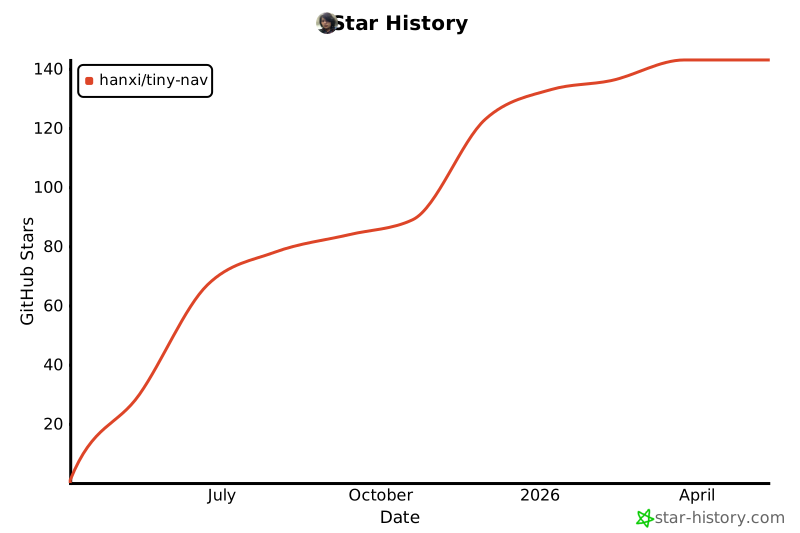
## Star History
[](https://star-history.com/#hanxi/tiny-nav&Date)