https://github.com/happyapplehorse/agere
The tool is used for building and driving workflows specifically tailored for AI initiatives. It can be used to construct AI agents.
https://github.com/happyapplehorse/agere
agent ai framwork python
Last synced: 6 months ago
JSON representation
The tool is used for building and driving workflows specifically tailored for AI initiatives. It can be used to construct AI agents.
- Host: GitHub
- URL: https://github.com/happyapplehorse/agere
- Owner: happyapplehorse
- License: mit
- Created: 2023-11-15T09:31:52.000Z (over 2 years ago)
- Default Branch: main
- Last Pushed: 2024-07-03T11:45:23.000Z (about 2 years ago)
- Last Synced: 2025-12-22T00:37:48.842Z (7 months ago)
- Topics: agent, ai, framwork, python
- Language: Python
- Homepage: https://happyapplehorse.github.io/agere/
- Size: 140 KB
- Stars: 161
- Watchers: 4
- Forks: 13
- Open Issues: 0
-
Metadata Files:
- Readme: README.md
- Changelog: CHANGELOG.md
- Funding: .github/FUNDING.yml
- License: LICENSE
Awesome Lists containing this project
README





[](https://codecov.io/gh/happyapplehorse/agere)

# Agere

Agere is a lightweight framework for building agents, with no third-party dependencies. Its features are universality and complete customizability.
It simplifies the process of building agents with complex logic by breaking down a complicated workflow into a series of independent, small steps,
which also facilitates future expansion or modification of its functionalities.
> Agere is the Latin etymology for "agent", frequently translated as "to act" or "to do", with the implication of "driving" and "propelling something forward".
# About
Agere utilizes a model of 'node-edge' to construct workflows.
Tasks are divided into 'node-edge'—nodes connected by edges, grouping each node with its subsequent actions.
One of the benefits of using edge nodes is that it makes the logic more coherent; when you define a node, you also specify the following edge.
Another advantage is that it allows for more direct and flexible parameter transmission between different nodes. You can pass any form of parameters as needed directly
in the call without having to use a unified context variable. Additionally, implementing conditional edges becomes simpler and more straightforward.
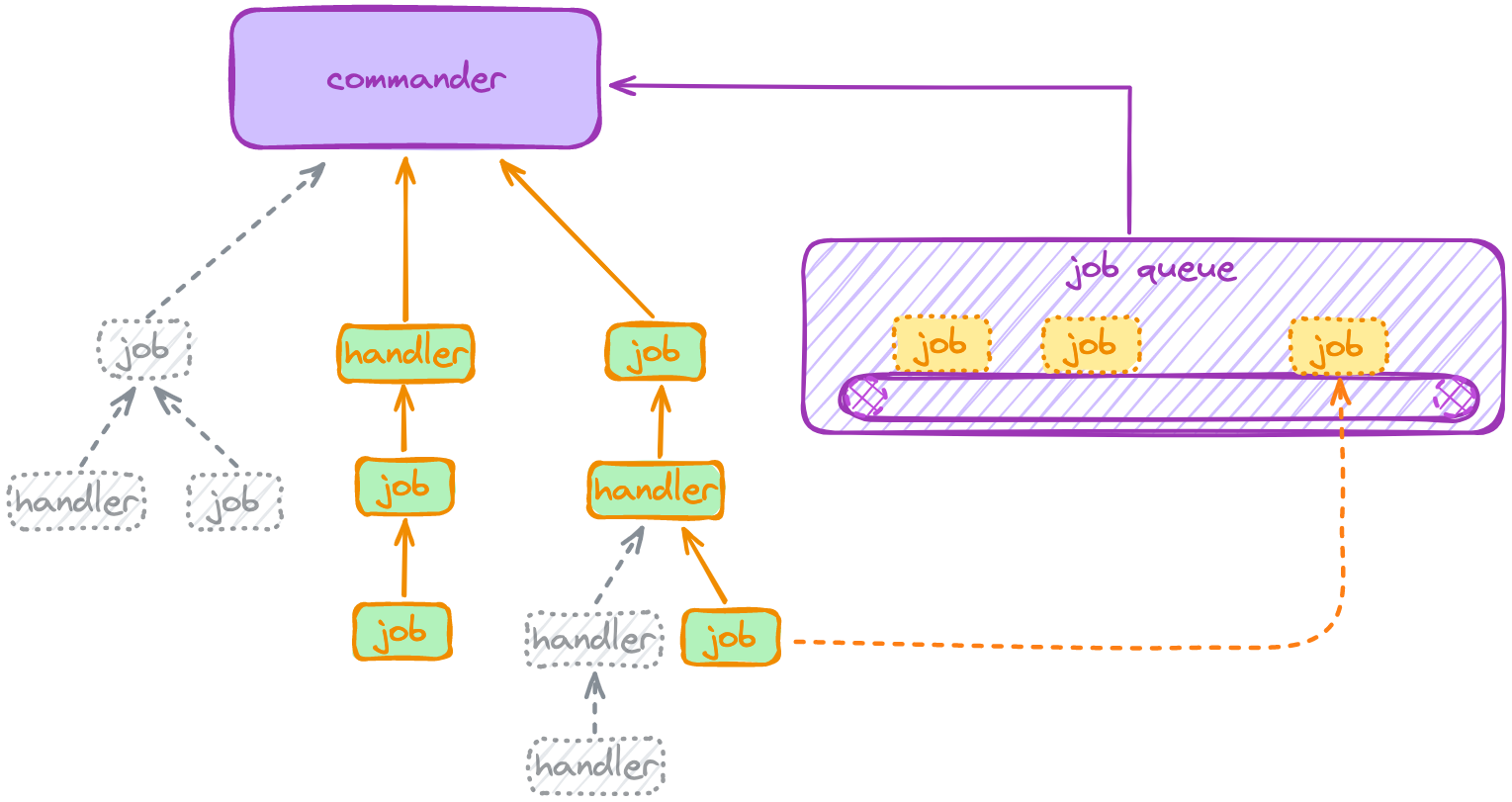
Agere employs Jobs and handlers as the basic types of task nodes. By defining Jobs (classes) and handlers (functions or methods), it breaks down the various parts of
an agent. The nodes are reusable and also facilitate future expansions or modifications of functionalities.
Within a Job, you can submit new Jobs or call handlers.
In handlers, you can also call other handlers or submit Jobs. Both Jobs and handlers fall under the category of TaskNode, i.e., task nodes, forming a tree structure that
tracks the relationships and running states of tasks. Within these nodes, you can add callbacks to execute at different times, such as at the start or end of a task,
upon encountering errors, or when being terminated, among others.
In constructing workflows, Agere possesses the following features:
- **Multitasking**: Agere enables multiple tasks to run in parallel.
- **Strategic Timing**: Task states at different moments can be controlled through callbacks.
- **Branching Out**: Different states of a node can be linked, for example, connecting edges to a node's start, end, or termination states.
- **Tailor-made**: The passing of parameters between nodes is more flexible, with each node being able to customize parameter transmission.
Agere emphasizes universality, operating independently of any tools, specific interfaces, or forms, and is not coupled with any tool. This allows it to invoke any
tool easily, facilitating smooth collaboration and integration with other tools.
The structure of agere is as follows:
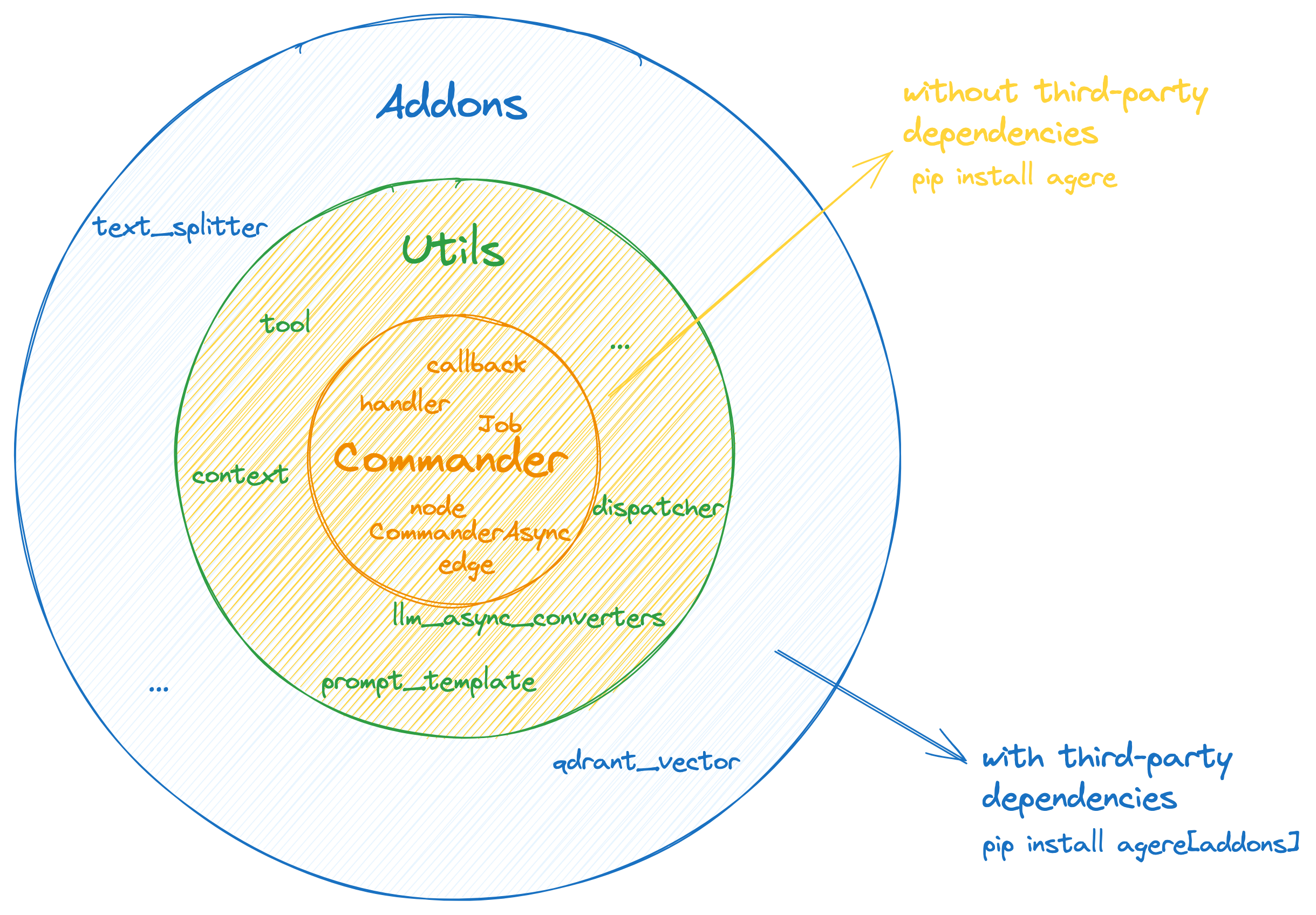
```
Agere
├─── Commander(core functionality)
├─── Utils
│ ├─── llm_async_converters
│ ├─── dispacher
│ ├─── prompt_template
│ ├─── context
│ ├─── tool
│ └─── ...
└─── Addons
├─── qdrant_vector
├─── text_splitter
└─── ...
```
# Why agere
- Lightweight, streamlined yet important features.
- Full customizability, allowing flexible customization of underlying functionalities.
- Universality, not dependent on any specific tool and can work in conjunction with any tool.
- Minimal dependencies, with core functionalities free of third-party dependencies.
This reduces coupling with specific technologies in the context of rapid technological iterations.
# Installation
Agere has no third-party dependencies.
```bash
pip install agere
```
# How to Use
Define Jobs and/or handlers **➔** Create a commander to run them
[Getting started](https://happyapplehorse.github.io/agere/getting_started/)
[Guide](https://happyapplehorse.github.io/agere/guide/framework/)
🎬[Tutorial-zh](https://www.bilibili.com/video/BV1q6421c71z)
## Agere Workflow Demonstration Example
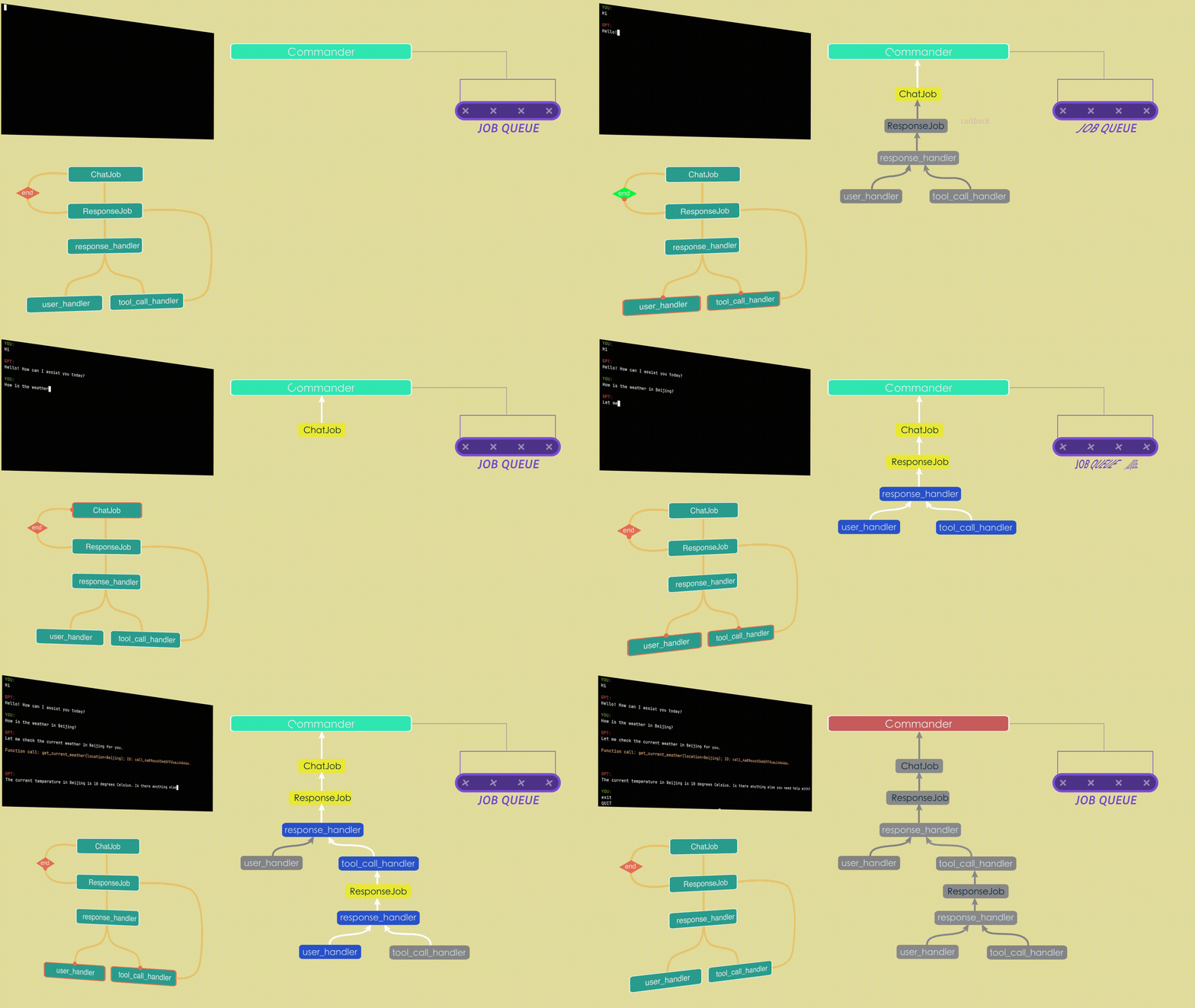
Above is a simple demonstration animation of a conversational agent's workflow that can call upon tools,
briefly illustrating the principles of agere.
In this agent, we want to enable GPT to send messages to the user while also calling tools at the same time (currently, GPT can only choose to either send messages to
the user or call tools, but cannot do both simultaneously).
We have defined two Jobs: a ChatJob, which is used to initiate a new conversation, and a ResponseJob, which is used to receive the content of GPT's replies.
Additionally, we defined three handlers: a response_handler, for parsing GPT's reply messages; a user_handler, for displaying messages sent to the user; and a
tool_call_handler, for executing function calls. Furthermore, we added a callback to the ResponseJob to initiate the next round of conversation upon its completion.
Lastly, a commander is utilized to execute it.
For a detailed tutorial on it, please see [Getting started](https://happyapplehorse.github.io/agere/getting_started/).
## Architecture Overview
## Basic Concepts
### [TaskNode](https://happyapplehorse.github.io/agere/guide/tasknode/)
Includes Commander, Job, and handler. Each TaskNode has one parent and 0-n children.
These nodes form a tree structure, where each node determines its own task completion
based on the status of all its child nodes.
### [Commander](https://happyapplehorse.github.io/agere/guide/commander/)
The commander is a node used for automatically scheduling and executing tasks, typically serving as the root node for all other nodes. Once you have defined some
Jobs and handlers, by assigning the initial entry work to it, it can automatically organize and execute these tasks for you.
### [Job](https://happyapplehorse.github.io/agere/guide/job/)
A Job is an object that packages a specific task along with the resources required to execute that task. It's as if it's reporting to a higher authority,
saying: "I have such and such task to do, involving these specific actions. Here are the materials you need, the task is yours now, the rest is not my concern."
That's the gist of it.
### [handler](https://happyapplehorse.github.io/agere/guide/handler/)
A handler is a function or method, similar to a coroutine function, that returns a handler object. This handler object can be called by other task nodes or can
be directly awaited. It's as if it's delegating to a subordinate, saying: "I have this task, go and do it for me."
### [Callback](https://happyapplehorse.github.io/agere/guide/callback/)
Callbacks can be added at various stages of a task, such as: task start, task completion,
encountering exceptions, task termination, Commander ending, etc.
# License
This project is licensed under the [MIT License](./LICENSE).